

TVCastHub
- 12.00
- 2.9
- Installs
- 10.00K
- Price
- Free

Screenshots
Analysis by Reviewed
I found TVCastHub appealing for a very simple reason: it focuses on getting video from a mobile device onto a television or another screen without making the task feel like a major setup project. As a free tools app from Bloomscape Interactive, it sits in a useful space between phone convenience and the comfort of a larger display. My first impression was positive because the purpose is immediately understandable, and the app does not ask me to learn an entirely new way of watching.
That first impression matters with a casting tool. I am not looking for a feature-heavy media center when I want to show a clip, watch something from my phone, or share a video with people in the same room. I want the connection process to feel predictable, the controls to be easy to find, and the session to stay out of the way once playback begins. TVCastHub has the right basic idea, but its lasting value depends on how often I actually need phone-to-screen casting and how much friction appears between opening the app and seeing the video.
How TVCastHub feels after the first week
During the first week, an app like this naturally gets more attention than it may receive later. I tend to test it with different kinds of viewing: a short personal clip, a longer video, and something I would rather watch on a television than on a small phone display. That testing helps reveal whether the app is useful beyond its store summary, “Cast Videos to TV & Screen,” and whether it can become part of a normal routine instead of remaining a novelty.
The strongest part of the concept is its narrow focus. TVCastHub is not trying to replace every entertainment app on my phone. It is a bridge between a mobile screen and a larger display. That makes it easier to understand than a broad streaming utility with menus for unrelated media, downloads, playlists, and account features. When I open it, I already know what job I expect it to perform.
For a household scenario, I can imagine using it when friends are visiting and someone has a video saved or available on a phone that everyone wants to see. It can also be useful when I am traveling and want to try a television in a room or shared space, provided the screen and network arrangement cooperate. The practical benefit is not that it creates new video content; it makes existing phone-based viewing more suitable for a group.
One useful habit is to decide what I want to show before beginning the casting session. Searching, browsing, and switching between several apps while trying to connect can make the experience feel more complicated than it needs to be. I get better results when I prepare the video first, then use TVCastHub for the screen transition. That workflow also makes it easier to tell whether a problem comes from the app, the video source, or the television.
Another small but important point is the difference between personal viewing and group viewing. For personal use, a failed connection may be an annoyance that makes me return to the phone. In a group, every delay feels longer because other people are waiting. I would therefore judge the app more favorably for occasional, low-pressure sharing than for situations where I need a guaranteed presentation tool.
More From Our News Desk

 Gmail
GmailGmail in a Busy Inbox: Who Benefits Most?
From first account to crowded workday, Gmail earns its place through dependable search and flexible sorting—but its best fit depends on how much inbox maintenance you can tolerate.

 Prime Video
Switching to Prime Video: What Changes in Your Viewing Routine
Prime Video can make a compelling second home for streaming, but switching means learning a different catalog, rental layer, and route from browsing to playback.

 Universal TV Remote Control
Universal TV Remote Control Works Best as a Reliable Backup
A phone remote earns its place through quick setup and reliable habits. Here is how to get more from Universal TV Remote Control—and where its limits show.

 Weather - By Xiaomi
Weather by Xiaomi Review: Clear at a Glance, Less Clear Up Close
Xiaomi’s weather app makes everyday forecasts quick to scan, but its calm surface can leave useful details and recovery paths harder to find than they should be.

 X
XX Under Pressure: Can It Recover When Posting Goes Wrong?
A resilience-focused review of X, examining setup, mistaken posts, interruptions, weak connections, and the gaps that matter when recovery needs to be dependable.

 Clash of Clans
Clash of Clans Is Won Between the Battles
Its raids are quick; its community is a long-term project of coordination, teaching, rivalry, and shared responsibility—with all the friction that entails.
Latest News



What makes the early experience attractive
The free entry point lowers the risk of trying it. I can install a tools app designed for casting without committing money before I understand whether it fits my devices and habits. The Everyone content rating also makes it broadly approachable for households, though that rating should not be confused with a promise that every video source or television will behave identically.
The app has reached over 10 thousand installs, which suggests that it is not an entirely isolated experiment, while its average rating of 2.9 shows that the experience is not universally smooth. I would treat that combination as a reason to test it personally rather than assume either extreme. It has enough visibility to be worth trying, but the rating tells me to keep expectations measured.
Its current version is 1.0.3, so I see TVCastHub as a relatively early product rather than a mature casting platform with years of refinement behind it. That can be encouraging if Bloomscape Interactive continues improving the rough edges, but it also means I would not build an important recurring workflow around it without testing the exact setup I plan to use.
The most useful first-week test is not simply “does it connect once?” I would repeat the process on separate occasions, stop and resume playback, rotate the phone, and try the app when the television is already in use for another input. These checks reveal whether the app is comfortable in ordinary conditions. A casting tool earns trust through repeated small successes, not through one impressive demonstration.
Where it fits beside familiar alternatives
The usual alternatives are built-in casting controls, platform-specific television apps, browser-based methods, or direct screen mirroring. Those options can be better when they are already integrated into the phone and television I own. A native control may require fewer steps, while a dedicated service app may offer more predictable playback for its own content.
TVCastHub is more interesting when I want a focused intermediary instead of jumping between several device-specific solutions. Its appeal is convenience across a general video-viewing situation, not deep control over one streaming service. The trade-off is that a general casting app may have more variables to handle than a feature designed by the television manufacturer or the operating-system provider.
I would choose the built-in option first when it is already reliable on my devices. I would consider TVCastHub when I want a separate, straightforward tool for casting videos and prefer not to depend on a collection of unrelated manufacturer apps. If my main need is watching one subscription service, that service’s official television app is likely the cleaner long-term choice.
Whether it keeps earning a place after the novelty
I’d judge whether TVCastHub deserves a lasting spot by looking beyond a successful first connection and asking whether it makes a familiar task simpler each time. For me, the useful test is whether I can repeat the same phone-to-screen routine without turning into the household troubleshooter. That distinction helps separate a handy occasional shortcut from a tool I would choose to keep using.
Month-to-month usefulness depends on repetition
After the first week, the question changes from “can this cast a video?” to “will I remember to use it next month?” That is where TVCastHub faces a tougher test. Casting is often an occasional action, and many people already have several ways to reach a television. An app can be perfectly understandable yet still disappear from daily life if the need only appears once every few weeks.
I see the best recurring value for people who regularly move personal videos from a phone to a shared screen. Families, casual hosts, students showing clips to classmates, and anyone who reviews phone-recorded footage on a larger display may find a clear reason to keep it installed. The value is strongest when the same casting task happens often enough that a dedicated tool saves mental effort.
For someone who watches almost everything through official television apps, the case is weaker. Those apps usually remember accounts, continue playback, and organize content around the service itself. TVCastHub is not the obvious center of that routine. It is better understood as a utility for the moments that fall outside a single streaming ecosystem.
A practical monthly workflow would be to keep the app for specific occasions rather than opening it for every video. I might use it for a family clip, a travel video, or a file that is easier to find on my phone than on the television. That selective approach protects its useful role without forcing it into tasks where another method is already faster.
There is also a trade-off involving attention. A dedicated casting app can reduce the number of steps when I know exactly what I want to display, but it adds another app to maintain and remember. If I only cast once in a long while, the benefit may not outweigh the time spent checking whether it still works with my current phone and screen arrangement.
The maintenance burden is small, but not zero
Maintenance for a casting utility is less about organizing content and more about keeping the surrounding setup understandable. I need to remember which screen I used, whether the phone and television are ready to communicate, and whether the video source behaves well when moved away from the phone. Those are not glamorous tasks, but they determine whether the app feels dependable.
My advice is to test TVCastHub before an event instead of treating it as an emergency solution. A short private check can expose a connection issue while there is still time to use a different method. This is especially important if several people will be watching, because troubleshooting in front of an audience quickly cancels out the convenience of a casting app.
I would also keep the workflow simple: choose the video, open the casting tool, select the intended screen, and avoid changing several settings at once. When something fails, changing one variable at a time makes diagnosis easier. Trying a different video can indicate whether the issue is tied to that source; trying another screen can indicate whether the television is the obstacle.
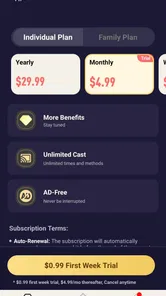
The app is free to install, but it includes in-app purchases ranging from $1.99 to $49.99 per item. That is a wide span, so I would pay close attention to what any purchase unlocks before spending money. For occasional casting, I would not assume that paying is necessary. I would first establish that the free experience fits my routine and that a paid option solves a problem I genuinely encounter.
This is also where the app’s early version matters. A newer utility can improve quickly, but updates may change the feel of the workflow over time. I would keep an eye on whether future releases make connection steps clearer and reduce interruptions. The right kind of maintenance from the developer could turn a merely adequate tool into a dependable household shortcut.
What may cause fatigue over time
The main source of fatigue is repetition of small delays. A casting app does not need to fail dramatically to become frustrating. If I have to reopen it, search for the screen again, recover from a disconnected session, or explain the process every time someone wants to watch a clip, I will gradually return to whatever method feels most automatic.
Another possible fatigue point is uncertainty about responsibility. When playback does not appear, I may wonder whether the video source is unsupported, whether the phone is not communicating with the screen, or whether the television is simply on the wrong input. A good utility should make those distinctions understandable. If the app leaves me guessing, the experience becomes harder to recommend to less technical family members.
Group use can expose this weakness more than solo use. In private, I can experiment without pressure. In a living room, the person holding the phone becomes the de facto technician. TVCastHub is most comfortable when everyone accepts a brief setup step; it is less suitable when the expectation is instant, appliance-like playback.
I would also avoid treating it as a replacement for every form of screen sharing. Showing a video is a specific task, while full device mirroring, presentations, gaming, and service-based streaming can have different requirements. If I need the entire phone interface on a television, or if I need controls that belong to a particular platform, another solution may be more appropriate.
The rating of 2.9, drawn from around 30 ratings and 12 written reviews, reinforces that cautious position. The number of responses is still modest, so I would not use it as a definitive verdict, but it is enough to remind me that real-world experiences vary. I would judge the app on my own setup and keep a backup method available for important occasions.
Who should install it, and who should skip it
I would recommend trying TVCastHub if I frequently have videos on my phone that I want to share on a larger display, especially when I prefer one focused tool instead of several service-specific apps. It is also worth considering if I want a free starting point and am comfortable spending a few minutes testing the connection before relying on it.
I would be more hesitant if my viewing already happens almost entirely inside official television applications. In that case, a separate casting utility may add another step without improving the experience. I would also skip it as my main presentation tool if a meeting, class, or event depends on flawless playback and there is no time for troubleshooting.
People who dislike managing device connections may find the app less satisfying than a television’s built-in interface. Likewise, viewers who expect one app to handle every type of media should look elsewhere. TVCastHub makes the most sense when its role stays narrow: move a video from the phone to a screen, then get out of the way.
My long-term verdict
After the initial novelty fades, I see TVCastHub as a situational tool rather than an app everyone needs permanently. Its focused purpose is easy to understand, the free installation makes experimentation reasonable, and it can be genuinely handy when a phone contains the video I want a group to see. Those are real strengths, particularly for casual sharing and occasional larger-screen viewing.
Its lasting place depends on reliability in the exact environment where I plan to use it. The modest average rating, early version, possible purchase costs, and natural uncertainty of casting workflows make me cautious about calling it indispensable. I would keep it installed if it repeatedly saves me time, but I would remove it if the built-in option on my devices proves consistently quicker.
My final recommendation is to test it with the videos and screens that matter to me, then judge the result over several separate sessions rather than one successful trial. The best reason to keep TVCastHub is repeated convenience, not the novelty of casting. If it becomes the quickest path from my phone to a shared display, it earns its space. If it creates another layer between me and content that already works elsewhere, the usual alternatives are the better long-term choice.
TVCastHub Frequently Asked Questions
What devices and network setup should I check before downloading TVCastHub?
TVCastHub is a casting tool, so it is worth checking that your phone and the TV or receiver you plan to use can work together before installing it. A stable Wi-Fi connection is also important for streaming. The app is rated for Everyone, and its Android minimum requirement is version 5.0, which may help Android users decide whether their device is ready.
What is TVCastHub and what can I use it for?
TVCastHub is designed to help users stream or cast video content from a mobile device to a compatible television or media receiver. Its usefulness depends on the services and devices supported by the current version. Before downloading, check whether your phone, smart TV, Chromecast-style receiver, or other casting hardware is compatible, since casting performance can vary between brands and operating systems.
Is TVCastHub compatible with Android and iPhone devices?
Compatibility depends on the version of TVCastHub available for your device and the operating system requirements listed on its official download page. In general, users should verify the minimum Android or iOS version, required permissions, and supported television brands before installing. Older phones, tablets, or televisions may not provide the same connection options as newer devices.
Does TVCastHub include movies, channels, or other streaming content?
TVCastHub should not automatically be assumed to provide licensed movies, television channels, or subscription content. Apps with casting features commonly act as a control or streaming companion, while the content may come from another service, website, or application. Review the app description and privacy information carefully to understand what content is available and whether separate subscriptions are required.
How do I connect TVCastHub to my television?
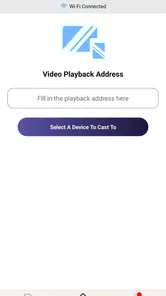
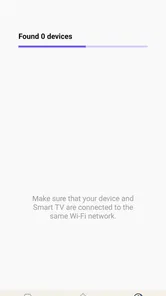
For the best chance of a successful connection, place your phone and television or casting receiver on the same Wi-Fi network, open TVCastHub, and select the available device from its connection menu. If the television is not detected, restart both devices, disable mobile-data-only connections, update the app, and confirm that the TV supports the casting method used by TVCastHub.
Pros
- Simple interface makes browsing available TV content quick and straightforward.
- Supports watching content on larger screens through compatible casting options.
- Useful search tools help locate channels or programs without excessive navigation.
- Lightweight design can run smoothly on many modern Android and iOS devices.
- Regular content updates may provide access to newly added channels or streams.
Cons
- Available channels and features may vary depending on your country or region.
- Some streams can be unstable
- with buffering or occasional playback interruptions.
- The app may include advertisements during browsing or while starting a stream.
- Certain casting features may require compatible devices on the same Wi-Fi network.
- Content availability can change without notice when third-party streams are removed.








