

TrueLane by the Hartford
- 1.63K
- 4.0
- Installs
- 100.00K
- Price
- Free
Screenshots
Analysis by Reviewed
I look at driving apps in two very different ways. Some are designed to get me from one place to another, while others are meant to help me understand what happens behind the wheel. TrueLane by The Hartford belongs to the second group. It is a free Maps & Navigation app built around telematics, so the useful question is not whether it can replace a familiar navigation app. The better question is whether its driving-focused approach fits the way you want to monitor and improve your time on the road.
That distinction matters before installing it. I would not choose this app as my main tool for finding a restaurant, checking a route, or exploring a new city. I would consider it when I want a driving companion connected to The Hartford’s telematics experience and I am comfortable making the app part of my regular driving routine. In my experience, that makes it more specialized than a normal map, but potentially more meaningful for someone who wants driving information rather than another set of directions.
What to consider before choosing TrueLane
The first decision is about purpose. A conventional navigation app usually earns its place by offering maps, turn-by-turn guidance, traffic context, saved places, or discovery tools. TrueLane has a narrower identity. Its store summary presents it as a telematics app, and that means its value depends on how interested you are in driving behavior and the wider service around it.
I would also consider whether I want one app to do everything. If I am already happy with my usual navigation tool, there is no obvious reason to abandon it just because I install this one. A practical setup can involve both: one app for directions and TrueLane for its driving-related role. That separation is important because it prevents a common disappointment—expecting a telematics product to behave like a full navigation platform.
Trust is another deciding factor. Driving apps can feel more personal than ordinary utilities because they are associated with trips and habits. Before using TrueLane regularly, I would read its on-screen explanations carefully, check which settings it asks me to enable, and make sure I understand how the service is intended to work. I would not treat a driving score or trip record as a perfect description of every situation. A phone can interpret a journey, but it cannot know the full context of traffic, weather, road design, passengers, or an emergency.
Device compatibility is straightforward but worth checking early. The app requires Android 10 or later, so an older phone may be the first obstacle. On a supported device, I would install it before an important journey rather than moments before leaving. That gives me time to review the setup, sign in if needed, and decide whether the experience fits my expectations without creating a distraction at the start of a trip.
The audience size suggests that this is not an obscure experiment. TrueLane has passed 100,000 installs, with an average rating of 4.0 from roughly 2,500 ratings. I see that as a useful sign of real adoption, not as proof that every driver will enjoy it. Ratings for telematics apps can reflect the surrounding insurance experience, phone compatibility, setup friction, and expectations as much as the core software itself.
More From Our News Desk

 Weather - By Xiaomi
Weather by Xiaomi Review: Clear at a Glance, Less Clear Up Close
Xiaomi’s weather app makes everyday forecasts quick to scan, but its calm surface can leave useful details and recovery paths harder to find than they should be.

 X
XX Under Pressure: Can It Recover When Posting Goes Wrong?
A resilience-focused review of X, examining setup, mistaken posts, interruptions, weak connections, and the gaps that matter when recovery needs to be dependable.

 Clash of Clans
Clash of Clans Is Won Between the Battles
Its raids are quick; its community is a long-term project of coordination, teaching, rivalry, and shared responsibility—with all the friction that entails.

 Android Auto
Android Auto Makes the Case for Quieter Car Software
The car interface is no longer judged by how much it can do, but by how quietly it helps. Android Auto shows what drivers now expect—and what still gets in the way.

 MobiOffice: Word, Sheets, PDF
MobiOffice: Transforming Mobile Productivity with Seamless Integration
MobiOffice: Word, Sheets, PDF is redefining mobile productivity with a surprising blend of functionality and innovation.

 EA SPORTS FC Soccer Mobile 26
EA SPORTS FC™ Mobile Soccer: Redefining Mobile Sports Gaming
Dive into EA SPORTS FC™ Mobile Soccer, where immersive gameplay and strategic depth transform mobile sports gaming.
Latest News



How I would judge it in daily use
I would judge TrueLane on four practical points: whether setup is clear, whether trip information feels useful, whether it stays out of the way while I drive, and whether the feedback helps me make a sensible change. The last point is the most important. Data has little value if I only open it once, glance at a result, and never connect it to a real habit.
A good test would be a normal week rather than one carefully controlled drive. I would use the app during commuting, errands, and a longer trip, then compare how understandable the results are from one journey to the next. The goal would not be to chase a perfect number. I would look for patterns: perhaps I am harsher on the brakes in one familiar area, or I tend to accelerate quickly when leaving work. Those observations are more useful than treating a single trip as a verdict on my driving.
There is also a safety criterion that I would not compromise on. I would set everything up while parked, keep the phone mounted appropriately if the workflow requires it, and avoid interacting with the screen while moving. A driving app should reduce uncertainty, not introduce a new source of it. If the setup makes me reach for the phone repeatedly, the convenience is not worth the distraction.
Where TrueLane makes the strongest case
The clearest strength is its focus. Because TrueLane is not trying to be a general-purpose map, I can approach it with a more specific goal: understanding my driving through telematics. That focus can be valuable for people who respond well to feedback. Instead of relying only on memory—“I think I drive smoothly”—I can use the app as a prompt to review my habits and decide what to change.
I especially like the possibility of turning an ordinary commute into a learning loop. On Monday, I might notice that a route produces less comfortable driving than I expected. On Tuesday, I could leave more space, anticipate stops earlier, and avoid rushing into gaps. Later, I would review whether the trip felt different. The app is most useful in this kind of cycle: observe, adjust, and review, rather than install, inspect once, and forget.
It can also suit households where more than one person wants a clearer conversation about driving. Feedback is easier to discuss when it is tied to a journey rather than a vague accusation. I would still treat the information as a starting point, not an argument winner. A family member may have had a legitimate reason for a maneuver that looks unusual in isolation. The useful outcome is a calm discussion about habits, not competition over who receives the better result.
Another advantage is that a dedicated telematics app can keep driving analysis separate from the clutter of a broad navigation service. When I open a map app, I am usually thinking about arrival time, traffic, or a destination. Those priorities can drown out reflection on how I drive. TrueLane’s narrower purpose makes it easier to use a trip review as a deliberate check-in instead of something buried among route suggestions and saved locations.
The app is free, which lowers the barrier to trying it. That does not automatically make it the right choice, because the real commitment is not the download cost. The commitment is giving the product a place in my driving routine and deciding that its telematics role is worth the attention. Still, a free starting point makes experimentation easier for someone who wants to see whether this style of feedback is motivating.
The developer is The Hartford Insurance Group, Inc., and that context helps explain why the app feels more like part of an insurance-related driving program than an independent navigation tool. For a Hartford customer already interested in that ecosystem, the app may feel more relevant than a standalone tracker. The connection can also make the experience more purposeful: the driver is not simply collecting random charts, but using a service designed around driving behavior.
Small workflow choices that improve the experience
My first practical tip would be to create a baseline. I would not change my driving dramatically on the first day just to produce a better-looking result. I would drive normally, review what the app shows, and note which feedback seems consistent. That gives me a more honest starting point and avoids confusing improvement with simply having an unusually easy trip.
My second tip would be to review trips when I am calm and parked, preferably at a regular time. Looking at feedback immediately after a frustrating journey can encourage overreaction. A weekly review is often more useful than checking every drive obsessively because it helps separate a one-off event from a recurring pattern.
My third tip would be to compare like with like. A short suburban errand, a congested commute, and a motorway journey place different demands on a driver. I would avoid judging them as if they were identical tests. If TrueLane presents trip information in a way that allows me to recognize those differences, I would use the context to guide my interpretation rather than treating every result as directly comparable.
A fourth useful habit is to make one change at a time. If I simultaneously alter speed, following distance, braking, and route choice, I will not know what made the next result different. A narrower experiment—anticipating stops earlier, for example—turns the app into a practical coaching aid instead of a stream of disconnected observations.
Where another type of app may fit better
TrueLane is not the right answer for someone whose main need is navigation. If I am driving in an unfamiliar area and need dependable directions, I would choose a mature map service first. It is built around the immediate problem of reaching a destination, while TrueLane’s telematics identity points toward reviewing driving rather than discovering roads.
I would also look elsewhere if I want a broad travel toolkit. People who need public transport planning, walking directions, business listings, offline maps, or detailed route comparisons should start with an app designed for those tasks. Adding TrueLane may still make sense for its specific driving role, but it should not be expected to replace the tools that handle those other forms of movement.
A standalone driving tracker may be a better fit for someone who wants a neutral product independent of an insurer. That kind of alternative could appeal to a driver who wants to compare vehicles, maintain a personal log, or keep telematics separate from an insurance relationship. I am not saying it will be better in every case; the trade-off is that a general tracker may lack the relevance of a service connected to The Hartford.
Some drivers should skip telematics apps altogether. If you dislike monitoring-style services, do not want to adjust phone permissions, or know that feedback will make you anxious while driving, the potential benefit may not justify the mental overhead. The point of a driving app is to support safer, more thoughtful habits. If it makes you focus on the screen or chase approval instead, it is working against its own purpose.
There is also a difference between wanting coaching and wanting proof. A driver interested in gradual self-improvement may appreciate reviewing patterns. Someone looking for an unquestionable record of every road event may find any phone-based interpretation frustrating. Real driving is messy, and no summary should be treated as a complete account of what happened. I would choose TrueLane for reflection, not as a substitute for my own judgement.
The cost of changing from a familiar navigation routine
Switching does not have to mean deleting the map app I already use. In fact, I would avoid making that change. The more sensible approach is to keep navigation where it works best and add TrueLane only if its telematics purpose solves a separate problem. That reduces the learning cost and lets me evaluate the app without disrupting the way I find destinations.
The bigger cost is attention. I would need to learn the app’s setup, understand its feedback, and build a review habit. If I never plan to look at the information or act on it, installing it is unlikely to add much. Before committing, I would ask myself whether I can name one driving habit I genuinely want to understand better. If the answer is no, the app may become background clutter.
There can also be a social cost when several people share a car. I would agree in advance about who reviews the information and how it will be discussed. Without that agreement, a useful tool can become a source of blame. The strongest use is collaborative and practical: identify a pattern, talk about the road situation, and decide whether a small change is worth trying.
For an existing Hartford customer, the change may feel smaller because the app’s purpose is easier to understand within that relationship. For someone outside that context, I would first decide whether the service itself is relevant before spending time on setup. The free price makes trying it less risky financially, but time, attention, and comfort with telematics still matter.
My recommendation for different kinds of drivers
I recommend TrueLane to a driver who wants a focused telematics companion, is comfortable with The Hartford’s role as developer, and is willing to review feedback thoughtfully. It is particularly appealing if you prefer measurable routines: establish a baseline, examine trips, change one habit, and see whether the next set of journeys feels more controlled.
I would recommend it less strongly to someone who simply wants directions. That person should keep using a navigation app that specializes in maps and routing. TrueLane can sit beside that tool, but it should not be judged as though it were competing on the same terms. Its value comes from the driving-analysis angle, not from being a universal travel assistant.
I would also advise patience during the first few sessions. Do not let one surprising result define your opinion. Check that the phone is supported, complete setup while parked, and give yourself enough ordinary trips to understand the pattern. If the feedback is clear and leads to a realistic improvement, the app is doing something worthwhile. If it feels confusing, distracting, or irrelevant after a fair trial, there is no reason to force it into your routine.
The age rating is Everyone, and the app was released on September 23, 2021. Its current version is identified as thehartford-v3.0.0.0-94839-g4d9860c-prod, which is useful to recognize when checking that the installed build matches the current app experience. I would still focus less on the version label than on whether the setup and daily workflow feel stable on my particular phone.
Overall, I see TrueLane as a specialized choice with a clear boundary. It is not my replacement for maps, route discovery, or travel planning. It is a free telematics app from The Hartford Insurance Group, Inc. that makes more sense when I want to examine driving behavior and turn observations into better habits. Choose it for reflection and driving feedback, not for turn-by-turn navigation. If that matches what you need, it is worth trying; if your goal is simply to get somewhere efficiently, a conventional navigation app remains the better fit.
TrueLane by the Hartford Frequently Asked Questions
Is TrueLane by The Hartford free to download, and which devices can run it?
TrueLane is a free Maps & Navigation app from The Hartford Insurance Group, Inc. It is intended for users who want to take part in the company’s telematics experience, rather than for general turn-by-turn navigation. The app is rated for Everyone and requires Android 10 or later on Android devices. Check that your phone meets this requirement before downloading.
Who is TrueLane intended for, and can anyone use it without insurance enrollment?
TrueLane is primarily relevant to drivers considering or participating in an eligible The Hartford telematics or usage-based insurance program. It may not be useful as a standalone driving tracker for someone who is not connected with a qualifying program. Before setting it up, review the enrollment terms associated with your policy and make sure you understand how participation works for your situation.
What is TrueLane by The Hartford, and how does it work?
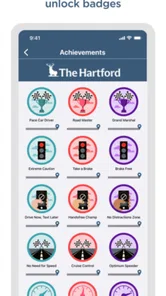
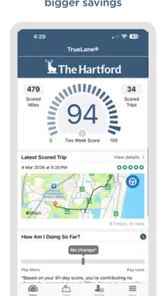
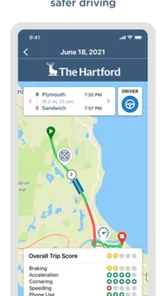
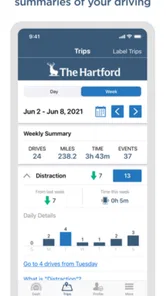
TrueLane by The Hartford is a driving-behavior app designed to help users understand and improve their habits behind the wheel. After installation and setup, it can use your phone’s sensors and location services to identify behaviors such as hard braking, rapid acceleration, speeding, distracted phone use, and sharp cornering. The app then presents trip information and driving scores through its dashboard.
Does TrueLane by The Hartford track my location and driving activity?
Yes. TrueLane generally requires access to location services and motion-related data so it can recognize when you are driving and evaluate each trip. Depending on your settings, phone model, and insurance program, the app may collect information about routes, trip timing, speed patterns, braking, acceleration, and phone interaction. Before enrolling, review the app’s privacy policy and permission requests carefully.
Can TrueLane affect my car insurance premium or policy?
TrueLane may be connected to an eligible The Hartford usage-based insurance program, meaning your driving results could be used when determining a discount or other policy-related outcome. The exact effect depends on your state, policy, enrollment terms, driving period, and program rules. Installing the app alone does not guarantee savings, so read the official program details before participating.
Pros
- Personalized driving feedback can help users identify risky habits.
- May support safer driving through trip tracking and performance insights.
- Useful tools for Hartford policyholders managing usage-based insurance.
- Can encourage smoother braking
- acceleration
- and cornering.
- Trip history may help users review driving patterns over time.
Cons
- Requires background location access
- which may affect privacy and battery life.
- Driving scores can be affected by phone placement or sensor inaccuracies.
- Some features may be limited to eligible Hartford insurance customers.
- Frequent tracking may feel intrusive for drivers who prefer more privacy.
- App value depends on consistent use and may not suit occasional drivers.











