

True Tie: Tie Knot Guide
- 50.00
- 4.7
- Installs
- 50.00K
- Price
- Free
Screenshots
Analysis by Reviewed
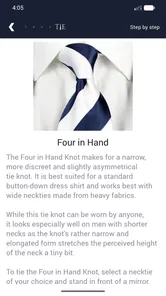
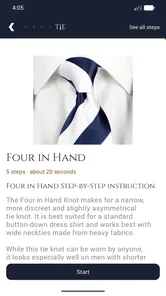
I usually think of tie guides as the sort of thing you open once, use in a hurry, and forget. True Tie: Tie Knot Guide changed that impression a little because its main strength is not a huge collection of fashion advice; it is the way it turns tying into a visual, repeatable process. I can look at the next step, copy it, and return to the instructions without needing a long explanation.
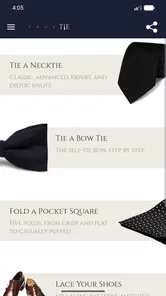
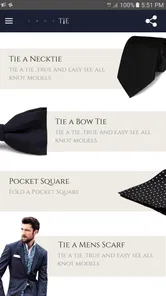
This is a free beauty app from Twin Brothers Payam & Peyman, aimed at anyone who wants practical help with personal presentation. Its focus reaches beyond neckties: it covers tie knots, bow ties, scarves, and shoe lacing. That makes it more useful than the name first suggests, especially when I need a quick reminder before leaving home rather than a general style article.
After trying it as a reference tool, I see the appeal clearly. It is not trying to replace a stylist, recommend an outfit, or judge whether a particular knot suits my collar. Instead, it concentrates on the physical sequence. The important capability is visual guidance that stays useful when my hands are busy.
Why the visual step-by-step approach matters
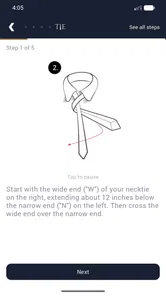
Tying instructions are surprisingly easy to misunderstand when they are written as text. Phrases such as “bring the wide end across” or “pass it behind the loop” make sense only after I already understand the basic shape. A picture removes much of that uncertainty. With this app, I can compare the position of the fabric at each stage instead of trying to remember a paragraph of directions.
That distinction matters most for beginners. When I first learn a knot, the difficulty is rarely the final pull. It is knowing whether I am holding the correct end, whether the fabric should pass in front or behind, and whether I have accidentally twisted the material. A clear visual sequence gives me a chance to catch the mistake early, before the whole knot has to be undone.
The same idea works for bow ties, scarves, and shoe lacing, although each has its own practical challenge. A scarf can look correct from one angle while sitting unevenly around the neck. Shoe lacing depends on keeping the pattern consistent across both sides. A bow tie is particularly unforgiving because small differences in tension are visible. Having the next movement presented visually is more helpful than reading a broad styling tip.
I also like that the app works offline. That changes its role from an occasional web search into a dependable reference I can keep available while travelling, getting ready in a place with poor reception, or helping someone else without first searching through results. It is a small advantage, but it directly supports the app’s purpose: open it when the item is already in my hands and start following along.
More From Our News Desk

 Gmail
GmailGmail in a Busy Inbox: Who Benefits Most?
From first account to crowded workday, Gmail earns its place through dependable search and flexible sorting—but its best fit depends on how much inbox maintenance you can tolerate.

 Prime Video
Switching to Prime Video: What Changes in Your Viewing Routine
Prime Video can make a compelling second home for streaming, but switching means learning a different catalog, rental layer, and route from browsing to playback.

 Universal TV Remote Control
Universal TV Remote Control Works Best as a Reliable Backup
A phone remote earns its place through quick setup and reliable habits. Here is how to get more from Universal TV Remote Control—and where its limits show.

 Weather - By Xiaomi
Weather by Xiaomi Review: Clear at a Glance, Less Clear Up Close
Xiaomi’s weather app makes everyday forecasts quick to scan, but its calm surface can leave useful details and recovery paths harder to find than they should be.

 X
XX Under Pressure: Can It Recover When Posting Goes Wrong?
A resilience-focused review of X, examining setup, mistaken posts, interruptions, weak connections, and the gaps that matter when recovery needs to be dependable.

 Clash of Clans
Clash of Clans Is Won Between the Battles
Its raids are quick; its community is a long-term project of coordination, teaching, rivalry, and shared responsibility—with all the friction that entails.
Latest News



Using the guide without turning it into a lesson
In practice, I would not sit down and study every option from beginning to end. The better workflow is to open the guide beside the clothing item, identify the style I want, and move through the visual steps at my own pace. If I lose track, I can pause mentally at the last position I recognize and rebuild from there rather than restarting an entire tutorial elsewhere.
A useful habit is to keep the fabric relaxed during the first few movements. Beginners often pull too tightly because they want the result to look neat immediately. That makes the next step harder to see and can shorten one side of the tie before the knot is formed. I find it easier to copy the shape loosely, check the orientation, and tighten only after the structure is correct.
For a bow tie, I would use the same principle but pay closer attention to symmetry. The guide can show the sequence, yet the final appearance still depends on adjusting both wings by hand. The app teaches the route; it does not remove the need for a mirror and a little patience. That is an important distinction for anyone expecting a single tap to produce a polished result.
With scarves, the visual instructions are most useful when I already know what kind of finish I want. A simple wrap for warmth and a more deliberate arrangement for appearance are different goals. The app helps with the mechanics, but I still have to choose the right scarf length, fabric thickness, and amount of looseness for the occasion.
Shoe lacing is where the guide can become unexpectedly practical. I can use it to change the appearance of a familiar pair or to understand a pattern that looks complicated when seen on finished shoes. The best way to follow it is to place the phone where both shoes remain visible, then complete one side slowly before copying the same pattern on the other. Trying to work from memory after seeing the sequence once is where uneven spacing usually begins.
A realistic morning use case
Imagine I have a formal event after work and discover that I can make a basic knot but cannot get the length right. I do not need an article about fabric choice or a list of fashion rules. I need to see the movements, repeat them, and make a small adjustment at the end. This is exactly the kind of situation where the app makes sense.
I would place the phone on a dresser, select a tie-knot guide, and follow the images while keeping the wider end in view. If the result sits too high, I would loosen it and repeat the sequence with the starting positions adjusted. The app is valuable here because it reduces the mental load: I can focus on the fabric in front of me instead of translating written instructions into hand movements.
The offline function is especially convenient in that scenario. I do not have to depend on a last-minute connection or scroll past unrelated videos. I can use the same reference at home, in a hotel room, or backstage before an event. For someone who only needs occasional help, that is more useful than a large style platform filled with content I will never open.
There is also a social use case. If a friend or family member asks me to show them a knot, I can hand over the visual guide rather than trying to explain every turn verbally. That avoids the common problem where my explanation makes sense only because I already know the movement. The learner can compare the picture with the fabric directly.
Where it is stronger than usual alternatives
The usual alternative is a web search. That can work, but it often creates friction: several versions of the same knot, mixed-quality diagrams, distracting pages, and a need for a connection. A video can be clearer for some people, especially when the camera shows the full movement, but video also forces me to pause and rewind at the exact moment I am trying to copy. A dedicated visual guide feels more controlled for short, practical tasks.
Compared with a general fashion app, this one is narrower and therefore easier to understand. It does not ask me to browse outfit inspiration before I can reach the technique. Compared with a static picture saved in my gallery, it gives me a sequence rather than one finished result. That difference is important: the finished knot tells me what I want, while the steps tell me how to get there.
Still, a video may be the better choice when I need to understand movement from multiple angles, and a human teacher is better when my hands keep reversing the instructions. True Tie is most effective as a compact reference, not as a complete course in formal dressing. Knowing that boundary prevents disappointment.
Tradeoffs that become clear during use
The visual approach is helpful, but it is not automatically perfect for every learner. Some people need written explanations alongside images, particularly when two steps look similar. If I cannot tell which part of the tie is meant to move, a short caption or spoken explanation would be useful. The app’s central design favors seeing and copying, so users who prefer detailed theory may find it brief.
Screen placement can also affect the experience. If the phone lies flat and the room is dim, I may need to lean over it while handling the fabric. A stand or nearby shelf makes the guide easier to consult without losing the position of the tie. This is not a flaw in the instructions, but it is a practical setup detail that makes a noticeable difference.
Another limitation is that technique alone does not guarantee a good fit. A knot can be formed correctly and still look wrong if the tie is too long, the collar is unsuitable, or the material is unusually thick. The app helps me execute the method, but I remain responsible for judging proportion and appearance. For a special event, I would practise once before the actual morning rather than treating the guide as a last-second miracle.
The same applies to scarves and shoes. The guide can show a pattern, but different fabrics and laces behave differently. A stiff scarf may not drape like a soft one, and thick laces may fill a pattern more heavily than thin ones. I appreciate the instructions more when I treat them as a starting structure instead of a guarantee that every material will look identical.
Its age rating is Everyone, which fits the straightforward nature of the content. I would recommend it to a teenager learning basic presentation skills, an adult who rarely wears formal clothing, or someone helping another person prepare. The app is also free, so trying it carries little commitment. On the other hand, a dedicated fashion enthusiast who wants fabric advice, color coordination, wardrobe planning, or personalized recommendations should look beyond this focused tool.
Small techniques that make the guide more useful
One of my favorite ways to use a step-based guide is to practise with an inexpensive or everyday item first. That lets me concentrate on direction and tension without worrying about creasing a favorite tie or damaging delicate fabric. Once the sequence feels familiar, I can repeat it with the item I actually plan to wear.
I also recommend checking the starting position before blaming the instructions. The length of the wide end, the side on which it begins, and the height of the collar all affect the final result. If the knot repeatedly ends too high or too low, I would change the starting length rather than pulling harder at the end. This is a simple adjustment, but it prevents a lot of unnecessary frustration.
For shoe lacing, I would photograph the completed first shoe before beginning the second. The picture becomes a personal reference for spacing and direction, while the app remains the source for the sequence. That combination is more reliable than trying to mirror the pattern mentally. It is also useful when the shoes have many eyelets and the design becomes difficult to track.
When helping someone else, I would let them perform the movement instead of tying the item for them. The app works best as a shared visual checkpoint: we can stop after each stage, compare the shape, and correct the direction immediately. This turns a potentially awkward explanation into a hands-on exercise.
Who will gain the most from it
The strongest audience is people who need occasional, practical guidance. If I wear a tie every day and already know several knots, the app may not change my routine much. If I only wear formal clothing for interviews, ceremonies, dinners, or presentations, it can be a useful safety net. The same is true for anyone who wants to make a bow tie, try a different scarf arrangement, or experiment with shoe lacing without searching each technique separately.
It is also a good fit for visual learners who become lost in written directions. The sequence gives me something concrete to compare with what my hands are doing. Beginners gain the most because each completed stage provides a small confirmation that they are still on track.
I would skip it if my main goal is personal styling advice. It will not tell me which knot matches a specific collar, whether a scarf suits my coat, or how to build a complete outfit. I would also choose a video tutorial if I find still images too static or need a demonstration from several viewpoints. The right choice depends on whether I need a repeatable reference or a more explanatory lesson.
The app has earned a 4.7 average from around 1.1 thousand ratings, and it has passed 50 thousand installs. Those figures suggest that its simple approach connects with a meaningful group of users, though popularity does not replace personal fit. Its current version is 8.1 and it runs on Android 6.0 or later, so compatibility is worth checking before installing on an older device.
My final view after using the guide
I see True Tie as a focused utility rather than a broad beauty platform. Its value comes from making physical techniques easier to follow at the exact moment I need them. The offline visual format is the feature that gives it a practical edge over a hurried search, while the range of ties, scarves, bow ties, and shoe lacing makes it more versatile than a guide limited to one knot.
It does not replace practice, a mirror, or good judgment about fit. It also may feel too minimal for someone who wants detailed fashion education. But for a free app that I can open before an event and use as a quiet visual reminder, the tradeoff is reasonable. I would recommend it to a friend who says, “I know what the finished knot should look like, but I cannot remember the steps.”
My recommendation is simple: use it as a hands-on reference, practise once before an important occasion, and let the app handle the sequence while you handle the final adjustment. That is where it feels most natural, and where its focused design delivers the most useful result.
True Tie: Tie Knot Guide Frequently Asked Questions
Can True Tie: Tie Knot Guide help me choose a knot for a particular occasion?
Yes. True Tie: Tie Knot Guide is useful when you want to learn a knot for a specific look, whether you are getting ready for a formal event or choosing an everyday style. Its visual steps let you compare how each tying method works and practise the movements. You can then decide which option feels appropriate and manageable for your outfit.
What else can I learn in True Tie: Tie Knot Guide besides necktie knots?
The app covers more than neckties: its guides include bow ties, scarves, and shoe lacing as well. That broader range can make it handy for users who want practical dressing and styling instructions in one place. The clear visual steps are intended to show how to complete each task, so you can follow along rather than relying only on written descriptions.
What is True Tie: Tie Knot Guide, and who is it designed for?
True Tie: Tie Knot Guide is a practical mobile app that teaches users how to tie different necktie knots through visual, step-by-step instructions. It is useful for beginners preparing for a formal event, students learning professional dress etiquette, or anyone who wants to improve their everyday appearance. The guided format makes it easier to follow each fold without relying on memory or written descriptions alone.
Which tie knots can I learn with True Tie: Tie Knot Guide?
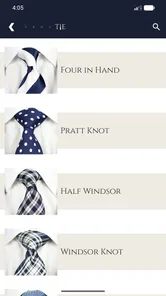
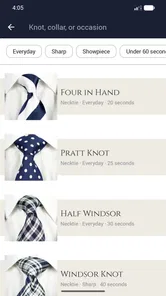
The app focuses on demonstrating several commonly used tie knots, ranging from simple options suitable for everyday office wear to more formal or elaborate styles. The exact selection may depend on the version of the app and the device platform, so users should check the in-app knot list after installation. Each guide generally explains the required movements in sequence, helping you choose a knot based on difficulty, occasion, and collar style.
Is True Tie: Tie Knot Guide suitable for complete beginners?
Yes. The app is primarily aimed at people who have little or no experience tying a necktie. Its visual instructions break the process into manageable steps, allowing you to pause, review, and repeat movements at your own pace. Beginners may still need a few attempts to understand the orientation of the tie and the difference between the wide and narrow ends, but the guided approach is more approachable than learning from a static diagram.
Pros
- Clear step-by-step visuals make knot techniques easy to follow.
- Covers several classic knots for work
- weddings
- and formal events.
- Useful offline when preparing in front of a mirror or wardrobe.
- Simple interface lets users focus on instructions without distractions.
- Helpful for beginners who have never tied a necktie before.
Cons
- Some advanced knot styles may be missing from the collection.
- Illustrations can be difficult to follow without practicing alongside them.
- Instructions may not account for different tie lengths or fabric types.
- The app offers limited guidance on matching knots with collars.
- Frequent users may find the content repetitive after mastering the basics.











