

Trucker Tools
- 2.99K
- 3.9
- Installs
- 1.00M
- Price
- Free

Screenshots
Analysis by Reviewed
When I judge a trucking app, I start with a practical question: what can it help me decide before I reach the next junction, stop, or delivery? Trucker Tools brings several parts of that working day together, including load-related tools, truck-oriented navigation, fuel information, and a guide to truck stops. That mix makes it more relevant to professional drivers than a standard map app, but it also means the experience depends on having a usable connection when you need current information.
When a connection matters on the road
For a working driver, a navigation app is only as useful as it is at the moment a decision has to be made. A load update, a search for a stop, or a route check can depend on having a usable connection, so I would treat Trucker Tools as a connected companion rather than assume every part will work without a signal. Before leaving a strong-coverage area, it is sensible to check the details you need for the next leg and keep a separate way to navigate if losing service would leave you without guidance.
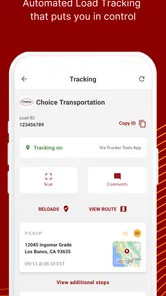
A practical example: imagine you are approaching a delivery window and need to keep tabs on a load while also deciding where to take a break. The tracking and stop-finding tools can help bring those tasks together, but they are most useful when your phone can reach the service. I would check the relevant load information before setting off, then avoid trying to read or adjust the phone while driving. The app can support a plan; it should not become a reason to make last-second decisions behind the wheel.
Features That Keep You Rolling
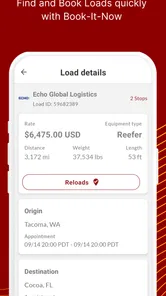
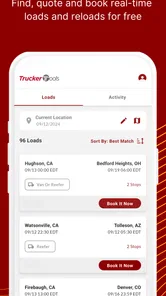
Alright, first things first, let's talk about what makes Trucker Tools stand out. This app is like a Swiss Army knife for truckers. You've got your real-time load tracking, which is a game-changer when you're trying to keep tabs on your haul. No more guessing games; you know exactly where your load is and when it'll get there. Plus, the app offers a load board to find and book loads swiftly. It's like having a personal dispatcher right in your pocket.
That combination is most valuable to drivers who want load-related tasks and road planning in one place, rather than bouncing between several general-purpose apps. I would still treat tracking as a useful view, not a substitute for confirming important delivery details with the people involved. If you are an owner-operator comparing work or handling a changing schedule, the load board may be worth exploring; if you only need turn-by-turn directions for a personal car, this trucking-focused toolkit is likely more than you need.
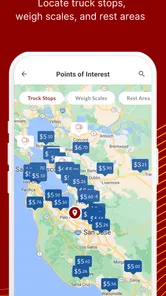
Now, if you're anything like me, finding a good place to stop is crucial. The app's truck stop guide is a lifesaver. It not only helps you find the nearest pit stop but also gives you details about amenities and parking availability. And let's be honest, knowing where you can grab a decent meal or a hot shower makes all the difference when you're on the road for days.
One useful habit is to compare a promising stop with the next stretch of your route before committing to it. Parking availability can change, and a listing is a planning aid rather than a guarantee that a space will still be open when you arrive. I would use the guide to narrow down options early, then make the final call based on current conditions and any direct updates available to me. That small distinction matters most late in the day, when detouring to a full lot costs time and energy.
More From Our News Desk

 Weather - By Xiaomi
Weather by Xiaomi Review: Clear at a Glance, Less Clear Up Close
Xiaomi’s weather app makes everyday forecasts quick to scan, but its calm surface can leave useful details and recovery paths harder to find than they should be.

 X
XX Under Pressure: Can It Recover When Posting Goes Wrong?
A resilience-focused review of X, examining setup, mistaken posts, interruptions, weak connections, and the gaps that matter when recovery needs to be dependable.

 Clash of Clans
Clash of Clans Is Won Between the Battles
Its raids are quick; its community is a long-term project of coordination, teaching, rivalry, and shared responsibility—with all the friction that entails.

 Android Auto
Android Auto Makes the Case for Quieter Car Software
The car interface is no longer judged by how much it can do, but by how quietly it helps. Android Auto shows what drivers now expect—and what still gets in the way.

 MobiOffice: Word, Sheets, PDF
MobiOffice: Transforming Mobile Productivity with Seamless Integration
MobiOffice: Word, Sheets, PDF is redefining mobile productivity with a surprising blend of functionality and innovation.

 EA SPORTS FC Soccer Mobile 26
EA SPORTS FC™ Mobile Soccer: Redefining Mobile Sports Gaming
Dive into EA SPORTS FC™ Mobile Soccer, where immersive gameplay and strategic depth transform mobile sports gaming.
Latest News



Navigation and Fuel Optimization
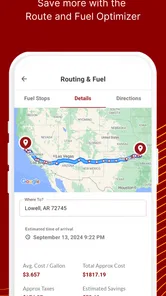
Getting lost is no fun, especially when you're driving a massive truck. That's why the app's GPS navigation is a must-have. It's tailored for truck routes, so you won't find yourself stuck on a narrow road or under a low bridge. The navigation feature takes into account your truck's dimensions, ensuring a smooth journey.
For a driver deciding between this and a familiar general map app, the truck-oriented approach is the key difference: a car route is not automatically a sensible route for a large vehicle. Even so, I would not make any single navigation screen the only authority for a difficult turn, a restriction, or an unexpected road change. Check the planned route while stopped, enter vehicle details carefully where the app asks for them, and use road signs and sound judgement as the final check. If you mostly drive a car or already rely on a dedicated truck navigation device, the extra tools here may matter more than replacing your existing navigation setup.
And let's talk about fuel – the bane of every trucker's existence. The app helps you find the best fuel prices along your route, which can save you a pretty penny. With fuel costs constantly on the rise, this feature alone makes the app worth a download.
Fuel comparisons are most helpful when treated as one part of the stop decision, not the whole decision. A lower listed price may not be worth a long detour, and a planned fuel stop can also be a chance to handle a break or check the next leg. I would compare the option against distance and timing rather than chasing the cheapest figure in isolation. That approach makes the feature more practical for a working route and less likely to turn a small saving into lost time.
Community and Support
One of the coolest things about Trucker Tools is its community aspect. You can connect with other truckers, share tips, and even get recommendations on places to eat or things to see along your route. It's like having a network of friends who understand the unique challenges of life on the road.
Community advice can add a useful human perspective to a map or listing, especially when you want a driver’s take on a stop. I would use recommendations as a starting point and consider whether they still fit my current route and needs; another driver’s preferred place may not suit every schedule. For new drivers, that practical context can help make unfamiliar stretches feel less daunting, while experienced drivers may prefer the app mainly for its work and planning tools.
And if you ever run into issues, the app's customer support is top-notch. They're quick to respond and genuinely seem to care about helping you out. It's refreshing to see an app that values its users and strives to make their lives easier.
Choosing the right tool for the route
The most useful way to compare this app with ordinary navigation alternatives is to look at the job you need done. A general map can be perfectly adequate for finding an address or checking a broad route, but it is not built around a truck driver's mix of load coordination, vehicle-aware routing, fuel choices, and suitable stops. A dedicated truck navigation device may remain the better primary guide for someone who wants a separate, always-visible unit or already trusts a familiar setup. I see Trucker Tools as most interesting when its additional planning tools earn space alongside navigation, rather than as a reason to discard every tool that already works.
That distinction matters for mixed workdays. A driver who spends most of the shift moving freight may value being able to check a load and then consider stops in the same app. Someone who drives a truck only occasionally, or mainly wants a simple route to a destination, may find the extra work-focused options unnecessary. Before building it into a routine, I would try one complete planning task: check a route, compare a reasonable stop, and see whether the load tools fit the way you already coordinate a job.
It is also worth separating convenience from certainty. A single app can make it easier to see several kinds of information together, but it does not remove the need to verify details that affect a delivery, a restriction, or a time-sensitive stop. When two sources disagree, I would pause somewhere safe and seek a reliable current answer rather than assume the screen that is easiest to reach must be right. That cautious habit is more useful than treating any digital tool as an unquestionable authority.
Making it fit your routine
Trucker Tools is free, rated for Everyone, and developed by Trucker Tools. It has been available since August 1, 2011, and version 10.3.0 is the current release. Its 3.6 average from around 9,000 ratings, alongside more than 1 million installs, suggests plenty of drivers have tried it, though popularity alone cannot tell you whether its mix suits your route or workflow.
For data-conscious use, I would avoid leaving the app open just to watch information that does not need constant attention. Check tracking, route choices, fuel options, and stop details when you are parked, then close or switch away when you are done. If mobile data is limited, prioritize the information tied to the next decision rather than repeatedly refreshing several screens. This is also a sensible way to reduce distraction: the safest time to sort out a route or investigate a stop is before moving, not while driving.
A simple routine can make those checks more useful without turning the phone into a constant distraction. Before a shift or a new leg, decide what actually needs attention: the next route choice, a likely break, a fuel stop, or a load detail. Review those items while parked, and leave non-urgent browsing until later. This keeps the app focused on decisions that can change your plan, rather than encouraging repeated checks that add little value while consuming attention and mobile data.
If connectivity drops, I would first focus on driving safely and use another available navigation method rather than troubleshoot on the road. Once parked and connected again, reopen the relevant part of the app and check whether the information you need is current before relying on it. That recovery routine is simple, but it prevents an old screen or a failed refresh from being mistaken for a live update.
For example, if a route check or stop search fails just as you are leaving a coverage area, I would not keep tapping through menus in motion or assume an earlier result remains current. Pull over at an appropriate place, use the navigation method already available to you, and revisit the app when service returns. For a load issue that could affect a handoff, a direct check with the people involved is a better fallback than relying on a screen that has not refreshed. The key trade-off is straightforward: connected tools can save time when they work, but a driver still needs a calm plan for when they do not.
People often wonder whether a trucking app like this can replace both a separate truck navigator and the usual map app. I would not make that assumption. Its truck-focused routing is a useful part of the package, but a dedicated device or another trusted navigation option can make more sense as the primary guide if you need a separate screen or want a backup that does not depend on the same phone workflow. Similarly, the app's stop and fuel information can help narrow choices, while current availability and the final suitability of a stop still deserve a check before you commit.
Another practical question is whether it suits a driver who is new to trucking. I think it can be worth exploring because the load, route, fuel, and stop tools reflect decisions a new driver has to learn to coordinate. But it is not a substitute for training, posted road information, or advice from an experienced dispatcher or driver. I would start with one or two features that solve an immediate problem, learn how they fit the day, and avoid trying to manage every task through the phone at once.
In conclusion, Trucker Tools is more than just an app; it's a trusty sidekick for anyone in the trucking industry. Whether you're a seasoned pro or a newbie, this app has something to offer. From load tracking to community support, it's designed to make your life on the road a whole lot smoother. So, if you're looking for a reliable partner to help you navigate the ups and downs of trucking, give it a spin. Safe travels, my friends!
My recommendation is strongest for drivers who want load, stop, fuel, and truck-route tools together and are comfortable using a connected app as part of a broader routine. It is less compelling as a stand-alone choice for someone who only wants basic directions, expects every detail to be current without checking, or needs to depend on a phone through stretches with unreliable service. The best way to judge it is to try the parts that match your day-to-day work and keep a backup plan for navigation and time-sensitive decisions. In that role, it can be a handy addition to a driver’s kit without pretending to replace experience, road awareness, or direct confirmation when it matters.
Trucker Tools Frequently Asked Questions
Is Trucker Tools suitable for someone who is new to trucking apps?
Trucker Tools is a Maps & Navigation app built for truck drivers, and its features focus on practical day-to-day needs such as finding truck stops, checking fuel prices, routing, and tracking loads. The app is intended to help drivers bring several useful tools together in one place. New users can explore the available options and decide which ones fit their work routine.
What should I know about installing Trucker Tools on my phone?
Trucker Tools is available for Android devices running Android 7.0 or later. It is free to download, and its content rating is Everyone, so it is not presented as an age-restricted app. Before installing, make sure your device meets the operating-system requirement and consider whether you are comfortable using navigation and tracking features as part of your trucking workflow.
What is Trucker Tools app and how does it benefit truck drivers?
Trucker Tools is a comprehensive mobile application designed specifically for truck drivers, offering a suite of features to enhance their daily operations. It provides real-time information on load tracking, fuel prices, truck stops, and routing. The app helps drivers maximize efficiency and minimize costs by offering tools like a truck stop guide, weigh station alerts, and load tracking capabilities, making it an indispensable tool for modern truckers.
Does Trucker Tools provide real-time load tracking and how accurate is it?
Yes, Trucker Tools offers real-time load tracking, which is highly accurate and reliable. The app utilizes advanced GPS technology to provide up-to-the-minute updates on load locations, ensuring that drivers and logistics companies can track shipments with precision. This feature helps in optimizing routes and improving communication between drivers and dispatchers, enhancing overall efficiency.
Is Trucker Tools app free to use or are there any subscription costs involved?
Trucker Tools offers a free version of the app that includes many essential features beneficial for truck drivers. However, for enhanced functionalities and premium services, users may choose to subscribe to a paid version. The subscription provides additional benefits such as advanced analytics, premium support, and exclusive features that can further assist drivers in their operations.
Pros
- Comprehensive load tracking feature.
- User-friendly interface.
- Real-time updates.
- Wide range of trucking tools.
- Efficient route planning.
Cons
- Occasional GPS glitches.
- Requires stable internet.
- Limited offline features.
- Some features are paid.
- Can drain battery quickly.











