Trucker Path: Truck GPS & Fuel
- 21.96K
- 4.8
- Installs
- 1.00M
- Price
- Free

Screenshots
Analysis by Reviewed
I’d think of Trucker Path as a planning companion for the parts of truck driving that ordinary navigation often handles poorly: choosing a truck-suitable route, lining up fuel, and finding somewhere to stop. Its value depends partly on how current the information is, so I wouldn’t make a long haul hinge on a single search result. Used with a little preparation and good judgment, though, it can make the choices around a trip easier to organize.
When a live connection helps most
Connectivity matters most when I’m looking for information that can change during the day. A refreshed search for fuel, parking, or a place to take a break is more useful than a result I checked hours earlier, particularly if my schedule or route has shifted. That makes a connected phone helpful not only for navigation, but also for adjusting the plan when the day doesn’t go exactly as expected.
I’d do the more involved planning before setting off: compare likely stops, note a backup, and get the route ready while parked. Then, if a delay changes when I expect to reach a fuel stop or parking area, I can check again somewhere safe. This is a better fit for how the app’s truck-focused information works than trying to solve every stop decision while already under time pressure.
A tool for the cab, not a reason to multitask
In a working cab, the useful question is not simply whether an app has lots of information, but whether I can consult it without letting the screen distract me. I’d use Trucker Path to prepare and revise a plan while stopped, then keep my attention on driving. Looking through stop feedback or comparing fuel choices while moving is a poor trade, even if the information could help later.
It can also serve different roles depending on the trip. A driver on a familiar local route may only need basic directions and find a general map quicker to open. On an unfamiliar run, the combination of truck-oriented routing and places relevant to truckers gives Trucker Path a clearer purpose. For a newer driver, it can help build a shortlist of stops, but learning to check signs, restrictions, and the actual road remains essential.
What to do when information is unavailable or uncertain
If the signal drops, a result looks old, or a stop no longer seems suitable, I wouldn’t keep tapping in the hope that the screen will settle the decision. I’d stop safely, reassess the plan, and use current road signs and conditions as the final guide. Before a trip through areas where coverage might be weak, checking route details and possible stops in advance is a sensible precaution. I would not rely on the app as an offline navigation solution.
For parking in particular, having more than one candidate matters. A listed location is a lead, not a guarantee that a space will be available when I arrive. I’d identify an alternative before the last stretch of the day, when fatigue and limited time can make a change of plan harder. That small bit of preparation is one of the most useful ways to make a stop-finding tool work in real life.
More From Our News Desk

Clash of Clans Is Won Between the Battles

Android Auto Makes the Case for Quieter Car Software

MobiOffice: Transforming Mobile Productivity with Seamless Integration

EA SPORTS FC™ Mobile Soccer: Redefining Mobile Sports Gaming

How Microsoft OneDrive Became a Mobile Productivity Giant

How Google Translate Breaks Language Barriers Effortlessly
Keeping phone use and trip planning manageable
Map searches and refreshed information can use mobile data, so drivers with a limited plan may prefer to do longer searches when connected to a suitable network and keep on-road checks focused. I’d also avoid leaving the app open for casual browsing when I only need a specific answer. The practical aim is to use the phone deliberately: plan, check what matters, and put it aside while driving.
How much the app helps will depend on the trip and the information a driver needs. Someone who mainly wants a quiet map for car journeys may find a standard navigation app less involved. A truck driver comparing routes, fuel, parking, and stop notes has more reason to use a specialized tool, while still treating changing information as something to verify rather than a certainty.
When it comes to finding the best tools for truck drivers, Trucker Path: Truck GPS & Fuel has been making quite the buzz. So, naturally, I had to give it a spin and see if it lives up to the hype. Let me take you through my experience with this handy app.
What matters most with a truck-focused map is not just the route on screen, but whether the information stays useful as conditions change. A driver may be looking for a legal way through an unfamiliar area, a place to refuel before the next leg, or a parking option before stopping for the night. I find that this combination makes the app more relevant to work journeys than a standard map built mainly around passenger cars.
Getting Started with Trucker Path
First off, downloading and installing the app is a breeze. It's available on both Android and iOS platforms, catering to a wide range of users. Once installed, you're greeted with a clean, user-friendly interface that doesn't overwhelm you with too many options right off the bat. It's like the app knows you're probably tired from a long haul and just want to get things done efficiently.
Developed by Trucker Path, this free Maps & Navigation app has a 4.8 average from around 71,000 ratings, with roughly 22,000 reviews and over a million installs. It is rated Everyone, and version 6.8.3 requires Android 8.0 or later. The basic download costs nothing, while in-app purchases range from $1.99 to $299.99 per item, so I would check what a particular purchase covers before paying rather than assuming every useful tool is included free.
Navigation Made Easy
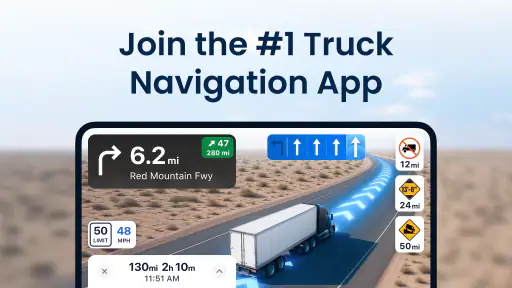
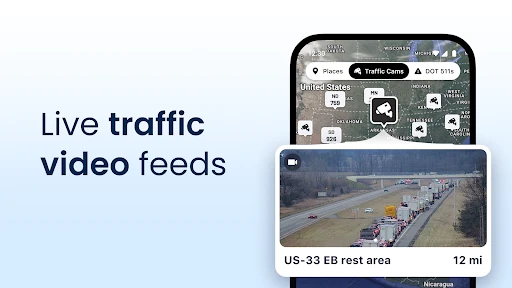
One of the standout features of Trucker Path is its GPS navigation designed specifically for truckers. Unlike regular GPS apps, this one takes into account the size and weight of your truck, providing routes that are safe and legal for your vehicle. This is a game-changer, especially when you're maneuvering through unfamiliar territory. The real-time traffic updates and ETAs were spot on during my test runs, making planning ahead much easier.
That said, I would treat any routing suggestion as a planning aid, not permission to ignore posted restrictions or the conditions in front of me. Truck dimensions and weight matter, and the driver remains responsible for checking that a route fits the actual vehicle and load. On a familiar local run, a regular navigation app may be simpler; the truck-specific angle becomes more valuable when the consequences of a wrong turn are higher.
Fuel Stops and Parking at Your Fingertips
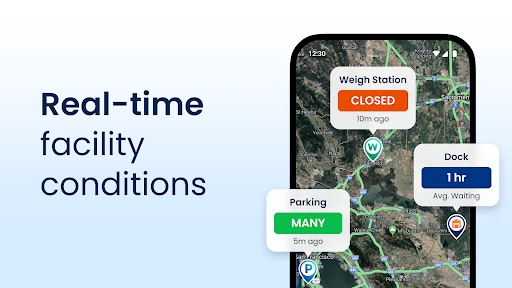
Another feature I found incredibly useful was the fuel station locator. Not only does it find the nearest fueling stations, but it also displays fuel prices, helping you save money. And let’s be honest, every penny counts when you’re on the road. The app also includes a parking locator, which shows available truck stops and rest areas along your route. I found this particularly helpful for planning my breaks, ensuring I always had a spot to rest.
A practical routine is to check possible stops before the tank is nearly empty or the end of a driving shift is close. That gives you room to compare choices and adjust if a preferred location does not suit the timing of the trip. I would still verify an important stop as I approach: listings and availability can change, and a map cannot guarantee that a space will be waiting when you arrive. The app helps narrow the search, but it cannot remove the need for a backup plan.
For example, on a long delivery day, I might check fuel options while planning the route, then look at parking possibilities before the final stretch rather than waiting until I am tired and under pressure. That small change makes the information more actionable: it turns the map into part of a stop plan, instead of a last-minute search. Drivers who mainly need ordinary turn-by-turn directions may find a general map less busy, while someone coordinating fuel, breaks, and truck-friendly stops has more reason to keep this tool handy.
Community-Driven Insights
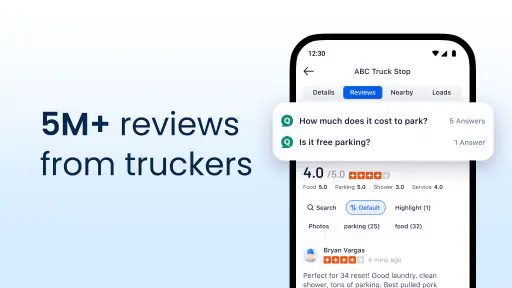
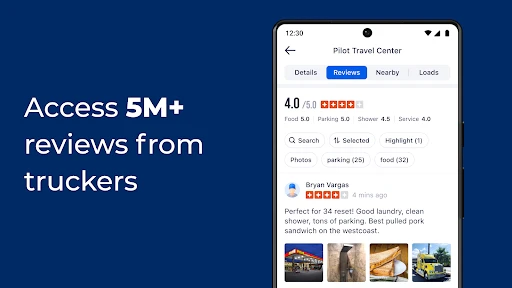
What really sets Trucker Path apart is its strong community aspect. The app allows drivers to leave reviews and tips about stops along the way, which can be invaluable. The feedback from other truckers helped me avoid some sketchy spots and discover hidden gems. It’s like having a community of seasoned road warriors right there in your pocket, always ready to lend a hand.
Community notes are most useful when read as one driver’s recent experience, not as a promise that every visit will be the same. I would look for practical details that affect my own decision and compare them with the route and timing, rather than relying on a single comment. This is a meaningful difference from a conventional navigation app, where the focus is often on getting from A to B rather than sharing stop-specific knowledge among truckers.
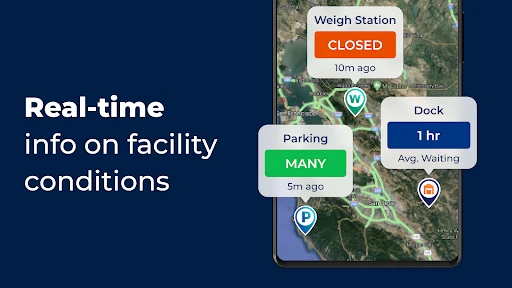
Moreover, the app offers information on weigh stations, scales, and even Walmart locations that allow truck parking. These little details make your journey smoother and stress-free.
Using It When Coverage Is Uncertain
Because route guidance and stop information are most useful when they can refresh, connectivity is part of the experience. I would check the route and likely stops before entering an area where service may be unreliable, then avoid making a last-second plan depend on a fresh search. I would not assume the app can provide offline navigation; if staying connected is important for a trip, confirm what works on your device before departure and keep a separate way to consult essential route details.
Mobile use also calls for a little discipline. I would set up the route and review options while parked, then leave attention on the road instead of browsing fuel prices or community comments while moving. If a signal drops or information appears stale, the sensible recovery is to pause somewhere safe, reassess the route, and use posted road signs and current conditions as the final guide. That approach matters especially around truck restrictions, where a quick guess can create a difficult detour.
Who Will Get the Most from It
I see this as a better fit for professional drivers and regular truck users than for someone who only needs occasional car directions. The combination of truck-oriented routing, fuel and parking searches, and stop feedback can support a working day in a way a typical map app may not. Newer drivers may also appreciate having several trip-planning needs in one place, though they should still learn how to assess route restrictions independently.
It may be less appealing if you want a very minimal map, rarely drive a truck, or prefer not to depend on a connected phone for timely information. A general navigation app can be the cleaner choice for everyday car trips, while Trucker Path makes more sense when truck-specific stops and planning are central. I would also keep in mind that community contributions can vary in usefulness, so the app works best as a source of options rather than the sole authority on a stop.
Final Thoughts
All in all, Trucker Path: Truck GPS & Fuel is more than just a navigation app; it’s a comprehensive tool tailored for the trucking community. With its thoughtful features and community-driven insights, it’s like having a co-pilot that’s always looking out for you. Whether you’re a seasoned trucker or just starting out, this app is definitely worth checking out. It’s safe to say that Trucker Path has secured a permanent spot on my home screen.
My connectivity verdict is that the app is most useful when I can plan ahead and refresh information as the trip unfolds, rather than treating it as an unquestionable source in every situation. It can help organize routing, fuel, parking, and practical stop research in one truck-focused place, but it does not replace driver judgment or a fallback plan. If those trade-offs suit the way you travel, the free starting point makes it reasonable to try; just review any paid options carefully and decide whether the added value fits your routine.
Trucker Path: Truck GPS & Fuel Frequently Asked Questions
Can Trucker Path help me plan a trip around truck stops and services?
Trucker Path brings truck-focused navigation together with information about parking, fuel, diesel, and weigh stations. That combination can help you think through where to stop as well as how to navigate, which is useful when planning a working route. It is still sensible to check that a stop suits your truck and plans before relying on it.
Who develops Trucker Path, and what kind of app is it?
Trucker Path is developed by Trucker Path and belongs to the Maps & Navigation category. Its focus is on truck drivers, with truck-safe GPS navigation and maps alongside information related to parking, fuel, diesel, and weigh stations. If you are looking for a general map app with no trucking emphasis, its main appeal is the specialized roadside and route-planning focus.
Is Trucker Path suitable for someone who wants truck-focused directions rather than a general map app?
Trucker Path is a Maps & Navigation app built around truck-driving needs. Its store description highlights truck-safe GPS navigation and maps, along with parking, fuel, diesel, and weigh-station information. That focus may make it useful if you want navigation and roadside planning tools together, rather than relying only on a general-purpose map. As with any navigation app, review route guidance carefully while driving.
What features does Trucker Path offer for truck drivers?
Trucker Path provides a comprehensive suite of tools designed specifically for truck drivers. It includes a truck-specific GPS navigation system, real-time updates on truck stops, weigh stations, fuel prices, parking availability, and more. The app also offers a community-driven platform where drivers can share information and tips, making it an invaluable resource for those on the road.
Is Trucker Path available for both Android and iOS devices?
Yes, Trucker Path is available for download on both Android and iOS devices. You can find it on the Google Play Store for Android devices and the Apple App Store for iOS devices. The app is designed to be user-friendly and accessible, providing truck drivers with essential features regardless of their device preference.
Pros
- User-friendly interface simplifies navigation.
- Real-time updates on traffic conditions.
- Comprehensive fuel station data available.
- Efficient routing saves time and fuel.
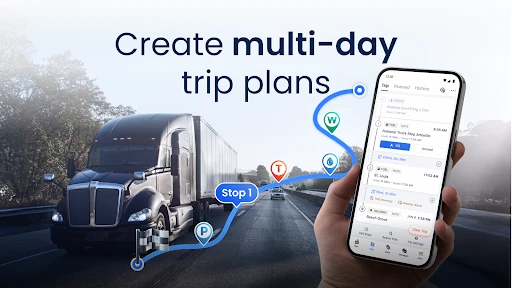
- Supports multiple stop planning.
Cons
- Limited offline map functionality.
- Occasional GPS signal drop issues.
- Some features require premium upgrade.
- Advertising can be intrusive at times.
- Battery consumption is relatively high.
- Category
- Maps & Navigation
- Version
- 6.8.3












