

Trucker Guide: Truck Stops
- 598.00
- 4.1
- Installs
- 100.00K
- Price
- Free

Screenshots
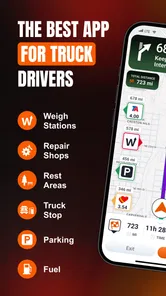
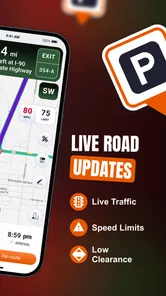
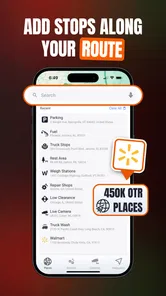
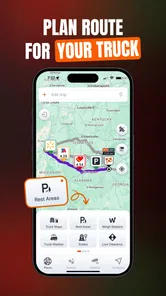

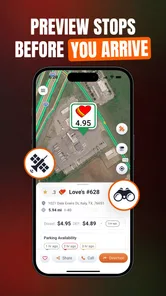
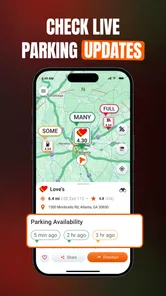
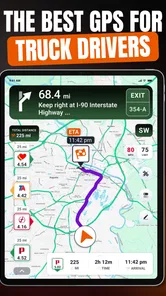
Analysis by Reviewed
I spend enough time thinking about truck routes, fuel stops, and parking options to know that a navigation app cannot be judged only by whether it draws a line between two places. For a professional driver, the useful question is often more practical: can I quickly find a suitable stop, understand what is nearby, and make a decision without fighting the screen while I am tired or under time pressure? That is the space where Trucker Guide: Truck Stops aims to help.
Developed by Trucker Guide, this free Maps & Navigation app is built around the daily needs of drivers on the road. It brings truck stops, parking, fuel, routes, and driver-oriented services into one place rather than treating a heavy vehicle like an ordinary car. I found that focus more valuable than a long list of flashy navigation features. The app feels most useful as a practical planning companion: something I would check before committing to the next stretch of a journey, especially when parking and fuel matter as much as the road itself.
The app has a 4.1 average from around 2.2 thousand ratings, with more than 100 thousand installs. That gives it a meaningful user base without making it feel like an all-purpose navigation giant. It is free to install, rated for Everyone, and supports devices running Android 8.0 or later. The current version is 6.0.4, while optional in-app purchases range from $14.99 to $149.99 per item. Those details matter because the free entry point makes it easy to test, but frequent users should still consider whether the paid options fit their routine.
Finding information without adding work to the drive
My first impression is that the app’s strongest idea is concentration. A driver does not always need another general map showing every business and street. Sometimes the immediate need is to identify a truck-friendly place to stop, compare nearby fuel possibilities, or see whether a route has useful services along the way. By putting those needs at the center, Trucker Guide reduces the amount of searching that would otherwise happen across several apps.
That focus can also improve readability. A general map often gives equal visual weight to restaurants, shops, residential streets, and truck-related locations. Here, the purpose is narrower, so the information is easier to interpret in a driving context. I would still use it while parked rather than trying to study details in motion, but the app is designed around decisions that can be made during a short break: where to stop next, whether a location is relevant to a large vehicle, and how far it is from the current route.
One useful habit is to use the app before leaving, not only when the fuel gauge is already low. I can look ahead for a suitable fuel point or parking possibility, then keep a practical fallback in mind. That is a better workflow than waiting until the last few miles and accepting the first result that appears. It also helps drivers who prefer to reduce last-minute choices, including people who find dense screens or rushed decisions tiring.
The interface is most approachable when I treat it as a planning tool instead of expecting it to replace every navigation service on my phone. A driver who wants a familiar turn-by-turn system, traffic layers, and broad local search may still prefer a mainstream mapping app for the actual route. Trucker Guide earns its place beside that tool by answering a more specific question: what does a truck driver need at or near the next stop?
More From Our News Desk

 Weather - By Xiaomi
Weather by Xiaomi Review: Clear at a Glance, Less Clear Up Close
Xiaomi’s weather app makes everyday forecasts quick to scan, but its calm surface can leave useful details and recovery paths harder to find than they should be.

 X
XX Under Pressure: Can It Recover When Posting Goes Wrong?
A resilience-focused review of X, examining setup, mistaken posts, interruptions, weak connections, and the gaps that matter when recovery needs to be dependable.

 Clash of Clans
Clash of Clans Is Won Between the Battles
Its raids are quick; its community is a long-term project of coordination, teaching, rivalry, and shared responsibility—with all the friction that entails.

 Android Auto
Android Auto Makes the Case for Quieter Car Software
The car interface is no longer judged by how much it can do, but by how quietly it helps. Android Auto shows what drivers now expect—and what still gets in the way.

 MobiOffice: Word, Sheets, PDF
MobiOffice: Transforming Mobile Productivity with Seamless Integration
MobiOffice: Word, Sheets, PDF is redefining mobile productivity with a surprising blend of functionality and innovation.

 EA SPORTS FC Soccer Mobile 26
EA SPORTS FC™ Mobile Soccer: Redefining Mobile Sports Gaming
Dive into EA SPORTS FC™ Mobile Soccer, where immersive gameplay and strategic depth transform mobile sports gaming.
Latest News



Why the truck-focused view changes the decision
Truck stops are not interchangeable. Distance alone does not tell me whether a location will be useful after a long shift. Parking is a separate concern from fuel, and a service that is convenient for a car may be awkward or unsuitable for a larger vehicle. The app’s value comes from making those driver-centered categories the starting point rather than an afterthought.
That distinction is especially helpful when planning a route with limited flexibility. A private driver can often make a quick detour or choose a different street. A commercial driver may need to consider vehicle size, rest timing, fuel access, and the likelihood of finding a workable stopping place. I would use the app to build a short list of realistic options before entering a less familiar area, then use a conventional navigation app for detailed road guidance if necessary.
A less obvious benefit is reduced mental switching. Without a specialized tool, I might search for fuel in one app, parking in another, and services through a general web search. Every switch creates another chance to misread a result or lose track of the original route. Trucker Guide does not eliminate that planning work, but it brings the main categories closer together. For me, that makes it more useful during a scheduled break than during an emergency search from the roadside.
There is also a trade-off. A focused catalog is only helpful when I still check the context around a result. A listed stop may be close on the map but inconvenient to reach from the correct direction, or it may not match my needs at that particular moment. I would never treat an app result as permission to stop somewhere unsafe or unsuitable. The sensible approach is to use the listing as a planning lead, then confirm the route, signs, and local conditions before committing.
Reading and operating it with different abilities in mind
For drivers with reduced vision, the most important advantage is the app’s narrow purpose. Fewer unrelated map categories can mean less visual clutter, and the basic task is easier to explain: find a truck-relevant place, inspect it, and decide whether it belongs in the route plan. I found that simpler mental model more valuable than decorative presentation. Still, anyone who needs large text, strong contrast, or magnification should test how the app behaves with their phone’s own display settings before relying on it for work.
People with color-vision differences may also benefit from checking information through more than one clue rather than depending on map colors alone. A marker’s position and accompanying text should be considered together. I would avoid making a decision from a tiny symbol at a glance, particularly at night or in bright sunlight. This is not a criticism unique to this app; maps are easy to misread when a user must distinguish several similar colors quickly.
For users with limited dexterity or hand tremors, the best workflow is preparation while stationary. Searching, zooming, and selecting a location can require precise taps, and those actions are not tasks I would want to perform while the vehicle is moving. A passenger can help, or a driver can prepare likely stops before departure. That simple change turns the app from a rushed roadside interface into a calmer planning aid.
Drivers with hearing loss are not placed at a disadvantage by depending on spoken information alone, because the app’s core purpose is visual location and service discovery. On the other hand, a user who depends heavily on audio prompts may find a specialized truck-stop guide less suitable as a complete navigation solution. I would pair it with a navigation system that matches my preferred audio or visual guidance style, rather than expecting this app to cover every sensory need.
Cognitive accessibility is another area where planning makes a difference. Long shifts, irregular sleep, and unfamiliar roads can make even simple choices feel complicated. I recommend deciding in advance what matters most: parking first, fuel first, or a particular service. That priority keeps the search focused. If I open the app without a clear question, the number of possibilities can still become another source of decision fatigue.
How it fits different driving situations
The clearest everyday scenario is a driver approaching the end of a shift in an unfamiliar region. Instead of waiting until the final fuel stop, I would open Trucker Guide during a legal break, look ahead for truck-oriented parking and fuel options, and choose a primary location plus a backup. If the first option does not suit the vehicle or the timing, I already have another place to investigate. That is a small planning step, but it can prevent a stressful search when energy and daylight are running low.
The app can also help when a route changes unexpectedly. Roadwork, a delayed delivery, or a full parking area may force a driver to reconsider the next stop. In that situation, a specialized directory is more relevant than a generic search for nearby businesses. I would use it to identify alternatives, then verify the final approach with a full navigation tool. This two-app workflow is not as simple as using one universal product, but it is more realistic for drivers whose needs go beyond ordinary car navigation.
For owner-operators and occasional long-distance drivers, the free installation lowers the risk of trying it. Someone who only takes a few extended trips can see whether the truck-focused information fits their habits before considering any optional purchase. Frequent users may find more value in paid features, but I would not buy immediately. I would first use the free experience on familiar routes, note which tasks it handles well, and decide whether it saves enough time to justify spending more.
For people who drive as part of a team, the app may be useful as a shared planning reference. One person can review the next stopping area while the other handles the current task, and both can agree on priorities before the next break. That arrangement is also better for accessibility: a driver who struggles with small controls, glare, or fatigue does not have to manage every search alone. The key is to keep all interaction away from active driving.
It is less compelling for a city driver who rarely needs truck parking or heavy-vehicle services. In that context, a standard map may be faster because it is already familiar and better suited to local errands. The same applies to someone who wants a single app for walking directions, public transit, traffic conditions, and broad business discovery. Trucker Guide has a clear audience, and its specialization is a strength only when the user actually needs it.
Where the experience still creates friction
The biggest limitation is that specialization does not automatically make every decision effortless. A driver still needs to interpret the result, consider the route, and judge whether the location fits the vehicle and schedule. I would not use the app as a substitute for common sense, road signs, or current local information. Its role is to narrow the search, not to remove responsibility from the person behind the wheel.
There is also a practical learning curve when moving from a general map. Users accustomed to one familiar search box and one predictable route view may need time to understand how this app organizes truck stops, parking, fuel, routes, and services. That learning period should be handled on a parked device, ideally on a route the driver already knows. Testing it during a difficult trip would make it harder to tell whether a problem comes from the app or from unfamiliar roads.
The optional purchase range deserves attention as well. A free app is attractive, but the presence of items from $14.99 to $149.99 means the long-term cost can vary considerably depending on what a user chooses. I would treat paid functionality as a decision based on repeated use rather than an automatic upgrade. Drivers should also be comfortable checking exactly what an optional purchase adds before paying, especially if they only need occasional stop planning.
Device compatibility is another consideration. Support for Android 8.0 and later covers many phones, but drivers using older hardware should check their device before planning around the app. A phone that is slow, difficult to read outdoors, or prone to battery problems can undermine a good navigation workflow. In my view, the app is most dependable when used on a well-maintained device with the route reviewed before departure.
Accessibility needs remain personal. A user may find the focused content easier to understand, while another may need larger controls, stronger contrast, screen magnification, or assistance from a passenger. I would not assume that a truck-focused interface automatically works for every visual, motor, hearing, or cognitive need. The fair test is practical: can the intended user locate a relevant stop, understand the result, and make a safe plan without unnecessary strain?
My inclusive verdict for working drivers
After looking at it as both a navigation utility and an accessibility-conscious planning tool, I see Trucker Guide: Truck Stops as a useful specialist companion rather than a universal replacement for every map app. Its best quality is its clear understanding of the truck driver’s decision: fuel, parking, routes, and services need to be considered together. That focus can reduce clutter and make route preparation more manageable, particularly for drivers who prefer to plan before fatigue or time pressure takes over.
I would recommend it to professional drivers, owner-operators, and anyone regularly traveling routes where truck-friendly stopping options matter. I would also recommend trying it alongside a familiar navigation app instead of forcing it to handle every task. Use this app to research the next practical stop, compare possibilities, and prepare a backup. Use the other tool when you need detailed road guidance or broader navigation features.
I would be more cautious about recommending it to users who rarely drive long distances, depend on highly specialized accessibility controls, or want one polished app for every kind of travel. Those drivers may find a mainstream alternative more comfortable. The same is true for anyone who dislikes checking information in advance; this app rewards preparation more than improvisation.
My final view is positive, with sensible limits. The free starting point, Everyone age rating, and truck-specific purpose make it approachable, while the established audience suggests it is more than a one-off experiment. Its real value appears when I use it deliberately: parked, before the next leg, with a clear priority and a backup plan. For drivers who need to make safer, less stressful stopping decisions, this focused guide is worth keeping on the phone, provided it complements rather than replaces responsible route planning.
Trucker Guide: Truck Stops Frequently Asked Questions
Is Trucker Guide: Truck Stops free to download?
Trucker Guide: Truck Stops is free to download, so you can try its truck-stop and roadside search features without an upfront app price. It also offers in-app purchases, which may be relevant if you want access to paid options. Check the purchase details shown in the app before confirming anything, and consider whether its free features meet your needs first.
Which devices can run Trucker Guide: Truck Stops?
The app requires Android 8.0 or later, so check your device’s operating system before downloading it. It is a Maps & Navigation app developed by Trucker Guide, with a general-audience content rating. If your device meets the minimum requirement, you can assess how it works on your phone and whether its maps and search tools suit the way you plan routes.
What is Trucker Guide: Truck Stops used for?
Trucker Guide: Truck Stops is designed to help professional drivers find truck stops and other useful roadside facilities while traveling. It can make it easier to locate places offering diesel fuel, parking, showers, restaurants, repair services, and other amenities. The app is especially useful for planning rest breaks and identifying suitable stops along a long-haul route.
Does Trucker Guide: Truck Stops show available truck parking?
The app provides information about truck stops and may include parking details, but drivers should not assume that a listed location will always have an open space. Parking availability can change quickly depending on the time of day, traffic, and local demand. It is best used for planning and comparing options, while confirming conditions on arrival whenever possible.
Can I use Trucker Guide: Truck Stops without an internet connection?
The app may require an internet connection for current maps, search results, location updates, and changes to truck stop information. Depending on the version and device, some previously viewed details may remain temporarily available, but full offline operation should not be expected unless the app specifically provides offline maps or saved locations. Check your connection before entering remote areas.
Pros
- Useful directory for locating truck stops across the United States.
- Shows amenities such as parking
- fuel
- showers
- and food options.
- Can help drivers compare facilities before planning a stop.
- Practical for finding services in unfamiliar areas.
- Simple layout makes key stop information easy to scan.
Cons
- Coverage and listing accuracy may vary by location.
- Some information may be outdated or missing.
- Limited usefulness outside the regions it supports.
- Requires reliable internet for the most current details.
- May not reflect real-time parking availability at truck stops.











