

Trenitalia
- 144.00
- 3.4
- Installs
- 10.00M
- Price
- Free

Screenshots
Analysis by Reviewed
If you’ve ever planned a train trip around Italy, you’ll know that the useful details are not limited to choosing a departure. You also need to keep the right journey in mind, make sensible choices when several trains appear, and be ready to check the plan again as travel day approaches. I see the Trenitalia app as a focused tool for that rail-specific work, rather than a replacement for every map or travel planner on my phone.
Speed expectations and sensible planning
For a straightforward station-to-station search, I’d expect the app to be most useful when I already know roughly when I want to travel. Entering the route and date is a practical starting point, but I wouldn’t treat a quick-looking search as a reason to rush through the choice: check the departure time and train details before committing. For a journey with several possible departures, that small pause can matter more than shaving a moment off the search.
As a free Maps & Navigation app from Trenitalia S.p.A, it is aimed at people arranging rail travel rather than replacing a general map or an all-purpose trip planner. The app has a 3.5 average from around 66,000 ratings and more than 10 million installs. Those figures suggest it has broad reach, though they don’t tell me whether a particular trip or device will feel effortless. I’d judge its value by whether it helps me find and manage the journey I actually need.
Getting Started with Ease
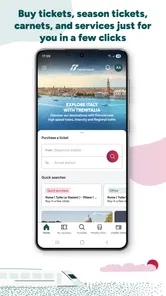
First things first, downloading and setting up the app is super straightforward. Available for both Android and iOS, it offers a sleek and user-friendly interface that's easy on the eyes. Upon opening the app, you're greeted with a simple search bar. Just punch in your departure and arrival stations, select your travel dates, and voilà! A list of available trains pops up faster than you can say “buongiorno.”
Booking a ticket
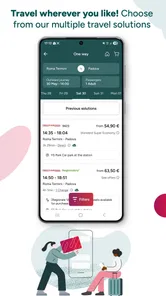
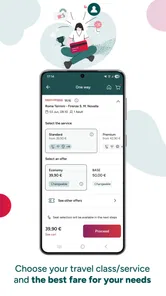
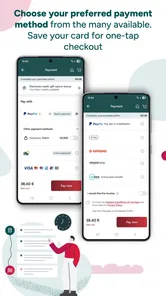
Booking a ticket through the app is as easy as pie. You can filter options based on time, price, or train type, which is a lifesaver if you're a last-minute planner like me. Once you've picked your perfect train, the app guides you through the payment process seamlessly. It accepts various payment methods, from credit cards to PayPal, making it convenient no matter where you're from. And the best part? Your ticket is stored digitally, so there’s no need to worry about losing paper tickets. Talk about peace of mind!
Comparing departures without overthinking
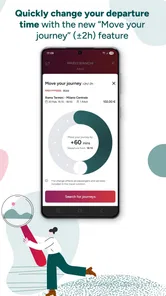
When I’m comparing departures, I would use the filters to narrow the field, then check the full details of the remaining options rather than assuming the cheapest or earliest result is automatically best. A lower fare may not suit a journey where timing is the priority, while the fastest-looking choice may leave little room for a change in plans. That trade-off is especially relevant when booking for someone else: confirm the stations and travel date before paying, since a small search-entry mistake can have a bigger consequence than a slightly slower screen.
For an everyday example, imagine planning a morning trip into a city for an appointment. I’d search the route the night before, compare a couple of departure times, and keep the selected ticket available on my phone. On the day, I’d check the travel information again before leaving home. This makes the app more useful as a planning-and-reference tool than as something to open only at the station in a rush.
More From Our News Desk

 Weather - By Xiaomi
Weather by Xiaomi Review: Clear at a Glance, Less Clear Up Close
Xiaomi’s weather app makes everyday forecasts quick to scan, but its calm surface can leave useful details and recovery paths harder to find than they should be.

 X
XX Under Pressure: Can It Recover When Posting Goes Wrong?
A resilience-focused review of X, examining setup, mistaken posts, interruptions, weak connections, and the gaps that matter when recovery needs to be dependable.

 Clash of Clans
Clash of Clans Is Won Between the Battles
Its raids are quick; its community is a long-term project of coordination, teaching, rivalry, and shared responsibility—with all the friction that entails.

 Android Auto
Android Auto Makes the Case for Quieter Car Software
The car interface is no longer judged by how much it can do, but by how quietly it helps. Android Auto shows what drivers now expect—and what still gets in the way.

 MobiOffice: Word, Sheets, PDF
MobiOffice: Transforming Mobile Productivity with Seamless Integration
MobiOffice: Word, Sheets, PDF is redefining mobile productivity with a surprising blend of functionality and innovation.

 EA SPORTS FC Soccer Mobile 26
EA SPORTS FC™ Mobile Soccer: Redefining Mobile Sports Gaming
Dive into EA SPORTS FC™ Mobile Soccer, where immersive gameplay and strategic depth transform mobile sports gaming.
Latest News



Making the app fit a real itinerary
A useful habit is to treat each search as a decision about the whole day, not just the train ride. If I need to reach a meeting, I’d compare the arrival time with how much time I need to get from the station to the destination. A train that arrives a little earlier may be the calmer choice even when another option appears more attractive at first glance. The app helps me focus on rail choices; I still need to think through the walk, onward transport, and the consequence of being late.
I’d also slow down when entering station names, especially for a trip involving a large city or a station I don’t know well. Similar-looking names and unfamiliar station layouts can make an otherwise simple search error-prone. Before completing a booking, I’d read the origin and destination as carefully as the date. This is an unglamorous check, but it is one of the most useful ways to avoid having a perfectly smooth app experience produce the wrong plan.
Real-time updates and what they can do
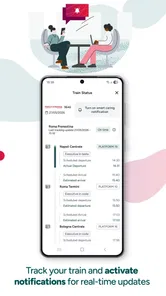
Now, we all know that travel plans can go haywire at times. That’s where the real-time updates feature comes in handy. The app keeps you informed with live updates on train schedules, delays, and platform changes. It’s almost like having a personal travel assistant in your pocket, whispering updates so you can adjust your plans on the fly. Trust me, this feature saved my Italian adventure more than once!
When travel gets busy
Heavy-use moments are less about tapping through screens quickly and more about staying organized while details change. If I have a connection or a tight arrival time, I’d look at updates before setting off and check again during the journey, rather than relying on a single glance hours earlier. A phone notification or app view can help me react, but I would still pay attention to station announcements and signs; using more than one source is sensible when a platform change affects where I need to go.
That balance is also the app’s main limitation as a travel companion: it can help me follow Trenitalia travel information, but it cannot remove the uncertainty of a disrupted trip or make every connection comfortable. If I’m travelling with a very tight schedule, I’d build in time where possible and have the station details to hand. For broad directions around a city, a general mapping app is usually a better companion; for planning and managing a Trenitalia rail trip, this app is the more focused choice.
Keeping connections manageable
For a journey with a change of train, I would not rely on a single early check to carry me through the whole itinerary. I’d note the planned connection, look again as the first leg approaches its destination, and give myself a moment to orient at the station. The app can keep rail information close at hand, but it cannot make a short transfer less stressful or guarantee that the next train will be convenient if circumstances change. When the connection is essential, extra time is a better safety margin than assuming everything will run exactly to plan.
If I’m travelling with another person, I’d agree on the key details before we separate in a busy station: destination, departure time, and where we plan to meet if we get split up. That is a small practical step, but it makes a phone-based travel plan less fragile. It also avoids the temptation to stare at the screen while moving through a station where signs and announcements deserve attention.
Additional tools for rail travellers
Beyond ticketing and updates, the app is packed with additional features that can elevate your travel experience. For one, you can access train maps and station information, which is perfect for first-time travelers. It even offers exclusive deals and discounts if you book through the app. Who doesn’t love a good bargain?
Moreover, the app allows you to manage your loyalty program, Cartafreccia, directly from your phone. You can easily track your points and redeem them for future travel. It's like getting rewarded for doing what you love—traveling!
Making station details useful
I’d check station information before a first visit rather than waiting until I arrive and have to make decisions in a hurry. Even a quick look at the relevant details can help me feel less uncertain about where the rail portion of the trip begins or ends. This is particularly helpful when I’m meeting someone, carrying luggage, or arriving in an unfamiliar place. It does not replace observing the station on the day, but it can make the transition between the train and the rest of the itinerary feel more deliberate.
The loyalty tools are more relevant to repeat users than to someone taking a single holiday trip. If I travel with Trenitalia often, having Cartafreccia details accessible alongside journey planning gives the app a practical reason to stay installed between trips. If I rarely use the rail service, those options are less likely to change my decision; I would focus instead on whether the search and ticket workflow suit the journey I’m planning.
Reliability, stability, and device fit
I’d keep the app updated and avoid leaving ticket or journey checks until the last possible moment, particularly when travelling somewhere unfamiliar. Its current version is 12.900.0, and Android users need version 6.0 or later. Those details are useful when deciding whether an older phone can run it, but they don’t guarantee identical speed or stability across devices. If the app feels sluggish on a particular phone, I’d close and reopen it, check the connection, and keep station displays as a practical backup for immediate changes.
It is rated for Everyone and is free to download, so the main question is less about age or purchase cost than whether its rail-focused role matches your habits. A frequent Trenitalia traveller has more reason to keep it installed than someone who only needs occasional directions or compares many transport operators in one place. I wouldn’t choose it as my only navigation tool for a whole holiday; I’d pair it with a map app for walking and local orientation.
What to rely on when plans shift
For reliability, I think in terms of having a workable routine rather than expecting any one app to settle every travel question. I’d check the itinerary before leaving, keep the ticket accessible, and consult live information again when timing matters. If a phone is running slowly, the first response can be simple: close and reopen the app, then check whether the connection is available. For urgent platform information, I’d also look at station displays and listen for announcements instead of repeatedly refreshing a screen while walking.
That approach matters most when the phone itself is part of the travel plan. A digital ticket is convenient, but I would not wait until the last minute to make sure I can bring it up. A charged, usable device and a clear understanding of the journey reduce avoidable stress; if a phone is old or behaving unpredictably, checking its compatibility before travel is more sensible than discovering a problem at the station.
Where alternatives make more sense
The usual alternative is a general map or multi-operator travel app. Those tools are often a better starting point when I need walking directions, local orientation, or a broad comparison across different ways of getting around. Trenitalia’s advantage is its narrower purpose: it is built around the rail operator’s own travel information and services. For someone whose main task is to plan and manage a Trenitalia trip, that focus is useful; for a trip mixing rail, buses, walking, and other operators, I’d expect to use more than one app.
I would also skip it as a regular tool if I only need to find my way around a destination and do not plan to travel by Trenitalia. Installing a specialist rail app for occasional general navigation would add little value. On the other hand, a person who takes these trains repeatedly can benefit from having the booking and travel workflow in a familiar place instead of starting from scratch with a broad planner each time.
Who will get the most from it?
I’d recommend it most to people who regularly take Trenitalia trains, want their ticket and journey information together, or like to compare departures before travelling. Someone who mainly needs walking directions, wants to coordinate several transport companies in one search, or rarely rides Italian trains may find a general navigation or travel-planning app more useful for everyday needs. The choice depends on the job: this is a rail-focused tool, not a universal guide to every leg of a trip.
My practical verdict is that it can make booking and keeping track of a Trenitalia journey more convenient, especially when I prepare before reaching the station. I’d still verify important travel details, allow breathing room around connections, and use station information alongside the app when plans change. If that way of travelling suits you, it is a sensible free addition to your phone; if you need broad, multi-operator navigation, I’d use a different app for that task.
Final thoughts on everyday performance
All in all, the Trenitalia app is a must-have for anyone planning to explore the beautiful landscapes of Italy by train. It's like having your personal train conductor, ensuring your journey is as seamless and enjoyable as possible. Whether you're a spontaneous adventurer or a meticulous planner, this app caters to all your travel needs with grace and efficiency.
So, what are you waiting for? Download the app, pack your bags, and let the Italian countryside whisk you away on an unforgettable journey. Happy travels!
My performance verdict is deliberately practical: I would use it to arrange a Trenitalia journey, keep its ticket and travel details accessible, and check relevant updates, while avoiding the assumption that a fast search means every step of a complicated trip is settled. It is most valuable when the rail leg is the heart of the plan. For local navigation, comparing multiple operators, or managing a holiday that depends on several kinds of transport, I’d pair it with broader tools rather than asking it to do everything.
Trenitalia Frequently Asked Questions
Can I use the Trenitalia app to check journey information before deciding to travel?
The app is intended to bring Trenitalia travel services and journey information to your mobile device. It may be useful when you want to look into a trip before making a booking, as well as when you are managing travel plans. If you regularly travel by train in Italy, having the operator’s app can make it easier to keep your travel tasks together.
Is the Trenitalia app intended for travelers in Italy or for international visitors too?
Trenitalia serves train journeys in Italy, including high-speed, regional, and international services, so the app may be relevant to both residents and visitors. Its multiple-language support is also useful for travelers who are not fluent in Italian. You can use it to explore travel options and manage bookings, whether you are planning a local trip or a wider journey.
Is the Trenitalia app free, and which devices can run it?
Trenitalia is a free app in the Maps & Navigation category, developed by Trenitalia S.p.A. It is suitable for everyone and runs on devices with Android 6.0 or later. Its straightforward purpose is to help travelers access Trenitalia services from a mobile device, making it worth considering if you regularly plan or manage train journeys in Italy.
What is Trenitalia and what services does it offer?
Trenitalia is the primary train operator in Italy, providing a range of services including high-speed, regional, and international train travel. The app allows users to easily search and book train tickets, manage bookings, and access real-time updates on train schedules and platforms. It also offers features like seat selection and special discounts for frequent travelers.
How user-friendly is the Trenitalia app for first-time users?
The Trenitalia app is designed with a user-friendly interface that simplifies the booking process. First-time users will find it easy to navigate through the app with clear instructions and intuitive design. The app provides step-by-step guidance for searching and purchasing tickets, making it accessible even for those who are not tech-savvy.
Pros
- User-friendly interface with easy navigation
- Real-time updates on train schedules
- Multiple payment options available
- Offers special discounts and promotions
- Supports multiple languages for convenience
Cons
- Occasional app crashes reported by users
- Limited offline functionality
- Inconsistent customer support response
- Ticket booking can be slow during peak times
- Some features require stable internet











