

TransLoc
- 788.00
- 3.2
- Installs
- 500.00K
- Price
- Free

Screenshots
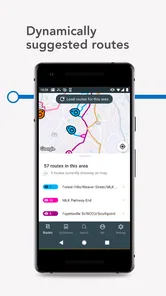
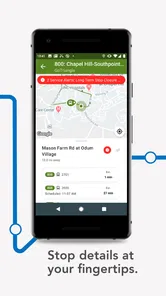
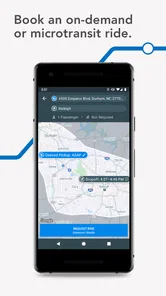
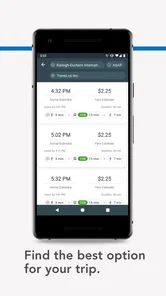
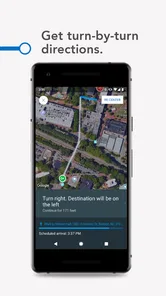
Analysis by Reviewed
When I am trying to catch a bus, the most useful information is usually not a full route map but a reliable answer to one immediate question: when will the vehicle actually arrive? TransLoc is built around that moment. It is a free Maps & Navigation app from TransLoc that focuses on live bus arrival information and, where the local bus agency supports it, lets riders request a ride from the same place. I see it as a practical tool for turning a vague wait at a stop into a more informed decision.
My experience with it is best understood as a complete travel workflow rather than as a general-purpose navigation replacement. I start with a destination or a stop in mind, check what the service is showing, decide whether the timing works, and then hand the next step back to the transit agency or driver. That handoff is important: the app can make the information easier to reach, but it cannot make an agency run on time or guarantee that every local service behaves in the same way.
From “I need a bus” to a clearer travel decision
I find that the useful starting point is a specific travel question: do I have time to reach this stop, or should I change plans? This section looks at how TransLoc can turn an uncertain wait into a practical choice, while keeping the local agency’s role in view. From there, I’ll consider what happens when a trip gets busy and how to make the app’s information work alongside your own judgment.
The starting condition matters more than the map
TransLoc makes the most sense when I already know that public transport is the right option and need help with the next part of the journey. Perhaps I am leaving work, walking toward a campus stop, or standing near a transfer point with a limited amount of time. In those situations, an arrival estimate is more useful than a long list of route-planning possibilities.
The app belongs to the public-transit side of Maps & Navigation, not the broad “take me anywhere” category. That distinction affects how I use it. A conventional map application may be better when I need to compare walking, driving, cycling, and several transit operators in one trip. TransLoc is more focused: I open it to understand the bus service connected to my local agency and to decide whether waiting, walking to another stop, or requesting a ride makes sense.
That focus is also why the local agency is central to the experience. The app is developed by TransLoc, but the quality of what I see depends on the transit network connected to it. In a city or service area with useful live information, the app can feel direct and reassuring. In a place with limited coverage or less dependable updates, the same interface cannot solve the underlying problem.
Checking arrival information without overtrusting it
My first step is to look for the relevant stop or service and read the arrival information as an estimate, not as a promise. This is a small but important habit. A displayed time helps me judge whether I can finish a coffee, leave a building, or walk faster, but I still allow room for traffic, boarding delays, and changes in the vehicle’s progress.
More From Our News Desk

 Weather - By Xiaomi
Weather by Xiaomi Review: Clear at a Glance, Less Clear Up Close
Xiaomi’s weather app makes everyday forecasts quick to scan, but its calm surface can leave useful details and recovery paths harder to find than they should be.

 X
XX Under Pressure: Can It Recover When Posting Goes Wrong?
A resilience-focused review of X, examining setup, mistaken posts, interruptions, weak connections, and the gaps that matter when recovery needs to be dependable.

 Clash of Clans
Clash of Clans Is Won Between the Battles
Its raids are quick; its community is a long-term project of coordination, teaching, rivalry, and shared responsibility—with all the friction that entails.

 Android Auto
Android Auto Makes the Case for Quieter Car Software
The car interface is no longer judged by how much it can do, but by how quietly it helps. Android Auto shows what drivers now expect—and what still gets in the way.

 MobiOffice: Word, Sheets, PDF
MobiOffice: Transforming Mobile Productivity with Seamless Integration
MobiOffice: Word, Sheets, PDF is redefining mobile productivity with a surprising blend of functionality and innovation.

 EA SPORTS FC Soccer Mobile 26
EA SPORTS FC™ Mobile Soccer: Redefining Mobile Sports Gaming
Dive into EA SPORTS FC™ Mobile Soccer, where immersive gameplay and strategic depth transform mobile sports gaming.
Latest News



The most useful workflow is to check the information before committing to the final walk. If the next bus is close, I can head straight to the stop. If the wait is longer, I have time to compare another nearby option or consider whether the ride-request function is appropriate in that service area. This is more practical than repeatedly refreshing a generic map while already running late.
I also pay attention to the difference between a planned schedule and a live-looking arrival estimate. A timetable tells me what should happen; an arrival view is valuable because it is intended to reflect the current operation. Neither should be treated as perfect. My recommendation is to use the estimate to make a decision, then keep watching the situation if the journey is time-sensitive.
A realistic everyday trip
Imagine leaving an office near a busy campus. I know the bus route I normally use, but I do not know whether the next vehicle is close enough to catch. I open TransLoc, check the stop, and see the available arrival information. If the bus is nearly there, I walk directly to the boarding point instead of opening several different travel tools.
If the wait is substantial, I use that pause productively. I can walk toward the stop rather than stand at the entrance, check whether another served location is more convenient, or decide that a ride request is worth considering if the agency offers it. The app does not remove every uncertainty, but it gives me a clearer starting point for the choice.
That scenario shows the app’s real strength: it reduces the number of small decisions between “I need to travel” and “I know what to do next.” It is especially helpful for routine journeys, where I already understand the general route and mainly need current arrival context.
Where the ride request fits
The ride-request option changes the app from a simple arrival checker into a possible connection point with the bus agency. I would not assume that every user sees the same option or that it works for every route. Its usefulness depends on whether the relevant agency has enabled that kind of service and whether the journey fits the agency’s operating rules.
When it is available, I treat the request as a separate decision rather than an automatic replacement for the bus. I first confirm that the service area and destination make sense, then submit the request through the app and wait for the agency-side process to take over. This is one of the app’s more interesting handoffs: TransLoc provides the interface, while the transit organization controls the actual fulfillment.
That division of responsibility means I would avoid requesting a ride at the last second when I have no backup. The app may make the request convenient, but convenience is not the same as an instant guarantee. For a medical appointment, a flight, or an important interview, I would build in extra time and keep another option available.
The handoffs that shape the experience
There are several handoffs in a normal TransLoc journey. I begin with my own plan: where I am, which stop I can reach, and how much time I have. The app then presents the transit information. From there, I hand the decision back to myself by choosing whether to walk, wait, or request a ride. If I request a ride, the next handoff moves to the local agency, which is responsible for the service itself.
These handoffs explain both the app’s usefulness and its limits. A clean arrival display cannot compensate for incomplete agency updates. A ride-request screen cannot control dispatching. Likewise, the app can help me get information before boarding, but it is not a substitute for understanding the stop location, boarding direction, or local transit rules.
I find it helpful to prepare the physical part of the trip while checking the digital part. I confirm that I am heading to the correct side of the road, keep the stop location in view, and avoid assuming that the nearest visible bus shelter serves every direction. This is not a criticism of TransLoc specifically; it is the practical reality of using a transit information tool in the street.
What the result feels like
The successful outcome is modest but valuable: I reach the stop with a reasonable idea of what is coming and avoid wasting time guessing. For regular riders, that can make the daily routine less stressful. For occasional riders, it can provide enough confidence to use a bus service without constantly asking whether the vehicle has already passed.
I would describe the app as a decision aid rather than a complete travel companion. It is strongest when the question is “Should I wait here, move, or request help?” It is less compelling when the question is “What is every possible way to cross this entire city?” That is where broader map applications usually offer more context, including multi-mode comparisons and walking directions across unrelated transport providers.
The result also depends on how much information the local agency supplies. A rider in a well-supported service area may get a smooth, useful experience, while another rider may find the app less informative. That variation is a key trade-off to understand before making it the only tool in a travel routine.
Small habits that make it more useful
I have found three practical habits especially worthwhile. First, I check the app before leaving an indoor location, not only after reaching the stop. That gives me time to change my walking pace or choose another plan. Second, I use arrival information as a window for decision-making rather than a precise appointment time. Third, when a ride request is offered, I treat it as an agency-operated service and allow enough time for the handoff.
A fourth habit is to use TransLoc alongside, rather than instead of, basic local knowledge. I save the stop name or recognize the route direction, then use the app for the changing part of the journey. This reduces the risk of staring at a live estimate while standing at the wrong boarding point.
These workflows are more valuable than simply opening the app and hoping it will plan everything. The app rewards a rider who knows the immediate problem they are trying to solve. It is not a magic layer over public transport; it is a focused way to bring arrival information and certain agency services closer to the rider.
Where the workflow breaks
The first weak point is coverage. Because the experience is tied to participating bus agencies, the app may not be equally useful in every location. If my local service is not represented or does not provide meaningful arrival information, I would choose the agency’s own tool or a broader transit app instead.
The second weak point is uncertainty around live operations. Traffic, vehicle changes, delays, and communication gaps can all make an estimate less dependable. I appreciate having current information, but I would not use a single displayed arrival as proof that the bus will arrive exactly when shown.
The third is the ride-request handoff. It may be convenient where supported, but it introduces another layer between my request and the actual journey. If I need a guaranteed departure time, I would compare the request option with a scheduled bus, a taxi, a rideshare service, or another backup before committing.
The fourth is scope. Someone who wants detailed door-to-door planning, walking guidance, cycling alternatives, or a comparison of several transport modes may find TransLoc too narrow. Its focused design is an advantage for arrival checks, but a limitation for complex trips that involve several unrelated services.
Who should use it and who should skip it
I would recommend TransLoc to regular bus riders, students, commuters, and anyone whose local agency is connected to the service. It is particularly suitable for people who already know their common routes but want a faster way to check what is happening right now. The free price also makes it easy to try without adding a purchase decision to the commute.
I would be more cautious about recommending it as the only navigation app for visitors. A tourist making a complicated journey may prefer a broader mapping tool that explains transfers and walking connections in one continuous plan. I would also suggest that riders with strict arrival deadlines keep a backup, regardless of which transit tracker they use.
For families, the Everyone content rating is reassuring, and the straightforward purpose should be accessible to ordinary riders. Still, the important question is not age but local usefulness: the app is worth keeping when it gives meaningful information for the routes a person actually uses.
How the current app fits into the decision
TransLoc has been available since September 8, 2017, and its current version is 5.3.21. It requires Android 6.0 or later, so compatibility is reasonable for many older Android devices, although anyone using a very old phone should check the system requirement before relying on it. The app has passed half a million installs and holds an average rating of 3.2 from around 1.8 thousand ratings, which suggests a mixed experience rather than universal satisfaction.
I read that rating as a reminder to judge the app through the lens of local service quality. A moderate score can reflect frustrations with accuracy, availability, or agency-specific behavior, not necessarily a failure of the basic idea. At the same time, I would not dismiss those frustrations: if arrival information is unreliable in my area, the app’s central purpose becomes much less useful.
The number of written reviews is in the hundreds, giving prospective users a useful reason to inspect comments from people in their own service area. I would look for patterns connected to the routes I use rather than treating the overall score as a universal verdict. Public-transit apps are unusually dependent on geography, so local relevance matters more than a single headline number.
My final take after following the whole workflow
TransLoc succeeds when I use it for what it is: a focused bridge between a rider waiting for a bus and the agency operating that service. Its arrival information can make ordinary travel decisions easier, and the ride-request option adds another path where the local agency supports it. The app is free, simple in purpose, and most useful when I already know the route but need current context.
Its weaknesses are equally clear. It cannot guarantee vehicle timing, it cannot make every agency equally informative, and it is not the best replacement for a full multi-modal navigation tool. The handoff from app to agency is the point where expectations need to stay realistic.
My recommendation is conditional but positive: install it if your bus agency is supported and your everyday problem is waiting uncertainty. Use it before leaving, verify that you are at the correct stop, and keep a backup for important trips. Skip it as your main travel planner if you need broad door-to-door routing or regularly travel outside its supported network. For the right rider, TransLoc does not need to do everything; it only needs to answer the next bus question clearly enough to help you make the next move.
TransLoc Frequently Asked Questions
Is TransLoc free to download, and are there any age restrictions?
TransLoc is free to download and is rated for Everyone. It is a Maps & Navigation app from TransLoc, intended to help riders access transit information and request a ride through participating agencies. The free price makes it easy to try, but the services available after opening the app depend on whether your transportation provider is supported and what it offers.
What should I check before relying on TransLoc for a trip?
Before planning a journey, look for your transit agency in the app and check that the routes and service information you need are available. TransLoc’s usefulness depends on the participating provider and the information it shares. It can help you follow a trip, but it is sensible to review the displayed route and arrival details before setting out, especially when your plans depend on a particular service.
What is TransLoc and what can I use it for?
TransLoc is a public transportation app designed to help riders find and follow nearby buses, shuttles, and other supported transit services. After selecting an available agency or route, you can check schedules, view stops, follow vehicles on a map, and estimate when the next service may arrive. The exact features depend on whether your local transportation provider is supported.
Does TransLoc provide real-time bus and shuttle tracking?
Yes, TransLoc can display real-time vehicle locations and arrival predictions for participating transit agencies. When live data is available, you can see vehicles moving along their routes and monitor expected arrivals at selected stops. However, predictions may occasionally be delayed or inaccurate because they depend on GPS signals, agency updates, traffic conditions, and the quality of the information supplied by the transit operator.
Can I use TransLoc without creating an account?
In many cases, you can use TransLoc’s basic transit-search and tracking features without registering for a personal account. You can typically select an agency, browse routes, and check arrivals directly in the app. Some options, such as saved favorites, alerts, or personalized settings, may require additional permissions or account-related features depending on the version of the app and the transit provider you choose.
Pros
- Real-time vehicle locations make waiting at stops more predictable.
- Supports multiple transit agencies in one app.
- Stop details include routes
- schedules
- and upcoming arrivals.
- Service alerts help users stay informed about disruptions.
- Simple map view makes nearby stops easy to find.
Cons
- Coverage depends on whether your local transit agency uses TransLoc.
- Arrival predictions can be inaccurate during traffic or service changes.
- Some agency information may appear outdated or incomplete.
- The interface can feel less useful in areas with limited route data.
- Background location use may affect battery life if enabled.











