

Transit - Subway & Bus Times
- 38.49K
- 4.6
- Installs
- 10.00M
- Price
- Free

Screenshots

Analysis by Reviewed
I judge a transit app by what it helps me decide before I leave and while I’m waiting—not by how many routes it can display. Transit • Subway & Bus Times is built around that practical moment: choosing public transport, checking a journey, and getting a clearer sense of what to do next. It is aimed at everyday riders, but it can also help when I’m visiting a city and need to make sense of a network I don’t know.
Start with the free experience
Transit is a free maps and navigation app from Transit, Inc., and that makes it easy to try before deciding whether it belongs in your daily routine. In-app purchases are listed from $2.99 to $50.00 per item, but I wouldn’t treat those figures as a required cost for using the app: the core download is free, and the purchase range alone doesn’t tell you which optional item is worth buying. I’d start with the free experience and spend only if an in-app option solves a specific need for you.
The app has been around since July 29, 2013, and its current version is 6.0.10. It is rated for Everyone, with a minimum OS requirement of 7.0. That combination makes it approachable for a broad range of users, though checking your device’s compatibility before installing is still sensible.
Where the value shows up
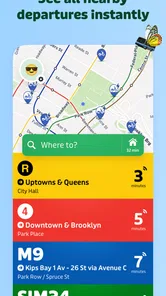
The real value is less about replacing every map app and more about making transit decisions easier. Transit’s reach across systems such as MTA, NJ Transit, MBTA, SEPTA, BART, MARTA and CTA, along with over a thousand cities, is useful when you move between local networks or travel somewhere unfamiliar. I’d keep it alongside a general-purpose map if I also need detailed driving directions or broader place discovery; for choosing a public-transport trip, a dedicated transit view is the more relevant tool.
Here’s a practical way I’d use it: before leaving work, check a route home and compare the available transit choices, then save the regular journey as a favorite for the next morning. If a connection looks tight, checking the route again before walking to the stop gives you a chance to reconsider rather than committing to the first plan you saw. That small habit is more useful than treating any arrival estimate as a promise.
Small choices that make a commute smoother
I would use a favorite as a starting point, not as a reason to stop checking the route. A familiar journey can still be affected by a changed departure or a missed connection, so it’s worth opening the route again when I’m actually ready to leave. This is especially helpful if I have a choice between two ways home: a plan that looks best from the office may be less convenient once I’m standing at a different stop or station.
For an unfamiliar trip, I’d review the full sequence before setting off rather than focusing only on the first vehicle. A transfer can be the part that determines whether a route is comfortable, and checking it in advance helps me notice when I may need extra time to find the next platform or stop. If the journey includes a long walk, I’d also use a general map to understand the streets around the endpoints. Transit is useful for comparing public-transport plans; it does not make every other navigation tool redundant.
More From Our News Desk

 Weather - By Xiaomi
Weather by Xiaomi Review: Clear at a Glance, Less Clear Up Close
Xiaomi’s weather app makes everyday forecasts quick to scan, but its calm surface can leave useful details and recovery paths harder to find than they should be.

 X
XX Under Pressure: Can It Recover When Posting Goes Wrong?
A resilience-focused review of X, examining setup, mistaken posts, interruptions, weak connections, and the gaps that matter when recovery needs to be dependable.

 Clash of Clans
Clash of Clans Is Won Between the Battles
Its raids are quick; its community is a long-term project of coordination, teaching, rivalry, and shared responsibility—with all the friction that entails.

 Android Auto
Android Auto Makes the Case for Quieter Car Software
The car interface is no longer judged by how much it can do, but by how quietly it helps. Android Auto shows what drivers now expect—and what still gets in the way.

 MobiOffice: Word, Sheets, PDF
MobiOffice: Transforming Mobile Productivity with Seamless Integration
MobiOffice: Word, Sheets, PDF is redefining mobile productivity with a surprising blend of functionality and innovation.

 EA SPORTS FC Soccer Mobile 26
EA SPORTS FC™ Mobile Soccer: Redefining Mobile Sports Gaming
Dive into EA SPORTS FC™ Mobile Soccer, where immersive gameplay and strategic depth transform mobile sports gaming.
Latest News



That division of labor is a practical advantage. I can use a transit-focused app to decide which service to take, then consult a broader map when I need a wider view of nearby places or walking directions. Trying to make one app serve every travel task can add friction, particularly when the question is not “Which bus?” but “Where exactly is this entrance?” Keeping both tools available lets each handle the job it suits.
Reliability needs a little judgment
Transit information is only as dependable as the updates available for a particular service and moment. I would use live timings to make a better-informed choice, not assume every estimate can account for a sudden disruption. In an unfamiliar place, I’d also check the complete route before setting off, especially if a transfer or a long walk is involved. A general map may be a better companion for street-level orientation, while the transit app is better suited to comparing public-transport options.
A useful habit is to treat an arrival time as guidance for a decision rather than a guarantee. If I have a strict appointment, I would allow room for a delay instead of planning to arrive at the last possible minute. If the displayed option depends on a close transfer, I’d compare it with a route that gives me more breathing room. The best route on screen is not always the best route for a person carrying bags, traveling with someone who walks slowly, or trying to avoid a stressful connection.
There is also a difference between having information and knowing the local context. A route can be technically workable but still feel awkward if I don’t know where to wait or how a station is laid out. For a first visit, I’d check the journey before leaving and keep enough time to orient myself at the transfer point. That preparation is more reliable than expecting an app to remove every uncertainty from a new city.
Who is likely to get the most from it?
Transit is most valuable if buses, trains or other public transport are part of your normal week, or if you want one app to consult across different city networks. It may be less useful if you mostly drive, walk, or rarely use transit; in those cases, installing a dedicated app may add little to the map tools you already use. Its 4.6 average from around 332,000 ratings and over 10 million installs suggest a substantial audience, but your local routes and habits matter more than popularity.
I’d particularly consider it if my routine crosses different transit operators or if I travel often enough to appreciate having one place to check unfamiliar networks. Someone who uses only one local system may still find it convenient, but should compare it with that operator’s own app if service-specific notices or local guidance are their priority. The right choice depends on the decision I need to make most often, not on which app has the longest feature list.
On the other hand, a person who needs detailed driving navigation, frequent searches for businesses, or a map-first view of an area may be better served by a general-purpose mapping app as their main tool. Transit can complement that kind of app rather than replace it. If you only take public transport occasionally, the free download makes trying it a reasonable low-commitment option, but there is no need to keep another app if it does not improve your actual trips.
Making the call on a real journey
Picture this: you’re standing at a bustling intersection, unsure of whether to take the bus or hop on the subway. That’s where Transit • Subway & Bus Times comes to the rescue. With its real-time updates, you can see exactly when your preferred mode of transport will arrive. No more guessing games or endless waiting. Just whip out your phone, open the app, and voila—your travel plan is laid out in front of you.
In a more ordinary version of that situation, I’m leaving work during a busy part of the day and have two plausible ways to get home. I’d check the options before walking to either stop, consider whether a transfer is worth the time saved, and look again if I’m delayed getting out of the building. If the route depends on a close connection, I’d choose based on how much uncertainty I’m comfortable with, not just the most optimistic arrival. That is where a transit planner can reduce indecision without making the decision for me.
Easy access is useful, but keep expectations grounded
One of the standout features of this app is its ease of use. The interface is clean, intuitive, and doesn’t require a degree in rocket science to navigate. You can set your frequently used routes as favorites for quick access, which is a real time-saver during those hectic mornings.
Favorites are most useful when they remove repeated searching, not when they become a substitute for checking current conditions. I’d save the trips I take often, then still review the route when plans change or I’m traveling at an unusual time. For a visitor, a saved hotel-to-station journey can be a handy reference during a stay; for a local, a regular commute is an obvious candidate. In either case, the benefit is quicker access to a known plan, while the actual trip still deserves a fresh look.
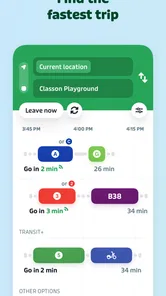
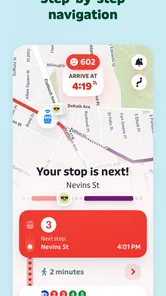
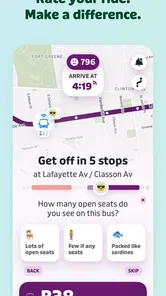
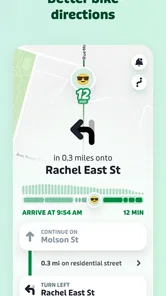
The app also offers step-by-step navigation, acting like a personal guide in your pocket. It helps you find the best route options, whether you’re commuting across town or exploring a new city. Plus, with transit schedules for buses, subways, ferries, and more, this app covers all bases.
“Best” is a personal judgment here. I would weigh a direct ride against a faster-looking route with a transfer, especially if I’m carrying something or unfamiliar with the station. A route with fewer changes can be easier to follow even when it takes longer, while a transfer may be worthwhile when it avoids a substantial detour. Looking at the steps, not just the headline choice, helps me pick the journey I can actually manage.
What live information can and cannot do
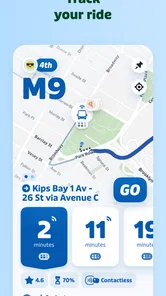
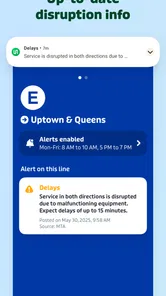
This is where Transit really shines. The real-time information is incredibly accurate, meaning you can plan your journey with confidence. Whether there’s a delay or a reroute, the app keeps you in the loop, so you’re never caught off guard. It’s like having your own personal transit insider!
I’d still leave room for judgment, especially when the trip matters. Live information can make waiting less of a guessing game, but no estimate should be treated as a promise that a vehicle will arrive exactly then or that a disruption will be reflected immediately. If a service change would leave me stranded, I’d check the route again before committing and keep an alternative in mind. This cautious approach doesn’t cancel out the convenience; it makes the information more useful.
For a low-pressure trip across a familiar neighborhood, I may be comfortable following the first sensible option. For an airport run, a medical appointment, or any journey where being late has a real cost, I’d build in more time and avoid a connection that leaves no margin. Transit helps me compare and monitor a public-transport journey, while the final buffer is still my responsibility.
Is it worth keeping installed?
Absolutely! If you’re someone who relies on public transport, this app is a game-changer. It’s not just about getting you from point A to point B—it’s about doing so efficiently and with peace of mind. Plus, it’s available for both Android and iOS, so no one’s left out.
My recommendation is more specific: I’d keep it installed if checking bus and rail options is a recurring part of my week, or if I regularly move between the city networks it covers. I’d skip it if I rarely take transit and already have a map app that answers my occasional route questions well. The free access makes a trial easy to justify, but the value comes from whether it changes a real decision—saving me a needless wait, helping me compare a transfer, or making a new city less intimidating.
As for paying, I’d make that decision only after using the free experience and identifying a particular optional purchase that matters to me. The listed in-app purchase range runs from $2.99 to $50.00 per item, but that span does not establish what an individual item provides or whether it suits a particular rider. I would not spend simply because I use the app often; I’d first decide what extra value I expect and whether that benefit is worth the specific cost shown for it.
A practical recommendation for transit riders
In conclusion, Transit is more than just an app; it’s a travel companion that makes navigating public transportation a breeze. Its user-friendly interface, coupled with real-time updates, ensures you’ll never miss another bus or train. So, go ahead, download it, and make your daily commute a little less stressful!
I’d describe it more carefully as a useful companion rather than a guarantee against missed buses or trains. Its strongest case is for someone who regularly needs to compare public-transport routes, check live information, and move between more than one city network. Its weaker case is for a person whose travel is mostly by car or on foot, or who needs a broad map more than a transit planner. If you ride often, try the free version with a real commute and see whether its route choices and quick access fit your routine; if they do, it has earned its place on your phone.
Transit - Subway & Bus Times Frequently Asked Questions
Does Transit • Subway & Bus Times help me choose a route before I leave?
Yes. Transit • Subway & Bus Times is built to help with public transportation navigation, so you can use it to look up routes and plan a trip before heading out. Its usefulness depends on the transit information available for your city and the systems you need. Check the relevant routes in the app and review the suggested journey before setting off.
What operating system do I need to install Transit • Subway & Bus Times?
On Android, Transit • Subway & Bus Times requires Android 7.0 or later. If your device meets that requirement, you can find the app through Google Play. The app is also available for iOS devices through the Apple App Store, so iPhone users can install it there. Check that your device’s software is compatible before downloading.
What cities and transit systems can I use Transit • Subway & Bus Times with?
Transit • Subway & Bus Times is designed for public transit trips across more than 1,000 cities. Its coverage includes major systems such as MTA, NJ Transit, MBTA, SEPTA, BART, MARTA, and CTA. Before relying on it for a particular journey, check that your local routes appear in the app, since available transit information depends on the city and system you need.
What features does Transit • Subway & Bus Times offer to its users?
Transit • Subway & Bus Times offers a variety of features to enhance your commuting experience. It provides real-time tracking of buses and subways, offline schedules, and step-by-step navigation. Additionally, users can set reminders for their transit times and receive alerts for service disruptions or delays. These features make it a comprehensive app for everyday commuters.
Is Transit • Subway & Bus Times available for both Android and iOS devices?
Yes, Transit • Subway & Bus Times is available for both Android and iOS platforms. You can download it from the Google Play Store for Android devices and the Apple App Store for iOS devices. This cross-platform availability ensures that users can enjoy the app's services regardless of their smartphone brand. On Android, the listed minimum operating system requirement is version 7.0.
Pros
- Real-time transit updates enhance travel planning.
- User-friendly interface for easy navigation.
- Wide coverage of multiple cities and regions.
- Customizable notifications for preferred routes.
- Offline mode available for uninterrupted access.
Cons
- Occasional inaccuracies in bus schedules.
- Some features require in-app purchases.
- Battery drain due to GPS usage.
- Limited support for rural areas.
- Ads can be intrusive at times.











