Tracker Detect: AirTag Scanner
- 1.24K
- 4.8
- Installs
- 100.00K
- Price
- Free

Screenshots
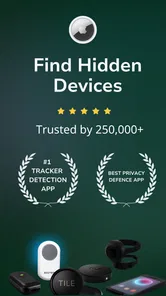
Analysis by Reviewed
Have you ever had that eerie feeling of being followed, but couldn’t quite put your finger on it? Well, that’s where Tracker Detect (Anti-Stalking) comes in to save the day! Let's dive into what this app is all about and how it can help you feel a little safer.
Understanding Tracker Detect: The Basics
Tracker Detect (Anti-Stalking) is an app designed to help you identify and manage unknown Bluetooth devices that might be tracking you. It's particularly useful for those who suspect they might be under surveillance, intentionally or unintentionally. It’s like having a personal detective in your pocket! Made by Tag Tracker LLC, this free tools app has a 4.3 average from around 5,600 ratings, with over 100,000 installs. It is rated for Everyone, and its current version is 8.5.1.
Where People Get Stuck
The useful way to approach this app is as a focused check, not a guarantee that every unknown device can be identified or that every alert proves someone is following you. A Bluetooth scan can give you a reason to investigate, but nearby devices may belong to other people or be ordinary electronics. I would treat a result as a prompt to look at the situation calmly, rather than as proof on its own.
That distinction matters in everyday use. If you are in a busy station, shared office, or apartment building, you may be surrounded by Bluetooth devices that have nothing to do with you. Repeating a scan in a different place and considering whether the same unfamiliar device remains nearby is more useful than reacting to one sighting. If you feel in immediate danger, focus on getting somewhere safe and contacting someone you trust or local authorities; an app is not a substitute for urgent help.
Features That Stand Out
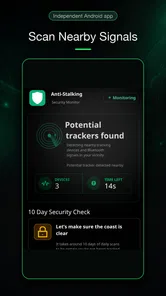
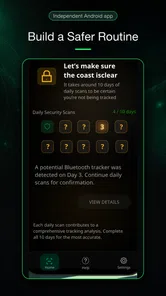
The app boasts a simple, user-friendly interface that doesn’t require a tech wizard to navigate. Once installed, it scans for any suspicious Bluetooth devices in your vicinity and alerts you if it finds something fishy. You can then take action, whether that's contacting authorities or simply moving to a safer location. It’s designed to ease your mind and help you take control of your personal security.
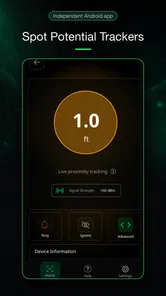
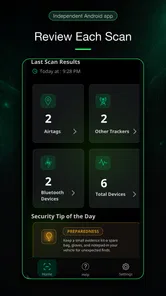
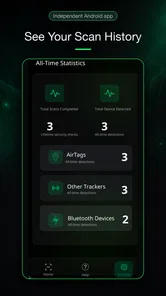
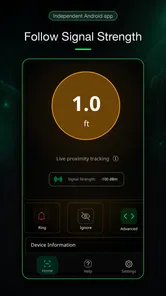
Moreover, the app provides detailed information about the detected devices, including signal strength and time of detection, helping you assess the threat level. It’s a bit like having your own little spy toolkit, minus the trench coat and fedora.
Setup Checks Before You Scan
If a scan appears empty or does not behave as expected, I would start with the basics: make sure Bluetooth is enabled and that the phone is ready to scan, then try again in a place where you can pause for a moment. Keep the app up to date; version 8.5.1 is the current release. Tracker Detect is free to install, though it offers in-app purchases ranging from $6.99 to $119.99 per item, so I would check the purchase screen carefully and avoid buying anything unless I understand what it unlocks.
More From Our News Desk

 Gmail
Gmail in a Busy Inbox: Who Benefits Most?
From first account to crowded workday, Gmail earns its place through dependable search and flexible sorting—but its best fit depends on how much inbox maintenance you can tolerate.

 Prime Video
Switching to Prime Video: What Changes in Your Viewing Routine
Prime Video can make a compelling second home for streaming, but switching means learning a different catalog, rental layer, and route from browsing to playback.

 Universal TV Remote Control
 Works Best as a Reliable Backup
A phone remote earns its place through quick setup and reliable habits. Here is how to get more from Universal TV Remote Control—and where its limits show.

 Weather - By Xiaomi
Weather by Xiaomi Review: Clear at a Glance, Less Clear Up Close
Xiaomi’s weather app makes everyday forecasts quick to scan, but its calm surface can leave useful details and recovery paths harder to find than they should be.

 X
X Under Pressure: Can It Recover When Posting Goes Wrong?
A resilience-focused review of X, examining setup, mistaken posts, interruptions, weak connections, and the gaps that matter when recovery needs to be dependable.

 Clash of Clans
 Is Won Between the Battles
Its raids are quick; its community is a long-term project of coordination, teaching, rivalry, and shared responsibility—with all the friction that entails.
Latest News



A practical first check is at home before a trip: open the app, learn where its scan controls and results appear, and note how it presents an unfamiliar device. That gives you a calmer baseline than trying to learn the interface while worried in a crowded place. For a travel day, I would scan after arriving and again later if a concern persists, rather than assuming a single result settles the question.
How It Works: A Peek Under the Hood
Tracker Detect scans for Bluetooth devices and checks if they match known tracking devices, such as AirTags or other similar gadgets. If a device is identified as suspicious, it notifies you immediately. This proactive approach is what sets it apart from other similar apps, ensuring that your safety isn’t compromised.
The app doesn't just stop at detection; it also offers educational resources to help users learn more about tracking and privacy. This feature is particularly helpful for those new to the world of digital privacy and security. It’s like having a mini-course on digital self-defense right at your fingertips.
Recovering a Useful Scan
If you get a result that worries you, avoid making a rushed decision based only on a device name or a momentary signal reading. Check whether the device appears again when you move to another nearby location, and keep track of when and where you noticed it. Signal strength and detection time can help you compare scans, but they are clues rather than a complete explanation of who owns a device or why it is nearby.
For a realistic example, imagine noticing an unfamiliar result after leaving a café. I would move to a public, comfortable place, scan again after some time, and see whether the concern persists rather than confronting anyone based on a single result. If it does persist and you feel unsafe, seek help from a trusted person or appropriate local services. The app can support your observations, but it cannot decide what action is safest in your specific circumstances.
When the App Is Not the Cause
Not every failed scan means the phone or app is broken, and not every unfamiliar Bluetooth device is a tracker. A device may simply be out of range or no longer present, while a crowded environment can make results harder to interpret. If repeated checks do not show the same device, I would avoid treating an earlier detection as a confirmed threat. Conversely, an empty scan cannot prove that no tracking device exists; this tool is one privacy check, not a comprehensive sweep of every possible technology.
That is also where the usual alternatives differ. A phone’s built-in safety features may be more convenient for alerts tied to its own ecosystem, while a manual search or professional support may make more sense when there is a concrete, ongoing concern. Tracker Detect is best suited to someone who wants a direct Bluetooth check and accessible guidance, not someone looking for continuous monitoring, a general security suite, or certainty from one scan.
My Personal Take
In my experience, using Tracker Detect (Anti-Stalking) has been a reassuring addition to my digital life. The app is straightforward, no-nonsense, and does exactly what it promises. While it’s not something you might use every day, it’s incredibly handy in situations where you feel your privacy might be compromised.
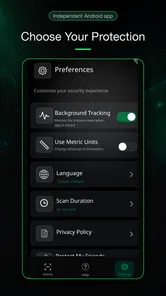
It’s also worth mentioning that the app doesn’t consume much battery, which is a huge plus for those constantly on the go. It runs quietly in the background, only springing into action when necessary. It’s the kind of app that makes you wonder how you ever managed without it!
Who Should Give It a Try?
I would recommend it most to people who want a simple, occasional way to check for Bluetooth trackers and who are comfortable treating results as leads to assess, not definitive answers. It can be useful before or during travel, after a change in routine, or when an unfamiliar device repeatedly appears to follow the same route. People who want an always-on safeguard, a full device audit, or a replacement for practical safety planning should look elsewhere or use additional support.
For me, its value is in giving a concerned user a concrete first step: scan, review what appears, and decide calmly whether further action is warranted. The trade-off is that this kind of check depends on what the phone can detect and what the result can tell you. It helps narrow a question; it does not resolve every privacy concern.
In conclusion, if you’re looking for a reliable and easy-to-use solution to help guard against unwanted tracking, Tracker Detect (Anti-Stalking) is definitely worth a look. It’s packed with useful features that make it a valuable tool in anyone's digital safety arsenal. Give it a try and take back control of your privacy!
Tracker Detect: AirTag Scanner Frequently Asked Questions
Is Tracker Detect free to download, and are there any potential costs?
Tracker Detect is free to download, so you can try its anti-stalking tools without paying upfront. The app also lists in-app purchases ranging from around seven dollars to around 120 dollars per item, so check the purchase details before confirming anything. If you only want to scan for nearby devices, review the app’s available features and purchase prompts first.
What should I check before installing Tracker Detect on my phone?
Tracker Detect is a tools app for Android, with a minimum operating-system requirement of version 6.0. Before downloading, check that your phone meets this requirement and that Bluetooth is available, since the app relies on Bluetooth to scan for nearby devices. Its content rating is Everyone, making it suitable for a broad audience.
What is Tracker Detect and how does it work?
Tracker Detect is an anti-stalking application designed to help users identify unknown tracking devices that may be in their vicinity. The app scans for Bluetooth devices that are not registered or recognized and alerts the user if a potential threat is detected. It is particularly useful for ensuring personal safety and privacy in public spaces.
Is Tracker Detect available on both Android and iOS platforms?
Yes, Tracker Detect is available for both Android and iOS users. The app can be downloaded from the Google Play Store for Android devices and the Apple App Store for iOS devices. This cross-platform availability ensures that a wide range of users can benefit from its anti-stalking features regardless of their device preference.
Does Tracker Detect require an internet connection to function?
No, Tracker Detect does not require an internet connection to function. The app primarily relies on Bluetooth technology to scan for and identify nearby tracking devices. This means users can utilize its features even in offline mode, making it convenient and reliable in areas with limited connectivity.
Pros
- User-friendly interface for quick setup
- Effective in detecting unwanted tracking devices
- Supports multiple device compatibility
- Real-time alerts for potential threats
- Battery-efficient operation
Cons
- Limited functionality on non-Apple devices
- Requires constant Bluetooth access
- May drain battery faster on older devices
- False positives can occur occasionally
- Limited customization options for alerts