TQL Carrier Dashboard
- 1.56K
- 4.8
- Installs
- 500.00K
- Price
- Free
Screenshots
Analysis by Reviewed
When I first stumbled upon the TQL Carrier Dashboard, I have to admit, I was a bit skeptical. Like, another logistics app? How different could it possibly be? But, oh boy, was I in for a surprise!
Choosing the right tool for the job
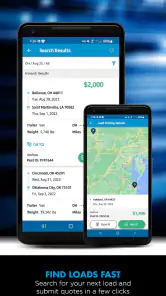
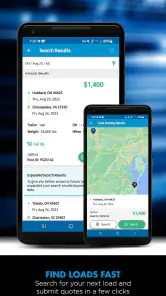
Before deciding whether to install it, I’d separate carrier work from ordinary trip planning. This app makes the most sense when finding freight through Total Quality Logistics is already part of your routine. If you mainly need directions, traffic information, or a way to compare routes, a dedicated navigation app will be more useful. The carrier-focused tools here are valuable for a different reason: they bring load searches and document handling into a workflow meant for carrier tasks.
That distinction also helps set realistic expectations about speed. A load search is not the same as asking a map to draw a route; I would give myself a moment to review the options rather than assuming the quickest tap is the best choice. When work decisions depend on load details, a calm check is worth more than shaving a few seconds off the process. I’d do that review while parked, with a dependable connection, and keep navigation in its own app.
For a carrier deciding between this and a broad business app, the trade-off is focus. A general file tool may be suitable for storing many kinds of paperwork, while this app’s appeal is that document scanning sits alongside carrier-oriented work. It does not need to replace every tool on a phone to be useful. I’d keep it for the recurring TQL workflow, and use other apps for tasks they handle better.
Where it fits in a carrier’s day
This app makes the most sense when your work already involves finding freight through Total Quality Logistics. A driver or carrier who regularly checks available loads can use it as a focused work tool, rather than trying to turn a general navigation app into a freight-search service. On a typical morning, I’d use a quiet moment before setting out to review options, then keep the phone available for work-related tasks at appropriate stops. That separation matters: a load-search screen is not a substitute for road navigation, and I would never recommend handling it while driving.
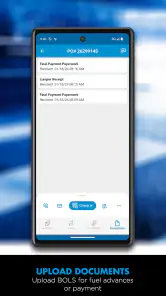
One practical way to get more value from a carrier app is to treat paperwork as part of the job, not an afterthought. TQL Carrier includes document scanning, so I’d build a simple routine around it: scan a relevant document when the work is complete and the phone is safely accessible, check that the image is readable, and keep the original until I know the digital copy is usable. That small pause can prevent a blurry or incomplete image from creating extra work later. The scanner is a meaningful distinction from ordinary map apps, which are designed to guide a route rather than support carrier paperwork.
The User Interface: A Breath of Fresh Air
First things first, let's talk about the user interface. The TQL Carrier Dashboard greets you with a clean, sleek design that's both visually appealing and highly functional. It's like walking into a room that's been Marie Kondo-ed to perfection. Everything you need is right where it should be, and navigating through the app feels as intuitive as scrolling through your favorite social media feed.
More From Our News Desk

Clash of Clans Is Won Between the Battles

Android Auto Makes the Case for Quieter Car Software

MobiOffice: Transforming Mobile Productivity with Seamless Integration

EA SPORTS FC™ Mobile Soccer: Redefining Mobile Sports Gaming

How Microsoft OneDrive Became a Mobile Productivity Giant

How Google Translate Breaks Language Barriers Effortlessly
Functionality: More Than Just Bells and Whistles
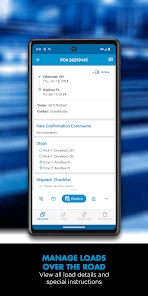
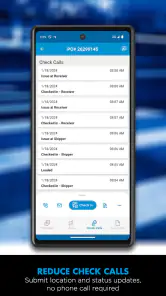
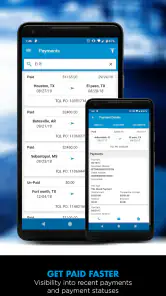
One of the standout features of this app is how seamlessly it integrates all the essentials for carriers. Whether you're a seasoned trucker or just starting out, the app's got your back. You can easily check loads, track shipments, and manage your schedule with just a few taps. It's like having a personal assistant who knows the ins and outs of logistics.
And the real kicker? The real-time updates. Imagine this: you’re on the road, and boom, an unexpected delay pops up. Instead of scrambling around, the app provides instant updates to keep you in the loop. It's like having a GPS that not only guides you but also gives you a heads-up on road conditions ahead.
Making load checks more useful
A less obvious benefit of having load search on a phone is being able to fit a quick check into a natural pause in the day, rather than waiting until returning to a desk. I would use that convenience to scan for possibilities, not to rush into a commitment. Compare the details carefully, and make sure the work fits the practical realities of the trip before acting. A shortlist made during a break can be useful; a decision made while distracted is not.
For someone who handles several pieces of paperwork, scanning can also serve as a simple checkpoint in the workday. I’d make the scan immediately after the relevant document is ready, while its context is still clear, then verify that the whole page is captured and legible. This is more reliable than leaving a stack of documents to deal with later, when it may be harder to remember which image belongs to which task. It is a habit, not a magic fix: a poor photo still needs to be redone.
There is a practical limit to combining tasks on one screen. Having carrier functions together can reduce app switching, but it does not mean a phone should become the only place where every work detail is managed. I’d keep essential information accessible through the normal work process and treat the app as a convenient mobile companion. That approach is especially sensible when a job depends on accurate paperwork or when connectivity is inconsistent.
Performance: Smooth Sailing All the Way
Now, I’ve used my fair share of apps that promise the world but deliver laggy performance. Thankfully, the TQL Carrier Dashboard isn’t one of them. It runs as smooth as a freshly oiled engine, with no hiccups or crashes during my entire testing period.
What’s more, the app doesn’t drain your phone’s battery like some other resource-heavy applications out there. So, you can have it running without worrying about your phone dying halfway through your journey.
When the day gets busy
The moments that test a carrier tool are often the awkward ones: checking a possibility between stops, handling a document after work is complete, or returning to a task after an interruption. I’d avoid leaving a search half-reviewed while switching between several apps, because it is easy to lose track of what still needs attention. Instead, finish one small task at a time: review the load, note what needs follow-up through your normal process, then move to paperwork when it is ready.
If a screen takes longer to respond than expected, I would not keep tapping rapidly or assume that a request has gone through. Pause, check the current screen, and retry only when it is clear what happened. That careful recovery habit matters more than a theoretical speed advantage, especially when a repeated action could create confusion. It is also a good reason to complete work steps while stopped rather than attempting to troubleshoot from the road.
My expectations for resource use would stay modest rather than absolute. The app is designed for carrier tasks, but a phone’s available memory, age, background activity, and connection can all affect how responsive any app feels. If the handset is already busy, closing unrelated apps before a work session may make the phone easier to use. I would also avoid treating an older operating system as proof that every feature will feel equally quick on every device.
What to expect from everyday use
Load searches and document scanning are useful in different ways: the first helps you assess work opportunities, while the second can make the paperwork side less cumbersome. I’d avoid searching in a rush with a weak connection or while juggling other tasks; give yourself time to review a load carefully and confirm the details before making decisions. For drivers, the safest workflow is to handle searches and scans while parked, then rely on a dedicated navigation app for turn-by-turn directions.
Compared with a standard mapping app, this one is aimed at carrier tasks rather than route planning. Compared with a general business or file-scanning app, its value is having load-related tools in the same carrier-focused place. That does not make it a complete replacement for either kind of app. If your priority is finding routes, checking traffic, or navigating unfamiliar streets, I’d choose a dedicated maps app; if you do not work with TQL loads, the specialized focus may offer little reason to keep it installed.
Who should install it, and what to check
I’d point this app toward carriers who want to search loads and handle work documents from a phone, especially if those tasks recur throughout the week. Someone who only needs occasional directions, or who is not part of the carrier workflow it serves, is better off with a conventional navigation option. If you are deciding whether to try it, check that your phone can run it and consider whether you have reliable access to the internet during the moments you expect to search or submit work documents. A clear scan and a deliberate review are more useful than trying to do everything at speed.
It is free, and the broad Everyone age rating means the store classifies its content as suitable for a general audience; that does not mean it will be useful to every phone owner. TQL Carrier is a Maps & Navigation app from Total Quality Logistics, LLC, with a 4.8 average from around 19 thousand ratings and more than 500 thousand installs. It first appeared in 2012, and its current version is 9.4.2, with Android 7.1 as the minimum OS. Those details make it approachable to a broad range of users, though an older compatible operating system does not guarantee the same experience on every device. I’d keep the app updated when possible and leave enough phone storage for ordinary work needs, rather than assuming every handset will feel equally quick.
Reliability and practical limits
For a work app, reliability is not only about whether it opens; it is also about whether I can complete a small task without creating uncertainty. I would confirm that a scan looks right before moving on, and I would check the screen after a load-related action rather than relying on a tap alone. These are sensible safeguards for any mobile work process, not a reason to assume the app will fail. They make the workflow easier to trust because I know what has actually been completed.
Connectivity is another part of the real-world picture. Searching and handling work-related tasks on a phone is most comfortable when the connection is steady, so I would plan more involved checks for a place where service is reliable. If I expect a route to pass through areas with poor reception, I’d make important decisions and complete necessary app work before setting off, then use a navigation tool suited to the trip. That is a better plan than expecting a carrier app to serve as an offline map.
There is also a difference between a helpful mobile companion and a complete fleet-management system. The app’s stated strengths—load search and document scanning—make it relevant to specific carrier tasks, but a user who needs a broader set of operational tools should judge it against those needs rather than assume the focused workflow covers everything. I’d install it for the tasks it is built around and keep other tools where they offer capabilities this one is not meant to replace.
Ending Thoughts: A Must-Have for Carriers
In conclusion, if you’re in the logistics game and looking for an app that combines functionality, reliability, and user-friendliness, the TQL Carrier Dashboard is a no-brainer. It’s like having a Swiss Army knife for your logistics needs, all wrapped up in one neat package.
So go ahead, give it a whirl. Whether you’re hauling freight across the country or just managing a fleet, this app is bound to make your life a whole lot easier. Happy trucking!
My performance verdict
For the right person, I see the appeal in having carrier work available on a phone: a quiet check before departure, a deliberate review during a safe break, and a legible document scan when the paperwork is ready. The best results come from treating those as separate, focused moments rather than trying to search, navigate, and scan at once. That workflow is practical precisely because it respects the limits of a phone and the attention a driver needs on the road.
I would recommend trying it if TQL load searches and related document handling are already part of your work. I would skip it if you want a general-purpose map, if you do not use the carrier workflow it supports, or if you need one app to replace every business and navigation tool you rely on. Its focused purpose is both its main strength and its clearest boundary. Used for that purpose, it can make a few recurring tasks more convenient; judged as a full navigation or fleet platform, it is the wrong comparison.
TQL Carrier Dashboard Frequently Asked Questions
How much storage space should I set aside for TQL Carrier Dashboard?
TQL Carrier Dashboard is a mobile app for finding loads and handling transportation-related tasks, so it may be useful to have room for the app and documents you work with on your device. Check your phone’s available storage before installing. Keeping some space free can also make it easier to save or scan paperwork as part of your carrier workflow.
Can I use TQL Carrier Dashboard to search for loads and manage paperwork from my phone?
Yes. TQL Carrier Dashboard is intended to help carriers find loads and handle related tasks on a mobile device. Its load-search and document-scanning tools are central to the app’s purpose, making it useful when you want to look for freight and work with paperwork while away from a computer. It is a focused carrier tool rather than a general map app.
What devices can I use to run TQL Carrier Dashboard?
TQL Carrier Dashboard is a mobile app for carriers who want to search loads and handle related tasks on the go. Before downloading, check that your phone or tablet runs a compatible operating system. The app is available for Android and iOS, and its minimum operating-system requirement is version 7.1.
Who develops TQL Carrier Dashboard, and who is it intended for?
The app is developed by Total Quality Logistics, LLC, and its focus is on carriers working with loads. Its Maps & Navigation category reflects its role in supporting transportation-related tasks. If you are a carrier looking for a mobile way to find loads and manage related activity, the app is aimed at that kind of workflow rather than general-purpose navigation.
What is the TQL Carrier Dashboard app used for?
The TQL Carrier Dashboard app is designed to streamline the logistics process for carriers. It allows users to easily manage their loads, track shipments in real time, and get instant updates on delivery status. Additionally, it provides tools for efficient communication with brokers, ensuring a seamless transportation experience.
Pros
- User-friendly interface for quick navigation
- Real-time updates on shipment statuses
- Customizable dashboard for personalized views
- Comprehensive load tracking features
- Efficient load booking process
Cons
- Requires stable internet for optimal performance
- Limited offline functionalities
- Occasional notification delays
- High data usage with continuous tracking
- Initial setup can be time-consuming
- Category
- Maps & Navigation
- Version
- 9.4.2











