Toucan Smart Home
- 931.00
- 4.5
- Installs
- 100.00K
- Price
- Free

Screenshots
Analysis by Reviewed
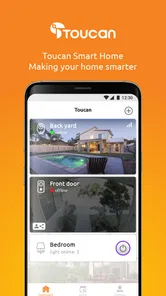
Managing a smart home sounds simple until several cameras, sensors, alerts, and family routines start competing for your attention. Toucan Smart Home is designed to bring that activity into one mobile control point, and after spending time with it, I found its appeal is less about flashy extras and more about making connected-home tasks feel approachable. It is a free lifestyle app from VuPoint Solutions Inc., aimed at people who want to create and customize a secure smart-home setup without treating home automation like a technical hobby.
The app has a 4.5 average from around 6,300 ratings, with more than 100,000 installs. Those figures suggest that it has found a useful middle ground for everyday users, although popularity alone does not tell you whether it will suit your particular devices or home routine. My view is that it works best when you want a straightforward companion for Toucan equipment rather than a universal command center for every smart product in your house.
How Toucan Smart Home feels in everyday use
The first thing I noticed is that the app is built around the idea of a connected home rather than a single isolated gadget. That matters because the practical value of a smart camera or sensor often depends on how quickly you can check it, adjust it, and respond to what it reports. A dedicated home app can be less confusing than switching between separate manufacturer applications, especially when you are checking the house while travelling or coordinating access with another person.
I would describe the overall experience as practical rather than experimental. The app belongs in the lifestyle category, and that is a good fit: it is meant to support routines, not demand constant attention. You open it when you want to see what is happening, make a change, or confirm that your home setup is behaving as expected. That focused purpose is one of its strengths for people who do not want to build elaborate automation scenes.
A realistic example is arriving at work and remembering that you were not completely sure whether the home setup was left in the right state. Instead of walking through every room or relying on memory, you can use the app as the first place to review your connected-home arrangement. Later, if an alert arrives while you are shopping, the useful question is not simply whether the app can notify you; it is whether the notification leads you quickly to the relevant device and lets you decide what to do next. That is the kind of small, repeated interaction where a home-control app earns its place.
The most important practical benefit is reducing friction between an alert and a decision. A smart-home application is not valuable merely because it displays devices. It needs to help you understand what deserves attention and what can wait. Toucan Smart Home is most convincing when used as a focused dashboard for a Toucan-centered setup, where the app and hardware are intended to work together.
Who will get the most from it
This is a sensible choice for someone buying into the Toucan ecosystem for the first time, particularly if the goal is a manageable home-security routine rather than a deeply programmable automation project. It should also appeal to households where more than one person needs a clear way to stay informed. A simple interface is often more useful than a technically powerful one when the person checking an alert is a partner, relative, or housemate who does not want to learn a complicated system.
More From Our News Desk

Weather by Xiaomi Review: Clear at a Glance, Less Clear Up Close

X Under Pressure: Can It Recover When Posting Goes Wrong?

Clash of Clans Is Won Between the Battles

Android Auto Makes the Case for Quieter Car Software

MobiOffice: Transforming Mobile Productivity with Seamless Integration

EA SPORTS FC™ Mobile Soccer: Redefining Mobile Sports Gaming
It is less suitable for a user who already owns a mixed collection of smart-home products from unrelated brands and expects one application to unify every device. In that situation, a broad platform with strong cross-brand support may be a better central hub. Toucan Smart Home makes more sense when compatibility with Toucan hardware is the priority and you are comfortable keeping the home experience within that ecosystem.
I would also think carefully before choosing it if your main interest is advanced automation. People who enjoy detailed triggers, intricate schedules, extensive integrations, or highly customized dashboards may eventually find a manufacturer-focused app limiting. That does not make the app poor; it simply defines the trade-off. Toucan appears to favor accessibility and direct control over the depth associated with specialist automation platforms.
Useful habits that make the app easier to live with
One useful habit is to treat the app as part of a routine rather than waiting for it to become important only during a problem. A short check before leaving home can help you notice whether the setup is in the state you expect. Another good practice is to keep your device organization understandable from the beginning. If you add equipment over time, clear names and a consistent mental map of the home will make alerts much easier to interpret than a collection of vague labels.
A second insight is that alerts should be judged by actionability, not volume. If every notification receives the same attention, you may start ignoring all of them. I recommend deciding which events genuinely need an immediate response and which ones are better treated as background information. The app can be part of that process, but the quality of your routine depends on how thoughtfully you configure and respond to the connected devices around it.
A third consideration is shared access. Before relying on the system for a household, decide who needs to check it and when. A security setup is less useful if only one person knows how to use the app. Walking another household member through the basic checks while everything is calm is far better than trying to explain the interface during an urgent moment. This is not a glamorous feature, but it is one of the most important real-world tests of any home-control application.
What the current release tells me about the product
The current release is version 3.3.2, Build512, and it supports Android 7.0 or later. That gives the app a relatively broad reach for Android users who are not running the newest phones. In practical terms, this can help households keep an older spare device available as a dedicated home monitor or shared control screen, provided that the phone remains secure and performs well enough for the task.
The version information also gives existing users a useful reference point. If you are troubleshooting, checking whether your installation is current, or comparing behavior across household devices, knowing the exact build is more helpful than simply saying that the app is updated. I would record the version before changing several things at once, because that makes it easier to identify whether a problem comes from the app, the phone, the network, or the connected hardware.
The app was released on July 2, 2018, so it is not a brand-new experiment. That history is reassuring in one sense: the product has had time to establish its role and attract a substantial installed base. At the same time, an older app lineage means I would not assume that every modern Android convention or every expectation from newer smart-home platforms is present. The current build matters more than the original launch date, but the age of the product is still useful context when setting expectations.
For someone already using Toucan equipment, the update story is especially relevant because app changes can affect the daily control experience even when the hardware stays the same. I would update at a convenient time rather than immediately before leaving for a trip, then spend a few minutes checking the actions I use most. That simple test can catch sign-in, notification, or device-connection problems before they become inconvenient.
How the release affects existing users
Existing users should think of the current version as a maintenance checkpoint, not as a reason to rebuild the entire home. If your setup is working, the sensible approach is to verify the essentials: can you open the app, see the expected equipment, receive the kind of alert you rely on, and reach the control you use most often? There is no benefit in changing every setting at once simply because a new build is installed.
People moving from an older phone should be more cautious. Android compatibility is not the same as identical performance across every device. A phone with limited storage, an aging battery, or aggressive background restrictions may behave differently from a newer handset. If alerts matter to you, check the phone’s notification and battery-management settings after moving the app. Those settings can affect how promptly any connected-home application gets your attention, regardless of how well the application itself is designed.
Another practical point is network diagnosis. When a device seems unavailable, avoid immediately blaming the app. First check whether the phone is online, whether other household services are responding, and whether the problem affects one device or the entire setup. Narrowing the issue this way saves time and prevents unnecessary reinstallations. If you do reinstall, make sure you know the account details and are prepared to reconnect the relevant equipment rather than assuming the process will preserve every local arrangement.
The free price makes experimentation easier, but the app includes in-app purchases ranging from $0.49 to $99.99 per item. I would therefore review any purchase screen carefully before confirming a transaction and decide which functions are genuinely important to your household. The free download lowers the entry barrier, but it does not automatically mean that every part of a larger smart-home experience carries no additional cost.
Where the experience still has limits
The largest limitation is the ecosystem question. A dedicated app can be pleasantly simple when your devices belong to the same family, but that simplicity becomes less attractive if you want to combine Toucan equipment with products controlled elsewhere. Before committing, I would map the devices you already own and identify which ones you expect to manage together. If the answer includes several brands and a wide range of automation rules, a more open platform may deserve the central role.
There is also a difference between monitoring a home and automating a home. Toucan Smart Home is easy to understand as a control and security companion, but users searching for a full smart-home laboratory may want more elaborate customization than a focused manufacturer app normally provides. I would not choose it solely because the phrase “smart home” sounds broad. Choose it when its connection to your Toucan setup matches the way you actually intend to use the home.
Reliability is another area where expectations should remain realistic. No phone app can compensate for a weak household network, a poorly positioned device, a flat battery, or a phone that suppresses background activity. The app may be the visible part of the system, but it is only one link in the chain. A good installation still requires sensible device placement, dependable connectivity, and a backup plan for moments when the phone is unavailable.
Privacy and security also deserve a thoughtful approach. A secure home is not created by installing one application and forgetting about it. Use a strong, unique account password, keep the phone protected, and avoid treating shared access casually. If someone no longer needs access, remove that access rather than leaving old accounts active. These steps are particularly important for any application connected to cameras, sensors, or information about when people are at home.
What I would watch before committing to it
If I were deciding today, I would first confirm that the Toucan hardware I plan to use is supported in the way I need. The app’s value depends heavily on that relationship. I would then test the basic workflow during ordinary conditions: opening the app, locating the right device, understanding an alert, and returning to the home overview. A few minutes spent on that sequence can reveal more about suitability than a long feature list.
I would also watch how well the app fits the household’s communication habits. If several people need to know what is happening, the best setup is the one everyone can understand and use consistently. If only one technically confident person can interpret the alerts, the system may create dependence instead of reassurance. Toucan Smart Home has a better chance of succeeding when the household agrees on who checks notifications, what deserves action, and how to respond when something looks unusual.
For new buyers, I would keep the purchase structure in mind. The app itself is free and rated for Everyone, which makes it approachable for a broad audience, but the presence of optional purchases means I would not make assumptions about the total cost of a complete setup. Think about the hardware, any desired paid functions, and the long-term routine rather than judging the experience solely by the download price.
For current users, the most useful thing to monitor is whether the latest build continues to support the actions that matter in your home. Version 3.3.2, Build512 is the current reference point, and Android 7.0 is the minimum operating system. Keeping both the app and phone environment in mind will make troubleshooting more orderly. If an older handset struggles, moving the app to a newer device may be a more productive test than repeatedly changing settings.
My final recommendation is fairly specific. I would suggest Toucan Smart Home to someone who wants a free, focused way to manage a Toucan-based smart-home arrangement and values a less intimidating experience. I would be more hesitant for a power user seeking broad brand compatibility, elaborate automation, or a single control layer for a highly mixed collection of devices. In my experience, the app is at its best when you let it do one job well: keep the Toucan side of your home visible, understandable, and easier to act on.
That makes it a worthwhile lifestyle app, but not a universal answer to every smart-home problem. Its 4.5 average and growing user base show that the approach works for many people, while the ecosystem and purchase considerations explain why it will not be the perfect fit for everyone. If your needs match its focused design, the free installation is an easy way to begin evaluating the experience. Just test the everyday workflow, plan your household access, and decide early whether you need simple control or a much broader automation platform.
Toucan Smart Home Frequently Asked Questions
Can I use Toucan Smart Home without owning a Toucan device?
Toucan Smart Home is intended to manage compatible Toucan smart-home and security products, so its main features depend on having supported hardware connected to your account. You may be able to install the app and explore its sign-in or setup screens first, but features such as viewing a camera feed, receiving device alerts, or changing product settings require a compatible Toucan device.
What is Toucan Smart Home, and what can I use it for?
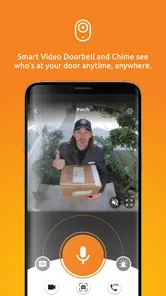
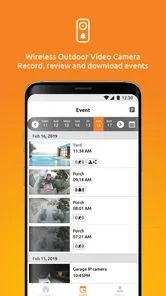
Toucan Smart Home is a companion app for managing compatible Toucan smart-home and security devices from a mobile phone or tablet. Depending on the products you own, it can let you view live camera feeds, review recordings, receive motion or activity alerts, communicate through supported cameras, and adjust device settings. The exact features available depend on your Toucan hardware, account, location, and subscription plan.
Is Toucan Smart Home compatible with my Android or iPhone?
Before downloading, check that your device meets the app’s current operating-system requirements listed on Google Play or the App Store. Toucan Smart Home is designed for supported Android and iOS phones and tablets, but compatibility can vary by device model and app version. You will also need a stable internet connection, a valid Toucan account, and compatible Toucan hardware to use the main features. The Android release requires version 7.0 or later, which is worth checking before installing if you use an older phone or tablet.
How do I connect Toucan Smart Home to my Toucan device?
After installing the app, create or sign in to your Toucan account and follow the in-app setup instructions. Most devices require Bluetooth or local network access during pairing, along with permission to use notifications and, in some cases, your phone’s camera for scanning a setup code. Keep the device near your Wi-Fi router while configuring it, and confirm that your network meets the product’s supported requirements.
Does Toucan Smart Home require a subscription or include extra costs?
The app may be free to download, but some Toucan devices and advanced services can involve separate costs. Depending on the product, features such as cloud video storage, extended recording history, enhanced alerts, or additional monitoring options may require a subscription or paid plan. Review the device description and subscription terms carefully, because available features, trial periods, and pricing can differ by region and product. The app also offers in-app purchases, so check the purchase details before confirming anything.
Pros
- Easy setup for compatible smart home devices
- Centralized control for lights
- cameras
- and appliances
- Remote access lets you manage devices away from home
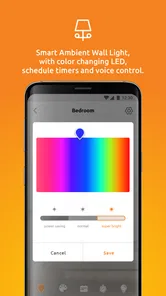
- Scheduling and automation can simplify daily routines
- Clean interface is approachable for less technical users
Cons
- Works best only with devices supported by the Toucan ecosystem
- Some features may require an active internet connection
- Advanced automation options can feel limited
- Notifications may become excessive with multiple devices
- Performance can depend on Wi-Fi quality and device compatibility











