TomTom GO Navigation
- 3.54K
- 3.6
- Installs
- 10.00M
- Price
- Free

Screenshots

Analysis by Reviewed
I tend to judge a navigation app by what happens between deciding to leave and reaching the door: can I enter a useful destination, understand the route, and recover when the real journey differs from the plan? TomTom GO Navigation is built for that practical stretch of the day, with a particular focus on drivers who need more than a simple line from A to B. Its truck routing, traffic information, multi-stop planning, and truck-focused points of interest make it especially relevant when a vehicle and its delivery schedule shape the route.
Choosing a guide for the day ahead
Before I open a navigation app, I ask what could make this particular trip difficult. A familiar drive with one stop has different needs from a shift with several deliveries, unfamiliar roads, and a vehicle that cannot take every shortcut. That is the situation where I would consider TomTom GO Navigation: not because every trip needs specialist planning, but because a truck driver benefits from guidance that takes the vehicle and the workday into account.
There is also a useful distinction between planning a route and planning a day. A map can help connect destinations, but I still need to decide which stop comes first, how much flexibility the schedule allows, and where I can pause to check a change. Treating the app as one part of that process, rather than an automatic dispatcher, makes its route guidance more useful and keeps responsibility for the decisions where it belongs.
When a basic route is not enough
For a quick trip across town, a standard phone map may be all I need. The case for this app becomes stronger when I’m driving a truck, planning several stops, or heading somewhere with unreliable mobile coverage. A route that suits the vehicle matters more than a shortcut that looks clever on a screen; a driver should still check that the suggested road is appropriate for the actual vehicle and journey.
That distinction also helps set expectations. This is a maps and navigation app from TomTom International BV, rather than a general travel planner or a tool for comparing every way to reach a destination. I would choose it when driving guidance is the main task. If I mostly walk, use public transport, or want a broad city guide, another kind of map app may fit my routine better.
First Impressions and User Interface
The first thing that struck me about TomTom GO Navigation is its sleek and intuitive user interface. The app opens up to a clear map view, and setting up your journey is as easy as pie. You simply input your destination, and the app does the rest. There's a certain comfort in knowing that even if you're not the most tech-savvy person, you'll still find your way around this app with ease.
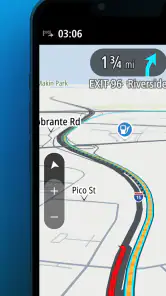
One of the standout features is the map clarity. It's almost as if you're looking at a digital atlas. The level of detail is impressive, and it really helps when you're trying to navigate through complex city grids. Plus, the real-time traffic updates are a lifesaver, helping you avoid those dreaded traffic jams.
You May Like

Clash of Clans Is Won Between the Battles

Android Auto Makes the Case for Quieter Car Software

MobiOffice: Transforming Mobile Productivity with Seamless Integration

EA SPORTS FC™ Mobile Soccer: Redefining Mobile Sports Gaming

How Microsoft OneDrive Became a Mobile Productivity Giant

How Google Translate Breaks Language Barriers Effortlessly
From destination entry to a workable route
For a multi-stop day, I’d think through the itinerary before pulling away: collect the addresses, put the stops in a sensible order, and review the resulting journey while parked. That small bit of preparation can make the app’s multi-drop planning more useful than entering each destination only when I arrive. It also gives me a chance to spot a stop that belongs earlier or later, instead of asking navigation to solve a scheduling problem on the fly.
Traffic guidance is most useful as a decision aid, not a promise that every delay will disappear. I’d use it to stay aware of changing conditions, then weigh a suggested change against what I know about the day—such as a delivery window or a necessary stop. For a driver on a tight schedule, the practical gain is having route information in one place; the trade-off is that traffic can change after a plan is made, so I would keep enough flexibility to respond safely.
Features That Make a Difference
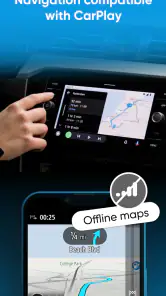
I have to give a shout-out to the app's offline maps feature. When you're traveling abroad or find yourself in an area with spotty internet coverage, this feature ensures you never lose your way. Download the maps in advance, and you're good to go, no data needed.
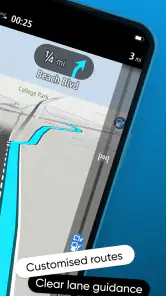
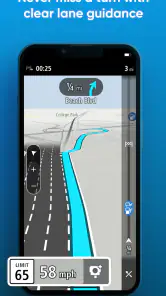
Another feature that caught my eye is the lane guidance. It's perfect for those tricky highway exits or when you're trying to navigate busy intersections. The app clearly shows which lane you should be in, reducing the stress of last-minute lane changes. It’s like having a co-pilot who knows the road ahead.
Making the handoffs work
Offline preparation is a particularly useful step before a long drive: I’d make sure the relevant map area is downloaded while I have a dependable connection, rather than waiting until coverage has already dropped. That changes the role of the phone from a live connection-dependent guide to a prepared navigation device. Traffic information and offline mapping serve different needs, though; the downloaded map helps with navigation in a weak-signal area, while live traffic is most valuable when current information is available.
Truck points of interest can also make the route more practical by helping drivers look for relevant places along the way, rather than treating the destination as the only important point. I would use them as a planning aid and check that a selected stop suits the day’s requirements before committing to it. That extra pause is worthwhile when a wrong turn or unsuitable stop could cost more time than it would on an ordinary car trip.
Performance and Reliability
Now, let's talk about performance. In my experience, the app runs smoothly without any hiccups. It recalculates routes quickly in case of missed turns, which, let's be honest, happens to the best of us. The voice navigation is clear and concise, providing instructions in a timely manner. You won’t have to strain your ears while trying to catch what the app is saying.
Battery usage is also optimized, so you don't have to worry about the app draining your phone's battery on long road trips. This is particularly important for those of us who rely heavily on our phones throughout the day.
Making a multi-stop shift manageable
Consider a driver starting with a morning collection, followed by deliveries at several unfamiliar addresses. Before leaving, I would gather the destinations, arrange them around the day’s priorities, and inspect the proposed route with the vehicle in mind. Once on the road, the spoken instructions let me keep attention on driving rather than repeatedly looking down to interpret the map. At a safe stopping point, I can reassess if a delay changes what is realistic.
The important detail is that the app handles navigation, not every operational decision. A planned sequence can reduce the mental effort of remembering what comes next, but it does not know which customer must be visited first or whether a stop is still practical for the vehicle. I would keep the schedule or work instructions available separately and use the map to support them, not replace them.
A realistic day behind the wheel
Picture a driver leaving early for several deliveries in an unfamiliar area. I’d enter the stops before setting off, use the planned route to understand the order, and rely on spoken directions and lane guidance as the road gets more complicated. If the day leads outside strong coverage, downloaded maps provide a useful fallback; if traffic changes, the live view can help inform a revised choice. The important handoff is from the screen to the driver: I’d review changes only when safely stopped, not try to manage a route while moving.
That workflow is where the app feels most distinctive compared with a general-purpose map app. Those alternatives can be convenient for casual errands and broad local discovery, while TomTom GO Navigation’s truck-aware routing and truck-related points of interest are more directly aimed at professional driving needs. The right choice depends on the vehicle and the trip, not on which map looks busiest with features.
Where the route can still fall short
No navigation app removes the need for judgment. A suggested route is not a substitute for checking road signs, vehicle restrictions, or the conditions around a stop. I would also avoid treating a traffic estimate as fixed: incidents and congestion can shift, and a different route may not always be better once the whole day’s plan is considered. These are ordinary but important limits for anyone relying on a phone as a driving companion.
The app is free to download, is rated for Everyone, and has a 3.6 average from around 269,000 ratings, with more than 10 million installs. It includes in-app purchases ranging from $1.99 to $129.99 per item, so I’d check what an offered purchase covers before paying rather than assuming every capability is included in the free experience. The current version is 3.6.292-beta, and it requires Android 7.0 or later. Those details make it easier to decide whether it fits your device and spending preferences before building a routine around it.
Questions worth settling before a trip
One practical question is whether a downloaded map solves every connectivity concern. I would treat it as preparation for navigating where reception is weak, not as a replacement for live traffic: those serve different purposes, and the latter depends on having current information. If the trip matters, preparing the map before departure is a sensible precaution rather than something to leave until the signal drops.
Another is whether the app’s truck-oriented guidance means I can stop checking the road context. I would not make that assumption. Vehicle dimensions, restrictions, signs, and changing conditions still matter, and the driver must verify that a suggested road works for the actual vehicle. The app can make route planning more relevant to truck travel, but it cannot take over that responsibility.
Cost also deserves a quick check before relying on a particular capability. The app is free to install, but in-app purchases are listed from $1.99 to $129.99 per item. I would review the details shown for any purchase and decide whether it matches how I plan to use the app, instead of assuming that every feature or service is included at no cost. That is especially important if I am choosing it for a regular work routine rather than trying it for an occasional journey.
Who I’d recommend it to
I’d consider it for truck drivers and other motorists who value vehicle-aware routing, planned multiple stops, and the option to prepare maps ahead of travel. It is less compelling if I only need occasional walking directions, prefer public transport guidance, or want navigation mainly for spontaneous local exploration. In those cases, a broad everyday map app may be simpler to keep at hand.
For a driver who already uses a general map app, the choice does not have to be all or nothing. I would use the specialist route guidance when the vehicle or a series of stops makes the journey more demanding, and keep a familiar general-purpose map for casual errands or looking around an area. That split is more useful than expecting one app to be equally good at truck routing, local discovery, and every travel mode.
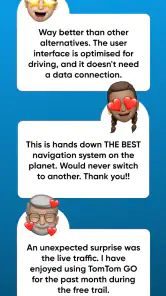
The app has a 3.6 average across around 269,000 ratings and more than 3,500 written reviews, so I would treat it as a well-used option with mixed reactions rather than assume it will suit every driver. The review count is a reminder to judge it against my own route, device, and workflow. For someone who only needs simple turn-by-turn guidance now and then, the setup and purchase choices may not feel worthwhile; for repeated truck trips, the specialized planning may justify a closer look.
Final Thoughts
All things considered, TomTom GO Navigation offers a comprehensive and reliable navigation experience. Whether you're a frequent traveler or just someone who wants to explore their city with confidence, this app is a fantastic companion. With its user-friendly interface, offline maps, and real-time traffic updates, it's hard not to be impressed.
So, if you're in the market for a navigation app that won't let you down, give TomTom GO Navigation a try. Who knows? You might just find it becomes your go-to guide on the road.
TomTom GO Navigation Frequently Asked Questions
Can I try TomTom GO Navigation before paying for it?
TomTom GO Navigation is free to download, but access to its navigation features may involve in-app purchases. The available in-app purchases range from $1.99 to $129.99 per item, so check the purchase details shown in the app before committing. If you are comparing navigation options, consider which features you need and whether the purchase choices suit your budget.
Does TomTom GO Navigation support Apple CarPlay and Android Auto?
TomTom GO Navigation can work with Apple CarPlay and Android Auto, which lets drivers use the app through a compatible in-car system instead of relying only on a phone screen. This can make route guidance easier to view while driving. Check that your car and device support the system you plan to use, then review the route before setting off.
Is TomTom GO Navigation suitable for truck drivers?
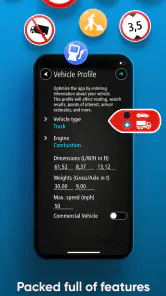
TomTom GO Navigation includes features aimed at truck journeys, such as routes designed to fit a truck, truck points of interest, traffic information, and multi-drop planning. These tools can make it easier to organize a route with several stops and find relevant places along the way. Before relying on any route, enter the appropriate vehicle details and review the proposed directions carefully.
Which devices and operating systems can run TomTom GO Navigation?
TomTom GO Navigation is a navigation app from TomTom International BV, available for Android and iOS devices. On Android, it requires version 7.0 or later, so checking your device’s software version before downloading is worthwhile. The app is intended for drivers who want route guidance on a mobile device, and it can also work with Apple CarPlay and Android Auto.
What features does TomTom GO Navigation offer?
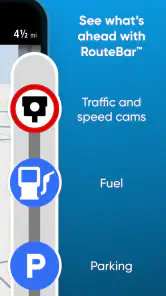
TomTom GO Navigation offers a comprehensive suite of features designed to make your driving experience smooth and efficient. The app provides offline maps, real-time traffic updates, speed camera alerts, and advanced lane guidance. With its intuitive interface, users can easily plan routes, avoid traffic congestion, and explore alternative paths. Additionally, the app integrates seamlessly with Apple CarPlay and Android Auto, enhancing your in-car navigation experience.
Pros
- High-quality offline maps.
- Accurate real-time traffic updates.
- Customizable routes.
- Integration with Apple CarPlay.
- Frequent map updates.
Cons
- Requires subscription for full features.
- Large app size impacts storage.
- Occasional app crashes.
- Limited POI search.
- Battery drain on long trips.

- Category
- Maps & Navigation
- Version
- 3.6.292-beta