

Toll Calculator GPS Navigation
- 235.00
- 4.0
- Installs
- 100.00K
- Price
- Free
Screenshots
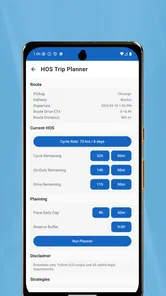
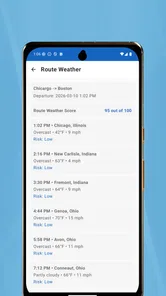
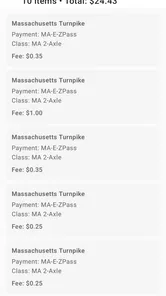
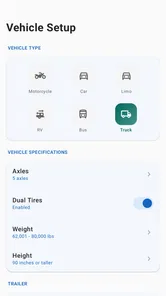
Analysis by Reviewed
I tested Toll Calculator GPS Navigation as a practical Maps & Navigation tool for estimating toll costs, and my first impression was that it serves a very specific need rather than trying to replace a full navigation suite. The app is developed by InfoTalk LLC and is free to download, with optional in-app purchases listed from $9.99 to $34.99 per item. That combination makes the initial decision easy: you can explore the app without paying first, but you should still pay attention to which functions are included before relying on it for regular travel planning.
The name is a little broader than the app’s clearest purpose. I would think of it primarily as a toll-planning companion for drivers who need to compare road charges, prepare a trip budget, or check whether a route makes financial sense. It is especially relevant to people driving cars, recreational vehicles, and commercial trucks, where a toll estimate can affect the whole journey rather than just add a small surprise at the end.
It has an average rating of 4.0 from around 790 ratings and has passed 100K+ installs, so it is not an unknown experiment. At the same time, that level of adoption is more modest than the huge navigation platforms most people already have on their phones. I read that as a useful signal about its role: this is a focused utility for a particular travel problem, not necessarily the one app I would install for every navigation task.
What the app is really useful for
The strongest reason to use Toll Calculator GPS Navigation is preparation. Before leaving, I can use a toll-focused tool to think about the cost of a route separately from driving time. That distinction matters because the fastest route is not always the most economical one, particularly when a trip includes several toll roads, bridges, express lanes, or different payment systems.
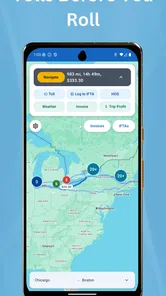
For an ordinary driver, the practical workflow is simple in principle: consider the planned journey, examine the toll cost, and compare that result with an alternative route. I find this more useful before starting the car than while already driving. A few minutes of planning can help me decide whether I am comfortable paying for speed or would rather accept a longer route to keep the trip cheaper.
The app’s store summary references several toll and travel terms, including E-ZPass, SunPass, FasTrak, TxTag, and other regional systems. That makes it more relevant to people who regularly cross different toll networks or travel between regions. A driver who knows only the name of one local toll program may still benefit from having a broader planning tool when a journey crosses state or regional boundaries.
It also has a clear use case for vehicle owners whose toll costs are not the same as those of a standard passenger car. A recreational vehicle, semi, or other larger vehicle can make route budgeting more complicated. The important habit here is to enter the vehicle information carefully whenever the app offers a choice, because a result based on the wrong vehicle class could give a misleading impression of the final expense.
More From Our News Desk

 Weather - By Xiaomi
Weather by Xiaomi Review: Clear at a Glance, Less Clear Up Close
Xiaomi’s weather app makes everyday forecasts quick to scan, but its calm surface can leave useful details and recovery paths harder to find than they should be.

 X
XX Under Pressure: Can It Recover When Posting Goes Wrong?
A resilience-focused review of X, examining setup, mistaken posts, interruptions, weak connections, and the gaps that matter when recovery needs to be dependable.

 Clash of Clans
Clash of Clans Is Won Between the Battles
Its raids are quick; its community is a long-term project of coordination, teaching, rivalry, and shared responsibility—with all the friction that entails.

 Android Auto
Android Auto Makes the Case for Quieter Car Software
The car interface is no longer judged by how much it can do, but by how quietly it helps. Android Auto shows what drivers now expect—and what still gets in the way.

 MobiOffice: Word, Sheets, PDF
MobiOffice: Transforming Mobile Productivity with Seamless Integration
MobiOffice: Word, Sheets, PDF is redefining mobile productivity with a surprising blend of functionality and innovation.

 EA SPORTS FC Soccer Mobile 26
EA SPORTS FC™ Mobile Soccer: Redefining Mobile Sports Gaming
Dive into EA SPORTS FC™ Mobile Soccer, where immersive gameplay and strategic depth transform mobile sports gaming.
Latest News



A realistic trip-planning example
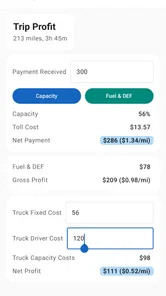
Imagine I am preparing a weekend drive in an RV and have two possible routes. One is shorter but passes through several toll points; the other takes longer but may reduce direct road charges. Rather than choosing purely from the map line, I would use the calculator to estimate the toll burden first, then consider fuel, driving time, and convenience together. The app is valuable in that moment because it turns an easily overlooked cost into part of the route decision.
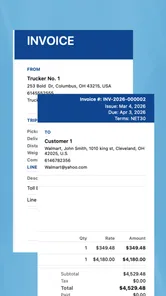
For a truck driver or fleet planner, the same idea becomes more important. A toll estimate can be considered alongside delivery timing and operating costs. I would not treat the app as the sole authority for an invoice or a formal reimbursement claim, but I would use it as an early planning check. That distinction is one of my main recommendations: use the result to guide a decision, then verify the final charge against the relevant toll operator when precision matters.
Another less obvious use is comparing payment arrangements. If a journey crosses areas associated with different electronic toll systems, I would check the route before setting out rather than assuming that one familiar account covers everything. The app can help identify where toll planning deserves attention, but the driver remains responsible for confirming account compatibility, vehicle registration details, and the actual terms of each toll provider.
Where it fits beside ordinary navigation apps
Google Maps, Apple Maps, and similar navigation tools are usually better choices when I need live traffic, turn-by-turn directions, broad place search, or a polished daily driving experience. They are built around getting me from one location to another. Toll Calculator GPS Navigation has a narrower advantage: it puts toll cost at the center of the planning conversation.
That difference means I would not automatically choose this app for a city commute. If my main concern is traffic congestion, lane guidance, parking, or finding a nearby business, a mainstream navigation app is likely more suitable. If my concern is whether a long-distance route will produce an unpleasant toll bill, this specialized app may be the more useful companion.
I also see value in using both types of app without expecting either one to do everything. I can use a toll calculator to compare the financial side of routes, then use my preferred navigation app for live directions. The trade-off is extra preparation and switching between tools, but that is preferable to assuming that a general map’s toll setting gives the same level of cost detail as a dedicated calculator.
Trust, controls, and moments that deserve care
I use this section to focus on the choices that shape a reliable trip estimate: what I enter, which permissions I allow, and when I pause to verify a result. A repeatable check before setting off can prevent a small input mistake from turning into a costly surprise, especially when the route involves a larger vehicle or several toll systems.
What I can judge without guessing
The developer is identified as InfoTalk LLC, the app is rated for Everyone, and the current version is 5.5. It was released on November 18, 2016, and supports devices running Android 8.0 or later. Those details help me understand the product’s position: it has been available for years, while its compatibility requirement means users with older Android devices may need to check their operating system before trying it.
I am careful not to treat age or download volume as proof that an app is perfect. A long presence can be reassuring, but it does not replace checking the screen before confirming a route or purchase. Likewise, a 4.0 average suggests a generally workable experience for many users, while leaving plenty of room for differences in expectations, regional coverage, and individual situations.
The app’s free entry point is convenient, but the optional purchases deserve deliberate handling. I would explore the available screens first and avoid assuming that every toll-related function is included at no cost. The listed purchase range is wide enough that a user should read each purchase description, understand whether it is one-time or recurring if stated on the purchase screen, and confirm the final amount through the platform’s own billing dialogue.
This is also where user control matters more than a low download price. A free installation can still lead to an unexpected charge if I tap through a purchase too quickly. My practical advice is to use the operating system’s purchase confirmation and subscription controls, keep approval settings enabled where appropriate, and review the transaction before accepting it. The app’s price model is not automatically a problem, but it rewards a careful first session.
Handling location and travel information
A toll and navigation app naturally deals with route-related information, so I would treat location access as a sensitive moment. I would grant only the access needed for the task I am actually performing, preferably while using the app if the phone offers that choice. I would also review the permission panel rather than assuming that a navigation label explains every type of access.
I do not consider a toll estimate worth giving an app unlimited access by default. If I am planning a trip from typed locations, I would prefer to enter those locations directly when practical. If I need current position support, I would enable the relevant permission during use and later revisit it in the phone settings. This approach gives me a clearer boundary between an intentional route calculation and continuous background access.
Travel information can reveal more than a single destination. Repeated searches may expose home, work, regular delivery areas, or frequent holiday routes. For that reason, I would avoid entering sensitive journeys casually on a shared device, and I would clear saved routes or recent searches when the app provides a visible control for doing so. I would also avoid taking screenshots that display addresses or account details unless I need them for a specific purpose.
Because privacy controls can depend on the operating system and the app version, I would inspect the permission and account screens directly on my phone. I would not infer that a permission is harmless simply because the app is in the Maps & Navigation category. The most trustworthy habit is to make each choice consciously, then check later whether the setting still matches what I intended.
Accuracy is a practical trust issue
For this kind of app, trust is not only about privacy or billing. It is also about knowing how much confidence to place in an estimate. Toll rules can depend on vehicle type, axle count, payment method, time, road segment, and local changes. I would therefore treat the displayed amount as a planning figure, not an invoice, unless I have separately confirmed the applicable toll authority’s charge.
This is particularly important for commercial vehicles and RVs. A small input mistake can matter more for a large vehicle than for a compact car. Before accepting a result, I would check the vehicle category, route direction, and payment assumptions. If the trip is expensive, unusual, or business-critical, I would compare the result with the official toll operator rather than relying on one calculator.
That extra check is not a criticism unique to this app; it is a sensible rule for any toll estimator. Still, a specialized calculator can create a false sense of precision if I look only at the final number. The better workflow is to use it for comparison, notice which toll sections drive the cost, and then verify the high-impact parts before committing to the route.
Who should use it and who should skip it
I would recommend trying Toll Calculator GPS Navigation if I regularly drive across toll roads, operate an RV, plan long-distance trips, or need to think about toll expense before choosing a route. It is also a reasonable tool for someone who finds general map apps too vague about the financial difference between routes.
I would be less enthusiastic for a person who wants one complete driving app with live traffic, voice guidance, local search, and every modern navigation convenience in one place. The focused toll purpose is its strength, but that focus also means it may feel unnecessary for short daily trips or journeys with no toll roads.
Fleet managers and professional drivers should approach it as a planning aid rather than a replacement for official toll accounts and accounting records. It can help with an initial route comparison, but business decisions may require current authority information, vehicle-specific rules, and documentation that a consumer calculator is not designed to replace.
My final assessment
After using it as a toll-planning companion, I see Toll Calculator GPS Navigation as a useful specialist app with a sensible place beside, rather than instead of, a full navigation service. Its free starting point makes it easy to test, its Everyone rating keeps the audience broad, and its focus on toll estimation addresses a real problem that ordinary map apps do not always present clearly.
My cautious recommendation is to install it when toll costs genuinely influence your travel choices. Begin with a low-risk route, inspect the vehicle and payment options, and compare an important estimate with the relevant toll provider. Keep location permissions limited to what you need, review any optional purchase before confirming it, and do not mistake an estimate for a guaranteed final charge.
The app is most valuable when it helps me make a better route decision before driving, not when I expect it to replace every navigation, billing, or toll-account tool. With that expectation, it can be a practical addition for cars, RVs, and commercial travel. Without that expectation, someone looking for live directions and a complete everyday map experience will probably be happier with a mainstream navigation app.
Toll Calculator GPS Navigation Frequently Asked Questions
Is Toll Calculator GPS Navigation free to download, and does it include in-app purchases?
Toll Calculator GPS Navigation is free to download, so you can try its route-planning tools without paying an upfront price. The app also offers in-app purchases, with items ranging from $9.99 to $34.99. Review the purchase details shown in the app before confirming anything, especially if you only need basic toll estimates or want to test how well it fits your regular journeys.
What devices can run Toll Calculator GPS Navigation?
The app requires Android 8.0 or later, which makes checking your device’s software version a useful first step before downloading. Toll Calculator GPS Navigation is a Maps & Navigation app from InfoTalk LLC, and its content rating is Everyone. If your device meets the operating-system requirement, you can consider whether its toll-planning and GPS navigation features suit the way you travel.
What is Toll Calculator GPS Navigation and what does it do?
Toll Calculator GPS Navigation is a travel and route-planning app designed to help drivers estimate toll expenses and find suitable routes. After entering a destination, users can compare route options, review expected toll charges, and use GPS guidance while driving. It can be especially useful for road trips, commuting, delivery work, and anyone who wants to plan fuel and toll costs before starting a journey.
How accurate are the toll prices and route estimates?
The app’s toll prices and route information are generally intended to provide helpful planning estimates, but they should not be treated as guaranteed final charges. Toll rates may change, and prices can vary depending on the vehicle type, payment method, local regulations, time of travel, or special discounts. Before leaving, it is wise to check official toll-road sources, particularly for long-distance or international trips.
Does Toll Calculator GPS Navigation work without an internet connection?
The app may require an internet connection to search for destinations, retrieve updated maps, calculate current toll information, and provide live traffic conditions. GPS positioning itself can often work without mobile data, but complete offline navigation depends on whether the app supports downloaded maps and saved routes. Users planning to travel through areas with weak coverage should prepare their route in advance and confirm offline availability.
Pros
- Calculates toll costs before departure for easier trip budgeting.
- GPS navigation helps compare routes with different toll expenses.
- Supports planning around toll roads and possible extra charges.
- Useful for drivers who frequently travel between cities or regions.
- Simple interface makes route and toll information easy to check.
Cons
- Toll prices may be outdated when operators change their rates.
- Coverage and accuracy can vary between countries and regions.
- Some routes may be missing recent road or toll-plaza updates.
- GPS use can increase battery consumption during longer journeys.
- May require an internet connection for current maps or toll data.











