TIP VPN
- 86.00
- 4.5
- Installs
- 100.00K
- Price
- Free

Screenshots
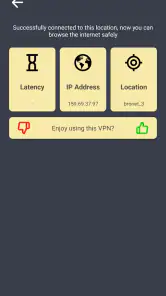



Analysis by Reviewed
When I choose a VPN, I want the connection process to be simple and the app’s limits to be clear before I rely on it. TIP VPN is a free Android tool from mobovpn group, and its current version is 3.0.2. It has a 4.5 average from around 7,900 ratings and more than 100,000 installs. Those figures suggest a sizeable audience, but I’d treat popularity as a reason to look closer, not as proof that a VPN is right for every privacy need.
How I’d fit it into an ordinary day
The clearest use case for this kind of app is a short session on a network I don’t control: checking messages while waiting for a train, reading work email from a café, or looking up directions at a hotel. I’d open the VPN before doing those things, then confirm that the connection is active rather than assuming the tap worked. When I leave the public network, I’d check again after reconnecting to mobile data or home Wi-Fi. Network changes are exactly the sort of small moment when a user can forget what is connected.
For a realistic routine, imagine I’m travelling and need to check a booking confirmation on hotel Wi-Fi. I’d connect first, load the email, and make sure the page works. If the confirmation link refuses to open, I’d avoid repeatedly switching locations without a reason: I’d test the page once without the VPN on a network I trust, then decide whether the issue is the service or the route. That keeps troubleshooting quick and avoids treating a VPN as a magic fix for every blocked or slow page.
For people who mainly want a simple on/off tool and don’t want to tune a long list of settings, that lightweight approach can be appealing. It is less compelling for anyone who needs to manage a household’s devices, set detailed rules for different apps, or prove to an employer exactly how a connection is protected. In those cases, I’d look for a service whose controls and documentation directly match the requirement.
What the version and age tell me
The current version, 3.0.2, gives existing users a concrete point of reference when checking that they have a recent build. The app’s release date, October 21, 2024, places it among newer VPN products, so I’d judge its development by what users can verify in the app now rather than assuming it has the long track record of established providers. A version number is useful context, but by itself it does not tell me what changed or how a particular update affects reliability.
If you already have it installed, I’d make a small before-and-after check whenever the app updates: connect on your usual network, open one site you know well, and see whether the connection stays usable when you switch networks. If something that worked before stops working, note the phone’s Android version and the network involved before changing several settings at once. That simple record can make it easier to tell a local Wi-Fi issue from a change in app behavior.
New users have a different decision to make. The app supports Android 6.0 and later, which makes it an option for some older Android devices as well as newer ones, but compatibility is only the first hurdle. I’d still check that the phone’s own network settings and other security tools do not interfere with a VPN connection. If setup feels confusing or the connection repeatedly drops, I would not keep sensitive tasks open while trying to diagnose it.
More From Our News Desk

Clash of Clans Is Won Between the Battles

Android Auto Makes the Case for Quieter Car Software

MobiOffice: Transforming Mobile Productivity with Seamless Integration

EA SPORTS FC™ Mobile Soccer: Redefining Mobile Sports Gaming

How Microsoft OneDrive Became a Mobile Productivity Giant

How Google Translate Breaks Language Barriers Effortlessly
Where a free, simple VPN makes sense—and where it doesn’t
Because the app is free, it is easy to try for casual browsing without first committing money. That matters if you only need occasional protection on public Wi-Fi and can tolerate checking whether a particular app or website works through the connection. The trade-off is that “free” does not tell me how a provider handles data or whether its service fits demanding privacy needs. I’d read the current privacy information and make my own call before using any VPN for sensitive work.
Compared with the VPN feature built into some browsers, a standalone app can be more useful when I want to cover activity beyond that browser. A browser-only tool may be enough if all I want is to protect web browsing in one place. Compared with a paid VPN that puts privacy policies, support, and advanced controls at the center of the service, a basic free app may not offer the reassurance or fine-tuning a cautious user wants. The better choice depends on whether convenience or documented control matters more to you.
There is also a practical trade-off when a VPN is left on all day. It can be convenient not to remember to turn it on, but it may introduce friction with services that challenge VPN connections, and it can complicate troubleshooting when a page fails. I’d use it deliberately at first, learn which everyday services behave normally, and only then decide whether leaving it connected suits my routine. If a work app, payment service, or login flow repeatedly objects, I’d use the service’s recommended route instead of assuming that persistent retries will fix it.
Questions I’d settle before depending on it
Would I use it for banking? I’d first test whether the bank’s app accepts the connection, and I would keep account protections such as a strong unique password and two-factor authentication in place. A VPN is not a substitute for those safeguards. If the bank flags the connection or makes sign-in harder, I’d disconnect and use a trusted network rather than risk being locked out while travelling.
Would I rely on it for streaming abroad? I’d treat that as something to test, not a guaranteed outcome. A selectable location can be useful, but streaming platforms may restrict VPN traffic or change their rules. If access to one specific catalog is the whole reason for installing a VPN, I’d choose a service with a clear track record for that use instead of planning around an assumption.
Can it make me anonymous? No VPN should be treated as complete anonymity. It changes how traffic is routed, but accounts, cookies, device settings, and the information I share can still identify me. My sensible use would be narrower: add a layer for routine connections on networks I don’t trust, while continuing to use careful browsing and account habits.
Should I pick it over a more established provider? For a low-stakes, everyday trial, its straightforward free approach may be enough. If I need detailed privacy assurances, business support, advanced controls, or a dependable answer about a specific service, I’d compare providers on those points and choose the one that explains them clearly. Popularity can help me notice an app, but it cannot make that decision for me.
What to keep an eye on
When deciding whether to keep using it, I’d watch for changes that matter in practice: whether connection setup remains reliable on my regular networks, whether switching between Wi-Fi and mobile data causes interruptions, and whether the apps I use most continue to work. I’d also revisit the privacy details when making the app part of a more sensitive routine. Those checks are more meaningful to me than chasing a particular server location or judging a VPN by one fast session.
The app is rated for Everyone, and it has 86 written reviews alongside its much larger rating pool. I’d read recent comments for patterns, especially reports that match my own phone or use case, rather than treating a single complaint or praise as decisive. If my needs change from casual browsing to confidential work, I’d reassess the tool instead of assuming the same simple setup remains appropriate.
First Impressions
Downloading and setting up TIP VPN was a breeze. I found it on both Android and iOS, and the installation was quick and painless. As soon as I launched it, I was greeted by a clean, intuitive interface. It's always a relief when an app doesn't overwhelm you with complicated settings right off the bat. Instead, TIP VPN offers a simple, straightforward layout that even a beginner could navigate with ease.
For Android users, the minimum supported system is Android 6.0, and the app is rated for Everyone. It was released on October 21, 2024, so this is a relatively recent product rather than a long-established VPN brand. Its 86 written reviews are a much smaller pool than its rating count, which is a useful distinction: I’d read recent user feedback for recurring connection or compatibility complaints instead of assuming the average captures every situation.
Features That Stand Out
Now, onto the juicy stuff! One of the coolest features of this app is its wide range of server locations. You can choose from numerous countries, which is perfect if you're looking to access region-restricted content. Streaming your favorite shows from anywhere in the world? Yes, please!
Another highlight is the app’s strong encryption protocols. It's like having a virtual fortress protecting your data from prying eyes. I mean, who wants their personal information floating around in the ether, right? With TIP VPN, you can surf the web knowing your data is safe and sound.
Still, I wouldn’t choose a VPN solely to get around streaming restrictions. Services can change how they detect VPN traffic, and a country selection does not guarantee that a particular library will open. If streaming is your main reason for installing it, test the service you care about before planning a trip or relying on it for a specific show. For ordinary browsing, location choice is more of a convenience than a promise of access.
A useful habit is to decide what you need before connecting. If you just want a safer session on public Wi-Fi, choosing a nearby available location is usually a more practical first try than chasing a distant one. If a page fails to load, disconnect once and compare; that quick check can help identify whether the VPN route is causing the friction instead of the site itself.
Performance & Reliability
Alright, so it’s packed with features, but does it perform well? From my tests, I can say that the connection speed was pretty solid. I didn't notice any significant slowdowns while browsing or streaming. The connection was stable, and I didn’t experience any annoying drops. That’s a win in my book!
Plus, the app doesn’t bombard you with ads, which is a huge plus. I mean, we all know how frustrating it can be when you're trying to do something important and an ad pops up out of nowhere. With TIP VPN, you can enjoy a smooth and uninterrupted experience.
My experience is a snapshot, not a guarantee across every phone, network, or destination. Public Wi-Fi can be congested, and a VPN adds another step between your device and a website, so a slower session does not automatically mean the app is malfunctioning. I’d avoid starting a large download or an important video call until I’ve checked how the connection behaves on the network I plan to use.
Compared with a VPN bundled into a browser, a standalone Android app is more convenient when I want protection across multiple apps rather than just web pages. Compared with a paid service built around detailed controls and a clearly documented privacy approach, a simple free option may be less suitable for high-stakes work. I’d use TIP VPN for ordinary browsing and casual travel connectivity, but choose a provider with policies and controls that meet my needs if sensitive work data is involved.
Is It Worth It?
In the world of VPNs, finding one that ticks all the boxes without breaking the bank can be tricky. However, TIP VPN offers a good balance between price and performance. It’s not the cheapest option out there, but considering the features and reliability, it’s definitely worth considering.
So, if you're in the market for a VPN that combines ease of use, robust security, and decent performance, give TIP VPN a shot. Whether you're streaming, browsing, or just looking to keep your online activity private, it's got you covered. Happy surfing!
My recommendation is conditional: it makes the most sense for someone who wants a straightforward, free VPN for routine use and is willing to check that it works with their usual apps. I’d skip it if I needed carefully documented privacy assurances, advanced configuration, or dependable access to a particular streaming catalog. Before making it part of a daily routine, I’d also check the app’s current settings and privacy details, then test a normal browsing session and a network switch. That gives a more useful answer than relying on a rating alone, and leaves room to move to a more transparent or specialised service if my needs grow.
TIP VPN Frequently Asked Questions
What should I check before installing TIP VPN?
TIP VPN is an Android app in the Tools category, developed by mobovpn group. It is free to download, rated for Everyone, and requires Android 6.0 or later. Before installing, check that your device meets that requirement and that you are downloading the app you intend to use. The app’s short description is simply “TIP VPN.”
Is TIP VPN suitable for a new VPN user?
TIP VPN is presented as a fast and secure VPN app for Android, so its basic purpose is straightforward: it is intended to route your internet connection through a VPN. The app has a 4.5 average from around 7,900 ratings, and it has over 100,000 installs. Those figures can help you gauge its reach, but your experience may depend on your device and connection.
What is TIP VPN and how does it work?
TIP VPN is a virtual private network application designed to provide users with secure and private internet browsing. By encrypting your internet connection, it ensures that your online activities remain anonymous and protected from prying eyes, such as hackers or government surveillance. TIP VPN routes your internet traffic through servers located in different countries, allowing you to bypass geo-restrictions and access content that might be blocked in your region.
Is TIP VPN free to use, and are there any premium features?
TIP VPN is free to download. The free version provides basic VPN services with limited server access and bandwidth. However, for users requiring more robust features like faster speeds, additional server locations, and enhanced security protocols, TIP VPN offers a premium subscription. This paid option unlocks all features and provides a better overall experience.
How does TIP VPN ensure my data privacy and security?
TIP VPN employs advanced encryption technologies, such as AES-256 bit encryption, to protect your data from unauthorized access. It also maintains a strict no-logs policy, meaning it does not track or store any of your online activities. This ensures that your browsing history remains confidential and secure at all times, providing peace of mind while using the service.
Pros
- Easy-to-use interface
- Fast connection speeds
- Multiple server locations
- Strong encryption standards
- No-log policy
Cons
- Limited free version
- Ads in free version
- Occasional connection drops
- Limited customer support
- No advanced settings
- Category
- Tools
- Version
- 3.0.2








