TimePassages Astrology
- 1.81K
- 4.7
- Installs
- 500.00K
- Price
- Free

Screenshots
Analysis by Reviewed
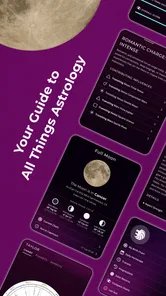
I opened TimePassages Astrology expecting a quick horoscope app, but I found something more useful for people who want to explore astrology through complete charts rather than short daily predictions. It is a free lifestyle app from AstroGraph Software, and its main appeal is the way it puts chart information and day-to-day astrological interpretation in the same place. I would recommend it to a curious beginner who wants to learn gradually, as well as to an experienced astrology enthusiast who wants a convenient mobile reference.
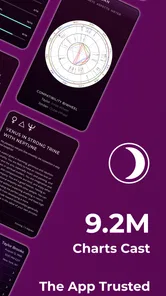
The app has a 4.7 average from around 8,400 ratings, with more than 500,000 installs. Those figures suggest that it has reached a substantial audience without making it feel like a noisy social platform. In my experience, the best part is that I can use it privately and at my own pace. I do not need to turn astrology into a public profile, and I can keep the experience focused on charts, timing, and personal reflection.
Using it around a shared household
A realistic household use case is a shared tablet or a phone that different people occasionally pick up. One person may want to check a birth chart, another may be interested in a daily interpretation, and a teenager may simply be curious about what the symbols mean. TimePassages Astrology works well as a conversation starter because the chart gives everyone something concrete to look at instead of relying only on a short zodiac message.
That shared-device situation also creates an important boundary: astrology charts are personal. A birth date, birth time, and birthplace can reveal more than someone may want to discuss casually. I would not enter another household member’s details without asking first, even if the intention is harmless. The app makes it easy to move from curiosity to personal information, so the respectful approach is to treat each chart as belonging to the person it describes.
For a couple or family, a useful routine is to look at one chart together and talk about the interpretations rather than presenting them as fixed judgments. I found this more constructive than asking whether the app can “prove” a personality trait. The chart can provide language for a discussion, but it should not replace a direct conversation about money, health, school, work, or relationships.
On a shared device, I would also avoid leaving a personal chart open. This is not because the app is difficult to use, but because the information can be surprisingly intimate. A quick switch between users is not the same as a carefully separated account system. If several people use the same device, each person should make it clear when they are finished and avoid assuming that anything displayed is meant for everyone else.
Setting up a chart without rushing
The first useful decision is whether I want a broad introduction or a more precise chart experience. If I already know my birth time, I can approach the chart with more confidence. If I only know an approximate time, I treat the result as a starting point rather than an exact personal map. That distinction matters because a small change in birth time can affect how someone interprets chart details.
More From Our News Desk

Weather by Xiaomi Review: Clear at a Glance, Less Clear Up Close

X Under Pressure: Can It Recover When Posting Goes Wrong?

Clash of Clans Is Won Between the Battles

Android Auto Makes the Case for Quieter Car Software

MobiOffice: Transforming Mobile Productivity with Seamless Integration

EA SPORTS FC™ Mobile Soccer: Redefining Mobile Sports Gaming
I recommend entering information slowly and checking it before moving on. A wrong birthplace or an incorrectly remembered time can make the reading feel personal while quietly changing the underlying chart. This is one of the less obvious lessons of using a detailed astrology app: the quality of the interpretation depends heavily on the quality of the starting information, not just on how polished the interface feels.
For a household, I would create a simple agreement before adding several people. Ask whose chart is being made, decide whether that person wants to read the interpretation alone or together, and keep the conversation optional. This is especially useful when a parent is helping a child explore astrology. Helping with the technical steps is fine; telling the child that the chart defines who they are is not.
The app is free to install, which makes that first experiment easy. It also includes in-app purchases ranging from $0.99 to $99.99 per item. I would therefore spend time with the basic experience before buying anything. A free starting point is enough to decide whether I actually enjoy reading charts, and it prevents the common mistake of paying for advanced material before understanding how I plan to use the app.
That pricing range also makes household expectations important. If a shared device is used by several people, I would discuss purchases before making them and keep payment decisions separate from casual browsing. The app’s free entry point is friendly, but optional purchases can become a source of confusion when one device is used by adults and younger family members.
Coordinating daily use without turning it into a rulebook
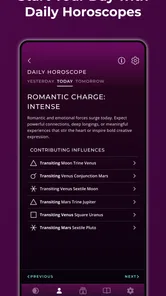
The daily insights are most useful to me when I read them as prompts for reflection. I might check the app in the morning, note a theme that seems relevant, and then return to ordinary plans. I would not use a daily interpretation to cancel an appointment, make a major financial decision, or decide how another person “must” behave. That is where healthy curiosity can turn into overreliance.
In a couple or family, a light routine can work well: each person reads privately, then shares only what they want to share. This avoids a common problem with shared astrology use, where one person reads another person’s interpretation aloud and treats it as an explanation of their motives. The app is better suited to voluntary discussion than to assigning labels.
One practical advantage is that the chart-based approach gives users more to compare than a generic sign-based horoscope. I can look at the broader picture and then consider how a daily message fits into it. That makes the experience feel less disposable than opening a short prediction, reading two sentences, and forgetting it. At the same time, the extra detail requires patience; someone looking for a ten-second answer may find it more involved than expected.
I also found that keeping a small note of what I actually experienced can improve the process. Instead of accepting every interpretation immediately, I can write down the parts that felt relevant and revisit them later. This turns the app into a personal reflection tool rather than a stream of instructions. It is a particularly good approach for households because it keeps each person’s interpretation personal while still allowing thoughtful conversation.
Another useful trade-off is timing. Checking the app constantly can make ordinary events feel like evidence for every prediction. Checking it once at a chosen time gives the material some space without letting it dominate the day. For me, that boundary makes the app more enjoyable and keeps its role proportionate.
Age, trust, and responsible interpretation
TimePassages Astrology is rated for Everyone, which makes it approachable for a broad audience. That does not mean every child will understand astrology in the same way as an adult. Younger users may read symbolic language literally, while older users may be more comfortable treating it as a reflective tradition. I would introduce it with a simple explanation: the app offers interpretations, not guaranteed facts about a person’s future.
For parents, the best shared use is collaborative rather than supervisory. Sit with a child who is interested, explain unfamiliar terms, and ask what they think instead of supplying the answer. If a reading sounds worrying, I would put it in context immediately and move on to something concrete. No chart should be used to frighten a child, predict a medical outcome, or justify restricting their choices.
The same principle applies between adults. A partner should not use a chart to win an argument, and a friend should not treat an interpretation as permission to cross a boundary. The app can support self-reflection, but trust still comes from listening and respecting consent. In my view, this is one of the most important ways to use a personal astrology tool responsibly.
Privacy also deserves attention in a shared setting. Birth information is not just a random collection of numbers; many people regard it as personal. I would ask before entering someone else’s details, avoid displaying a chart in a public room, and be cautious about handing a device to someone who may browse through saved material. These are simple habits, but they matter more than any clever interpretation.
Someone who dislikes symbolic or spiritual frameworks may not enjoy the app, even if the chart tools are well presented. It is also not the right choice for a user who wants professional psychological, medical, legal, or financial guidance. I would skip it if I knew I was likely to make major decisions based solely on predictions. A conventional calendar, journaling app, or evidence-based advice source would be a better fit for those needs.
How it compares with simpler astrology alternatives
Compared with a basic horoscope app, TimePassages Astrology feels more substantial because it centers the chart rather than only the user’s zodiac sign. That makes it a better choice for someone who wants to understand why different parts of an interpretation appear. The trade-off is that it asks for more attention and may feel less instantly entertaining.
Compared with reading astrology websites in a browser, the app is more convenient for repeated personal use. I can return to the same kind of information without searching through unrelated pages. That continuity is useful when I am learning terminology or comparing a daily insight with the broader chart. A website may still be better for someone who wants many independent explanations or prefers not to install a dedicated app.
Compared with social astrology services, this feels more private and self-directed. I do not need a feed of other people’s opinions to get value from it. That is a strength for a household because each person can explore independently. The downside is that users who want community discussion, live conversation, or a strong social layer may find the experience too solitary.
Compared with a paper astrology book, the app is faster for checking information and easier to carry. A book can be better for slow study, annotation, and building a structured understanding over time. I would use the app for quick reference and a book or course for deeper learning if astrology became a serious interest.
The developer, AstroGraph Software, has positioned the app as a focused astrology experience rather than a general lifestyle dashboard. That focus is welcome. I did not feel pushed toward unrelated wellness tools or a crowded collection of distractions. Still, focused does not mean effortless: beginners should expect to encounter unfamiliar concepts and should resist the temptation to interpret every detail at once.
Everyday strengths and points of friction
The strongest everyday advantage is the balance between accessibility and depth. I can open the app for a short daily check, but I can also spend longer exploring a chart when I have the time. That range makes it suitable for different members of a household, provided everyone understands that the app is a tool for interpretation rather than an authority over personal decisions.
Another strength is the possibility of learning through repetition. Seeing chart language regularly helps unfamiliar ideas become less intimidating. I found it more effective to focus on one part of a chart at a time instead of trying to memorize everything. This is a practical tip that saves time and makes the experience less overwhelming for a first-time user.
The main friction is the same feature that gives the app its value: detail. Someone expecting a simple “today will be good” message may feel that the chart approach requires too much concentration. The app can also encourage confirmation bias if I search only for statements that match what I already believe. Keeping a skeptical, reflective attitude improves the experience.
There is also a financial boundary to consider. The app is free, but optional purchases can become expensive at the upper end of the listed range. I would not assume that paying automatically makes an interpretation more accurate or more personally meaningful. First decide whether the free experience fits your habits, then consider any purchase carefully and discuss it before using a shared payment method.
On supported devices, the minimum operating system is Android 9 or later. The current version is 3.1.5, so I would check compatibility before planning to use it on an older phone or tablet. That is especially relevant in a household where a spare device may be passed between family members. A shared-device plan only works if the device can run the app comfortably.
The app was released on February 14, 2020, and its continued presence in the lifestyle category gives it a more established feel than a brand-new experiment. I would still judge it by my own reading habits rather than by age or popularity. A long-running app can be familiar and useful, but the real question is whether its approach matches the way I want to explore astrology.
My household verdict
I think TimePassages Astrology is a good choice for households that want to explore astrology respectfully, one person at a time, with room for optional discussion. Its free entry point, Everyone age rating, and mix of daily insights with chart-based material make it approachable without reducing the subject to a single sentence. The app is especially valuable when users treat it as a prompt for reflection and learning.
I would be more cautious about installing it on a device used by several people without clear boundaries. Birth details should be entered with consent, purchases should be discussed, and personal interpretations should not be read aloud as if they were objective descriptions. Those are not flaws in the app itself; they are practical conditions for using any personal astrology tool well.
My final recommendation is simple: try it if you want more than a generic horoscope and are willing to spend time learning what a chart is showing. Skip it if you want evidence-based guidance, a social network, or instant entertainment with no reading involved. For me, its best role is a private, flexible companion for curiosity—something I can check, question, and put down again without letting it make decisions on my behalf.
The best way to use it is with curiosity, consent, and a clear line between reflection and real-world responsibility.
TimePassages Astrology Frequently Asked Questions
Can I use TimePassages Astrology on my Android or iOS device?
TimePassages Astrology is a mobile lifestyle app for people interested in astrology. Before downloading, check that your device meets the app’s operating-system requirements and that you are choosing the version offered for your platform. The app is designed to make chart information and astrological insights accessible from a phone, so it can be useful for checking your chart or following current planetary themes while away from a computer.
Who develops TimePassages Astrology, and is it widely used?
TimePassages Astrology is developed by AstroGraph Software and is presented as a tool for exploring charts and astrological insights. It has an average rating of 4.7 from around 8,400 ratings, with about 1,800 written reviews and more than 500,000 installs. These figures can help you gauge its visibility among users, though individual experiences may vary depending on what features and interpretations they are looking for.
What is TimePassages Astrology, and what can I use it for?
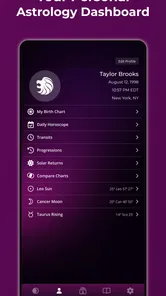
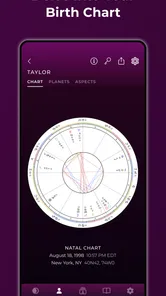
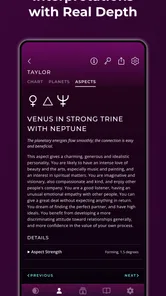
TimePassages Astrology is an astrology app designed to help users explore natal charts, planetary positions, zodiac signs, houses, aspects, and current transits. After entering your birth date, time, and location, the app presents personalized chart information and interpretations. It can be useful for beginners learning astrology as well as experienced users who want a convenient way to review charts and follow planetary movements.
How accurate is the birth chart in TimePassages Astrology?
The accuracy of your chart largely depends on the information you provide. A correct birth date, exact birth time, and accurate birthplace generally produce more precise house placements and rising-sign calculations. If your birth time is unknown or approximate, some results may be less reliable, particularly the ascendant and house positions. As with all astrology software, interpretations are for personal reflection and entertainment rather than scientific prediction.
Does TimePassages Astrology offer daily horoscopes and transit information?
Yes, TimePassages Astrology includes features focused on current planetary transits and their relationship to your natal chart. Depending on the version and available plan, you may see daily or ongoing interpretations that explain how planetary movements could correspond with themes such as relationships, communication, work, or personal growth. These readings are best treated as general guidance, since astrology interpretations are subjective.
Pros
- Detailed birth charts with planetary positions
- houses
- and aspects.
- Includes daily horoscopes tailored to your natal chart.
- Useful glossary helps beginners understand astrology terminology.
- Tracks current planetary transits and their potential chart influences.
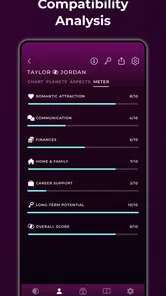
- Offers compatibility tools for comparing two birth charts.
Cons
- Many advanced interpretations and features require a paid subscription.
- The interface can feel dense and dated on smaller phone screens.
- Astrology content may be overwhelming for users seeking simple readings.
- Accurate chart calculations require precise birth time and location details.
- Some features depend on an internet connection to load updated information.











