Tilla Premium
- 74.00
- 4.8
- Installs
- 10.00K
- Price
- $4.99

Screenshots
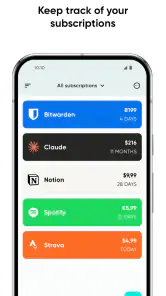
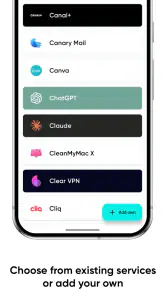
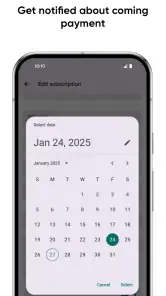
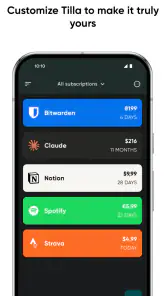
Analysis by Reviewed
When recurring plans are scattered across streaming, storage, fitness, and other services, it is easy to lose track of what renews when. I see Tilla Premium as a focused finance app from Pavlo Rekun for keeping those commitments visible without turning the task into a full budgeting project. Its usefulness depends less on elaborate financial analysis than on whether you want one dedicated place to record subscriptions and check upcoming payments.
The purchase is straightforward, but the value is personal
Tilla Premium costs $4.99, so it is a paid app rather than a free tracker with a separate premium tier. That makes the decision fairly direct: you are paying upfront for a dedicated subscription-management tool. I would judge that cost against the value of catching a renewal you meant to cancel, not against the price of a complete budgeting service. The app is rated 4.8 on average from around 1.1 thousand ratings, and it has passed 10 thousand installs, which suggests that this focused approach has found an audience.
The age rating is Everyone, and the app was released on July 14, 2021. Version 2.6.1 is the current version, with Android 6.0 as the minimum operating system requirement. Those details make it easier to decide whether it fits your device and household, but the more important question is whether you actually want a separate place to record subscriptions. If you already review recurring payments reliably through your bank, this may feel like an extra step rather than a necessary purchase.
Why Tilla Premium Stands Out
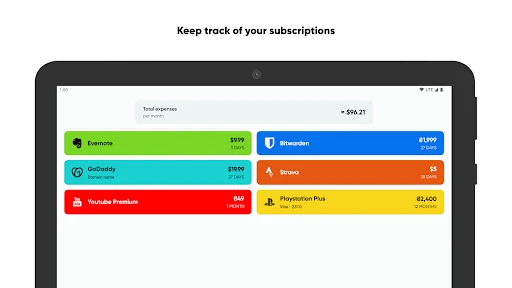
Let’s dive right into why Tilla Premium is a game-changer. Firstly, it offers a super clean and intuitive interface. You don’t need to be a tech wizard to figure things out here. From the moment I opened the app, I was impressed by how straightforward it was. Adding a new subscription is as easy as pie - just a few taps and you’re done.
Reminders help when dates are easy to forget
One of the standout features of Tilla Premium is its reminder system. The app sends you notifications before your subscriptions are due, so you’ll never be caught off guard by unexpected charges again. How cool is that? I mean, who hasn’t been surprised by a forgotten renewal at least once? With Tilla Premium, those days are over.
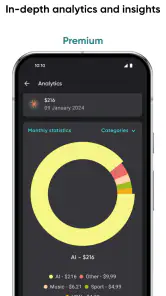
Another handy feature is the ability to categorize subscriptions. Whether it’s streaming services, gym memberships, or digital magazines, you can sort them all neatly. This organization helps you visualize where your money is going each month. Personally, I found this feature incredibly helpful in managing my budget.
Make the list useful by maintaining it
The best way to get value from a tracker like this is to add a subscription as soon as you sign up, rather than trying to reconstruct everything later. I would include annual renewals as carefully as monthly ones: a calendar reminder is only useful when the date and amount you entered are correct. When a trial turns into a paid plan, updating the entry promptly keeps the list meaningful. This small habit is more important than having a long feature list, because Tilla depends on the information you maintain.
More From Our News Desk

Weather by Xiaomi Review: Clear at a Glance, Less Clear Up Close

X Under Pressure: Can It Recover When Posting Goes Wrong?

Clash of Clans Is Won Between the Battles

Android Auto Makes the Case for Quieter Car Software

MobiOffice: Transforming Mobile Productivity with Seamless Integration

EA SPORTS FC™ Mobile Soccer: Redefining Mobile Sports Gaming
For example, imagine reviewing your subscriptions while waiting for a train and noticing a music service you barely use is due soon. A reminder gives you a chance to decide whether to keep it, rather than discovering the charge afterward. The app can help you remember and organize; it cannot make the cancellation decision or replace checking the provider’s own account page. I’d treat its list as a personal reference, not as proof that a payment has been stopped.
Compared with relying on bank statements, Tilla offers a forward-looking view: statements show what has already been charged, while a maintained subscription list can help you prepare for what is coming. A spreadsheet can do something similar without a paid app, but then you have to manage its structure and reminders yourself. If you want broader spending analysis across everyday purchases, a full budgeting app is likely a better fit. Tilla’s narrower scope is useful precisely when you want recurring commitments separated from all the other transactions in your finances.
Where it fits among everyday finance tools
The choice is not simply between Tilla and a bank app. A bank statement is dependable for checking completed transactions, but it can make it harder to see a renewal that has not happened yet, especially when merchants use different billing names. Tilla is more useful as a deliberately maintained forward calendar of subscriptions. That distinction matters: use the bank to verify what was charged and the tracker to remind yourself what you expect to be charged.
A calendar can also handle renewal dates, and it may be enough if you only have a couple of plans. The trade-off is that a calendar event does not naturally give you a categorized inventory of recurring services. A spreadsheet offers more flexibility, but you must build and maintain the columns, dates, and any reminder process. Tilla’s appeal is that it keeps the job narrowly focused; its limitation is that it does not replace a broader view of income, everyday spending, or account activity.
One practical approach is to use the app during a subscription audit rather than waiting until a charge surprises you. Open recent bank activity, identify recurring services, and add the ones you intend to keep or review. Then check the list at a regular moment, such as when you are planning monthly expenses. This is more reliable than entering a rushed, incomplete list once and assuming it will stay accurate on its own.
Ease of use, access, and realistic expectations
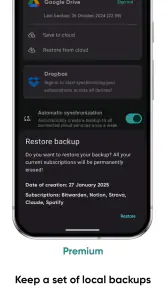
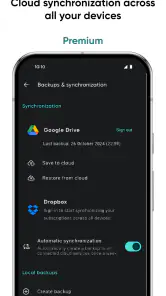
What I also love about Tilla Premium is its accessibility. It’s available on both Android and iOS, meaning you can manage your subscriptions from pretty much any device. Plus, the synchronization across devices is seamless. I was pleasantly surprised by how effortlessly my data synced between my phone and tablet.
And let's not forget about security. With everything going digital, protecting your info is crucial. Tilla Premium takes this seriously with its secure encryption, ensuring your data stays safe from prying eyes.
For a shared household, the most useful role may be a single person keeping a tidy record of services everyone uses, then bringing that list into a conversation about what to keep. That can make a renewal review more concrete than trying to remember services from memory. I would still check each provider directly before changing a plan: a tracker is a planning aid, not a control panel for the subscriptions themselves.
Another useful habit is recording enough context to recognize why an entry is there. A service name alone may not remind you whether it is for work, family, or a short-term project when you revisit the list months later. Categories can help group entries, while a quick review after signing up or canceling keeps the overall picture honest. The strength of a manual tracker is also its main trade-off: you choose what to record, but you remain responsible for keeping it current.
Who is likely to get their money’s worth?
I’d recommend it to someone with enough recurring services that dates and categories have become hard to keep straight, especially if reminders would prevent a missed renewal. It may also suit a household that wants one person to maintain a clear list for shared services, provided the entries are kept current. The no-limits positioning makes it especially appealing if you have a long list rather than just a couple of subscriptions.
It is also a reasonable fit for someone who prefers a clear inventory over a detailed financial dashboard. If you want to answer, “What services am I paying for, and when should I review them?” a dedicated list can be less distracting than a broad personal-finance app. The benefit is strongest when you have varied billing cycles, including plans that renew less often than monthly and are easy to overlook.
On the other hand, I would skip it if you only have one or two predictable bills, already use a calendar consistently, or prefer not to enter and maintain subscription details by hand. The paid price is harder to justify when your existing banking app or spreadsheet already solves the problem. If you need automatic transaction detection or a complete monthly budget, choose a tool designed for those jobs instead of expecting a focused tracker to do everything.
Before buying, I would ask myself two practical questions: will I actually add each service when it starts, and will I revisit the list when a plan changes? If the answer to both is no, a new app will not fix the underlying habit. If the answer is yes, the small effort of maintaining one clean list may be worthwhile, particularly when remembering a single renewal would matter more than having sophisticated budget reports.
A measured buy-or-skip verdict
In a world where subscriptions are the norm, having an app like Tilla Premium is almost a necessity. It’s not just about keeping track of payments; it’s about gaining control over your spending habits. The ease of use, combined with its reliable features, makes it a must-have for anyone looking to streamline their financial management.
So, if you’re tired of losing track and paying for things you don’t even use, give Tilla Premium a try. It’s like having a personal assistant who reminds you what’s due and when. Who wouldn’t want that kind of help?
My verdict is more measured: Tilla earns its place when you will keep its records accurate and make use of the reminders, not simply because subscriptions are common. For a person who wants a lightweight, dedicated list and values a nudge before renewals, the upfront purchase can be worthwhile. If you want your spending tracked automatically or need a broader financial picture, I’d put that money toward a different kind of tool.
Tilla Premium Frequently Asked Questions
What kind of app is Tilla Premium?
Tilla Premium is a finance app for keeping track of subscriptions. Its short description is simply “Tilla Premium,” while its central purpose is reflected in the store summary: keeping track of subscriptions with no limitations. If you want an app focused on organizing recurring services rather than managing general tasks, this is the product’s main appeal.
What is Tilla Premium, and how does it differ from the free version?
Tilla Premium is an upgraded version of the Tilla app, designed to enhance your experience with additional features and functionalities. While the free version offers basic task management tools, Tilla Premium includes advanced options such as custom reminders, collaborative tools for team projects, and ad-free usage. This makes it ideal for users who need more robust task management solutions.
Is Tilla Premium available for both Android and iOS devices?
Yes, Tilla Premium is available for both Android and iOS devices. You can download it from the Google Play Store for Android or the Apple App Store for iOS. The app is optimized for both platforms, ensuring a seamless user experience regardless of your device choice.
What are the key features of Tilla Premium that justify its cost?
Tilla Premium offers several key features that justify its cost, such as enhanced task management capabilities, personalized reminders, and collaboration tools for team projects. Additionally, it provides an ad-free experience, which allows for uninterrupted use. These features are designed to boost productivity and streamline your task management process, making it a worthwhile investment.
Can I share my Tilla Premium subscription with other users?
Tilla Premium allows for collaborative use, enabling you to share projects and tasks with other users. While the subscription itself is tied to a single user account, the app’s collaborative features ensure that you can work efficiently with team members or family in managing shared tasks, which enhances its value for group use.
Pros
- Efficient subscription management.
- User-friendly interface.
- Supports multiple currencies.
- Secure payment tracking.
- Customizable notifications.
Cons
- Limited free version features.
- Occasional sync issues.
- No web app version.
- Needs manual data input.
- Complex UI for beginners.
- Category
- Finance
- Version
- 2.6.1











