

ThingsBook
- 260.00
- 4.2
- Installs
- 100.00K
- Price
- Free

Screenshots
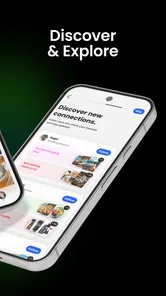
Analysis by Reviewed
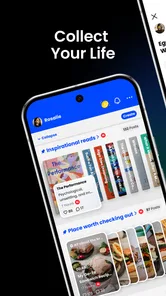
I like the idea behind ThingsBook because it treats personal notes as something worth keeping, not merely something to type and forget. Developed by ThingsBook Studio, this free social app is built around writing, collecting, and archiving pieces of everyday life in a personal space. After spending time with it, I see it as a calmer alternative to the usual stream of quick posts and disposable updates. It feels better suited to people who want to preserve thoughts, lists, memories, and small observations in an organized way.
The app has a 4.2 average from roughly 700 ratings, with more than 100,000 installs, so it already has a meaningful user base without feeling like an overcrowded social network. It is rated Teen and runs on Android 10 or later. The version I reviewed is 1.1.1, and its January 2026 release places it among newer apps rather than long-established note platforms. That matters: ThingsBook feels focused and approachable, but it does not yet replace every specialized tool I use for serious planning, collaboration, or long-term knowledge management.
How ThingsBook fits into a real daily routine
I use ThingsBook most naturally when I give it a small, dependable place in the day rather than expecting it to organize everything for me. A quick capture can preserve the detail I would otherwise forget, while a later review helps me decide what is worth keeping and what was only useful in the moment. That routine also makes setup friction easier to spot before a personal archive grows.
A personal archive instead of another noisy feed
My basic workflow with ThingsBook starts with one simple rule: I write something when it is worth returning to, not whenever I want to fill a timeline. That changes the way I use it. A short reflection after a difficult day, a recipe adjustment, a travel idea, a photo-related memory, or a list of things I want to remember can all belong in the same personal space without needing to become a public performance.
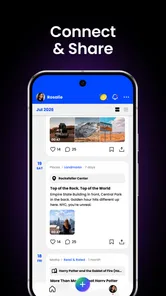
The social category is important, but I would not approach this app expecting the constant interaction of a conventional social platform. Its appeal is more personal. I can treat an entry as a private record, a collected item, or a piece of a larger archive. That makes it especially attractive to people who enjoy journaling but do not want a formal diary routine with pressure to write long entries every day.
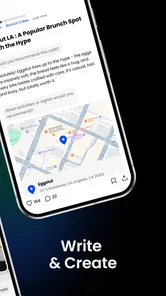
A realistic example is a busy weekday when I am preparing for a weekend away. Instead of scattering information across a messaging app, a notes app, and saved browser pages, I can use ThingsBook as a lightweight travel notebook. I might record the neighborhood I want to explore, add a reminder about a restaurant, write down what I packed, and later archive a short account of what actually happened. The value comes from keeping those fragments together so the trip remains useful after it is over.
That workflow also reveals the app’s first trade-off. ThingsBook is more appealing when I decide what deserves a place in my archive. If I throw every passing thought into it without a naming or sorting habit, the personal space can become just as messy as an ordinary notes folder. The app gives me a pleasant place to collect material, but I still need to supply the discipline.
More From Our News Desk

 Instagram
Instagram’s Power Comes From Its Place in Your Phone
A close look at how Instagram turns Meta’s reach, recommendation systems and everyday camera habits into durable platform power—and what that costs users.

 Gmail
GmailGmail in a Busy Inbox: Who Benefits Most?
From first account to crowded workday, Gmail earns its place through dependable search and flexible sorting—but its best fit depends on how much inbox maintenance you can tolerate.

 Prime Video
Switching to Prime Video: What Changes in Your Viewing Routine
Prime Video can make a compelling second home for streaming, but switching means learning a different catalog, rental layer, and route from browsing to playback.

 Universal TV Remote Control
Universal TV Remote Control Works Best as a Reliable Backup
A phone remote earns its place through quick setup and reliable habits. Here is how to get more from Universal TV Remote Control—and where its limits show.

 Weather - By Xiaomi
Weather by Xiaomi Review: Clear at a Glance, Less Clear Up Close
Xiaomi’s weather app makes everyday forecasts quick to scan, but its calm surface can leave useful details and recovery paths harder to find than they should be.

 X
XX Under Pressure: Can It Recover When Posting Goes Wrong?
A resilience-focused review of X, examining setup, mistaken posts, interruptions, weak connections, and the gaps that matter when recovery needs to be dependable.
Latest News



What I would save there, and what I would not
I find the app strongest for material that benefits from context. A plain shopping reminder may be quicker in a dedicated task app, while a note about why I chose a particular ingredient, what I learned from a failed recipe, or how I want to improve it next time has more lasting value in an archive like this.
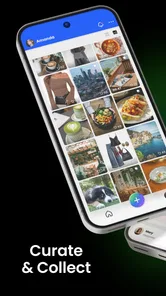
I would also use it for recurring personal themes: books I want to read, ideas for gifts, memorable conversations, places I have visited, or small creative projects. The important distinction is that these are collections of personal reference, not simply tasks waiting to be checked off. Once I started thinking in those terms, the app became more useful and less like a replacement for every other tool on my phone.
For shared work, complex project planning, or information that requires strict structure, I would choose a specialized alternative. A collaborative workspace is better when several people must edit the same material, while a task manager is better when deadlines, recurring actions, and completion states are central. ThingsBook makes more sense when the owner of the material is primarily me and the goal is to remember, reflect, or build a personal record.
The first habit that makes the app better
My most useful early habit was writing a clear first line for every entry. I avoided vague labels such as “thoughts” or “stuff” and used a phrase that would still make sense weeks later. For example, “What worked on my morning routine” is far more useful than “today.” This is not a glamorous trick, but it determines whether an archive remains searchable in my head or becomes a pile of forgotten fragments.
I also found it helpful to separate capture from editing. When I had only a few seconds, I wrote the idea in its rough form instead of trying to make it polished. Later, I could return to it, add context, and decide whether it belonged in a longer collection. That two-stage approach reduces the pressure that often makes journaling apps feel like work.
Settings I would check before settling in
Because ThingsBook is a social app with a personal focus, I would spend a few minutes reviewing every available visibility and account-related option before building a sensitive archive. I would pay particular attention to who can see an item, how sharing behaves, and whether the default choices match the kind of writing I expect to create. A private reflection and a post intended for friends should not be handled casually in the same way.
I would also check the display and notification controls early. An archive works best when it is easy to revisit, but constant alerts can turn a quiet personal tool into another source of interruption. I prefer notifications that support a deliberate habit rather than pull me back into the app throughout the day. If I use it for a daily note, a single planned reminder is more useful to me than frequent activity prompts.
Another worthwhile check is the way the app presents archived material. I would look at how older entries are reached and whether the organization style feels natural before committing to a large collection. This is where a short trial period helps. Create a few different kinds of entries—one reflective, one practical, and one memory-based—and then see how comfortable it is to return to them. That test tells me more than a polished first impression.
My advice is not to overconfigure the experience on the first day. Start with the smallest set of choices that protects personal material and keeps the interface calm. Then adjust after a week of actual use. Settings that seem important in theory may not matter in practice, while a small notification or presentation preference can have a major effect on whether I keep the habit.
Faster patterns for people who dislike long journaling sessions
ThingsBook does not need to become a nightly essay. I get more consistent results from short, repeatable formats. One pattern is the three-line entry: what happened, what I noticed, and what I want to remember. Another is a quick “keep, change, try” note after an event. These structures are fast enough for ordinary days but still create useful records.
I also like using a capture phrase at the beginning of an entry. A label such as “idea,” “memory,” “reference,” or “decision” gives the note an immediate purpose. This makes later review easier without forcing me to build a complicated filing system. The trick is to use a small vocabulary and repeat it consistently. Too many categories create another maintenance job.
For collections, I would create a central entry that explains what belongs there. If I am gathering reading notes, the opening record might state whether I am collecting quotations, reactions, or recommendations. That simple explanation prevents the collection from drifting into unrelated material. It is a non-obvious advantage of a personal archive: the organizing note can preserve the reason behind the collection, not just its contents.
Another efficient pattern is the weekly sweep. Once a week, I would review recent entries, improve unclear wording, and archive anything that has served its purpose. I would not try to rewrite everything. The goal is to keep the archive understandable, not perfect. This short maintenance session is more sustainable than waiting until the collection becomes overwhelming.
When I am using ThingsBook during a busy day, I would avoid opening it with the expectation of browsing indefinitely. I would enter with a specific action: capture an idea, update a collection, or revisit one older note. That small boundary protects the app’s personal character and prevents it from becoming another feed that consumes time without giving much back.
Where it compares well with familiar alternatives
Compared with a basic notes app, ThingsBook feels more intentional for personal collecting and reflection. A conventional notes tool often begins as a blank list of documents, which is flexible but can become anonymous. ThingsBook’s identity encourages me to think about an entry as part of my life archive rather than just a temporary memo.
Compared with a public social network, it is a better fit for slower, more considered sharing and personal record-keeping. The usual social feed rewards immediacy, reactions, and volume. ThingsBook appeals to a different mood: I can focus on the meaning of an entry and its future usefulness instead of wondering whether it will attract attention.
Compared with a dedicated journal app, it may feel less rigid and more social in spirit. That flexibility is helpful if I want to mix memories, collections, and practical personal material. The compromise is that someone seeking a highly structured mood tracker, detailed writing analytics, or a specialized diary system may prefer an app designed specifically for that purpose.
Compared with a task manager, ThingsBook is better for context and worse for operational follow-through. I can record why something matters, but I would not rely on it as my only system for deadlines and recurring obligations. The right choice depends on whether I am trying to remember an experience or ensure that an action happens at a particular time.
Limits experienced users should understand
The biggest limitation is conceptual rather than technical: an archive is only as useful as its retrieval habits. If I save everything with no consistent wording, I may remember that I wrote something without being able to find it mentally. ThingsBook rewards a modest amount of organization. Users who want automatic sorting or a fully structured database may find this approach too dependent on personal effort.
I also would not treat it as a secure vault for highly sensitive information simply because the space feels personal. Personal and private are not automatically identical. I would avoid storing secrets, financial credentials, or anything that belongs in a purpose-built security tool. For ordinary reflections and memories, the app is a comfortable home; for critical confidential records, I would choose a service designed around that requirement.
There is a similar trade-off with permanence. The emotional appeal of archiving life is strong, but I would still keep important material in a second location when losing it would genuinely hurt. A meaningful story, a family record, or a carefully developed creative idea deserves a backup habit independent of any single app. That is sensible digital housekeeping, not a criticism unique to ThingsBook.
People who want a large public audience may also be disappointed. The app’s strongest use is not chasing reach. If the main reason for joining a social service is discovering viral content, following celebrities, or measuring engagement, a mainstream network will probably be more satisfying. ThingsBook is for a quieter relationship with personal material, whether or not sharing is part of that experience.
Finally, users who need mature collaboration tools should look elsewhere. A group project with assignments, permissions, revision history, and formal approvals needs a workspace built for coordination. ThingsBook can hold the personal side of a project—ideas, lessons, and reflections—but I would not make it the operational center for a team.
Who will get the most from it
I would recommend ThingsBook to someone who wants a personal social space without the pressure of constant public posting. It is particularly suitable for reflective people, casual writers, travelers, collectors of ideas, and anyone who has outgrown scattered notes but does not want to maintain a complex knowledge system.
It is also a good match for people who struggle with traditional journaling because they imagine every entry must be polished. The app works better when I allow short, imperfect records to accumulate. Over time, those fragments can become a more honest account of daily life than occasional formal entries.
I would be more cautious recommending it to a user who needs precise task management, advanced collaboration, strict document control, or a specialized wellness tracker. Those needs are not impossible to combine with ThingsBook, but another app will usually handle the core job more directly. The best setup may be to let ThingsBook preserve meaning and context while other tools handle deadlines, files, or sensitive data.
My verdict after building a repeatable routine
After using it as a place for short captures, weekly reviews, and longer personal collections, I think ThingsBook succeeds because it encourages a different pace. It is not trying to be every productivity tool or every social network at once. Its value appears when I use it deliberately: write something worth keeping, give it a clear identity, return to it later, and archive it with enough context to remain meaningful.
The free price makes it easy to try, and the Teen rating makes its intended audience clear without making the experience feel childish. The current version, 1.1.1, is still best approached with realistic expectations: I see a focused personal archive rather than a replacement for mature note-taking, task, or collaboration software.
My strongest recommendation is to begin with one repeatable collection and one weekly review habit. That approach lets the app prove its value without demanding a complete life-management system. If you want a place to preserve thoughts, memories, and personal discoveries in a more intentional way than a standard feed, ThingsBook is worth trying. If you mainly need deadlines, team workflows, or highly specialized tracking, I would keep your existing tools and use this app only for the personal stories and ideas that deserve to last.
ThingsBook Frequently Asked Questions
What kind of app is ThingsBook, and who develops it?
ThingsBook is a social app from ThingsBook Studio, built around keeping personal writing and collections together. Its store summary describes it as a place to write, collect, and archive your life in one personal space. That focus may appeal if you want an app for recording thoughts and experiences rather than managing a highly specialized work project.
Which devices can run ThingsBook, and what version is available?
ThingsBook is available for Android devices running version 10 or later, and its current version is 1.1.1. Before downloading, check that your device meets the operating-system requirement and that the app is offered for your platform in its official store. Keeping an app updated can also help you receive its latest available changes and improvements.
What is ThingsBook and what can I use it for?
ThingsBook is a personal organization and productivity app designed to help you keep track of tasks, notes, ideas, reminders, and everyday responsibilities in one place. After exploring its features, it feels most useful for users who want a simple digital space to record important information, plan activities, and reduce the chance of forgetting appointments, errands, or unfinished tasks.
Is ThingsBook suitable for beginners who have never used a productivity app?
Yes, ThingsBook is generally approachable for beginners because its main purpose is easy to understand: add information, organize it, and review it when needed. The interface may take a short time to explore, especially if you want to customize categories or routines, but basic task and note management can be learned quickly without requiring previous experience with planning applications.
Does ThingsBook work offline, or do I need an internet connection?
The availability of offline functionality may depend on the specific version of ThingsBook and the device platform you use. Basic information may remain accessible without a constant connection, but features such as synchronization, backups, account services, or sharing can require internet access. Before relying on the app for important data, check its current store description and permissions.
Pros
- Quickly capture ideas
- notes
- and reminders in one place.
- Simple interface makes everyday organization easy to learn.
- Useful for keeping personal lists and small tasks together.
- Lightweight design should run smoothly on most modern devices.
- Helps reduce forgotten errands through organized information.
Cons
- May feel too basic for users needing advanced project management tools.
- Limited collaboration features can restrict shared planning.
- Organization may become difficult when storing many unrelated entries.
- Some features may require time to discover without detailed guidance.
- Not ideal for users who need extensive calendar or document integrations.











