

TfL Go: Plan, Pay, Travel
- 105.00
- 4.6
- Installs
- 1.00M
- Price
- Free

Screenshots
Analysis by Reviewed
On a London day when the plan changes halfway through, I want more than a route drawn on a map: I want a quick way to see what is happening across the transport network and decide what to do next. That is the practical appeal of TfL Go: Plan, Pay, Travel. It is a free navigation app from Transport for London, and I see it as a useful city-specific companion rather than a replacement for every map or payment tool on my phone.
What the app is good at right now
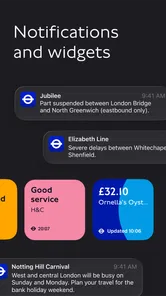
For someone travelling around London, the value is in bringing journey planning and transport updates together. Instead of treating a trip as a fixed set of directions, I can check the network and adjust when a disruption makes my preferred route less sensible. The app is for everyone, and its 4.4 average from around 41,000 ratings suggests it has found a broad audience, though ratings alone cannot tell me whether it suits a particular trip.
It has more than a million installs, and its current version is 3.1.0. Those details place it as an established, actively identifiable TfL app, but I would not treat a version number by itself as proof of any particular recent feature. What matters in practice is whether its live information and route choices help with the journey I am making today.
Choosing a route when the day changes
Ever found yourself stuck in the bustling streets of London, trying to figure out the best way to get from point A to point B? Well, that's where the TfL Go: Plan, Pay, Travel app comes in handy. Designed to make your life easier, it's like having a personal travel assistant right in your pocket.
Your Ultimate Travel Companion
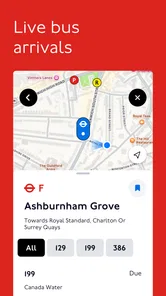
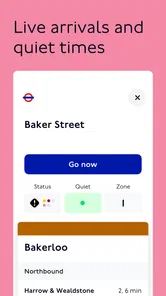
When it comes to navigating the city, the TfL Go app is a game-changer. Whether you're a local or just visiting, this app has got your back. What I love most is its user-friendly interface that makes planning journeys a breeze. You can easily check live updates on the tube, bus, and even the overground services. It’s like having a live map that updates at your fingertips!
Planning Made Easy
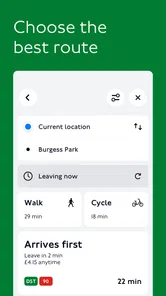
One of the standout features is the journey planner. It allows you to enter your starting point and destination, and voilà, you get the best routes with real-time updates. This isn't just useful for the daily commute; it’s a lifesaver for those spontaneous trips across the city. Plus, it gives you multiple route options, so if one line is down, you can quickly switch to another without breaking a sweat.
My practical tip is to check the route again shortly before setting off, especially if I am connecting between services. A route that looked straightforward when I first planned it may no longer be the easiest choice after a delay or a change in conditions. I also compare the alternatives for walking and transfers, not just the headline journey time: a route with fewer changes can be worth choosing when I have luggage, children, or a tight connection.
More From Our News Desk

 Weather - By Xiaomi
Weather by Xiaomi Review: Clear at a Glance, Less Clear Up Close
Xiaomi’s weather app makes everyday forecasts quick to scan, but its calm surface can leave useful details and recovery paths harder to find than they should be.

 X
XX Under Pressure: Can It Recover When Posting Goes Wrong?
A resilience-focused review of X, examining setup, mistaken posts, interruptions, weak connections, and the gaps that matter when recovery needs to be dependable.

 Clash of Clans
Clash of Clans Is Won Between the Battles
Its raids are quick; its community is a long-term project of coordination, teaching, rivalry, and shared responsibility—with all the friction that entails.

 Android Auto
Android Auto Makes the Case for Quieter Car Software
The car interface is no longer judged by how much it can do, but by how quietly it helps. Android Auto shows what drivers now expect—and what still gets in the way.

 MobiOffice: Word, Sheets, PDF
MobiOffice: Transforming Mobile Productivity with Seamless Integration
MobiOffice: Word, Sheets, PDF is redefining mobile productivity with a surprising blend of functionality and innovation.

 EA SPORTS FC Soccer Mobile 26
EA SPORTS FC™ Mobile Soccer: Redefining Mobile Sports Gaming
Dive into EA SPORTS FC™ Mobile Soccer, where immersive gameplay and strategic depth transform mobile sports gaming.
Latest News



Useful for visitors, with a London-shaped limit
For a visitor, I would use TfL Go to understand how London’s transport options fit together, then keep the destination and any important interchange in mind rather than trying to memorise a whole day’s itinerary. On a typical afternoon, for example, I might check a route from a museum to a restaurant, see that a line is disrupted, and choose another route before leaving the building. That small check can prevent an avoidable detour.
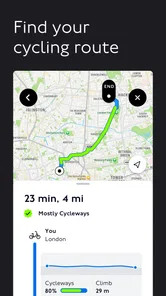
Compared with a general map app, TfL Go is the more natural place to check TfL-specific service information and plan around the local network. A broader navigation app may be more useful when the journey includes driving, cycling, or places beyond London. I would keep both available if my day mixes modes or crosses the city boundary; TfL Go is strongest when the question is specifically how to travel on London’s transport system.
A useful routine for unfamiliar journeys
When I am heading somewhere I have not visited before, I would plan from the actual entrance or address I need rather than stopping at the nearest station name. The last part of a London trip can involve a long walk, a busy interchange, or an exit that puts me on the wrong side of a large road. Checking the whole door-to-door journey before leaving helps me decide whether the train route is still convenient once that final stretch is included.
For a day with several stops, I would avoid building one rigid chain of routes in advance. Instead, I would check the next leg when I am ready to leave each place. That is a practical way to use live network information without constantly revising plans that may change anyway. It also makes TfL Go easier to use for a visitor who knows the next destination but does not yet know which line or interchange will be most convenient.
Seamless Payment Integration
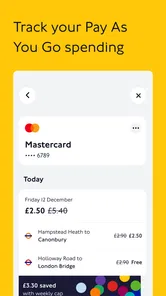
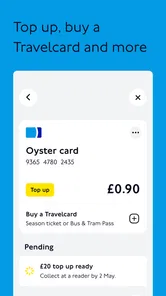
Gone are the days of fumbling for change or topping up your Oyster card. With the TfL Go app, you can manage your payments directly through your phone. It integrates seamlessly with your contactless payment methods, making it super convenient. Trust me, this feature alone makes commuting a lot less stressful.
I would still separate planning a journey from choosing how to pay for it. Before setting out, decide which payment method you intend to use and keep using it consistently, rather than switching casually between a phone, a card, and another option. That simple habit makes it easier to keep track of the method used for a trip. If you already have a payment routine that works, the app’s route-planning value can still be useful without changing that routine.
Keeping payment and planning simple
A useful question for a first-time visitor is whether installing a transport app means they must also change how they pay. I would not assume that route planning and payment need to be treated as one decision: I can use the app to decide how to travel while keeping to a payment method I already understand. Before a trip, I would check what I plan to use at the station or on the bus and avoid tapping with different cards or devices without a reason.
That distinction matters most when more than one person is travelling. Each person should know which card or device they intend to use, rather than relying on one phone to organise every part of the group’s journey. The app can help with the route, but agreeing on the payment routine beforehand reduces avoidable confusion at a gate or when boarding.
Accessibility and User Experience
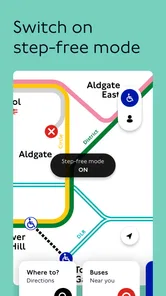
Another aspect where TfL Go shines is in its attention to accessibility. The app provides step-free access information and other accessibility features, which are crucial for those with mobility challenges. It’s clear that the developers have put a lot of thought into ensuring everyone can navigate the city comfortably.
For a step-free journey, I would check the access details for the stations along the whole route, not just the departure and arrival points. An accessible start and finish do not help if an interchange in the middle creates a problem. I would also allow time to review an alternative before travelling, because the best route on paper may not be the most comfortable one for a particular person or day.
Accessibility means checking the whole trip
For someone travelling with a wheelchair, a pushchair, or limited energy, I would treat the step-free information as a planning aid rather than a guarantee that every part of the journey will feel easy. The route includes more than stations: the distance between platforms, the walk from an exit to the destination, and the amount of time available to change services all affect whether an option is workable. I would compare alternatives with those real needs in mind, not simply choose the route with the fewest minutes on screen.
If the app offers a route that looks accessible but leaves me uncertain about a particular interchange, I would pause and check that detail before setting off. A little extra planning is worthwhile when a missed connection or an unsuitable station would make the journey stressful. That is also a situation where asking station staff for help may be more useful than relying on a map alone.
Where it fits in a travel routine
The app makes most sense for London residents who regularly use TfL services, and for visitors who want a local view of the network without learning every route in advance. It is less compelling if I rarely travel in London or need one tool to handle extensive navigation outside the city. In those cases, a general-purpose map may be the more useful everyday choice, with TfL Go kept for London trips.
It is also worth being realistic about what live information can do: it helps me make a better-informed choice, but it cannot remove the disruption itself or guarantee that a journey will go exactly to plan. I treat the route as a helpful recommendation, stay alert to changes, and leave a little flexibility when arriving at a fixed-time appointment matters.
When another map is the better tool
I would choose a general-purpose map first when London transport is only one part of a wider journey, such as travelling from outside the city and then continuing on foot or by another mode. Those apps are designed to cover a broader range of places and travel types, while TfL Go earns its place through its London network focus. Keeping both does not mean one has failed; they answer different questions.
Likewise, if I only need a quick walking direction to a nearby shop, opening a dedicated transport planner may be unnecessary. TfL Go is most useful when I need to understand a TfL route, compare options, or account for a service change. Knowing that boundary helps keep it from becoming just another app I open out of habit.
What the version history can and cannot tell me
TfL Go was released on April 22, 2021, and the current version is 3.1.0. That gives the app a clear history and a current release marker, but it does not tell me which individual improvements arrived between versions. I would look for visible changes in the app itself rather than assume that a newer number means a specific feature or a complete redesign.
For existing users, the sensible approach is to keep using the parts that already work for them and recheck settings or familiar screens after an update. For a new user, the main question is simpler: does the app make TfL routes and service changes easier to follow than the tools already on your phone? Its free price makes trying it straightforward, while its focus on London is the main reason someone elsewhere may not need it. The minimum operating system is 8.0, so compatibility is worth checking before relying on it.
What I would watch as a regular user
For someone who already relies on the app, the useful test after an update is practical rather than numerical: can I still find my usual route quickly, and are the details I use for a changed journey easy to reach? I would pay attention to whether familiar planning steps remain clear and whether service information helps me make a decision, rather than expecting a version change to transform the whole experience.
For a new user, I would try it on a familiar journey first. That gives me a simple way to compare its route suggestions with the option I already know, without risking an important connection on my first attempt. Once I understand how it presents alternatives, I would be more comfortable using it for an unfamiliar trip or when a disruption changes the plan.
Who will get the most from it
I would recommend TfL Go most readily to someone who uses the Tube, buses, or other TfL services often enough to care about network changes. It is also a good fit for a visitor who wants transport-specific guidance without needing to understand every line before arriving. Its Everyone age rating makes it suitable for a broad audience, but younger travellers should still have a clear plan for where they are going and how they will pay.
I would skip it as a main navigation tool if London travel is rare, if most journeys happen elsewhere, or if I need one app to coordinate many types of transport across a much wider area. Someone who prefers a familiar general map and only needs occasional London directions may not gain enough from installing a separate app. The best reason to keep it is a repeated need for London-focused route planning and service checks.
Final Thoughts
All in all, if you’re in London, the TfL Go app is an essential tool for making your travels around the city smoother. It offers practical solutions for everyday commuting and spontaneous adventures alike. Whether it's planning, paying, or just keeping up with the latest travel updates, this app has you covered. So, next time you're in town, make sure to give it a try. You'll wonder how you ever navigated the city without it!
TfL Go: Plan, Pay, Travel Frequently Asked Questions
Can I see whether a journey is affected by service changes before I set off?
TfL Go is intended to help with travel planning and provides real-time information about public transport routes, schedules, and disruptions. Checking the app before you leave can help you see relevant updates and make an informed choice about your journey. As with any live travel information, conditions can change, so it is sensible to check again if your plans depend on a particular service.
Is TfL Go useful if I am visiting London rather than commuting every day?
It can be useful for visitors as well as regular travellers. TfL Go is designed to help people plan and navigate journeys across Transport for London’s network, with route information and live updates to support decisions along the way. Its Everyone age rating makes it suitable for a broad audience, and its focus on travel planning can help newcomers understand their options around the city.
Do I need a TfL account to use the app?
TfL Go is described as a journey-planning and navigation app, with travel information intended to help users make decisions about getting around London. The core purpose is to plan journeys and check network updates, rather than to manage a paid download or make fare payments inside the app. If you are choosing it for travel guidance, its transport-planning features are the main reason to install it.
Will TfL Go help me choose between different routes?
Yes. TfL Go is built to assist with planning and navigating journeys across the Transport for London network, so route information is central to its purpose. It also provides information about schedules and disruptions, helping you compare your travel options in context. Step-by-step navigation and live updates can make it easier to follow a chosen journey and respond if travel conditions change.
Can I use TfL Go to plan a journey before I arrive in London?
You can use TfL Go to plan journeys and review travel information, which makes it useful when preparing for a trip as well as when travelling around the city. Journey planning works best while connected to the internet, since the app needs connectivity for real-time updates and accurate planning. Preparing ahead can help you become familiar with routes before setting off.
Pros
- User-friendly interface for seamless navigation.
- Real-time updates on transport schedules.
- Integrated payment feature for convenience.
- Comprehensive coverage of London transit.
- Offline access to saved routes.
Cons
- Limited to London transport system only.
- May drain battery with constant updates.
- Occasional delays in real-time data.
- Requires internet for initial route planning.
- Limited customization of notification settings.











