

Terramar Brands USA
- 20.00
- 4.7
- Installs
- 10.00K
- Price
- Free

Screenshots


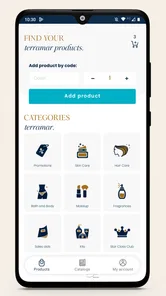
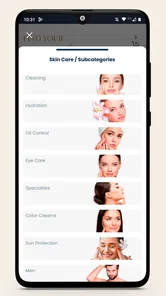
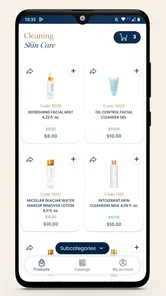

Analysis by Reviewed
Terramar Brands USA is a beauty shopping app from TerramarBrands, and my first impression is that it is designed for one straightforward purpose: putting the brand’s products and a shopping cart in the same place. That focus can be useful when I already know what I want to browse or buy, but it also means I judge the app differently from a beauty advice platform. I am not looking for a full cosmetics community, a detailed routine builder, or a replacement for a general online marketplace here. I am looking for a reasonably direct way to explore Terramar Brands USA and manage a purchase.
The app is free and suitable for Everyone, which makes it approachable for casual shoppers as well as people who already use Terramar products. It has a 4.7 average from around 58 ratings, and the app has passed 10 thousand installs. Those figures suggest a small but positive user base rather than a massive shopping platform. In my view, that is important context: this is a focused brand app, not an all-purpose beauty destination with the depth and scale of a major retailer.
Where the shopping experience can slow you down
The first place I would expect users to get stuck is before they even reach the useful part of the app. A brand shopping app has to load its catalog, images, product information, and cart functions correctly. If the opening screen hangs, appears incomplete, or does not respond when I tap, it is tempting to assume the app itself is broken. In practice, a weak connection, a temporary service interruption, or a device that has not refreshed the app properly can create the same impression.
I also pay attention to the difference between browsing and completing a purchase. Seeing a product is not the same as successfully adding it to the cart, and seeing a cart is not the same as getting through checkout. If a button appears inactive, I first check whether I have selected all of the choices the product requires. I would not repeatedly tap a control that seems frozen; I would wait briefly, return to the product page, and try again after confirming that the page has finished loading.
Another common point of friction is expecting the app to behave like a beauty recommendation service. Terramar Brands USA is better understood as a brand-specific shopping tool. If I want to compare many unrelated labels, filter a large cosmetics market, or read a broad range of independent opinions, a general beauty retailer may be more efficient. The focused catalog is a strength when I want Terramar products, but it is a limitation when my search starts with a category rather than a brand.
My practical advice is to begin with a simple task. Open the app when the connection is stable, browse without rushing, and add one item only after its information has appeared fully. This makes it easier to tell whether a problem comes from the product page, the cart, or the connection. It also avoids building a complicated cart while I am still deciding whether the app is responding normally.
What I check before blaming the app
Before troubleshooting deeply, I check whether other apps can connect normally. If a browser or another shopping app is also slow, the problem is probably broader than Terramar Brands USA. I then switch between Wi-Fi and mobile data if both are available. That simple comparison often separates a local network issue from a problem limited to one service.
More From Our News Desk

 Gmail
GmailGmail in a Busy Inbox: Who Benefits Most?
From first account to crowded workday, Gmail earns its place through dependable search and flexible sorting—but its best fit depends on how much inbox maintenance you can tolerate.

 Prime Video
Switching to Prime Video: What Changes in Your Viewing Routine
Prime Video can make a compelling second home for streaming, but switching means learning a different catalog, rental layer, and route from browsing to playback.

 Universal TV Remote Control
Universal TV Remote Control Works Best as a Reliable Backup
A phone remote earns its place through quick setup and reliable habits. Here is how to get more from Universal TV Remote Control—and where its limits show.

 Weather - By Xiaomi
Weather by Xiaomi Review: Clear at a Glance, Less Clear Up Close
Xiaomi’s weather app makes everyday forecasts quick to scan, but its calm surface can leave useful details and recovery paths harder to find than they should be.

 X
XX Under Pressure: Can It Recover When Posting Goes Wrong?
A resilience-focused review of X, examining setup, mistaken posts, interruptions, weak connections, and the gaps that matter when recovery needs to be dependable.

 Clash of Clans
Clash of Clans Is Won Between the Battles
Its raids are quick; its community is a long-term project of coordination, teaching, rivalry, and shared responsibility—with all the friction that entails.
Latest News



I also make sure the device has enough free space and that the app is not being closed immediately by the operating system. Terramar Brands USA supports Android devices beginning with version 5.0, so compatibility on an older supported device is possible, but compatibility alone does not guarantee a smooth experience on every handset. Older hardware may take longer to display image-heavy shopping pages, especially when several apps are open at once.
The current version is 2.3.0, so I would check the app page for an available update before spending time on more involved fixes. Updates can resolve loading or checkout problems, but I would avoid assuming that every failure requires an update. If the app worked earlier on the same device and the network is fine, restarting the app is still the fastest first step.
A clean setup routine for a first visit
On a first visit, I prefer a calm setup rather than immediately trying to complete a large order. I close other demanding apps, confirm a stable connection, and open the brand app from a fresh start. I then give the catalog time to load before navigating rapidly between sections. This matters because fast repeated taps can make a slow page look unresponsive, while the app may still be processing the previous request.
I keep my first browsing session deliberately small. I inspect a product, note what I actually want, and test the cart with that item. If the cart updates correctly, I know the basic path from product discovery to cart management is working. Only then would I continue shopping. This is one of the most useful habits for a brand store: it creates a clear checkpoint instead of leaving me unsure whether a later problem was caused by the app or by a long sequence of unfinished actions.
If I am using an older Android phone, I would also restart the device before the first serious shopping session. That is not a Terramar-specific feature or requirement; it is simply a sensible way to clear temporary memory pressure. I would not recommend changing advanced device settings or installing unrelated tools just to use this app. For a focused shopping application, the best setup is usually the least complicated one.
When the app opens but a page looks incomplete, I wait once, leave the screen, and return to it. If that does not help, I close and reopen the app. Clearing temporary app data can be a reasonable Android troubleshooting step, but I would treat it carefully and make sure I understand what information may be removed before using it. I would not erase app data as a first reaction if I am midway through a shopping process.
Recovering a stalled cart or interrupted session
The cart is the part of this app I would watch most closely because it represents the transition from browsing to action. If an item seems to disappear after I add it, I first reopen the cart rather than adding it repeatedly. Duplicate taps during a slow connection can create confusion, and I would rather verify the cart contents than assume the first tap failed.
If the cart page does not refresh, I take a screenshot or make a quick note of the items I intended to purchase, then close and reopen the app. I do not treat a missing visual update as proof that an order was placed. The safer approach is to check the cart and any later confirmation screen carefully before trying again. This is especially important when a connection has been unstable, because repeating an action without checking its result can make the situation harder to understand.
A useful recovery pattern is to reduce the task to one item. I return to the catalog, open the product again, and add it once. If that works, I continue with the rest of the cart slowly. If even one item repeatedly fails to appear, I stop experimenting with multiple products and focus on whether the app is loading product information correctly. That distinction saves time: a single product-page issue should not be treated as a complete checkout failure.
I would also avoid switching devices in the middle of a purchase unless necessary. Moving from an older phone to another device can make it unclear which cart state is current. If I must switch, I begin by checking the cart from the new device before repeating any action. The goal is not to force the app to recover through repeated taps; it is to establish which step completed successfully.
When the problem may be outside the app
Some apparent app failures are actually caused by the phone, network, or account context. A device with an incorrect system time can cause trouble with secure connections in many apps. A network that blocks certain services can produce blank pages even though ordinary websites work. Battery-saving restrictions may also close an app while it is working in the background, making a return to the cart feel as if progress was lost.
I would test the app on a different connection before concluding that TerramarBrands has a service problem. If it works on mobile data but not on home Wi-Fi, I would investigate the router or network settings rather than reinstalling immediately. If it fails on both connections while other apps work, restarting the phone and checking for an update are sensible next steps. These checks are ordinary, safe troubleshooting; they do not require changing permissions or using unofficial downloads.
Reinstallation is a last resort for me, not the opening move. Removing and reinstalling a shopping app can clear local problems, but it may also remove locally stored session information. I would only do it after noting what I need for my shopping session and after making sure I can access the app again normally. I would install it only from the official Android or iOS store, since a brand shopping app has no good reason to require a third-party package.
It is also worth separating catalog questions from technical faults. If I cannot find a particular beauty item, that does not automatically mean the search is malfunctioning. The app is centered on Terramar Brands USA, so its usefulness depends on whether that brand’s range matches what I want. A general retailer is the better choice when I need cross-brand comparison, broader availability, or a single cart containing products from several companies.
Who will get the most from this focused store
I think the app makes the most sense for an existing Terramar customer who wants a direct brand-specific shopping route. It is also suitable for someone who has been given a Terramar product name and wants to browse that brand without navigating a huge marketplace. The free price removes a barrier to trying it, and the Everyone rating makes it a low-risk option for ordinary household browsing.
A realistic everyday scenario would be a shopper replacing a familiar beauty product after noticing that the current one is nearly finished. Instead of searching a broad retailer and sorting through unrelated results, I would open the app, look through the Terramar catalog, add the intended item to the cart, and review the cart before leaving the session. That workflow is simple, and the app’s focused purpose works in its favor.
The trade-off becomes clearer for a first-time beauty shopper who wants education before buying. If I need ingredient comparisons across brands, extensive shade matching, independent reviews, or recommendations based on a detailed routine, I would start elsewhere. Terramar Brands USA can be part of the final shopping step, but it is not the tool I would choose as my only source for broad beauty research.
I would also skip it if I strongly prefer one marketplace for every purchase. A general retailer may offer a more familiar checkout flow, broader delivery choices, and easier comparisons. The brand app is more appealing when staying within Terramar is the point, not when the brand is incidental to the search.
How it compares with ordinary beauty-shopping alternatives
Compared with a general beauty marketplace, this app’s advantage is concentration. I spend less time filtering out brands I do not want, and the shopping journey feels more intentional when my decision is already centered on Terramar. That can be valuable for repeat purchases, gift ideas from the same brand, or a quick browse of its range.
The general marketplace wins on breadth. It is normally better for comparing similar products from different manufacturers, checking a wide range of customer experiences, or combining unrelated items in one order. A beauty advice app may also be stronger for learning how products fit into a routine. I would not install Terramar Brands USA expecting it to replace those tools.
Compared with using a mobile browser, the app offers a more dedicated brand environment and a cart built around that store. The browser may still be preferable if I am researching several retailers at once or if my phone handles web pages more smoothly than the app. My choice would depend on the task: focused Terramar shopping favors the app, while open-ended research favors the browser or a broader retailer.
My practical verdict after weighing the friction
Terramar Brands USA is a sensible free beauty app for shoppers who specifically want Terramar Brands USA products in a focused shopping environment. I like its clear purpose and the fact that the cart gives the experience a practical endpoint rather than turning it into a purely promotional catalog. The positive 4.7 average and its growing install base make it easy to recommend as a trial for interested customers, while the modest scale reminds me not to expect the depth of a major marketplace.
My main reservation is not that the concept is confusing, but that focused shopping apps leave less room for error when something goes wrong. A stalled product page or cart update can interrupt the whole journey because there are fewer alternative routes inside the app. The best response is a disciplined one: check the connection, let pages finish loading, test a single item, verify the cart, and only then continue.
For repeat Terramar shoppers, I would install it and use it as the brand’s dedicated storefront. For someone comparing many beauty labels or seeking detailed product education, I would use a broader retailer or research tool first and return here only if Terramar becomes the preferred choice. My recommendation is therefore conditional but positive: choose this app for focused Terramar shopping, not as a complete beauty-shopping replacement.
TerramarBrands has kept the idea straightforward, and that simplicity is its strongest quality. With the current 2.3.0 release available for Android devices starting with version 5.0, it is accessible to a wide range of users. I would approach it with realistic expectations, keep the first session small, and treat the cart as a checkpoint. Used that way, Terramar Brands USA is a practical companion for brand-loyal beauty shoppers rather than an overextended app trying to do everything.
Terramar Brands USA Frequently Asked Questions
What should I check before installing Terramar Brands USA on my phone?
Terramar Brands USA is a beauty app for customers interested in the brand and its products. Before installing, check that your device runs Android 5.0 or later if you are using Android, and download the app through an official app store. The app is free, and its Everyone age rating makes it suitable for a broad audience.
What is Terramar Brands USA, and what can I do with the app?
Terramar Brands USA is designed to give customers access to the company’s products, brand information, and shopping features in one place. Depending on the version available in your region, you may be able to browse collections, view product details, check prices, manage a shopping cart, and place orders. The app is most useful for users already interested in Terramar’s catalog and direct purchasing options.
Is Terramar Brands USA free to download and use?
The Terramar Brands USA app is free to download. Some features can require registration or an active customer account. You are not normally charged simply for installing or browsing the application, but purchases, shipping, taxes, or other order-related fees may apply. Before completing checkout, review the displayed total carefully, including delivery costs and any available payment conditions.
Do I need an account to shop through Terramar Brands USA?
An account may be required for certain functions, particularly placing orders, saving personal information, reviewing purchase history, or accessing member-related benefits. Some versions may allow visitors to browse products without registering first. If you create an account, use accurate contact and delivery details, choose a strong password, and review the app’s privacy policy to understand how your information is handled.
Can I use Terramar Brands USA outside the United States?
Availability and shopping support may depend on your location. Although the service is focused on the United States, users in other countries may be able to access product information while being unable to complete an order or receive delivery. Currency, shipping destinations, taxes, payment methods, and regional app availability can vary, so confirm these details in the app before relying on it for an international purchase.
Pros
- Clear showcase of Terramar Brands’ product range and collections.
- Useful brand information for customers researching available products.
- Convenient mobile access to the company’s online presence.
- Simple layout makes browsing key sections straightforward.
- May help users discover new releases
- offers
- or brand updates.
Cons
- Limited value if you are not already interested in Terramar Brands.
- Some product details may require visiting the external website.
- Shopping features and availability can vary by region.
- The experience may feel more promotional than interactive.
- Updates and support information may not always be immediately visible.











