

Televista
- 73.00
- 3.7
- Installs
- 50.00K
- Price
- Free

Screenshots


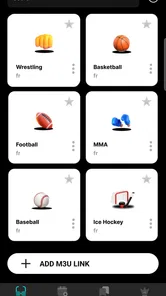
Analysis by Reviewed
I approached Televista as a practical media player rather than as an all-in-one entertainment service. That distinction matters. Its store summary is simply “media player,” while the short description identifies it as Televista, so the useful question is not whether it can replace every television app, but whether it makes your existing viewing routine easier. After spending time with it, I see a straightforward tool for people who already have media to play and want a dedicated place to handle that task on Android.
The app comes from DEVXDA and sits in the Tools category. It is free to install, carries a Teen content rating, and supports devices running Android 6.0 or later. The current version is 1.1.9. Those details make it accessible to a wide range of Android phones and tablets, although the Teen label is still a reminder that the player itself does not determine whether every source or channel you use is suitable for younger viewers.
From a media file to a finished viewing session
When I use Televista as the final step between a media file and watching it, the key is keeping the handoff simple: know where the content is, then open it deliberately rather than searching across several apps. I’d also decide in advance whether the session is personal or shared, since that affects which file I choose and where I leave the device afterward. That practical boundary leads naturally to the question of how to set up a household routine without assuming the player manages separate users for you.
Start with the material you already want to watch
The most realistic way to use Televista is to begin outside the app. Perhaps you have a video stored on your phone, a file transferred from another device, or a viewing source that you normally open through a less focused utility. Instead of treating the player as a discovery platform, I would treat it as the final viewing step: identify the content first, then use Televista to play it.
This starting point keeps expectations sensible. If you want a large catalog, recommendations, subscriptions, or a polished streaming ecosystem, a dedicated streaming service is likely to feel more complete. Televista makes more sense when playback itself is the problem. That can be useful when the default phone player feels limited, when you prefer a separate app for media, or when you want a consistent player instead of switching between different viewers.
Before opening it, I would also prepare the viewing environment. Check that the file is actually available on the device or that the source you intend to use is ready. This small habit avoids confusing a player problem with a content-access problem. A media player can only work with material it can reach, and separating those two stages makes troubleshooting much faster.
The first handoff: locating content and opening it
The first handoff is from your storage or source into the player. In everyday use, this is where convenience is decided. If Televista appears in the share or open-with choices for a compatible item, selecting it should make the transition feel natural. If you are browsing from inside the app, the important thing is to identify the correct file without losing track of where it came from.
More From Our News Desk

 Gmail
GmailGmail in a Busy Inbox: Who Benefits Most?
From first account to crowded workday, Gmail earns its place through dependable search and flexible sorting—but its best fit depends on how much inbox maintenance you can tolerate.

 Prime Video
Switching to Prime Video: What Changes in Your Viewing Routine
Prime Video can make a compelling second home for streaming, but switching means learning a different catalog, rental layer, and route from browsing to playback.

 Universal TV Remote Control
Universal TV Remote Control Works Best as a Reliable Backup
A phone remote earns its place through quick setup and reliable habits. Here is how to get more from Universal TV Remote Control—and where its limits show.

 Weather - By Xiaomi
Weather by Xiaomi Review: Clear at a Glance, Less Clear Up Close
Xiaomi’s weather app makes everyday forecasts quick to scan, but its calm surface can leave useful details and recovery paths harder to find than they should be.

 X
XX Under Pressure: Can It Recover When Posting Goes Wrong?
A resilience-focused review of X, examining setup, mistaken posts, interruptions, weak connections, and the gaps that matter when recovery needs to be dependable.

 Clash of Clans
Clash of Clans Is Won Between the Battles
Its raids are quick; its community is a long-term project of coordination, teaching, rivalry, and shared responsibility—with all the friction that entails.
Latest News



I recommend using a simple test item the first time rather than beginning with the one video you most want to watch. A short, familiar clip gives you a quick way to check whether the handoff is working and whether the controls behave as you expect. It also prevents you from spending time adjusting your routine around a file that may itself be unusual.
One practical insight is to keep your media organized before relying on the app for regular viewing. Clear filenames and sensible folders matter more than people expect. A player can make playback easier, but it cannot repair a chaotic library. Separating films, recordings, lessons, and temporary downloads means you spend less time searching and less time opening the wrong item.
Moving through playback instead of merely pressing play
Once the content opens, I judge a media player by what happens after the first minute. Starting a video is the easy part. The real test is whether I can pause, resume, move to a different point, and recover from an interruption without turning the session into a series of corrections.
This is particularly important on a phone. Mobile viewing is rarely a single uninterrupted event. A message arrives, someone asks you a question, or you need to put the device down for a moment. A useful player should fit that stop-and-start pattern rather than assuming you are watching in a cinema-like setting.
My advice is to spend the first session learning the controls while watching something familiar. Try pausing, seeking, changing orientation if your device allows it, and returning after leaving the app. That workflow reveals more than a quick launch does. It also helps you decide whether Televista is comfortable enough for long sessions or better suited to occasional playback.
Choosing the right device for the job
Televista is an Android app, so the device itself becomes part of the experience. A phone is convenient for private viewing and short clips, while a larger screen is more comfortable for films, lectures, and anything with small visual details. If your Android tablet is supported, it may offer a better balance between portability and readability than a phone.
I would not assume that installing the player on a larger display automatically turns it into a television platform. The app’s role remains playback. The quality of the final session will depend on the screen, speakers, file, and connection involved in the rest of your setup. That is an important trade-off: Televista can be the playback tool, but it is not a substitute for every part of a home entertainment system.
A realistic everyday workflow
Imagine that I receive a video I need to watch before leaving home. I save it to the phone, open Televista, locate the item, and begin playback. A few minutes later I pause it because I need to travel. When I have time again, I return to the same viewing task rather than searching through several unrelated apps. The value here is not dramatic; it is the reduction of small interruptions between having the content and actually watching it.
Another useful scenario is reviewing a recording in several short sessions. Instead of treating the file as something that must be completed in one sitting, I use the player as a repeatable checkpoint: open, watch, pause, leave, and continue later. This is a better fit for mobile life than a setup that only feels convenient when you have an uninterrupted evening.
For study or work-related viewing, I would pair the app with a written note-taking routine. Keep the notes outside the player, mark the moment you stopped, and return to the media with a clear purpose. This avoids expecting the app to act as a full research workspace. Televista handles the viewing side; your notes, folders, or cloud storage handle the handoff afterward.
Where the handoffs create friction
The workflow becomes less smooth when the content is difficult to locate, when the source is not available to the app, or when you expect the player to provide services it was not designed to replace. This is the central limitation I would explain to a friend: Televista may simplify playback, but it does not remove the preparation required before playback.
There is also a difference between a media player and a managed streaming app. Streaming alternatives usually combine content discovery, account management, watch history, recommendations, and playback in one controlled environment. Televista is more appealing when you want a focused playback tool and already know what you want to watch. If discovery is the main reason you open an entertainment app, the usual streaming alternatives will probably feel more satisfying.
That comparison also affects privacy and organization expectations. A dedicated service tends to guide you through its own catalog and workflow. A general player is more dependent on your files and habits. I find that liberating when I want direct control, but less convenient when I want the app to remember everything and lead me to the next program automatically.
Free to start, with a cost boundary to keep in mind
Televista is free to install, which makes testing the workflow easy. You can find out whether it fits your device and viewing habits without paying at the download stage. However, the app includes in-app purchases ranging from $1.29 to $129.99 per item. That is a wide range, so I would pay attention to each purchase screen and avoid assuming that every useful function is included at no cost.
My practical rule is simple: use the free experience long enough to decide whether the basic handoff from content to playback works for you. Only then consider an optional purchase, and only if its purpose is clear in your own routine. Someone who watches occasional local media may have no reason to spend anything, while a frequent user may judge an upgrade differently. The important point is to evaluate the cost against a real recurring benefit, not against curiosity during the first launch.
What the adoption numbers suggest, and what they do not
Televista has passed 50 thousand installs, with a 3.7 average from 193 ratings and 73 reviews. I read that as a sign of a modest but real user base rather than proof that it is the obvious choice for everyone. The rating is neither a strong warning nor a ringing endorsement, which matches my own balanced view: the app may suit a specific playback need, but it deserves a trial on your particular device before becoming your default.
The developer, DEVXDA, has kept the product identifiable as a media player rather than presenting it as a broad entertainment destination. That narrow identity is useful when deciding whether to install it. If your need is focused, the app is easier to assess. If your expectations include a complete content ecosystem, the mismatch will appear quickly.
Who should use it and who should skip it
I would recommend trying Televista if you already have media to play, prefer a dedicated Android tool, and value a direct path from stored content to viewing. It can also suit people who move between short and long sessions and want playback to remain separate from browsing, messaging, or a larger streaming subscription.
I would skip it if your main goal is discovering new shows, maintaining a synchronized watchlist, or receiving recommendations from a large catalog. In those cases, a conventional streaming app is the better choice because its entire workflow is built around finding and managing content, not simply playing material you bring to it.
I would also be cautious if you need a player for a very specialized professional workflow. Editors, presenters, and people who require detailed media inspection should choose a tool designed around those tasks. Televista’s strength is ordinary viewing, not a promise of a production suite.
Small habits that make the experience better
My first tip is to test the app with three different situations: a short clip, a longer file, and a session interrupted by another task. This exposes practical friction early and tells you whether the player belongs in your daily routine or only works for occasional use.
My second tip is to separate source problems from playback problems. If one item fails, try another known-good item before blaming the app. If several items behave poorly, then check the device, storage location, or source handoff. This simple sequence prevents wasted time and is especially useful when media comes from different places.
My third tip is to decide where Televista fits before changing your whole library. Start with one folder or one type of content. If the workflow feels natural, expand it. If it does not, you have learned something without reorganizing everything around a player that may not be the right match.
A fourth trade-off is worth remembering: separation can be both the benefit and the inconvenience. Keeping playback in a focused app reduces clutter, but it also means your content management, notes, and discovery tools remain elsewhere. I like that arrangement when I know exactly what I want to watch. I dislike it when I am trying to browse, choose, and watch in one relaxed session.
My overall result after following the full flow
From preparing the content to opening it, watching, pausing, and returning later, Televista makes the most sense as a focused tool in a larger routine. Its usefulness comes from giving playback a clear place, not from pretending that playback is the entire entertainment experience. That makes it easier to recommend honestly: it is a candidate for people with a specific need, not a universal replacement for every video app.
The free installation lowers the barrier to testing, and support for Android 6.0 or later gives it a broad device range. At the same time, the Teen rating and the presence of in-app purchases mean I would still approach it thoughtfully, especially on a shared device or when another person may be using the app.
My final opinion is that Televista is worth trying when your starting condition is simple: you have media, you need a player, and you want a repeatable route to the viewing screen. Its best result is a cleaner handoff from “I have something to watch” to “I am watching it.” If your starting condition is instead “I need an entire entertainment service,” choose a more specialized alternative. For focused Android playback, though, Televista has a reasonable place in the toolbox, provided you test the complete workflow on your own device and keep your expectations centered on what it is: a media player.
Televista Frequently Asked Questions
Is Televista available for Android, and what should I check before installing it?
Televista is listed for Android devices running Android 6.0 or later. Check that your phone or tablet meets this minimum requirement and has enough available storage before installing. Televista is a tools app from DEVXDA, and its store summary describes it as a media player. The app’s Teen content rating is also worth considering when deciding whether it is suitable for your household.
What is Televista and what can I use it for?
Televista is a television and streaming-focused application designed to help users discover and watch available content in one place. Depending on the version and region, it may provide access to live channels, on-demand programs, schedules, or links to supported services. Before downloading, check the official description carefully because the available features and catalog can vary by country, device, and licensing agreements.
Is Televista free to download and use?
The Televista app is free to download, but that does not necessarily mean every feature or program is free. Some content can require a subscription, account, payment, or access through a participating television provider. In-app purchases range from $1.29 to $129.99 per item, so review the purchase information before registering, especially if the application offers premium channels, exclusive programs, or optional upgrades.
Can I watch live television and recorded content with Televista?
Televista’s viewing options depend on the edition of the app and the services supported in your location. Some users may find live television, program guides, replay functions, or on-demand content, while others may only have access to listings or links to external platforms. After installation, confirm which channels and playback features are actually available on your account and device.
Which devices and operating systems are compatible with Televista?
Compatibility can differ between Android and iOS versions, as well as between phones, tablets, smart televisions, and other streaming devices. Check the official store page for the minimum operating-system requirement, supported screen types, and any hardware limitations. Keeping your device updated can improve stability, although older phones may experience slower navigation, playback issues, or limited access to newer features.
Pros
- Simple interface makes browsing available channels quick and convenient.
- Offers a broad selection of television content in one mobile app.
- Useful for discovering programs without switching between multiple services.
- Streaming access is convenient when watching away from a traditional TV.
- Channel and program information can help users plan what to watch.
Cons
- Content availability may vary depending on your country or region.
- Streaming quality depends heavily on your internet connection.
- Some channels or programs may require additional access or subscriptions.
- The app may use considerable mobile data during extended viewing sessions.
- Compatibility and performance can differ across Android and iOS devices.








