SurveyMonkey Rewards
- 6.20K
- 4.2
- Installs
- 100.00K
- Price
- Free

Screenshots
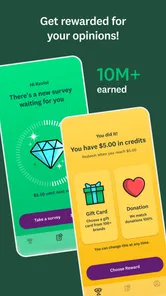
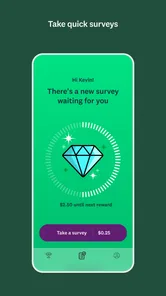
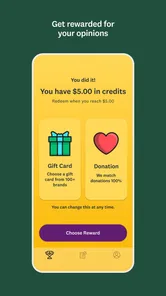
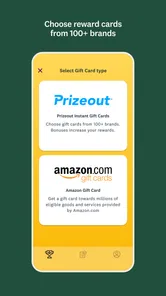

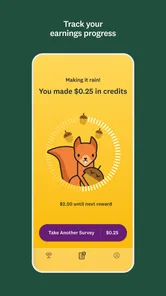
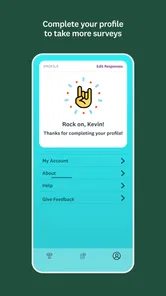
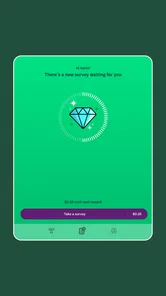
Analysis by Reviewed
I found SurveyMonkey Rewards most interesting when I stopped treating it like a way to make money and started treating it as a small, occasional activity for spare moments. The Lifestyle app, developed by SurveyMonkey, gives you surveys to complete in exchange for rewards. That sounds simple, but the real experience depends heavily on when a survey appears, whether your connection is stable, and whether you are willing to answer screening questions before reaching the useful part.
My overall impression is positive, with an important qualification: this is better for people who enjoy sharing opinions in short sessions than for anyone expecting dependable income. The app is free, rated for Everyone, and its store presence shows a 4.2 average from around 12 thousand ratings, which suggests that plenty of users find the basic idea worthwhile. I would still approach it with realistic expectations. Survey availability can vary, and the value of your time depends on how often you qualify and how smoothly the app communicates with its servers.
How SurveyMonkey Rewards feels in everyday use
The first thing I noticed is that the app is built around a very specific habit: check in, see what is available, complete a survey if the timing suits you, and leave. It is not an app I would keep open continuously. It works more naturally as something to look at during a commute, while waiting for an appointment, or during a quiet break when I have enough attention to answer carefully.
That distinction matters because surveys are not passive tasks. Even a short questionnaire asks you to read, remember, compare, and make choices. Rushing through answers just to finish can make the experience feel tedious, while giving thoughtful responses takes more time than the store summary might imply. I got better results by treating each questionnaire as a focused interruption rather than trying to multitask through it.
The interface is most useful when it makes the next action obvious. I do not want to search through menus to discover whether a new survey is waiting. I also prefer checking the available reward information before starting, because that lets me decide whether the expected effort is worth the time. This small decision prevents the common mistake of beginning every questionnaire automatically and then feeling disappointed when one does not fit my schedule.
Because the app is free, there is no financial barrier to trying it. The more meaningful cost is attention. Someone who enjoys opinion polls may see that as a fair exchange, while someone who dislikes repetitive questions will probably lose patience quickly. The app is not a replacement for a regular job, a freelance platform, or a cashback service tied to purchases. Its appeal comes from turning occasional spare minutes into modest rewards, not from offering predictable earnings.
What the connection changes during a survey
Connectivity is part of the experience rather than an invisible background detail. Survey content, eligibility checks, and completion status need to communicate with the service, so I would begin a questionnaire only when my phone has a dependable connection. A weak signal can turn a quick task into an uncertain one, especially if a page takes too long to load or the app needs to validate an answer before moving forward.
More From Our News Desk

Weather by Xiaomi Review: Clear at a Glance, Less Clear Up Close

X Under Pressure: Can It Recover When Posting Goes Wrong?

Clash of Clans Is Won Between the Battles

Android Auto Makes the Case for Quieter Car Software

MobiOffice: Transforming Mobile Productivity with Seamless Integration

EA SPORTS FC™ Mobile Soccer: Redefining Mobile Sports Gaming
This makes certain locations better than others. A stable home network, a reliable workplace connection, or a strong mobile signal is preferable to an underground station, a crowded venue, or the edge of coverage. I would not save a survey for the exact moment a train enters a tunnel. The risk is not only inconvenience; losing momentum can make it harder to remember where I was or whether the last response went through.
I also learned to avoid opening the app while my phone is already struggling with several network-heavy tasks. If photos are synchronizing, video is streaming, or another download is consuming the connection, a survey may feel slower than it needs to. Closing unnecessary activity first is a simple improvement, particularly when I am trying to complete something during a short break.
There is a useful trade-off here. A connection lets the app provide current survey opportunities and confirm progress, but it also means the best moment to use it is not always the moment I happen to have free time. If you need an app that works predictably in airplane mode or in areas with unreliable coverage, this is not the right type of tool to depend on. I would plan around connectivity instead of assuming every session will be available anywhere.
Using it on the move without wasting a short break
SurveyMonkey Rewards fits mobile use, but not every mobile situation is equally comfortable. I would use it while seated, with enough time to read each question and check the answer before continuing. I would not recommend filling out a survey while walking, crossing a street, or handling luggage. The rewards are not worth turning a simple questionnaire into a distraction or a safety issue.
Short waiting periods can work well, although I would first estimate how much time I actually have. If a doctor’s office calls my name unexpectedly or a bus arrives, stopping halfway through a survey may be frustrating. A better routine is to check the survey first, judge whether the length appears manageable, and start only when I can give it uninterrupted attention. This is one of the most practical habits for avoiding abandoned sessions.
The app can also suit people who prefer structured micro-tasks. I like having a clear beginning and end, rather than scrolling through an endless feed. That said, the experience is less satisfying if you open it expecting a constant stream of new work. Availability is the central variable. Some visits may be productive, while others may offer little reason to stay. I would check at natural points in the day rather than refreshing repeatedly.
On a phone, small distractions have a larger effect than they do on a desktop. Notifications, incoming calls, low battery warnings, and changing signal strength can all interrupt concentration. My advice is to use it when the phone is settled: sufficient battery, a stable connection, and a few uninterrupted minutes. That preparation sounds excessive for a survey app, but it makes the difference between a calm session and a frustrating one.
What to do when a survey stops or the app loses contact
Any network-dependent questionnaire deserves a cautious workflow. Before starting, I check that the connection indicator looks normal and that I am not about to move into a poor coverage area. During the survey, I avoid repeatedly tapping a button if the screen appears slow. Multiple taps can create confusion about whether an answer was submitted once or several times, and waiting briefly is usually safer than forcing the app to react.
If the app becomes unresponsive, I would first pause rather than immediately close it. A temporary delay may resolve itself. If the screen remains stuck, I would reopen the app and look for the survey or completion state before trying to repeat anything. The important principle is to confirm what happened before submitting the same responses again. Duplicate effort is especially annoying when the questionnaire has already recorded progress on the service side.
For a dropped connection, moving to a stronger signal is the sensible first step. I would not switch repeatedly between mobile data and a wireless network in the middle of a question unless necessary, because that can make the interruption harder to understand. Once the connection is stable, reopening the app gives me a better chance of seeing the current state than continuing to tap a frozen screen.
There is also a human side to recovery. If I am unsure whether a survey counted, I would rather wait and inspect the account status than assume the reward disappeared or immediately start over. This is one area where patience matters more than speed. The app is designed around brief tasks, but a brief task can still require a careful recovery decision when connectivity fails.
I would also keep the application updated through the normal app-store process. The current version is 3.08.05, and using the current release is a sensible way to avoid preventable compatibility problems. The minimum operating-system requirement is 10, so anyone using an older device should check compatibility before planning around the app. These details are easy to overlook when an app seems lightweight, yet they matter if the phone is already old or unreliable.
Making the experience kinder to your data plan
SurveyMonkey Rewards is not the kind of app I would expect to consume data like a video service, but a data-conscious routine is still worthwhile. I would use a trusted wireless network when convenient, especially if I expect to spend time browsing available surveys or completing several in one sitting. This is less about assuming heavy usage and more about avoiding unnecessary uncertainty on a limited mobile plan.
My practical approach is simple: open the app deliberately, complete the task I chose, and close it when finished. I would not leave it running just because a new survey might appear. That habit keeps the app from becoming another source of background distraction and makes my usage easier to understand. It also encourages me to judge each session by its actual value rather than by how long I can remain available.
Privacy and data decisions deserve attention with any survey service because the purpose of the app is to collect opinions. I would read the app’s current privacy and account information before answering questions I consider sensitive, and I would only provide details I am comfortable sharing within the service. This is not a criticism unique to SurveyMonkey Rewards; it is a basic condition of participating in opinion research. The reward should not pressure me into ignoring my own boundaries.
A useful tip is to separate “available” from “worth doing.” A survey can appear at a convenient time but still not justify the attention it demands. I look at the apparent effort, my connection quality, and whether I can finish without interruption. That three-part check is more useful than chasing every notification. It also reduces the temptation to use mobile data for a task I would have skipped if I had paused for a moment.
Who will enjoy it, and who should choose something else?
I think the app suits people who like questionnaires, want a free way to collect occasional rewards, and are comfortable checking in rather than receiving guaranteed work. It can be a pleasant fit for someone who already spends time waiting in places with a solid connection. The straightforward concept also makes it approachable for adults and younger users within the Everyone content rating, provided they understand what they are participating in and make sensible decisions about personal information.
It is less suitable for anyone who needs a fixed return for a fixed amount of time. Survey availability, qualification, connection quality, and personal patience all affect the result. If your goal is saving money on purchases, a conventional cashback app may be more relevant. If you want to sell skills, a freelance marketplace is a better match. If you want entertainment with no expectation of reward, a game or media app will probably feel more satisfying.
Compared with ordinary survey websites, a dedicated mobile app is more convenient during short breaks because it is already designed for a phone screen. Compared with broad rewards platforms, its focus is narrower: you are primarily giving opinions rather than combining surveys with shopping tasks, receipt uploads, or other activities. That narrower purpose is a strength if you want a less cluttered experience, but a weakness if you want many ways to earn within one account.
The developer’s reputation for survey software gives the app a clear identity, but it does not remove the need for personal judgement. I would not install it expecting every visit to produce a useful opportunity. I would install it if I liked the subject matter, accepted the variable availability, and wanted a small activity that could fit around an existing routine.
My connectivity verdict
After using SurveyMonkey Rewards as an occasional mobile task, I see it as a reasonable free Lifestyle app with a clear boundary: it works best when the network is stable and your expectations are modest. The app’s audience has grown beyond 100 thousand installs, and its current version shows that it remains an active product rather than a forgotten experiment. Still, those figures do not change the central truth that your experience depends on the surveys offered to you and the conditions in which you complete them.
I would recommend trying it from a comfortable location first, not during a rushed commute or in an area with unreliable coverage. Give yourself enough time to read carefully, decide whether a survey is worth starting, and recover calmly if the connection falters. That approach makes the rewards feel like a bonus for spare attention instead of a promise the app cannot guarantee.
My final recommendation is to treat SurveyMonkey Rewards as an occasional opinion-and-reward companion, not an income source. If you enjoy answering surveys and can use a dependable connection, it is worth testing because there is no purchase price. If you dislike screening questions, need offline reliability, or want predictable earnings, I would choose a different category of app. For the right user, its simplicity is the appeal; for everyone else, the network dependence and variable availability will be hard to overlook.
SurveyMonkey Rewards Frequently Asked Questions
Is SurveyMonkey Rewards free to download?
Yes. SurveyMonkey Rewards is a free lifestyle app from SurveyMonkey, so you can install it without paying for the download. Before signing up, consider whether you are comfortable sharing profile details to receive survey matches. The app’s main purpose is reflected in its summary: take surveys and earn rewards. As with any rewards app, check the terms and available options inside the app before spending time on surveys.
What devices can I use SurveyMonkey Rewards on?
SurveyMonkey Rewards is available for Android and iOS devices that meet the operating system requirements. On Android, the minimum supported operating system is version 10. Check your device’s software version before downloading, and use the official app store for your platform. Keeping your operating system and app updated can also help ensure that the app works as intended and that you receive any available improvements.
What is SurveyMonkey Rewards, and how does it work?
SurveyMonkey Rewards is a mobile app that lets you earn rewards by completing short surveys. After creating an account, the app matches you with available questionnaires based on your profile. Each survey shows its estimated time and reward before you begin. Once completed and approved, your earnings are added to your account and can be redeemed according to the options available in your region.
How much money can I earn with SurveyMonkey Rewards?
Your earnings depend on the number of surveys you qualify for, the length of each questionnaire, and the rewards offered in your location. Some users may receive several invitations, while others may see fewer opportunities because of their demographic profile or limited survey availability. The app should be viewed as a way to earn occasional extra money rather than a dependable replacement for regular income.
How do I receive or redeem my SurveyMonkey Rewards earnings?
SurveyMonkey Rewards generally provides digital reward options after you reach the applicable redemption threshold, although the exact choices and minimum amount can vary by country and account status. Before investing significant time, check the rewards section inside the app to see what is currently offered. Processing times may also differ, and some rewards can require verification or additional account information.
Pros
- Simple surveys can be completed in just a few minutes.
- Rewards are issued through digital gift cards after qualifying activity.
- The app is easy to navigate for first-time users.
- Survey invitations can fit conveniently into short breaks.
- It offers a straightforward way to earn small rewards from opinions.
Cons
- Survey availability may vary significantly by location and profile.
- Some surveys screen users out after they have answered initial questions.
- Rewards are modest and are not a reliable source of income.
- You may need to provide demographic information to receive invitations.
- Notifications can become distracting when survey opportunities are limited.











