

Straightaway Powered by Mapbox
- 84.00
- 3.3
- Installs
- 50.00K
- Price
- Free

Screenshots
Analysis by Reviewed
Planning a day with several stops is one of those jobs that looks simple until the addresses start piling up. I tested Straightaway Powered by Mapbox with that kind of task in mind: arranging multiple destinations, checking the order, and then following turn-by-turn guidance without constantly rebuilding the trip. It is a free navigation app from Straightaway, LLC, aimed at people who need more than a simple route from point A to point B.
My first impression was that its value depends less on ordinary navigation and more on how well you prepare the stop list. If you are delivering items, visiting clients, handling property appointments, or running errands across town, the route-planning side can save meaningful time. If you only need directions to one place, a familiar map app will usually feel quicker and less demanding.
The app sits in the Maps & Navigation category and is available for Everyone. It has passed fifty thousand installs and holds a 3.3 average from roughly one hundred sixty ratings, with around eighty reviews. Those figures suggest a useful but not universally smooth experience, which matches my own view: the idea is practical, but the setup and recovery steps matter more here than they do in a basic navigation tool.
Getting a multi-stop route ready without unnecessary friction
I find the easiest way to keep a multi-stop trip manageable is to treat route setup as its own short task, rather than trying to solve every detail once I’m on the road. A clean, clearly labeled stop list makes it easier to spot a misplaced destination and decide which parts of the proposed order need a human check. From there, the next thing I’d consider is where route planning tends to become frustrating.
Where people usually get stuck
The most common point of friction is not driving. It is turning a messy list of destinations into a clean route. A customer name, apartment number, business name, and street address may all look understandable to a person, yet the app still needs a usable location for each stop. When one entry is vague or points to the wrong part of a large property, the whole plan can become less reliable.
I recommend treating the first route as a planning exercise rather than immediately pressing start. Add the stops, inspect the proposed order, and look for anything that seems geographically strange. A destination that appears between two nearby stops but is actually across a bridge or on the opposite side of a divided road deserves a second look. Route optimization can arrange destinations efficiently, but it cannot correct an address that resolves to the wrong place.
Another stumbling block is expecting the app to behave like a simple search box. A single destination is easy to understand, while a multi-stop route requires decisions about sequence, stop accuracy, and when to begin navigation. Users who skip that review may blame the turn-by-turn guidance for a problem created earlier during address entry.
More From Our News Desk

 Weather - By Xiaomi
Weather by Xiaomi Review: Clear at a Glance, Less Clear Up Close
Xiaomi’s weather app makes everyday forecasts quick to scan, but its calm surface can leave useful details and recovery paths harder to find than they should be.

 X
XX Under Pressure: Can It Recover When Posting Goes Wrong?
A resilience-focused review of X, examining setup, mistaken posts, interruptions, weak connections, and the gaps that matter when recovery needs to be dependable.

 Clash of Clans
Clash of Clans Is Won Between the Battles
Its raids are quick; its community is a long-term project of coordination, teaching, rivalry, and shared responsibility—with all the friction that entails.

 Android Auto
Android Auto Makes the Case for Quieter Car Software
The car interface is no longer judged by how much it can do, but by how quietly it helps. Android Auto shows what drivers now expect—and what still gets in the way.

 MobiOffice: Word, Sheets, PDF
MobiOffice: Transforming Mobile Productivity with Seamless Integration
MobiOffice: Word, Sheets, PDF is redefining mobile productivity with a surprising blend of functionality and innovation.

 EA SPORTS FC Soccer Mobile 26
EA SPORTS FC™ Mobile Soccer: Redefining Mobile Sports Gaming
Dive into EA SPORTS FC™ Mobile Soccer, where immersive gameplay and strategic depth transform mobile sports gaming.
Latest News



Setup checks that prevent avoidable problems
Before leaving, I would check the route while the phone has a stable internet connection and enough battery for the journey. Confirm that every stop is present, especially after editing the list. It is also worth checking the starting point: if the app begins from the wrong location, the optimized sequence may not reflect the route you actually intend to drive.
For businesses, I would use the most complete address available rather than relying only on a company name. Large stores, office complexes, campuses, and residential developments can contain several entrances. If the destination is important, compare the displayed location with the address you were given before starting navigation. This small pause is more useful than repeatedly recalculating once you are already moving.
The current version is 5.3.1 and supports devices running Android 8.0 or newer. That makes the compatibility check straightforward, but it still pays to confirm that the phone itself is behaving normally before a busy route. A device that is low on storage, struggling with location accuracy, or switching aggressively between connections can make any navigation app appear unreliable.
Because the app is free to download, it is easy to try without an upfront purchase. It also offers in-app purchases ranging from $9.99 to $95.99 per item, so I would review the purchase screen carefully before committing to anything beyond the basic experience. The free entry point is appealing for occasional route planning, while frequent professional users should decide whether the paid options fit their actual workload rather than assuming they are necessary.
A better way to organize the stop list
One practical habit is to group stops by purpose before entering them. For example, I might separate deliveries, pickups, and personal errands, then decide whether combining them in one route makes sense. A mathematically efficient order is not always the best working order if one stop has a time constraint or requires a return to the vehicle.
I also prefer using consistent labels. If several destinations have similar names, adding a recognizable customer or location label helps me identify the correct stop later. This is especially useful when a route is interrupted and I need to understand which destination comes next without opening every address again.
A less obvious trade-off is that optimization can reduce driving distance while making the day feel less natural. You may pass near a later stop, turn away to complete another destination, and then return. That can be efficient on a map but inconvenient if you are carrying items, meeting people at specific times, or trying to finish one neighborhood before moving to another. I would inspect the order instead of accepting it blindly.
Recovering when the workflow breaks
Routes rarely fail in one dramatic way. More often, a stop changes, a destination is skipped, or the driver takes an unexpected turn. My preferred recovery method is to stop safely, identify the exact problem, and then rebuild only what is necessary. Continuing to drive while repeatedly editing the route creates more confusion than it solves.
If one address is wrong, correct that address first and then review the surrounding stops. A single bad location can distort the route order, so simply dragging that stop elsewhere may not produce the best result. When the route is no longer trustworthy, starting a fresh plan can be faster than trying to patch several changes.
If navigation appears to have stopped responding, I would first check whether the phone still knows its current position and whether the route screen is showing the intended destination. A brief wait in a safe place, followed by reopening the route or recalculating, is a sensible general recovery step. I would avoid deleting the entire plan until I had confirmed that the issue was not just a temporary location or connection problem.
When a stop has already been completed, mark it mentally or keep a simple note outside the app before making changes. This sounds basic, but it prevents the common mistake of sending yourself back to a completed destination after a route edit. For a long working day, a small written checklist can be more dependable than relying on memory alone.
When the app is not the cause
Navigation accuracy is affected by the environment as much as by the software. Underground parking areas, dense city streets, tunnels, tall buildings, and poor visibility of the sky can all delay location updates. In those situations, a route may appear frozen or place the vehicle slightly away from the road even though the app is still trying to regain a reliable position.
Road changes create another source of confusion. A recently closed street, temporary construction, private access road, or unusual entrance may not match what the route expects. If the instructions seem unsafe or physically impossible, follow the road signs and local conditions first. No route planner should override ordinary driving judgement.
It is also possible for the phone to be the weak link. A loose charging cable, overheating device, weak mobile connection, or battery-saving behavior can interrupt a trip. I would test the app on a short familiar journey before depending on it for a full day of stops. That trial reveals whether the problem follows the route or follows the device.
The same principle applies to address databases. A business may have moved, a new development may not be fully mapped, or a postal address may lead to a general entrance instead of the precise door. In those cases, the app can still be useful for getting close, but the final approach may require information from the recipient or property manager.
How it compares with ordinary navigation apps
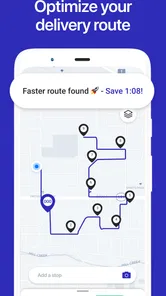
The main difference between Straightaway and a conventional map app is the starting question. A standard navigation tool asks where you want to go next. Straightaway is more useful when you already have a collection of destinations and need help deciding how to visit them in a sensible order.
That makes it a stronger fit for delivery drivers, mobile service workers, sales visits, real-estate appointments, caregivers, and anyone doing a concentrated set of errands. The benefit is not merely turn-by-turn directions; it is the planning layer before the driving begins. For one-off trips, however, the extra route preparation may feel like unnecessary work.
I would not replace a general map application for exploring nearby places, checking broad local information, or casually finding a single restaurant. Those tools tend to be more familiar for spontaneous searches. Straightaway earns its place when the list of stops is the problem, particularly when manually arranging them would be tedious or easy to get wrong.
There is also a human factor. A driver who wants total control over the sequence may prefer arranging every stop manually. Someone who wants the app to suggest an efficient order will appreciate the automation but should still review the result. The best experience sits between those extremes: let the app handle the repetitive planning, then apply your knowledge of appointments, loading, parking, and access.
Who should use it, and who should skip it
I would recommend it to people who regularly visit several destinations in one outing and feel that route order wastes time. It is particularly promising for repeat workflows where the same person plans routes every day and can develop a consistent habit of checking addresses before departure.
It is less suitable for someone who only needs occasional directions, dislikes preparing a route in advance, or expects every destination to be recognized perfectly from a short business name. It may also frustrate users whose work depends on highly specific arrival windows unless they are willing to manage those priorities themselves while reviewing the suggested order.
The app is not a substitute for local knowledge. If you know that a particular entrance is closed, a neighborhood has difficult parking, or a customer can only receive visitors from one side of a building, your judgement should shape the route. The software can organize stops, but it does not remove the practical details of completing them.
My practical verdict after using it
The real strength is the planning workflow, not simply the map on the screen. Straightaway Powered by Mapbox makes the most sense when several stops need to be arranged before the vehicle moves. Its turn-by-turn navigation completes that workflow, but the quality of the result depends heavily on accurate addresses, a sensible starting point, and a quick human review.
I like the free starting point and the clear focus on multi-stop travel. I also appreciate that the app can address a problem ordinary navigation often leaves to the user: deciding what order to visit a long list of places. At the same time, the average rating of 3.3 shows why expectations should stay realistic. This is not an effortless replacement for every map app, and setup mistakes can make the experience feel harder than expected.
My advice is to test it on a short route with a handful of familiar stops. Check the suggested sequence, compare it with what you know about traffic and access, and practice recovering from one change before using it for a demanding workday. If that process saves you from manually rearranging destinations, the app can become a useful part of your routine. If your trips are mostly single-destination journeys, a standard navigation alternative will probably be simpler.
For me, Straightaway is best viewed as a route-planning assistant with navigation attached. It is practical for organized multi-stop travel, but it rewards preparation and common sense. Downloading it is free, the age rating is Everyone, and the developer is Straightaway, LLC; just remember that the app works best when you treat the proposed route as a well-informed draft rather than an unquestionable instruction.
Straightaway Powered by Mapbox Frequently Asked Questions
Is Straightaway suitable for personal trips as well as delivery work?
Straightaway is built around planning routes with multiple destinations, so it can be useful for personal errands or other trips where you need to visit several places in one outing. Its focus on arranging stops and navigating between them may be especially helpful for drivers with a busy itinerary. It is a Maps & Navigation app developed by Straightaway, LLC.
What is Straightaway Powered by Mapbox used for?
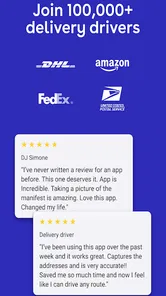
Straightaway Powered by Mapbox is a route-planning and navigation app designed to help drivers organize stops and follow efficient delivery routes. It is particularly useful for couriers, local delivery workers, and anyone who needs to visit multiple addresses in one trip. The app focuses on reducing unnecessary driving by arranging stops and providing map-based directions.
Can Straightaway optimize a route with multiple stops?
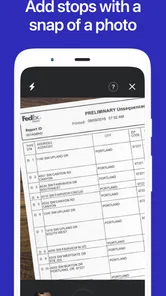
Yes. One of Straightaway’s main features is multi-stop route planning. After entering or importing several destinations, the app can arrange them into a more practical order instead of requiring you to visit them manually in the order they were added. The quality of the result depends on accurate addresses, traffic conditions, and the number of stops included.
Does Straightaway provide turn-by-turn navigation?
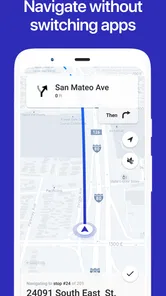
Straightaway can help plan your route and guide you between destinations, but the exact navigation experience may depend on the version of the app, your device, and supported navigation integrations. In some cases, it may pass directions to a preferred mapping or navigation service. Drivers should always check the route before starting and follow local traffic regulations rather than relying blindly on the app.
Is Straightaway Powered by Mapbox free to download and use?
Straightaway is free to download, while in-app purchases range from $9.99 to $95.99 per item. Some features can therefore involve additional costs. Pricing and included tools may change over time, so review the current Google Play Store or Apple App Store listing before installing. Check whether unlimited stops, route optimization, imports, or business features require payment.
Pros
- Quickly records routes and displays them on an interactive map.
- Mapbox integration provides smooth
- detailed map rendering.
- Useful for reviewing travel history and retracing previous journeys.
- Supports location tracking for road trips
- walks
- and outdoor activities.
- Clean interface makes route information easy to understand.
Cons
- Continuous GPS use can noticeably reduce battery life.
- Accuracy may drop in tunnels
- indoors
- or areas with weak signals.
- Some mapping features may require an active internet connection.
- Background location access may raise privacy concerns for some users.
- Advanced route data and export options may be limited.











