

Stock Options Trading Signals
- 17.00
- 4.3
- Installs
- 10.00K
- Price
- Free

Screenshots
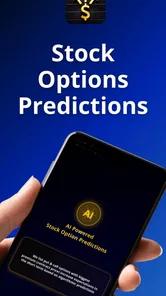
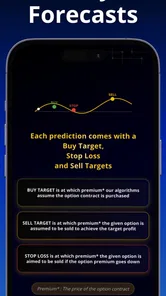
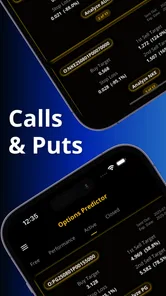
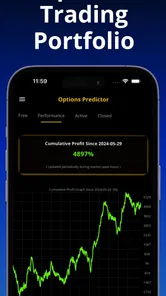
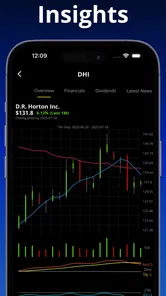
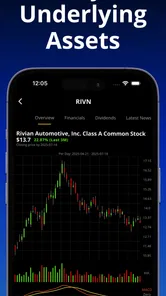
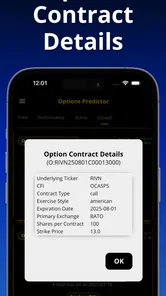
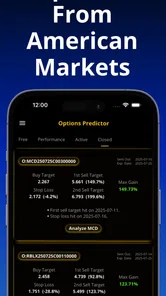
Analysis by Reviewed
I approached Stock Options Trading Signals as a finance app for people who want AI-assisted ideas and analysis around American stock options markets, rather than as a complete replacement for a brokerage account. That distinction matters immediately: it can help organize your thinking, but it does not remove the need to understand contracts, risk, expiration, liquidity, or the consequences of acting on a prediction.
In my experience, the app’s most interesting value is its attempt to turn a complicated options workflow into something easier to scan on a phone. The developer is Loheden AI Solutions AB, and the app is free to install, with optional in-app purchases ranging from $39.99 to $199.99 per item. It is rated for Everyone, runs from Android 7.1 onward, and has reached over 10K installs. Those details make it approachable to curious beginners, although the subject itself is not beginner-proof.
How clearly the app works across different users and situations
I use this section to look at how the same signal-focused workflow can feel different for a newcomer, a practiced trader, or someone checking markets in a brief window of time. The useful test is whether each person can turn a screen full of possibilities into a deliberate next step, rather than simply reacting to what stands out. That makes it easier to judge which situations suit the app—and where its limits matter most.
Readability and navigation when the market is moving
Financial apps are easiest to judge when you imagine using them under pressure. A stock-options screen can become confusing quickly because the reader is not only looking at a company name. They may also need to distinguish between calls and puts, strike prices, expiration dates, premiums, implied expectations, and the direction of a signal. Any design that makes those elements easier to separate has practical value, even before the user decides whether a trade is sensible.
What I like about this product’s focus is that it is narrower than a general investing dashboard. Its purpose is centered on stock options trading signals and analysis for American markets, so the experience is aimed at finding and interpreting potential opportunities rather than managing every part of a personal financial life. That focus can reduce the amount of unrelated information competing for attention.
Still, a focused app is not automatically a simple app. Options vocabulary remains dense, and a prediction can look more authoritative than it really is if the surrounding explanation is not read carefully. I would advise new users to slow down and identify exactly what a signal refers to before treating it as an action prompt. The useful question is not merely “Is this bullish or bearish?” but “What instrument, time frame, and risk does this idea involve?”
For readers with limited vision, readability depends on more than font size. Contrast, spacing, the order of information, and whether important changes are visually obvious all affect how safely someone can scan a trading screen. I would use the phone’s display enlargement and system text settings where available, then check whether the most important labels remain understandable rather than relying on color alone.
More From Our News Desk

 Gmail
GmailGmail in a Busy Inbox: Who Benefits Most?
From first account to crowded workday, Gmail earns its place through dependable search and flexible sorting—but its best fit depends on how much inbox maintenance you can tolerate.

 Prime Video
Switching to Prime Video: What Changes in Your Viewing Routine
Prime Video can make a compelling second home for streaming, but switching means learning a different catalog, rental layer, and route from browsing to playback.

 Universal TV Remote Control
Universal TV Remote Control Works Best as a Reliable Backup
A phone remote earns its place through quick setup and reliable habits. Here is how to get more from Universal TV Remote Control—and where its limits show.

 Weather - By Xiaomi
Weather by Xiaomi Review: Clear at a Glance, Less Clear Up Close
Xiaomi’s weather app makes everyday forecasts quick to scan, but its calm surface can leave useful details and recovery paths harder to find than they should be.

 X
XX Under Pressure: Can It Recover When Posting Goes Wrong?
A resilience-focused review of X, examining setup, mistaken posts, interruptions, weak connections, and the gaps that matter when recovery needs to be dependable.

 Clash of Clans
Clash of Clans Is Won Between the Battles
Its raids are quick; its community is a long-term project of coordination, teaching, rivalry, and shared responsibility—with all the friction that entails.
Latest News



That last point is especially important in finance. If a positive and negative movement are shown mainly through green and red, a color-blind user may have to work harder to interpret the screen. A more inclusive presentation would make the direction clear through words, symbols, or layout as well as color. I would not assume that a colored chart or badge communicates equally well to every reader.
Motor and sensory considerations for careful interaction
Options trading is a poor match for rushed tapping. A small screen, a moving market, and a mistaken selection can create a costly combination. I found the app more suitable as a research and review tool than as something to operate impulsively with one hand while distracted. Before acting on anything, I would enlarge the relevant details, confirm the underlying asset, and take a second look at the contract information.
Users with limited dexterity may benefit from treating the app as a staged workflow: browse ideas first, inspect one candidate, write down the reasoning, and only then decide whether any separate brokerage action is appropriate. This reduces the need for rapid repeated taps and makes accidental selection less likely. It also separates analysis from execution, which is a sound habit for everyone, not just people with motor limitations.
For users who experience visual fatigue, the subject matter creates another challenge. Charts, compact figures, and repeated comparisons can be tiring even when the interface itself is reasonably organized. Short sessions may work better than trying to monitor every idea continuously. I would also avoid using the app as a substitute for a written trading plan, because moving between several screens while tired makes it easier to miss a contract detail.
People who are sensitive to motion, flashing changes, or crowded visual updates should approach market-monitoring tools cautiously. The market context can change quickly, and a user may feel pressure to keep refreshing or checking. A calmer routine is more accessible: choose a review time, inspect the signal, record what you understood, and step away before making a decision.
Audio access is also worth considering. Someone who cannot comfortably read dense financial information may prefer spoken assistance from the operating system, but financial terminology can sound ambiguous when read aloud. Abbreviations, symbols, and numbers need careful listening. I would verify every spoken detail visually or through a second source before treating it as a trade instruction.
Situational access beyond disability
Accessibility is not limited to permanent impairments. A person may be using the app outdoors, in bright sunlight, with a cracked screen, on a small device, or while dealing with poor connectivity. Another user may be tired, unfamiliar with options, or trying to follow a signal while caring for a child. Those situations reduce attention and make compact financial interfaces harder to use safely.
This is where I see the app as most useful when used deliberately rather than continuously. Someone who works during market hours could review potential ideas during a quiet break, then compare them with their own rules later. A student learning options could use the analysis as a prompt for research instead of treating it as a shortcut. An experienced trader might use it to generate candidates for further checking, while keeping execution and risk control in a separate brokerage workflow.
The American-market focus is both helpful and limiting. It gives the app a defined audience, but it is not automatically a good fit for someone whose investments are centered on another region or whose schedule does not align with those markets. Time-zone confusion can also create situational difficulty. I would confirm the relevant market session and the age of any signal before making assumptions about its current usefulness.
Another realistic scenario is a user who wants to understand an options idea while sharing a phone with a family member or working in a public place. In that setting, privacy and concentration become practical concerns even without making claims about the app’s security features. I would avoid reviewing sensitive account information in public and would not let another person’s urgency determine the pace of my decision.
The app’s free entry point lowers the barrier to trying it, but the optional purchases change how I would evaluate it over time. I would first decide whether the basic experience improves my research process. Only after establishing a repeatable reason for using additional tools would I consider paying for an upgrade. A higher price does not make a prediction more reliable, and a paid feature should be judged by whether it saves meaningful effort or improves understanding.
Remaining barriers and where another tool may be better
The biggest barrier is not necessarily navigation; it is interpretation. AI-generated analysis can be useful for spotting patterns or narrowing a watchlist, but it cannot turn an uncertain market into a certain one. Users who want plain-language education, portfolio allocation, long-term investing, or direct order execution may find a conventional investing app more appropriate. Those tools often make it easier to see holdings, cash, statements, and account-level risk in one place.
Likewise, a dedicated options platform may be better for someone who needs advanced contract comparison, detailed payoff analysis, or highly configurable order controls. I would choose this app when I want an additional source of ideas and analysis, not when I need every professional trading function in one interface. Its value depends on fitting into a larger process rather than replacing that process.
Beginners should pay special attention to the difference between a signal and a recommendation. The store summary describes AI predictions and analysis, but I would still treat every result as a starting point for verification. Check the company news, the underlying price, the contract’s expiration, the spread, and the amount you could lose. If you cannot explain why the idea fits your plan, the accessible choice is to skip it.
There is also a cognitive-access barrier for users who process information more slowly. A stream of opportunities can encourage comparison fatigue, especially when several contracts look similar. My practical workaround would be to limit the review to a small personal checklist: what is the thesis, what invalidates it, how much time is involved, and what is the maximum acceptable loss? If the app helps you answer those questions, it is serving your decision-making. If it only creates more alerts to sort through, it may be adding friction.
Users who depend on assistive technologies should test the actual screens they need before committing to a paid purchase. System-level accessibility tools can help with enlargement, contrast, and spoken content, but they cannot guarantee that every financial label will be presented in a useful order. I would be especially cautious around charts, compact tables, and controls whose meaning depends on color or position.
What I would do with it in a real routine
My preferred workflow begins before opening the app. I would define the type of opportunity I am willing to consider, the maximum amount at risk, and the time horizon. Then I would use the app to inspect possible signals, not to decide instantly. For each candidate, I would record the underlying stock, the direction of the idea, the contract details, and the reason it appeared interesting.
Next, I would compare the signal with information from a brokerage or market-data source. This is one of the most important trade-offs: the app may make discovery faster, while another service may be better for confirming prices, liquidity, account impact, and order mechanics. Keeping those roles separate makes it easier to notice when an attractive-looking signal does not fit the actual trade.
A useful advanced habit is to review missed ideas as well as acted-on ideas. If a signal looked promising but I rejected it, I could later ask whether my reason was sound or whether I simply misunderstood the contract. That turns the app into a learning aid instead of an endless source of predictions. It also protects against judging the product only by memorable wins.
I would not use it while driving, walking through traffic, or making a decision in a noisy environment. That sounds obvious, but options require enough attention to read several connected details correctly. Situational accessibility means knowing when not to use the app. A quiet review later is safer than a rushed glance now.
The current version is 1.3.82, and the app was released on October 11, 2023. It has an average rating of 4.3 from around 474 ratings, with 17 written reviews. Those figures suggest that many users find something worthwhile in it, but they should not replace personal testing. Ratings rarely reveal whether the product suits a screen-reader user, someone with tremor-related motor difficulty, or a beginner who needs extensive explanations.
My inclusive verdict
I see Stock Options Trading Signals as a potentially useful companion for people who want AI-supported ideas about American stock options and are prepared to verify everything themselves. Its focused finance category, free starting point, and narrow purpose make it easier to explore than building a research process from scratch. The developer, Loheden AI Solutions AB, has positioned it around analysis rather than around being a universal money-management app.
For accessibility, my verdict is conditional. The app can fit users who are comfortable adjusting their phone settings, reading financial terminology carefully, and working at a controlled pace. It may also help people who need a compact way to create a research shortlist. However, users who rely on strong semantic labeling, non-visual chart access, generous touch targets, or extensive educational guidance should test it carefully and keep another source available.
I would recommend it to an independent learner, an experienced trader seeking another idea generator, or anyone who understands that predictions are inputs rather than instructions. I would skip it if I wanted a simple savings app, long-term portfolio management, guaranteed clarity, or a single tool for research and execution. The optional purchases are another reason to begin slowly: pay only when the app demonstrably improves your process, not because a premium option feels more authoritative.
My final advice is simple: use the app to ask better questions, not to avoid asking them. Read the signal, inspect the contract, confirm the market context, and decide whether the risk makes sense for you. When used with that discipline, it can be a practical addition to an options-research routine. Without that discipline, its convenience may make a complicated decision feel easier than it really is.
Stock Options Trading Signals Frequently Asked Questions
Is Stock Options Trading Signals suitable for beginners?
Stock Options Trading Signals is a finance app for people interested in options ideas and analysis, but options trading itself can be complex. Beginners should first learn how calls, puts, strike prices, expiration dates, premiums, and volatility work. Treat alerts as prompts for further research rather than instructions to trade, and consider practicing without real money until you understand the risks.
What markets does Stock Options Trading Signals cover?
The app focuses on AI predictions and analysis tools for stock options in American markets. That focus can help users looking for options-related ideas in that market, but it does not make a signal a complete assessment of a company or investment. Check each alert against current market conditions and your own goals before deciding whether it is relevant to you.
What is Stock Options Trading Signals, and how does it work?
Stock Options Trading Signals is an app designed to provide market ideas and alerts related to stock options. Signals may include information such as the underlying asset, call or put direction, strike price, expiration date, and possible entry or exit levels. The app is intended to support research and decision-making, not to place trades automatically or guarantee profitable results.
Are the trading signals accurate, and can they guarantee profits?
No trading signal can guarantee accuracy or consistent profits. Signals are generally based on technical analysis, market data, algorithms, or the opinions of analysts, and they can become outdated quickly when prices move suddenly. Before acting on any alert, users should independently verify the information, understand the potential loss, and remember that options can expire worthless or lose value rapidly.
Do I need previous options-trading experience to use the app?
Basic knowledge is strongly recommended before using Stock Options Trading Signals. Users should understand calls, puts, strike prices, expiration dates, premiums, implied volatility, and the risks of leverage. Beginners may find the alerts useful for learning how ideas are presented, but they should not trade real money until they understand order types, assignment risk, time decay, and the possibility of losing the entire premium.
Pros
- Clear alerts can help users spot potential options opportunities quickly.
- Useful for traders who want ideas without constantly monitoring the market.
- Signals may cover multiple assets
- offering broader market exposure.
- Simple notifications can fit well into a fast-paced trading routine.
- Helpful for comparing market ideas before conducting personal research.
Cons
- Signals are not guaranteed and may lead to losses if followed blindly.
- Timing delays can make an otherwise attractive trade less profitable.
- Limited context may hide volatility
- liquidity
- or earnings-related risks.
- Subscription costs may reduce returns
- especially for smaller trading accounts.
- Options require experience; beginners may misunderstand risk and expiration dates.












