Stardew Valley Tracker
- 302.00
- 4.6
- Installs
- 10.00K
- Price
- $3.49

Screenshots
Analysis by Reviewed
I like the idea of keeping a Stardew Valley reference close at hand, but the best companion is one that helps without turning a relaxed farm visit into homework. Stardew Valley Tracker is a dedicated tool for looking up game details and shaping a play session around your own priorities. Its usefulness depends less on how much you want to complete than on how often you find yourself pausing to remember what to do next.
Readability and finding the right detail
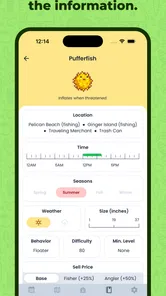
When I open a companion app, I usually have one question in mind: what should I bring, who should I visit, or what did I want to work toward? A focused lookup is a more comfortable way to use a reference than scrolling through a long guide without a goal. The tracker’s value is in bringing Stardew-oriented information together, so I can consult it between in-game tasks instead of searching across several unrelated pages.
That approach also makes it useful for players who are still learning how the game’s many items, quests, and relationships fit together. Rather than trying to memorize every detail, I can check an answer when I need it, then return to playing. I would still keep my own priorities simple: choose one or two things for a session, rather than treating every available reference as a task that needs to be completed.
Keeping a Busy Farm Straight
I find a tracker most useful when I’m trying to make a plan without pausing to search through several pages of notes. Before a play session, I can check what I meant to work toward, then use the app as a reference when a quest, item, or villager question comes up. That makes it a natural fit for players who enjoy collecting and completing goals, especially if they are new to the game’s many details.
It also suits short sessions. If I only have time to play for a little while, I can decide in advance which in-game event or relationship task matters most, rather than spending that time wondering what I had planned. I would not treat a tracker as a substitute for exploring, though: players who enjoy discovering everything unaided may find that looking up answers takes some of the surprise out of Stardew Valley.
Your Farming Companion
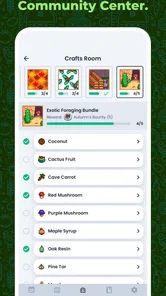
Let’s dive right into what makes this app a must-have for any serious Stardew Valley fan. The Stardew Valley Tracker isn’t just a simple checklist; it’s an all-encompassing guide that helps you keep track of everything from your farming tasks to your relationships with the villagers. No more scribbling notes on paper or frantically searching through wikis. With this app, all the info you need is right at your fingertips.
Features Galore
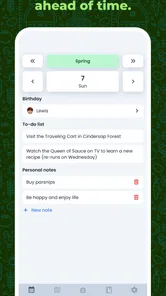
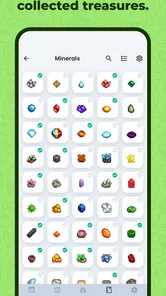
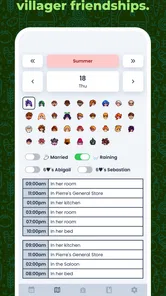
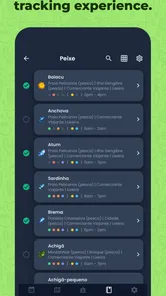
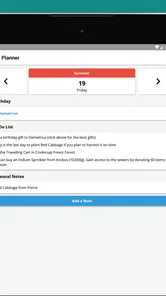
The app is packed with features that make it an essential tool for both new and veteran players. It has a comprehensive list of all the items in the game, detailed guides on how to complete quests, and even a calendar to track in-game events. I mean, have you ever forgotten about the Starlight Festival? With this tracker, you’ll never miss another event again. Plus, the app is regularly updated, so you’re always in the loop with the latest game changes.
More From Our News Desk

 Gmail
Gmail in a Busy Inbox: Who Benefits Most?
From first account to crowded workday, Gmail earns its place through dependable search and flexible sorting—but its best fit depends on how much inbox maintenance you can tolerate.

 Prime Video
Switching to Prime Video: What Changes in Your Viewing Routine
Prime Video can make a compelling second home for streaming, but switching means learning a different catalog, rental layer, and route from browsing to playback.

 Universal TV Remote Control
 Works Best as a Reliable Backup
A phone remote earns its place through quick setup and reliable habits. Here is how to get more from Universal TV Remote Control—and where its limits show.

 Weather - By Xiaomi
Weather by Xiaomi Review: Clear at a Glance, Less Clear Up Close
Xiaomi’s weather app makes everyday forecasts quick to scan, but its calm surface can leave useful details and recovery paths harder to find than they should be.

 X
X Under Pressure: Can It Recover When Posting Goes Wrong?
A resilience-focused review of X, examining setup, mistaken posts, interruptions, weak connections, and the gaps that matter when recovery needs to be dependable.

 Clash of Clans
 Is Won Between the Battles
Its raids are quick; its community is a long-term project of coordination, teaching, rivalry, and shared responsibility—with all the friction that entails.
Latest News



One practical way I’d use those references is to check a villager’s preferences before setting off with gifts, then keep a short mental or personal note of the next relationship goal. That can prevent aimless backtracking, but it also means the app is most helpful when I consult it between tasks rather than constantly switching away from the game. If you like solving every detail from memory, that convenience may feel like a shortcut you do not want.
What I really love about this app is the villager tracker feature. It shows you what items each villager loves and hates, which makes gift-giving a breeze. Building relationships in Stardew Valley is crucial, and this feature ensures you’re always prepared to impress your pixelated pals!
Turning a lookup into a useful plan
A small workflow makes a dedicated guide feel less intrusive: check the detail before launching a session, decide what is genuinely worth doing today, and leave the rest for another time. For example, if I know I want to make progress on a relationship, I can consult gift preferences first and avoid spending the session wandering around hoping to find the right person or item. The benefit is not that the app plays for me; it is that I can spend more of my limited playtime making choices instead of reopening searches.
I would be careful not to turn that preparation into a rigid checklist. Stardew Valley is enjoyable partly because plans change, and an unexpected opportunity can be more fun than following a carefully optimized route. A tracker works best as a prompt or reference, not as a scorecard. If a session is meant to be relaxing, I can look up one useful fact and then ignore the rest of the planning.
Easy Navigation
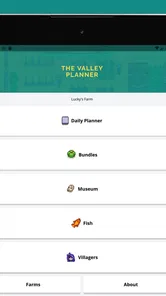
One of the things that can be quite daunting about some tracker apps is the user interface. Thankfully, the Stardew Valley Tracker is incredibly user-friendly. The layout is intuitive, making it easy to find what you’re looking for without any fuss. Whether you’re checking off daily tasks or planning your crop rotations, everything is laid out in a way that makes sense.
For readability, a clear route to reference material matters more than having every possible detail on screen at once. I’d approach it with a specific question in mind—such as what I need for a quest—rather than trying to absorb a whole guide in one sitting. That makes the app easier to use in brief visits, while players who need larger text, stronger contrast, or particular assistive controls should check how it behaves on their own device before relying on it.
Motor, sensory, and attention considerations
Using a phone as a companion involves more than reading: I have to hold or position the device, move through its interface, and shift my attention back to the game. If repeated tapping is uncomfortable, or if switching between screens makes it harder to stay focused, a paper list with one or two reminders may be a better fit. A quick pre-session lookup can reduce those interruptions, but it does not remove the need to navigate the app when a new question comes up.
For sensory comfort, I would judge the actual screen on the device I plan to use rather than assume that a compact guide will suit everyone. Players who rely on a particular text size, contrast setting, screen reader, or other assistive control should try the relevant parts of the app before building a routine around it. If reading on a phone is tiring, consulting it away from the game in a calm moment—or asking a friend to help make a short reference note—may be less demanding than looking things up during play.
Another great thing? It’s available for both Android and iOS, so no matter what device you’re on, you can carry your farm essentials with you. And let’s be real, having your farm progress right there on your phone is pretty neat.
Using It Around Your Day
A realistic routine might be checking the calendar before a quick evening session, looking up a gift while away from the game, and returning to play with a simple plan. That kind of separated use can be more comfortable than trying to read and play at the same time, particularly if switching attention between screens is tiring. The trade-off is that a phone reference still requires you to pick up and navigate another device; a paper note may be easier for someone who wants a single glance, while a general web search may suit someone who only needs an answer once in a while.
For instance, if I have a short break before dinner, I can check a date or gift detail then, decide on one small goal, and avoid spending the first part of the later play session trying to remember what I had in mind. If plans change once I start playing, I can simply leave that goal unfinished. This is a useful distinction: the app can help me prepare, but it should not make an evening session feel like an appointment I have to keep.
Compared with a wiki or a general web search, a dedicated tracker is appealing when I expect to return to Stardew-specific information repeatedly and want a more focused place to consult. A search can be quicker for one isolated question, and a wiki may suit someone who wants to browse broad explanations. Paper notes have the opposite strength: they are easy to glance at and can be personalized, but I have to write and maintain them myself. The right choice depends on whether I value a single dedicated reference more than the freedom to use whatever I already have.
As a paid Tools app, it costs $3.49, so I’d think about how often I expect to use its Stardew-specific references before buying. It has a 4.6 average from around 1.3K ratings, with over 10K installs, and it is rated Everyone. Developer hiugo released it on July 25, 2018; version 4.4.5 supports Android 7.0 and later. Those details make it straightforward to judge whether it fits your device and budget, but the real value depends on whether a dedicated companion is more useful to you than free notes or occasional searches.
Who will get the most from it
I would recommend considering it if Stardew is a regular part of your downtime and you often need to check more than one kind of detail—such as a quest requirement, an item, a villager preference, or an in-game date. Keeping those lookups in a game-focused tool can be more convenient than repeatedly searching the web. It may also help newer players feel less overwhelmed by the amount to learn, as long as they still want to make their own decisions rather than follow a complete guide.
On the other hand, someone who plays occasionally and rarely looks anything up may get more value from a free note or one quick search. It is also a poor match for a player who wants to discover every answer independently, or for anyone who finds using a second screen distracting or physically uncomfortable. If accessibility depends on a specific interaction or display behavior, I would test that directly before paying; a tool is only useful when its reference material is comfortable to reach.
Where It May Not Fit
A dedicated tracker is not automatically the best choice for every player. If you only want one answer, opening a full companion app may be more effort than a quick search. If you prefer to keep your playthrough blind, item and quest references can remove the pleasure of figuring things out. And if your main need is recording a personal schedule rather than consulting Stardew information, a simple notes app may be the better tool.
I’d also avoid assuming that a reference app will replace the game’s own cues or remember every personal intention in exactly the way I do. A useful habit is to check a guide before a session, choose one or two priorities, and then put the phone aside while playing. That keeps the tracker in a supporting role instead of turning a relaxed farm visit into a checklist exercise.
Conclusion
In a nutshell, the Stardew Valley Tracker is a game-changer for anyone who wants to maximize their Stardew Valley experience. It’s not just about keeping track of your farm; it’s about enhancing the fun and making sure you enjoy every bit of your time in this beloved game. So, if you’re serious about your Stardew Valley adventures, this app is definitely worth checking out. Happy farming!
My more measured recommendation is for players who regularly look up gifts, quests, items, or dates and want those Stardew references gathered in one place. It is less compelling for casual players who rarely need reminders, people who prefer discovery without guides, or anyone whose access needs are not met comfortably by the app on their device. For me, its strongest use is reducing small bits of lookup friction without dictating how to play: check what you need, make your own plan, and keep the farm itself the fun part.
A grounded choice for different play styles
What I would want to know before committing is whether I will actually consult a dedicated companion often enough to justify a paid download, and whether its way of presenting information works for me. The price is a one-time consideration for a tool with a narrow, game-specific purpose; the value comes from repeat use, not from simply having another app installed. If I only play now and then, I would first see whether a note or occasional search already solves the problem.
For players who do use it regularly, I would keep the phone nearby but out of the way, consult it between activities, and write down only the next priority if I need a reminder. That simple boundary helps preserve the loose, exploratory feel of the game while still making the tracker useful. My inclusive verdict is that it can make Stardew’s many details easier to approach for some players, but comfort depends on the individual device, reading preferences, and way of interacting; there is no single setup that will suit everyone.
Stardew Valley Tracker Frequently Asked Questions
What does the Stardew Valley Tracker app help me plan?
Stardew Valley Tracker is a tools app described as a planner and tracker for Stardew Valley. It may suit players who want a companion for organizing their play, but it is separate from the game itself. Before downloading, consider whether you prefer to keep notes and plans in a dedicated app alongside your game.
What is the main purpose of the Stardew Valley Tracker app?
The Stardew Valley Tracker app is designed to enhance your farming experience by helping you keep track of crops, animals, and events within the game. It serves as a companion tool, allowing you to organize your farm activities efficiently, ensuring you never miss a harvest or important festival again.
Is the Stardew Valley Tracker app compatible with all versions of the game?
Yes, the Stardew Valley Tracker app is compatible with all versions of Stardew Valley, whether you're playing on PC, console, or mobile. The app is regularly updated to ensure compatibility with the latest game updates and expansions, providing a seamless experience across all platforms.
Does the Stardew Valley Tracker app require an internet connection to function?
No, the Stardew Valley Tracker app does not require an internet connection to function. Once downloaded, it operates offline, allowing you to access and update your farm information anytime, anywhere. This makes it a convenient tool for players who may not have consistent internet access.
Is my game progress automatically synced with the Stardew Valley Tracker app?
The Stardew Valley Tracker app does not automatically sync with your game progress. Instead, it requires manual input of your farm data. This allows for customized tracking based on your specific in-game activities and ensures that you have full control over the information you choose to monitor.
Pros
- User-friendly interface for easy navigation.
- Comprehensive tracking of game progress.
- Customizable reminders for tasks.
- Supports all platforms
- including PC and consoles.
- Frequent updates with new features.
Cons
- Requires internet connection for full functionality.
- Limited offline features.
- May experience occasional syncing issues.
- Learning curve for new users.
- Some features locked behind a paywall.