Spoly: Sports Card Scanner
- 82.00
- 4.8
- Installs
- 10.00K
- Price
- Free

Screenshots
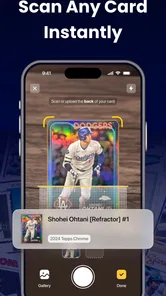
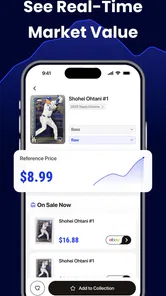
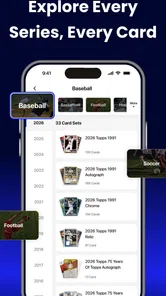
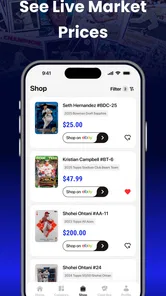
Analysis by Reviewed
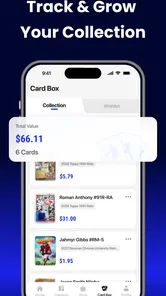
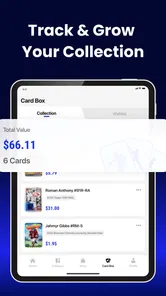
Collecting sports cards is enjoyable until the practical work begins. Identifying an unfamiliar card, estimating its value, and keeping a collection organized can quickly turn a relaxing hobby into a pile of notes, screenshots, and open browser tabs. Spoly: Sports Card Scanner is built for that exact problem. It is a free lifestyle app from Scaling Engine Limited that brings card identification, valuation, and collection management into one place.
I approached it as a collector would: not just asking whether it can recognize a card, but whether it helps reduce the small points of friction that appear when you are handling several cards at once. The app has a 4.7 average from around 1.1 thousand ratings, with more than 10 thousand installs, so it has already attracted a meaningful early audience. My overall impression is positive, especially for people who want a more organized starting point than manually searching every card. However, its usefulness depends heavily on the quality of the image, the accuracy of the information you enter, and your expectations about valuation.
Getting past the first points of friction
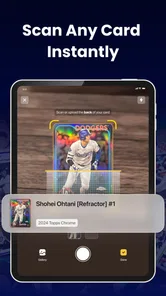
The first thing I would tell a new user is not to treat the scanner as magic. A sports card is a small, detailed object, and the result can be affected by glare, shadows, a busy background, or a camera angle that hides part of the design. If the first scan does not look right, that does not automatically mean the app is broken. It may simply need a cleaner view of the card.
I found it helpful to prepare a small scanning area before working through a collection. A flat surface, even lighting, and a plain background make the card easier to read. Keeping the card inside the camera frame without cropping its edges is also important, because small details such as the player name, team mark, year, or card number may be needed to distinguish one issue from another.
Collectors often get stuck when they expect one photo to settle every variation. A base card, parallel, insert, signed card, or special edition can share much of the same artwork while having a different value. If the visual difference is subtle, I would use the scan as a starting point and then inspect the result carefully rather than accepting the first match without checking it.
This is where Spoly becomes more useful than a simple image search. Instead of using a general search engine and sorting through unrelated results, I can keep the identification step connected to the valuation and collection workflow. That does not remove the need for judgment, but it gives the process a clearer structure.
What to check before scanning
Before blaming the app, I would check the basics. The phone camera lens should be clean, the card should be fully visible, and the lighting should be bright enough to show printed details without creating reflections. Foil cards are particularly awkward because a direct light source can wash out the very marks that separate one version from another.
More From Our News Desk

Weather by Xiaomi Review: Clear at a Glance, Less Clear Up Close

X Under Pressure: Can It Recover When Posting Goes Wrong?

Clash of Clans Is Won Between the Battles

Android Auto Makes the Case for Quieter Car Software

MobiOffice: Transforming Mobile Productivity with Seamless Integration

EA SPORTS FC™ Mobile Soccer: Redefining Mobile Sports Gaming
I would also avoid scanning a card while holding it in midair. Small movements make the image less stable, and a sleeve can introduce reflections or wrinkles. For valuable cards, I would not remove protective storage just to get a better scan. Instead, I would try a different angle or move the light source. Protecting the card matters more than getting an instant result.
If the camera view appears slow or fails to respond, I would close other demanding apps, reopen Spoly, and try again in a well-lit place. These are simple steps, but they eliminate many problems that users may mistakenly attribute to the card database or recognition process.
The app is free to install, which makes it easy to test with a small group of cards before committing to a larger workflow. There are in-app purchases listed at $29.99 to $39.99 per item, so I would examine what a paid option changes for my own collecting habits before buying anything. A casual collector may be comfortable using the free experience, while someone cataloging a large collection may find the additional tools more relevant.
Making the first collection useful
A collection manager is only valuable if the information inside it remains trustworthy. My advice is to begin with a manageable batch rather than photographing an entire room of cards in one sitting. Start with cards you know well. That gives you a reference point for judging whether the identification and valuation results make sense.
When a card is recognized, I would check the visible details against the physical card before saving it. Look at the player, team, season, set design, card number, and any wording that signals a variation. This extra moment is especially important when several cards look nearly identical. Saving an incorrect match may be more troublesome later than spending a few seconds verifying it now.
I would also separate identification from condition assessment in my mind. A scanner may help determine what a card is, but condition still involves corners, edges, surface, centering, print defects, and sometimes authenticity concerns. A clean-looking scan should not be interpreted as a professional grade or a guarantee of a particular selling price.
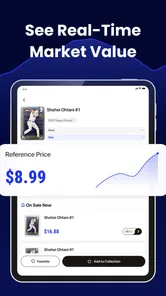
That distinction is one of the most important practical lessons with this type of app. The valuation feature can help me understand where a card may sit in the market, but it should be treated as an estimate rather than a promise. Prices can differ according to condition, timing, demand, seller reputation, and whether the card is raw or professionally graded.
Recovering when a scan or saved record goes wrong
When a scan produces an unexpected result, I would not immediately repeat the same action with the same image. First, I would compare the proposed card with the physical one. If the player is correct but the set or variation is wrong, I would try to improve the image by changing the angle and removing glare. If the entire result is unrelated, I would retake the image with the card centered and the background simplified.
A useful recovery habit is to keep a small handwritten or digital note of cards that need checking. That prevents a questionable result from being forgotten and stops me from repeatedly scanning the same card without changing anything. Once the lighting or angle is corrected, I can return to the uncertain items with a clearer plan.
For a large collection, I would work in batches based on a meaningful category: one binder page, one player, one season, or one box. This makes it easier to notice mistakes. If I scan unrelated cards in a random order, an incorrect match can blend into the collection and become difficult to find later.
Another practical tip is to photograph or scan the front and inspect the physical reverse before finalizing a record whenever the card has a confusing front design. The back may contain the information needed to separate similar releases. I would not assume that a visually distinctive front is enough for a precise catalog entry.
If a saved item does not appear where I expect it, I would first check the collection view and any available sorting or filtering controls rather than scanning it again. Repeatedly creating records can lead to duplicates, which then make the collection less reliable. Keeping one carefully checked entry is better than accumulating several uncertain versions.
Because the current version is 1.2.1, I would also make sure the app is updated through the relevant app store before troubleshooting extensively. An update can resolve ordinary stability problems, but I would still avoid assuming that every recognition issue is an app defect. The image and the card variation remain the most common sources of confusion.
A realistic everyday workflow
Imagine finding a small stack of cards while clearing a storage box. I would place them on a table, group obvious duplicates, and begin with a few cards whose players or teams I recognize. After scanning each one, I would compare the result with the printed details, save only the matches that look convincing, and set aside anything uncertain.
Next, I would use the valuation information as a prioritization tool. Cards that appear more interesting could receive a closer condition check, while ordinary duplicates could be cataloged quickly. This is more useful than treating every card as if it deserves the same amount of research. The app can help me decide where to spend my time, even when I still need external judgment before selling.
Finally, I would review the saved collection for duplicate entries and obvious mismatches. This last pass is easy to skip, but it is what turns a series of scans into a dependable inventory. If I later trade, insure, organize, or sell cards, clean records will matter more than how quickly the original scans were completed.
When the app is not the cause
Some frustrations come from the nature of card collecting rather than from Spoly. Older cards may have faded printing, damaged corners, unusual layouts, or incomplete information. Modern releases can have many parallels and inserts that look almost the same. A recognition tool has to work with those ambiguities, and no automated result should replace a collector's inspection.
Network conditions can also affect an app that needs to retrieve identification or valuation information. If a result takes longer than expected, I would check whether other apps can connect normally and try again later before concluding that the card cannot be recognized. I would also avoid repeatedly tapping controls, since that can create confusion about whether an action has completed.
Camera hardware is another variable. A phone with a scratched lens, poor focus, or aggressive image processing may make difficult cards harder to read. In that situation, trying a different device can be a sensible test. If the same card fails everywhere, the card itself may be unusually difficult to identify; if it works on another phone, the original camera or lighting setup is more likely responsible.
Valuation disagreements deserve similar caution. If a number looks surprisingly high or low, I would verify the exact card version and condition before making a decision. I would not list a card for sale, trade it, or assume a profit based on a single estimate. For expensive cards, specialist marketplaces, recent comparable sales, and professional advice may be better choices than relying on an app alone.
This is also where Spoly should not be confused with a grading service, an authentication service, or a replacement for a detailed collector's database. Its appeal is the combination of quick identification, valuation guidance, and personal organization. If my main goal is formal authentication or deep historical research, I would use a more specialized source alongside it.
Who will get the most from it
I think Spoly is a strong fit for a collector who has enough cards to lose track of them but does not want to build a spreadsheet from scratch. It is also useful for someone sorting a family collection, checking duplicates before a trade, or creating a more practical inventory before moving or downsizing.
Beginners may appreciate having the identification and organization steps connected. Instead of learning several separate tools, they can start with a card, inspect the result, and build a collection gradually. The Everyone content rating also makes it suitable for a broad household audience, including families sorting cards together.
More experienced collectors can still benefit, but they should use it as a productivity aid rather than an authority. Someone who already knows set variations may spot errors faster and use the app mainly to speed up record keeping. In that role, the biggest advantage is not replacing expertise; it is reducing repetitive typing and searching.
I would be more cautious about recommending it to a collector who needs guaranteed market prices, formal grading, or highly specialized research. I would also skip it if I dislike checking automated results manually. The app saves time only when I am willing to verify important details. For a very small collection, a simple notes app may be enough, while a large professional operation may need a more advanced inventory system with controls designed for business use.
How it compares with familiar alternatives
The usual alternative is manual searching. That approach can be more precise when I already know the exact set and variation, but it becomes slow when I am starting with an unknown card. Spoly's advantage is the shorter path from physical card to organized record. Its weakness is that an automated match may look convincing while still being wrong, especially among visually similar releases.
A spreadsheet offers complete control over fields, naming, and custom notes. It is better for collectors who want a highly personal catalog or who need unusual information that a dedicated app may not support. The trade-off is that I must identify cards, research values, enter details, and maintain the structure myself. Spoly is more convenient at the beginning, while a spreadsheet can be more flexible at the end.
General image-search tools are useful for discovering clues, but they often return a mixture of marketplaces, social posts, and unrelated images. They are not designed around a personal sports card collection. Spoly's focused workflow makes more sense when I want to move from recognition to valuation and then to organization without rebuilding the context each time.
Specialist collecting platforms may be a better fit for advanced users who need deeper market history, detailed grading records, or extensive trading functions. I would choose Spoly when speed and simplicity matter more than a full professional catalog. The right choice depends less on the size of the collection than on how precise and customizable the records need to be.
Privacy, purchases, and sensible expectations
Before scanning a valuable collection, I would take a moment to understand how the app handles saved items and images through its store privacy information and in-app settings. I would avoid photographing unrelated personal documents or placing identifying information in collection notes. That is a good habit with any camera-based cataloging tool.
The free price makes experimentation straightforward, but the in-app purchase range means I would not unlock paid items automatically just because I had a large backlog. I would first test the basic workflow with cards from different eras, finishes, and conditions. If the app consistently saves me time, the purchase may make sense; if I still need to do most of the research elsewhere, I would keep using the simpler option.
It is also worth remembering that a valuation is not the same as cash in hand. A displayed estimate may help me prioritize cards, but the final amount depends on finding a buyer and presenting the card accurately. I would use Spoly to organize decisions, not to make promises about what a card will sell for.
My practical verdict
After looking at the complete workflow, I see Spoly as a useful companion for everyday sports card sorting rather than a final authority on identity or price. Its strongest idea is bringing scanning, valuation, and collection management together, because those are the three tasks that usually become scattered across different tools.
The app works best when I prepare the card carefully, verify the result, and use valuation as guidance. The most effective approach is to scan in small batches, separate uncertain matches, check variations manually, and review saved records for duplicates. Those habits make the app more dependable and also protect me from the most expensive collecting mistakes.
Scaling Engine Limited has made a focused lifestyle app that should appeal to both newcomers and hobbyists with growing collections. The 4.7 average and early install base suggest that many users are finding value in the concept, while the current version gives the product room to mature through future improvements. I would recommend trying it with a representative sample before deciding whether it belongs at the center of a larger collection.
My recommendation is simple: use Spoly as a fast first pass and an organized home for your records, but keep your own judgment in charge of important identifications and sales. If that balance matches the way you collect, the free download is worth exploring. If you need professional authentication, exhaustive market research, or total control over every catalog field, a specialist service or a carefully designed spreadsheet will be the better companion.
Spoly: Sports Card Scanner Frequently Asked Questions
Is Spoly suitable for someone new to collecting sports cards?
Spoly is aimed at people who want to identify cards and keep track of a collection without starting with a manual catalog. Its all-in-one focus combines card identification, valuation, and collection management, which can make it a useful companion for beginners as well as established collectors. It is still sensible to check important details yourself, especially when a card’s edition or condition could affect its value.
What is Spoly: Sports Card Scanner used for?
Spoly: Sports Card Scanner is designed to help collectors identify and organize sports trading cards using their smartphone camera. After scanning a card, the app can provide information such as the player, sport, card set, estimated value, and related market details when available. It is useful for quickly reviewing a collection, although results may depend on image quality and the app’s current database.
How accurately does Spoly identify sports cards and estimate their value?
The app can save considerable time compared with manually searching for every card, but its results should be treated as a starting point rather than a guaranteed appraisal. Recognition may be affected by glare, damaged cards, unusual editions, autographs, parallels, or poorly centered photos. Market values can also change frequently, so users should compare Spoly’s information with recent sales and trusted marketplaces before buying, selling, or insuring a card.
Which sports cards can I scan with Spoly?
Spoly is intended for sports trading cards, but the exact coverage depends on the app’s supported database and the releases it currently recognizes. Popular modern cards are generally more likely to be identified than obscure regional issues, very old cards, custom cards, or limited variations. If a scan is not recognized, checking the card’s year, brand, set, player name, and card number manually may help locate the correct listing.
Does Spoly require an internet connection, and what permissions does it use?
Because card recognition and pricing information may rely on online databases, an internet connection is likely needed for the best experience, especially when searching current market data or synchronizing a collection. The app may request camera access to scan cards and could require account or storage permissions for saved items. Before installing, review the permissions and privacy information in the official Google Play or App Store listing.
Pros
- Quickly identifies many sports cards using your phone’s camera.
- Useful for organizing large collections with searchable card records.
- Helps estimate card values without manually checking every listing.
- Supports collection tracking for multiple sports and card types.
- Simple interface makes scanning accessible for beginners.
Cons
- Recognition can struggle with damaged
- rare
- or poorly photographed cards.
- Price estimates may vary from actual sale prices and market conditions.
- Some features or scans may require a paid subscription.
- Accurate results depend on clear lighting and a steady camera.
- Coverage for niche cards or newer releases may be inconsistent.











