Speed Queen
- 2.50K
- 4.4
- Installs
- 1.00M
- Price
- Free

Screenshots
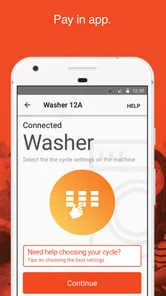
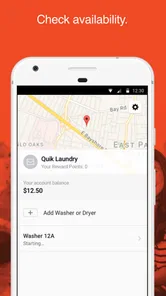
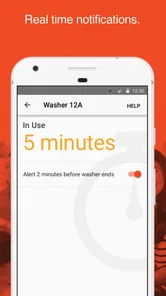
Analysis by Reviewed
Paying for laundry is rarely the part of the day I want to think about. That is the narrow problem Speed Queen tries to solve: it is a free Lifestyle app from Alliance Laundry Systems that lets me handle payment for a compatible Speed Queen washer or dryer from my phone. I found the idea useful when the machine and the app worked together as expected, but the experience is more practical than exciting. It is a tool for a specific laundry routine, not a general household-management app.
That distinction matters. If you regularly use Speed Queen equipment that supports the app, moving payment to a phone can remove a small but repeated inconvenience. If you own a different brand, use machines that only accept coins or cards, or simply prefer paying at the machine, there is little reason to install it. My overall impression is that its value depends less on the app itself than on whether the laundry equipment around you is compatible and whether you are comfortable putting a payment task on your phone.
What the app is really useful for
The core experience is straightforward: open the app when you need to pay for a supported washer or dryer, select the relevant machine, and complete the payment process from the phone. That makes the app most relevant in shared laundry rooms, apartment buildings, student housing, and other places where Speed Queen equipment is installed for multiple users. It is also useful for anyone who dislikes carrying coins or searching for a physical payment method before starting a load.
In my experience, the biggest benefit is reducing interruptions. Imagine arriving at the laundry room with a basket, detergent, and a narrow window before work. With a conventional setup, you may need to check the machine, find change, return to your room, or deal with a payment terminal that is not responding. A phone-based option can make the start of the wash feel more deliberate: identify the machine, pay, and get on with the rest of the chore.
That convenience should not be confused with remote laundry management. The app’s stated purpose is payment, so I would not choose it expecting a complete control center for washing schedules, detergent reminders, maintenance planning, or household inventory. Its strength is being focused. Its weakness is the same focus: people looking for a broader smart-home experience may find it limited.
Alliance Laundry Systems is the developer, and the app has been available since January 8, 2018. It currently appears as version 4.0.2 and supports devices running Android 6.0 or later. Those details make it accessible to many older Android phones, although support for an operating system does not guarantee that every device, payment setup, or laundry installation will behave identically.
Trust starts with the equipment, not just the screen
When I assess a payment app like this, I first ask whether it has a clear job and whether the user can understand when that job is being performed. Speed Queen benefits from having a narrow purpose. I am not being asked to navigate a social feed, a complicated dashboard, or a collection of unrelated services. The relevant moment is usually obvious: I need to pay for a particular machine.
More From Our News Desk

Weather by Xiaomi Review: Clear at a Glance, Less Clear Up Close

X Under Pressure: Can It Recover When Posting Goes Wrong?

Clash of Clans Is Won Between the Battles

Android Auto Makes the Case for Quieter Car Software

MobiOffice: Transforming Mobile Productivity with Seamless Integration

EA SPORTS FC™ Mobile Soccer: Redefining Mobile Sports Gaming
At the same time, trust depends on the connection between the phone and the physical washer or dryer. Before relying on the app for an urgent load, I would test it with a small, non-critical laundry task. That gives me a chance to learn how the machine is identified, how payment confirmation appears, and what happens if the laundry room has weak connectivity. A short trial is more useful than discovering a problem when I am late for work or dealing with a full basket.
The app’s broad adoption is encouraging: it has passed one million installs and holds a 4.4 average from around 8,500 ratings. I read those figures as signs that the basic concept works for a substantial audience, not as a guarantee that it will work in every building. Laundry-room equipment is often managed by a property owner or operator, and that local setup can shape the experience just as much as the software.
Payment controls deserve a careful look
The most important controls are the ones I can see at the moment of payment. I want to know which machine I am paying for, what action I am confirming, and whether the app gives me a clear indication that the transaction succeeded. A useful habit is to pause before confirming and compare the machine identifier in the app with the label on the physical equipment. That simple check can prevent paying for the neighboring washer in a crowded laundry room.
I would also avoid treating a payment confirmation as proof that the machine itself has started. The two events can feel connected, but they are not necessarily the same practical outcome. After paying, I would check the washer or dryer directly and make sure the selected cycle begins. If it does not, I would keep the transaction screen or confirmation available before trying to pay again, since repeating a payment in frustration can create avoidable confusion.
That is one of the less obvious trade-offs of phone payment: it removes the need for coins, but it introduces a second layer of checking. With a coin-operated machine, the physical action is visible. With an app, I need to confirm both the digital payment and the machine response. For me, the convenience is still worthwhile, but only when I build that quick verification into the routine.
The app is free to download, which lowers the barrier to trying it. Free does not mean the laundry service itself is free, of course; the payment is for using the supported washer or dryer. I would treat the app as a payment method rather than as a way to avoid the normal cost of operating the equipment.
What I would review before trusting it with regular use
For a payment-focused app, privacy is not an abstract concern. The moment I use it, I am asking a phone-based service to participate in a financial transaction and to connect that transaction with a physical machine. I therefore look for visible choices during setup and payment: what information is requested, whether account details can be reviewed, how payment methods are managed, and whether the app makes important actions easy to understand.
I would not rush through permissions or account screens just because I am standing in a laundry room. If the app requests access that seems unrelated to paying for equipment, I would stop and examine the explanation before continuing. The same applies to notifications and saved payment details. Notifications may be useful for transaction feedback, but I prefer to decide whether they are worth enabling rather than accepting every prompt automatically.
There is also a practical privacy issue in shared spaces. I would avoid leaving the payment screen open while stepping away from the machine, particularly if the phone is unlocked. A short lock-screen timeout and device authentication are sensible protections for any app involved in payment. These are phone-level habits rather than special Speed Queen functions, but they matter because the app is used in public or semi-public laundry rooms.
Another good habit is separating troubleshooting from repeated payment attempts. If a machine does not respond, I would first check the app’s transaction status, then inspect the physical machine, and only afterward consider another payment. Taking a screenshot or noting the time can help when contacting the building manager or payment support. It is a small workflow improvement, but it gives me a record instead of relying on memory.
Where the everyday experience can become frustrating
The app is most convenient when the phone is charged, the device is online, the laundry room has a compatible machine, and the payment flow proceeds normally. Real life is less tidy. A weak connection, a nearly empty battery, an outdated phone, or a machine that has been taken out of service can turn a simple task into a delay. I would keep a backup payment option when laundry is time-sensitive, especially in a building where the app is the only method I have not yet tested.
There is also a learning curve for shared laundry rooms with several similar machines. Selecting the wrong washer is an easy mistake if I am distracted. I recommend matching the machine number twice: once before opening the payment flow and again immediately before confirmation. If the room is busy, standing close enough to read the equipment label is safer than trying to identify it from across the room.
People who wash clothes infrequently may not gain much from installing a dedicated payment app. For them, a machine accepting a familiar physical payment method may be simpler. The same is true for users who do not want payment information on a phone or who share a device with family members. Speed Queen is not automatically the better option just because it is digital.
On the other hand, frequent users can benefit more than the store summary suggests. The value accumulates through repetition. Avoiding a trip for change, reducing the number of items carried into the laundry room, and having a consistent payment routine can make weekly laundry noticeably less annoying. The app is strongest when it removes a recurring friction point rather than when it is used once in a while.
Who should use it, and who should skip it?
I would recommend trying Speed Queen if three conditions line up: the laundry room uses compatible Speed Queen equipment, phone payment is available there, and you already prefer managing small transactions digitally. It is particularly suitable for apartment residents, students, and families who use shared machines often. The Everyone content rating also makes it broadly appropriate from an age-classification perspective, though payment responsibility and account ownership still belong with the user.
I would skip it if the machines in your building do not support the service, if you mainly use a private washer and dryer at home, or if you need a payment method that works without relying on a phone. I would also choose a traditional alternative when a laundry room has unreliable connectivity and no dependable support process. Convenience is not convenience if it adds uncertainty every time a load needs to start.
Compared with coins, the app is easier to carry and potentially easier to repeat, but coins make the transaction feel immediate and independent of the phone. Compared with a card terminal, the app may reduce physical contact and keep payment in one place, while the terminal can be faster for someone who does not want an account or app workflow. Compared with a general mobile wallet, Speed Queen is more closely tied to the laundry equipment and the service environment. A general wallet may be more versatile, but it may not replace the machine-specific steps required here.
That comparison helped me place the app correctly. It is not competing with every payment tool on equal terms. It is a specialized bridge between a user and supported Speed Queen laundry equipment. If that bridge fits your building, it can be useful. If it does not, no amount of app familiarity will make it relevant.
My cautious verdict after looking at control and convenience
Speed Queen is a sensible utility for people who regularly pay for compatible washers and dryers. I like its focused purpose and the way it can simplify a repetitive chore, but I would use it with a deliberate routine: confirm the machine identity, review the payment action, check that the physical cycle starts, and keep a backup plan for connectivity or phone problems.
The app has a 4.4 average across around 2,500 reviews, and its free price makes testing it relatively easy. Still, those strengths should not replace a compatibility check in the actual laundry room. The right question is not whether phone payment sounds convenient in theory; it is whether the machines you use support it reliably and whether the visible payment controls give you enough confidence to repeat the process.
My recommendation is therefore practical rather than enthusiastic: install it when it solves a problem you face every week, test it before depending on it, and keep your own boundaries around payment and permissions. For the right Speed Queen laundry room, it can turn a minor nuisance into a quick phone task. For everyone else, the usual coin, card, or wallet option may be simpler and more trustworthy because it already matches the equipment in front of them.
Speed Queen Frequently Asked Questions
Is Speed Queen free to download, and is it suitable for all ages?
Speed Queen is a free Lifestyle app from Alliance Laundry Systems, and its content rating is Everyone. That makes it accessible to a broad range of users, though its usefulness depends on whether you use compatible Speed Queen laundry equipment or a participating facility. The app is intended to support laundry-related tasks, including paying for a washer or dryer from your phone.
What devices can install Speed Queen?
Speed Queen is available for Android and iOS, and the Android version requires Android 6.0 or later. Before downloading, check that your device meets the relevant operating-system requirement and that the app is offered in your region. Having a compatible phone is only one part of the setup: the laundry machine or facility you want to use also needs to support the app’s connected services.
What is Speed Queen, and what can I do with the app?
Speed Queen is a companion app designed to help users interact with compatible Speed Queen laundry machines and services. Depending on the supported model and region, it may let you monitor a wash or drying cycle, receive status notifications, check machine availability, manage payments, and locate participating laundry facilities. The exact features can vary, so compatibility should be confirmed before downloading.
Is Speed Queen compatible with every washing machine and dryer?
No. Speed Queen’s app features generally depend on the specific machine, laundry facility, and country where the service is being used. Some household appliances may not support app connectivity, while machines in participating laundromats may offer additional functions such as remote cycle monitoring or digital payment. Check the app listing and your machine’s documentation to verify compatibility.
Does Speed Queen require an account or payment information?
Some functions may be available without creating an account, such as viewing basic information or finding supported locations. However, features involving machine management, notifications, loyalty benefits, or mobile payments may require registration and additional account details. If you use the app in a laundromat, payment methods and processing fees can differ by location, so review the displayed terms before starting a cycle.
Pros
- Simple controls make laundry settings easy to understand.
- Helpful cycle options support different fabric and load types.
- Clear status updates make it easier to track a wash remotely.
- Useful for coordinating laundry in shared or busy households.
- Can reduce waiting time by notifying you when a cycle finishes.
Cons
- Requires compatible Speed Queen connected appliances for full benefits.
- Remote features depend on a stable Wi-Fi connection.
- Some functions may vary by appliance model or region.
- Initial setup can take time if pairing the appliance fails.
- Limited usefulness if you do not own a connected Speed Queen machine.











