Sorax: AI Video Maker & Image
- 3.00
- 2.3
- Installs
- 50.00K
- Price
- Free

Screenshots
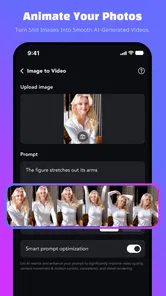
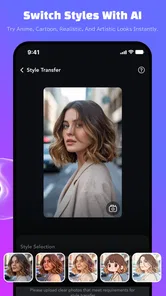

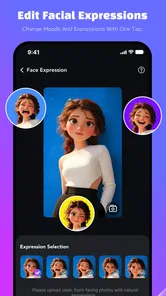
Analysis by Reviewed
I spent time with Sorax as a lifestyle app for turning still images into short, cinematic-looking visual creations. Its central idea is appealing: instead of treating a photo as a finished picture, it gives you an AI-focused way to experiment with animation, video effects, and visual styles. That makes it interesting for social posts, personal memories, mood boards, and quick creative tests when a regular photo editor feels too static.
My first impression was mixed. The concept is easy to understand, and the app feels aimed at people who want a result without learning a full video-editing workflow. At the same time, the experience depends heavily on how smoothly the app can process a request, so your connection and patience matter more than they would with a basic crop-and-filter tool. I would describe it as a playful visual experiment rather than a complete replacement for a traditional editor.
What the app is really useful for
Sorax comes from White Warrior and is listed in the Lifestyle category, although its practical use sits close to creative photography and short-form video tools. The current release is version 1.0.2, and the app is free to install, with optional purchases ranging from $1.99 to $99.99 per item. That pricing range is important: you can try the basic experience without paying upfront, but anyone who plans to use it frequently should pay attention to what is included before committing to repeated purchases.
The strongest use case is a single image that would benefit from movement or atmosphere. A travel photo, portrait, product snapshot, pet picture, or sunset can become a starting point for a more expressive result. I found the idea more useful when I began with a clear purpose instead of randomly trying every available style. For example, a calm portrait suits a restrained animation better than an aggressive effect, while a city photo can handle stronger motion and contrast.
That choice of source image makes a bigger difference than many first-time users expect. A sharp, well-lit photo with a clear subject gives the generator a better visual foundation. Busy backgrounds, faces partly hidden by objects, and images with several competing subjects are more likely to produce a result that feels visually confused. My practical tip is to prepare two or three versions of the same photo: a full frame, a tighter crop, and a cleaner crop with distractions removed. Comparing those versions can be more productive than simply changing styles.
The best results come from treating the app as a creative sketchbook, not a one-tap guarantee. I would use it to find a direction, create a striking draft, or add motion to something that would otherwise remain a still image. If I needed exact timing, precise transitions, dependable text placement, or detailed control over every frame, I would move the project into a conventional video editor afterward.
Why connectivity changes the workflow
The AI nature of the app makes network conditions part of the experience. Requests that involve generating animation or applying a heavier visual effect can feel very different on a stable connection compared with a congested mobile signal. This is not just a matter of waiting a little longer. A slow or interrupted connection can break the creative rhythm, especially when you are comparing several variations and want to make decisions while the original idea is still fresh.
More From Our News Desk

Weather by Xiaomi Review: Clear at a Glance, Less Clear Up Close

X Under Pressure: Can It Recover When Posting Goes Wrong?

Clash of Clans Is Won Between the Battles

Android Auto Makes the Case for Quieter Car Software

MobiOffice: Transforming Mobile Productivity with Seamless Integration

EA SPORTS FC™ Mobile Soccer: Redefining Mobile Sports Gaming
I recommend doing the exploratory part of a project when you have reliable Wi-Fi or a strong mobile connection. That is particularly sensible if you are working with several large photos or testing multiple styles in one sitting. A good workflow is to select and crop your source images first, then start generation only after you have narrowed the choices. This reduces unnecessary uploads and avoids spending time processing images you already know you will not use.
Connectivity also affects when the app makes sense in everyday life. On a commute, in a café with overloaded public Wi-Fi, or while travelling between locations, Sorax can be less predictable than a normal gallery editor. I would still use it in those situations for choosing images and planning ideas, but I would avoid depending on it for an urgent post or a finished result that must be ready immediately.
For a realistic example, imagine taking a photo at a birthday dinner and wanting a short animated memory before sharing it that evening. I would first choose the cleanest image, remove unnecessary visual clutter through cropping, and wait until I had a stable connection before generating the effect. If the first version looked too dramatic, I would change one element at a time rather than restarting with a completely different style. That makes it easier to tell whether the source photo or the effect is responsible for the weak result.
Using it comfortably on a phone
Sorax is most attractive when the whole process stays mobile. You can start with an image already in your phone’s library, experiment without opening a desktop editor, and review the result in the same place where you are likely to share it. That convenience matters for spontaneous ideas: a photo taken during a walk, a quick image for a story, or a personal memory that needs a little movement can be handled without building a large project.
There is a trade-off, though. Phone screens encourage quick decisions, while AI-generated visuals deserve a closer inspection. A result can look impressive at a glance but reveal awkward motion, distracting changes, or an unbalanced composition when viewed carefully. I suggest checking the entire output rather than judging only the opening moment. If you plan to share it, watch it once with the sound off and once at normal speed. Those simple checks help separate a genuinely useful result from an effect that is merely eye-catching for a second.
Storage and battery habits also become more relevant when you work with image and video outputs. I would avoid generating many near-identical versions without reviewing them, because creative experimentation can quickly leave a phone full of files that are difficult to compare later. A small naming or folder routine helps: keep the original image, save the strongest variation, and discard failed attempts once you are sure they have no further value.
The app is a better fit for casual creators than for someone who wants a detailed timeline on a small screen. If your goal is to produce a polished promotional clip with exact branding, multiple layers, captions, and controlled audio, a dedicated mobile editor will probably feel more dependable. Sorax is more appealing when the visual transformation itself is the main point.
What happens when a generation goes wrong
AI image animation is not perfectly predictable, so failure recovery is part of using the app well. Sometimes the source picture is the problem; sometimes the chosen style asks for more visual information than the image contains; and sometimes the output simply does not match the mood you had in mind. I would not treat an unsuccessful generation as a reason to abandon the app immediately. Instead, I would change one variable at a time.
Start by trying a different crop. If the subject is too small, bring it closer. If the background is distracting, choose a simpler frame. If the image contains several people, test a photo with one clear focal point. Only after those changes would I switch styles. This method is more efficient because it tells you what improved the result. Changing the photo, style, and effect together may produce something different, but it teaches you very little about why it worked.
When a request takes longer than expected, I would avoid repeatedly tapping the same action. First check whether the app is still responding, then give the process a reasonable moment before trying again. Repeated submissions can create confusion about which version is newest and may be wasteful if purchases or usage limits are involved. A calmer recovery routine is to return to the project, confirm the selected source, and submit a single revised attempt.
I also recommend keeping the original photo untouched. Sorax works best as an additional creative layer, not as the only copy of an important memory. Save the source in your normal photo library before experimenting. That way, a disappointing animation does not affect the image you may later want to print, edit traditionally, or share in its original form.
Making the experience more data-conscious
Because the app works with personal images, I would be selective about what I upload. Private family moments, identity documents, confidential work material, and photos containing sensitive information deserve extra caution in any online creative workflow. Even when an image seems harmless, check the frame for addresses, screens, badges, or other details you would not want included in a generated result.
A data-conscious routine does not have to make the app inconvenient. Crop out irrelevant surroundings, use a duplicate rather than the only original, and avoid sending a large image when a smaller, well-composed version will do. This can also improve the creative result because the generator has fewer distractions to interpret. In practice, privacy-minded preparation and better visual preparation often point in the same direction.
Mobile data is another reason to plan ahead. If you are not on Wi-Fi, generate only the versions you genuinely want to inspect. Do the selection work locally in your gallery first, then use Sorax for the final experiments. This is especially helpful for travellers or anyone with a limited data allowance. The app becomes less of an open-ended browsing tool and more of a focused finishing step.
I would also be careful with the purchase path. Since the app is free but includes individual purchases, I would check the cost shown at the moment an effect or generation is selected and confirm before approving anything. The broad range from $1.99 to $99.99 per item means the financial difference between occasional testing and heavy use can be substantial. If you only need one animated image, the free entry point may be enough to decide whether the style suits you. If you expect to create content every week, calculate the likely total rather than assuming the app will remain effectively free.
How it compares with familiar alternatives
A standard photo editor is still the better choice for dependable corrections. Cropping, exposure, colour balance, sharpening, and retouching are tasks where manual controls usually provide clearer results than an AI effect. If your image only needs to look cleaner, Sorax may be more elaborate than necessary.
A conventional mobile video editor is stronger when you need structure. It gives you a timeline, more deliberate control over duration, and a clearer way to combine clips, photos, text, music, and transitions. That approach takes longer, but the result is easier to reproduce and revise. I would choose that type of app for a business announcement, a tutorial, or a video with a precise message.
Sorax has a different advantage: it lowers the barrier to trying a cinematic treatment on a single image. You do not need to build a full sequence before seeing whether the idea has potential. For personal storytelling and visual experimentation, that speed can be more valuable than detailed control. The trade-off is consistency. A manual editor asks more from you but generally gives you a clearer explanation of how the final image was made.
Its store rating sits at 2.3 from around 36 ratings, with three written reviews, while the app has passed 50K installs. I read that combination as a reason to approach it with realistic expectations rather than as a definitive verdict. The install count suggests that people are trying it, but the modest average indicates that the experience has not worked equally well for everyone. I would test it with nonessential images before deciding whether it belongs in a regular creative routine.
Who should try it, and who should skip it
I think Sorax is worth trying if you enjoy experimenting with portraits, travel photos, visual diaries, or social content and want movement without learning a complex editing system. It is also useful for someone who often has a good photo but feels it lacks energy when posted as a still image. The app gives that person a quick way to explore a more cinematic direction.
I would be more cautious if you need predictable professional output, have a very limited mobile data plan, or dislike waiting for cloud-style processing. It is also not my first recommendation for sensitive images or projects where exact control matters more than novelty. A manual editor may feel slower at the beginning but can be the more efficient choice once revisions become important.
The mature age rating of 17+ is another practical consideration. I would not treat it as a casual children’s creativity app, and I would keep that rating in mind before recommending it for a younger user. The mature classification also makes it sensible to think carefully about the images and themes you choose to process, especially when a phone is shared with family members.
My final view on the connected experience
After using Sorax, I see it as a focused AI visual playground with a clear mobile appeal. Its value comes from transforming a still image into something more expressive, not from replacing every editing tool on your phone. The most satisfying workflow is selective: prepare a good image, use a stable connection, test one change at a time, inspect the whole result, and keep the original safe.
The app is free to start, runs on Android 7.0 or later, and the current version is 1.0.2, so it is accessible to many Android users. Still, accessibility does not remove the practical questions around connectivity, image privacy, and optional spending. I would not open it expecting every attempt to be share-ready, and I would not purchase heavily before confirming that its visual style matches my own taste.
My recommendation is cautious but positive for casual creators: try it when you have a reliable connection and a few noncritical images ready. If you want quick cinematic experimentation from a phone, Sorax can provide ideas that a normal photo editor would not. If you need offline certainty, precise editing, or a repeatable professional workflow, choose a conventional editor instead. The app works best when you treat its unpredictability as part of the creative process rather than expecting it to behave like a complete video-production suite.
Sorax: AI Video Maker & Image Frequently Asked Questions
What devices and operating systems can run Sorax: AI Video Maker & Image?
Sorax is an app for Android, and its minimum operating system requirement is Android 7.0. Before downloading, check that your device meets this requirement and has enough available storage for the app and any creations you save. AI video and image generation can also place demands on your device and connection, so a compatible operating system alone does not guarantee that every task will run equally smoothly.
What is Sorax: AI Video Maker & Image, and what can I create with it?
Sorax: AI Video Maker & Image is an AI-powered creative app designed to turn written ideas, photos, and visual prompts into short videos or generated images. During testing, it felt most useful for creating social media content, concept visuals, promotional clips, animated portraits, and quick experiments without traditional editing skills. The available tools and results may vary depending on the app version, selected model, and account plan.
Is Sorax: AI Video Maker & Image free to download and use?
Sorax is free to download, but not every feature is necessarily free to use. In-app purchases range from $1.99 to $99.99 per item, so check the price shown for a feature before confirming a purchase. AI generation commonly uses credits, limits, subscriptions, or purchases, especially for higher-resolution exports, faster processing, premium styles, or removing watermarks. Review any trial conditions, renewal terms, and credit system in the app before starting a project.
Do I need an internet connection to use Sorax?
Yes, an internet connection is generally required for the main AI features because prompts, images, and video requests are processed through online servers. Generation speed can depend on your connection, server demand, and the complexity of the request. The app may allow you to view or manage previously saved creations offline, but you should not expect full offline access to its AI video and image-generation tools.
How good are the videos and images generated by Sorax?
Sorax can produce impressive results for quick creative projects, but the quality is not always perfectly consistent. Simple prompts and clear source images usually provide more reliable outcomes, while complex scenes, hands, faces, text, or precise movements may contain visual errors. Results can also differ between attempts. It is best viewed as a fast creative assistant rather than a complete replacement for professional video or graphic-design software.
Pros
- Turns text prompts into videos and images with minimal editing effort.
- Useful templates help beginners create social media content quickly.
- AI-generated visuals can inspire creative concepts and story ideas.
- Supports rapid experimentation with different styles and prompts.
- Convenient for creating short promotional or personal videos on mobile.
Cons
- Results may contain visual glitches
- especially with faces and hands.
- Advanced customization can feel limited compared with professional editors.
- High-quality generations may require credits or a paid subscription.
- Processing times can vary depending on prompt complexity and server demand.
- Privacy terms should be checked before uploading personal images or sensitive content.











