Snap News: Local & Alerts
- 153.00
- 4.3
- Installs
- 500.00K
- Price
- Free

Screenshots
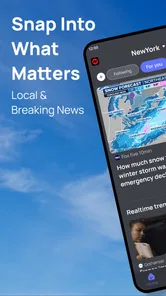
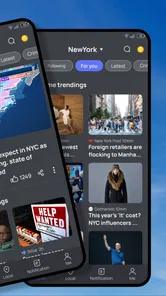
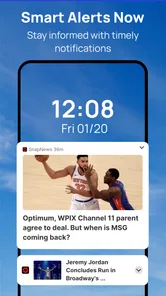
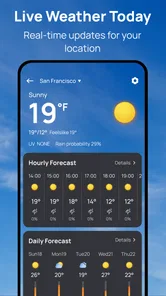
Analysis by Reviewed
I reach for a local news app when I want a quick sense of what is happening nearby without turning a five-minute check into an hour of scrolling. Snap News: Local & Alerts is aimed at that habit: it brings community coverage and timely stories together in a news-and-magazines app. My impression is that its appeal depends less on flashy extras than on whether its mix of local and broader updates fits the way you keep up with the day.
Built by Build4world, Snap News: Local & Alerts is free to use and rated for Everyone. It has a 4.3 average from around 4,700 ratings, with more than 500,000 installs. Those figures suggest it has found an audience, but they do not tell you whether its coverage matches your neighborhood or interests; that is the part I would judge during everyday use.
Who benefits from a quick local check
I can see the strongest fit for someone who wants a convenient way to get oriented, not a new place to spend a long stretch reading. If you already know which local topics matter to you—transport, community events, schools, or council decisions, for example—you can use each visit with a clear purpose: scan for relevant developments, then leave the app once you have the useful outline. That intentional approach makes a mixed news feed easier to use than simply opening it whenever you have a spare moment.
It is less suited to readers who want to build a detailed, carefully balanced picture of one issue from multiple named publications. For that, I would choose the original outlets or a reader where I can deliberately assemble sources. A broad feed may save time at the start of a news check, but saving time is not the same as getting the depth or editorial consistency those readers want.
A quick read on the app today
I find it useful to judge Snap News by the job I want it to do: provide a quick starting point for local and trending coverage, rather than replace the sources I rely on for depth. In this section, I’ll focus on how that role can fit into an ordinary news routine and where a little selectivity makes the feed more useful. Relevance to your own area is the key test.
Local coverage is the central appeal
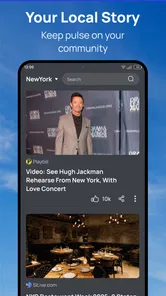
The most useful idea here is putting community updates alongside trending stories. National headlines are easy to find in major news apps, but local information can be scattered across community sites, social feeds, and individual publishers. Snap News gives readers a place to begin that check. I would treat it as a convenient starting point rather than assume one app can replace every source that matters in a town.
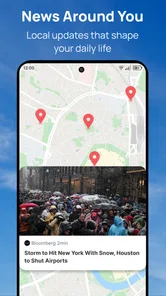
That distinction matters because “local” is only valuable when it is genuinely relevant. A nearby road closure, council decision, school update, or event can affect a day in a way a widely discussed national story does not. When opening a news app between errands, I want a short route to the stories that change what I should do next. Snap News is most compelling when its local selection serves that practical purpose, not merely when it adds another stream of headlines.
More From Our News Desk

Weather by Xiaomi Review: Clear at a Glance, Less Clear Up Close

X Under Pressure: Can It Recover When Posting Goes Wrong?

Clash of Clans Is Won Between the Battles

Android Auto Makes the Case for Quieter Car Software

MobiOffice: Transforming Mobile Productivity with Seamless Integration

EA SPORTS FC™ Mobile Soccer: Redefining Mobile Sports Gaming
The app’s title also sets an expectation around alerts. For me, alerts are most useful when they flag something timely enough to act on, and least useful when they create a constant interruption for stories I would have read later anyway. I would approach notifications selectively: keep them for genuinely useful updates if the app’s controls allow that, and otherwise make a deliberate habit of checking the app when convenient. That helps preserve the value of timely news without letting it dictate the day.
Where it fits in a daily routine
A realistic use case is checking the app before leaving home. I might look for a local development that could affect a commute, scan a few trending stories, then close it rather than keep refreshing. Another is a quick evening check for community developments I missed while working. In both cases, the benefit is having local and wider news in one place; the sensible limit is remembering that a headline feed is not a substitute for checking an official source when a decision has real consequences.
For a reader who follows neighborhood issues, community events, or local developments alongside general headlines, that combination can save the effort of opening several sources just to get oriented. Someone who mainly wants deep reporting, specialist analysis, or a carefully curated set of publications may be better served by a newspaper’s own app or a dedicated news reader. Snap News makes more sense as a broad, quick-access layer than as the sole authority for every topic.
A small workflow that keeps the feed useful
One practical trick is to decide what would count as a successful visit before opening the app. For example, I might want to check whether anything nearby changes my route or plans, rather than trying to catch up on every headline. If nothing relevant appears, I can stop there. This gives local coverage a clear job and reduces the temptation to treat each visit as an open-ended browsing session.
I would also keep a simple mental distinction between a headline that points me toward a subject and a source that can support a decision. If a local item affects plans, I would note the publisher or organization behind it and check that source directly when details matter. That is especially useful when a short update leaves practical questions unanswered, such as exactly where a change applies or when it takes effect. A quick feed is good for discovery; the originating source is better for confirmation.
How I would use it without getting buried
My practical approach would be to check local coverage first, then use trending stories as a secondary scan. That order keeps the app’s distinguishing value in view and reduces the chance of spending the whole session on widely shared stories that are already appearing elsewhere. If a headline looks important, I would open the underlying story and consider whether it is detailed enough for what I need; for urgent public-safety or service information, I would verify it with the relevant local authority.
A second useful habit is to separate “interesting” from “actionable.” A trending item can be worth knowing about without deserving an alert or a long reading session. Local stories about a change to a service or an upcoming community event may be less dramatic yet more useful. This is not a special feature claim; it is a way to get more value from the app’s stated mix of local and popular news while keeping attention under control.
What its current version suggests
Version 1.2.7 gives existing readers a clear reference point, but the number alone is not a changelog. I’ll separate what that current version and the release date establish from what remains a reader’s expectation, then consider the practical checks I would use after updating: whether local coverage still earns a place in my routine and whether the app complements, rather than duplicates, my other news sources.
A modest, identifiable product stage
Snap News is at version 1.2.7, and its release date is January 23, 2025. Those details place it as a relatively young product with a defined current version, rather than a long-established news platform whose identity has been shaped over many years. I would read that as context, not proof of a particular change: a version number alone does not reveal which features were added or how the app has evolved between releases.
For someone deciding whether to try it, the practical implication is to evaluate what is in front of them now. Check whether the local stories are actually useful in your area, whether the broader selection complements your existing sources, and whether the pace of updates suits your reading habits. The app’s current state is what matters more than assumptions about what a future release might bring.
On a device running Android 7.0 or later, the stated minimum operating-system requirement makes it accessible to a range of older Android devices as well as newer ones. That is helpful if you do not replace your phone often. I would still judge performance on the particular device and connection I use, since an operating-system threshold by itself does not guarantee that every phone will feel equally responsive.
What existing users should notice
If you already use Snap News, the version information gives you a straightforward point of reference when checking that your app is current. I would not infer a redesigned interface, new alert controls, or expanded coverage from the version number alone. Instead, the changes worth noticing are the ones you can verify in your own reading routine: whether the stories you care about are easy to find, whether local coverage remains relevant, and whether the app is still worth opening alongside your other sources.
That user-level test is more useful than chasing updates for their own sake. A news app can be perfectly adequate without introducing a dramatic new feature in every release. If Snap News continues to help you get oriented quickly, it may earn a regular place on your phone. If your local feed feels thin or the headlines overlap too much with another app you already trust, there is little reason to keep it out of habit.
The trade-offs compared with familiar alternatives
Compared with a general-purpose news app, Snap News’s clearest point of difference is its stated emphasis on community coverage alongside trending stories. A large publisher’s app may offer more depth in its own reporting, while a social feed can surface neighborhood conversations quickly but may mix useful information with rumor and opinion. Snap News sits between those approaches as a news-focused place to scan; the value depends on the relevance and quality of the stories it presents to you.
It is also different from building a personal reading list from separate local outlets. That manual setup can give you more control over which voices you follow, but it takes effort and can leave you checking several apps. Snap News may be more convenient for a quick overview, while a dedicated reader or publisher app is preferable when you want a consistent source, a particular editorial perspective, or longer-form reporting. I would use convenience as the reason to try it, not assume convenience means complete coverage.
Where friction may remain
The same mix that makes a combined feed convenient can make it harder to focus. Trending stories can compete with the local items that motivated you to open the app, and a headline-led check may leave you with a rough outline rather than enough context to understand a complicated issue. I would avoid treating prominence in a feed as a measure of importance. For decisions involving safety, money, health, or public services, follow the story to a dependable primary source.
There is another personal trade-off: news can become a habit of checking rather than a useful source of information. Even an app intended for quick updates can encourage repeated visits if every new headline feels urgent. I would decide in advance when I want to check it—perhaps once before heading out and once later in the day—rather than letting notifications or curiosity fragment concentration. Readers who prefer a quiet, scheduled digest may find a newsletter or a deliberately curated reader better suited to them.
Coverage is also inherently place-dependent. An app can be a strong match for one reader and a weaker one for someone in a different community, simply because the stories that matter are not the same everywhere. Before relying on Snap News as a daily local source, spend a few sessions checking whether it surfaces the places and topics you care about. If it mostly shows general stories, it may still be useful for trending news, but it will not replace a local outlet that follows your area closely.
Who should give it a try
I would recommend trying Snap News if you want a free way to combine a quick local scan with broader popular stories, and you are comfortable using it as one part of your news routine. It may especially suit people who want to check in during small gaps—before a commute, over lunch, or while deciding what is happening in their community—without assembling a long list of sources first.
I would skip it, or pair it with a more focused source, if your priority is detailed investigative reporting, a particular publisher’s perspective, or a highly controlled reading queue. It is also not the right sole source for urgent alerts unless you have confirmed that its coverage meets your needs; for immediate local instructions, official channels remain the safer choice. That is not a knock on a general news app so much as a sensible boundary for any headline feed.
What I would watch next
As the product develops, the useful signs for readers will be practical ones: whether local coverage stays relevant, whether trending items remain easy to distinguish from community news, and whether the reading experience makes it simple to find context rather than only headlines. Those are expectations to watch, not promises about future releases. I would judge any update by whether it improves the everyday task of finding useful local information without adding noise.
Overall, Snap News has a clear role: a convenient check-in for readers who want community news and wider stories in the same place. Its free access and Everyone age rating make it easy to consider, while its young release history is a reason to assess the actual coverage rather than assume it already fits every reader. I would give it a trial as a supplementary news source, keep the items that genuinely help me understand my area, and continue using specialist or official sources whenever depth and certainty matter.
Snap News: Local & Alerts Frequently Asked Questions
What is Snap News: Local & Alerts?
Snap News: Local & Alerts is a news app designed to help you follow current events, with an emphasis on stories relevant to your area. Depending on its available features and settings, it may also send alerts about developing or important news. The stories and alert coverage you see can vary by location, publisher availability, and the preferences you choose in the app.
Can I customize which news and alerts I receive?
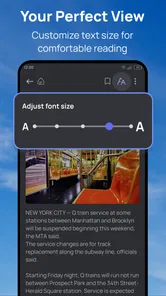
News apps commonly let readers select topics, locations, or notification preferences, but the exact controls available in Snap News: Local & Alerts may depend on your version and device. Before relying on alerts, check the app’s settings for options to tailor local coverage, mute topics, or limit notifications. You can also review your phone’s notification settings if you want to reduce interruptions.
Does Snap News: Local & Alerts require an internet connection?
You will generally need an internet connection to load the latest articles and receive timely updates or breaking-news notifications. If the app offers cached or saved stories, those may remain readable offline, but new content cannot be fetched without a connection. Availability and performance can also depend on your network quality, region, and the news sources supported by the app.
Is Snap News: Local & Alerts free to download and use?
Check the app’s store listing before downloading to confirm its current price and whether it offers in-app purchases, subscriptions, or advertising. App pricing and features can change over time and may differ between Android and iOS or by country. Review any payment details carefully, especially before starting a trial or subscribing, so you know when charges may apply.
What privacy information should I check before installing the app?
Because Snap News: Local & Alerts focuses on local news and alerts, check whether it requests access to your location, notifications, or other device data, and consider whether those permissions are necessary for the features you want. You can usually manage permissions through your phone’s settings. Read the store’s privacy disclosures and the app’s privacy policy for details on data collection, use, and sharing.
Pros
- Choose local coverage for the places and topics you care about.
- Breaking-news alerts can help you stay informed as stories develop.
- A personalized feed makes it easier to find relevant headlines.
- Useful for keeping up with community news beyond national coverage.
- Quick access to multiple news sources in one app.
Cons
- Alert volume may feel distracting unless you adjust notification settings.
- Local story availability can vary by region.
- Some headlines may link to articles on external publisher websites.
- A personalized feed may take time to match your interests.
- News coverage and update frequency depend on participating sources.













