SMS Backup & Restore Pro

Tools

477.00
4.1
Installs
100.00K
Version
10.24.003
SMS Backup & Restore Pro icon SMS Backup & Restore Pro icon
Advertisements

Screenshots

SMS Backup & Restore Pro screenshot
Advertisements

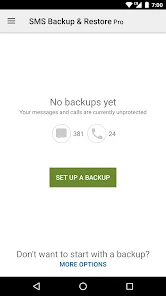
Ever had that gut-wrenching moment when you realize your phone just died and all your important text messages went along with it? Well, that’s where SMS Backup & Restore Pro comes in! This nifty app is like that reliable friend who always has your back, especially when it comes to keeping your SMS history intact.

Why You Need This App

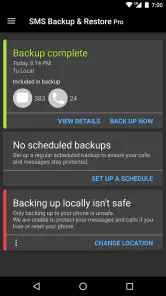
I first stumbled upon SMS Backup & Restore Pro when I was frantically searching for a way to save my text messages before switching phones. Let me tell you, this app is a lifesaver. It’s super easy to use and incredibly efficient in backing up all your SMS and MMS messages, plus your call logs, without breaking a sweat.

The Setup

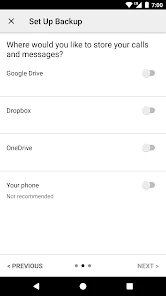
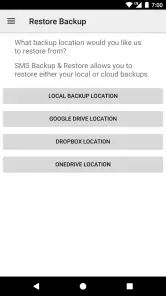
Getting started with the app is as easy as pie. Once you’ve downloaded and installed it, the app walks you through the setup process. You can choose to back up your data to your Google Drive, Dropbox, or even locally on your phone. I opted for Google Drive because, hey, why not keep everything in the cloud?

Features That Stand Out

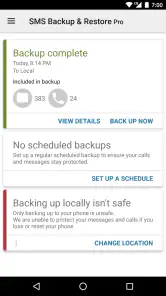
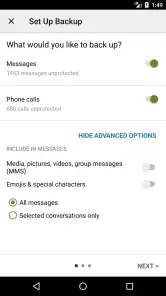
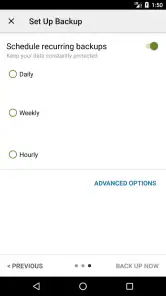
One of the things I love most about this app is the ability to schedule regular backups. You can set it to back up daily, weekly, or monthly, depending on your needs. This feature ensures you’re never caught off guard. Plus, the app gives you the option to select exactly what you want to back up. Only interested in SMS? No problem. Need those call logs saved too? You got it.

Another cool feature is the seamless restore process. When I switched to a new phone, all it took was a few taps, and boom, all my messages and call logs were right where I left them. It’s like I never switched phones at all!

Performance and Usability

In terms of performance, SMS Backup & Restore Pro is top-notch. It works quietly in the background without hogging all your phone’s resources. The interface is clean, intuitive, and straightforward. Even if you’re not tech-savvy, you’ll find navigating through the app a breeze.

Final Thoughts

All in all, if you’re looking for a reliable way to keep your SMS and call logs safe, SMS Backup & Restore Pro is definitely worth a shot. It’s user-friendly, efficient, and does exactly what it promises. Whether you're switching phones or just want to have a backup plan, this app has got you covered. So go ahead, give it a whirl and never worry about losing important messages again!

Pros

  • Easy to use interface
  • Automatic backups
  • Cloud storage options
  • Selective backup options
  • Fast restoration process

Cons

  • No iOS support
  • Ads in free version
  • Limited customization
  • Data encryption lacks
  • No multi-device sync
Advertisements

Download

Download From Google Play Download From App Store

You May Like

Frequently Asked Questions

What is SMS Backup & Restore Pro and how does it work?

SMS Backup & Restore Pro is an application designed to help users back up and restore their SMS messages and call logs on Android devices. The app allows you to create backups in XML format and save them locally on your device or transfer them to cloud storage services like Google Drive or Dropbox. Users can easily restore their messages and call logs from these backups to any Android device, ensuring their data is safe and easily recoverable.

Is SMS Backup & Restore Pro compatible with all Android devices?

Yes, SMS Backup & Restore Pro is compatible with most Android devices running Android 4.0.3 (Ice Cream Sandwich) and above. However, it's always a good idea to check the app's compatibility with your specific device model and Android version before downloading. The app is optimized to work with a wide range of Android smartphones and tablets, making it a versatile tool for data backup and restoration.

Does SMS Backup & Restore Pro support backup to cloud services?

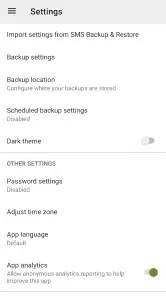
Yes, SMS Backup & Restore Pro supports backing up your SMS messages and call logs to several cloud services, including Google Drive, Dropbox, and OneDrive. This feature allows users to store their backups securely in the cloud, providing an extra layer of protection against data loss. Users can easily configure their preferred cloud service within the app settings and manage their backups seamlessly.

Can I view the contents of my backups created with SMS Backup & Restore Pro?

Yes, you can view the contents of your backups created with SMS Backup & Restore Pro. The app saves backups in XML format, which can be viewed on any device with an appropriate viewer or editor. Additionally, the app provides a built-in viewer that allows users to browse through their backed-up messages and call logs directly within the app, making it convenient to access and review your data.

Is there customer support available for SMS Backup & Restore Pro users?

Yes, SMS Backup & Restore Pro offers customer support to assist users with any issues or questions they may have. Users can access support through the app's help section, which provides FAQs and troubleshooting guides. Additionally, they can contact the support team via email for more personalized assistance. The app developers are committed to providing timely and effective support to ensure a smooth user experience.