SMS Auto Reply - Autoresponder
- 108.00
- 3.1
- Installs
- 10.00K
- Price
- $7.49

Screenshots
Analysis by Reviewed
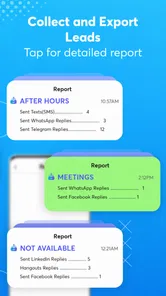
SMS Auto Reply - Autoresponder is built around a simple but useful idea: when I can’t answer a text, it can send a response in my place. That can make it easier to stay focused without leaving people guessing. I see its strongest use as setting expectations, not replacing a real conversation: a brief message saying I’m unavailable is more considerate than silence, but it won’t handle a complicated exchange for me.
Letting texts wait without leaving people in the dark
Ever found yourself in a situation where you're driving, in a meeting, or just need some quiet time, and yet, your phone keeps buzzing with messages? Well, SMS Auto Reply - Autoresponder is designed just for those moments. It’s an app that automatically responds to incoming texts when you're unable to do so. It's like having your very own personal assistant who never sleeps!
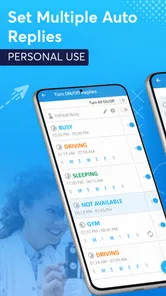
Setting up replies for different situations
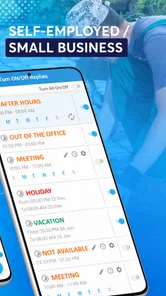
Now, let’s talk features. The app is packed with customization options. You can set up multiple auto-reply rules based on your needs. For instance, you can have a work profile, a driving profile, or even a 'do not disturb' mode. I found this especially useful because I could tailor the responses depending on the situation. It doesn't just stop at SMS; it can also respond to missed calls, which is pretty neat if you ask me.
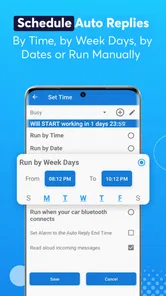
The app interface is user-friendly. You don’t need to be a tech wizard to navigate through it. Setting up auto-replies is as simple as selecting a profile and typing your message. Plus, it supports scheduling, so you can plan your auto-replies in advance. Imagine setting it for a week-long vacation and not having to worry about a thing!
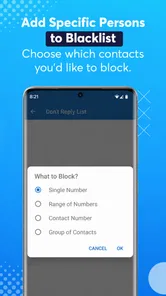
For a useful setup, I’d keep each reply short and specific. “I’m driving and will reply when I’ve stopped” is clearer than a vague message that could make someone think I’m ignoring them. I’d also review the wording before using a profile for work: an automatic note should sound polite and neutral, since the same template may reach different people. If the app offers a choice of who receives a reply, it’s worth checking that setting carefully so a personal message doesn’t go to a contact who doesn’t need it.
When automatic replies help most
A realistic example is a busy afternoon when I’m moving between meetings. I can choose a work response before I get occupied, then read incoming texts later instead of breaking focus each time the phone lights up. A scheduled reply can also suit a planned break, such as time away from the phone, while a driving profile addresses a different situation where responding immediately would be unsafe. The point is to tell people what to expect, not to suggest I’m available for a back-and-forth.
This is where the app differs from simply silencing notifications. Do Not Disturb can reduce interruptions, but it doesn’t itself explain the silence to the person texting. A manual reply gives more control over tone and context, but takes attention at exactly the moment I may be busy. An autoresponder trades that personal touch for convenience. I’d use it for predictable periods of unavailability, and switch it off when I’m free to answer normally.
More From Our News Desk

 Gmail
Gmail in a Busy Inbox: Who Benefits Most?
From first account to crowded workday, Gmail earns its place through dependable search and flexible sorting—but its best fit depends on how much inbox maintenance you can tolerate.

 Prime Video
Switching to Prime Video: What Changes in Your Viewing Routine
Prime Video can make a compelling second home for streaming, but switching means learning a different catalog, rental layer, and route from browsing to playback.

 Universal TV Remote Control
 Works Best as a Reliable Backup
A phone remote earns its place through quick setup and reliable habits. Here is how to get more from Universal TV Remote Control—and where its limits show.

 Weather - By Xiaomi
Weather by Xiaomi Review: Clear at a Glance, Less Clear Up Close
Xiaomi’s weather app makes everyday forecasts quick to scan, but its calm surface can leave useful details and recovery paths harder to find than they should be.

 X
X Under Pressure: Can It Recover When Posting Goes Wrong?
A resilience-focused review of X, examining setup, mistaken posts, interruptions, weak connections, and the gaps that matter when recovery needs to be dependable.

 Clash of Clans
 Is Won Between the Battles
Its raids are quick; its community is a long-term project of coordination, teaching, rivalry, and shared responsibility—with all the friction that entails.
Latest News



Useful control, with a few things to weigh
The app interface is user-friendly. You don’t need to be a tech wizard to navigate through it. Setting up auto-replies is as simple as selecting a profile and typing your message. Plus, it supports scheduling, so you can plan your auto-replies in advance. Imagine setting it for a week-long vacation and not having to worry about a thing!
Automation can also create awkward moments if a reply goes out when the situation has changed. Before relying on a scheduled profile, I’d check its timing and make sure I know how to turn it off promptly. I’d avoid putting sensitive information in a reply, too; a basic availability note is usually enough. And if someone needs a detailed answer or urgent help, an automated text is no substitute for contacting them directly.
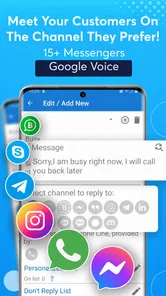
One practical question is whether a recipient will know the reply is automatic. The safest approach is to make that clear in the message itself, rather than leaving room for someone to assume I’ve read and considered their text. Another is whether it suits every phone or messaging setup: this is specifically a text-focused communication tool, so anyone who mainly talks through internet messaging apps should not assume it will cover those conversations.
Who is likely to get the most from it?
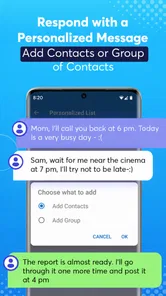
Here’s the thing: I love apps that are intuitive and do exactly what they promise. The SMS Auto Reply - Autoresponder does just that. It’s reliable and does not drain your battery, which is a big plus. I was particularly impressed with its ability to handle multiple contacts and groups. Whether it’s friends, family, or colleagues, the app ensures everyone gets a timely response.
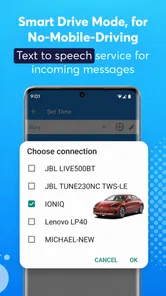
Another noteworthy feature is the app’s ability to integrate with driving modes. Safety first, right? It automatically detects when you're driving and activates the auto-reply function, so you can keep your eyes on the road and hands on the wheel.
This will make the most sense to people who receive ordinary SMS messages and have recurring stretches when they can’t respond: drivers, people in meetings, or anyone who wants a planned quiet period. Someone who rarely texts, prefers to answer each person individually, or depends mainly on chat apps may be better served by their phone’s built-in focus tools or by simply replying manually. I’d also be cautious about treating any driving automation as a reason to interact with the phone on the road; set things up before setting off.
Making the message useful rather than misleading
The quality of an autoresponder depends less on clever wording than on whether the message gives the recipient a useful expectation. I’d avoid promising a precise reply time unless I can keep it. “I’ll get back to you when I can” is honest, while a firm deadline can create a second problem if meetings run long or plans change. For work contacts, a neutral note can acknowledge receipt without suggesting that the message has been read in detail.
There is also a small but important choice between one general response and separate messages for different circumstances. A single template is easier to maintain, but can sound odd if it says I’m driving while I’m actually away from my desk. Distinct profiles are more helpful when the context genuinely changes what the recipient needs to know. I’d keep the number of profiles manageable and give each one a name that makes its purpose obvious, so choosing the right one is quick rather than another task to manage.
For a family group, for example, a reply can simply say I’m unavailable and will check in later. For a colleague, I might add when I expect to be reachable, if that is dependable. I would not use an automatic message to share where I am, why I am away in detail, or anything private that could be forwarded. The practical goal is reassurance, not a full explanation of my schedule.
Where automation can go wrong
One trade-off is that an automatic answer can arrive in response to a message that did not need one. A friend might send a quick update rather than ask a question, and a canned response can feel impersonal. That is why I would reserve the feature for times when a delay is likely to matter, rather than leaving it active as a permanent substitute for normal texting. If a conversation is already underway, an automatic reply may also interrupt the natural flow instead of helping it.
I’d also treat any profile as something to check, not something to set once and forget indefinitely. A schedule that made sense for a planned day away could be wrong when plans change; a work message can sound misleading outside working hours. Before a long period away, I’d test the wording and confirm which profile is active. When returning to normal availability, switching back matters just as much as turning the reply on.
Because the tool deals with messages sent to my phone, I would be careful about how broadly a reply is applied. A useful rule is to keep the text appropriate for someone I do not know well, since an unexpected sender may see it too. I would not assume an automatic response confirms that I have seen a message, and I would not rely on it as an emergency service. It can communicate a boundary; it cannot judge urgency or decide which person needs a personal answer first.
How it compares with built-in phone tools
Compared with a basic focus or silence setting, an SMS autoresponder does something more direct for the person contacting me: it can acknowledge that I am not responding right now. That distinction is valuable when people are likely to interpret silence as being overlooked. The built-in option may still be better if my only goal is to stop my own phone from interrupting me, especially when I do not want to send automatic messages at all.
Manual replies remain the better choice for sensitive topics, negotiations, or anything where tone depends on the exact message. They take attention, but they let me respond to what the person actually said. This app’s strength is narrower: it handles the predictable gap between receiving an ordinary text and being able to answer it. If most of my conversations happen in internet-based chat services, I would choose an approach that covers those services rather than expect a text-focused app to solve the whole problem.
In practice, I’d use the autoresponder as a temporary layer around my normal messaging habits. It is not a replacement for muting a noisy group, arranging a real handoff at work, or telling close contacts directly that I’ll be unavailable. Those options solve different problems. The app is most useful when a short, immediate acknowledgement is enough and I can predict when I will be out of reach.
Cost, compatibility, and my verdict
Made by LeMi Apps / Easy Life Automation, this communication app has been around since December 4, 2014, and its current version is 8.8.0. It requires Android 6.0 or later and is rated for Everyone. The listed price is $6.49, so I’d consider whether automatic SMS replies solve a frequent enough problem for me before paying. Its 3.1 average from 522 ratings, alongside 10K+ installs, suggests it may not be a universal fit; I’d weigh that alongside my own need for the specific workflow rather than expecting it to suit every texting habit.
All in all, SMS Auto Reply - Autoresponder is a fantastic app for anyone looking to streamline their communication and ensure they never leave anyone hanging. It’s like having a little piece of peace of mind right in your pocket. So, if you’re tired of constantly checking your phone or just want to focus on the task at hand, give this app a try. I bet you'll wonder how you ever managed without it!
SMS Auto Reply - Autoresponder Frequently Asked Questions
What Android version does SMS Auto Reply - Autoresponder require?
SMS Auto Reply - Autoresponder is an Android communication app that requires Android 6.0 or later. Before downloading, check that your device meets this requirement so you can install and use the app. Its focus is on automatic replies to SMS messages, making it relevant for people who want a prepared response when they cannot answer a text themselves.
Who makes SMS Auto Reply - Autoresponder, and is it rated for all ages?
The app is developed by LeMi Apps / Easy Life Automation and has an Everyone content rating. That makes its stated age classification broad, though users should still consider whether automatic text replies suit their own needs and how they want to communicate with their contacts. It is a communication app centered on SMS auto-replies rather than a general-purpose messaging service.
What is SMS Auto Reply - Autoresponder and how does it work?
SMS Auto Reply - Autoresponder is an application designed to automatically respond to incoming SMS messages on your Android device. Once installed, users can set predefined responses for specific contacts or situations. This app is particularly useful for times when you're busy, driving, or simply unable to respond manually, ensuring that your contacts receive timely responses.
Is SMS Auto Reply - Autoresponder free to use?
SMS Auto Reply - Autoresponder offers both a free and a premium version. The free version provides basic features essential for auto-reply functions, while the premium version unlocks additional customization options and advanced features such as scheduling responses and removing ads. Users can choose to upgrade based on their needs. The listed price is $6.49, so check the purchase details in the app before deciding whether an upgrade is right for you.
Can I customize the auto-reply messages in SMS Auto Reply - Autoresponder?
Yes, SMS Auto Reply - Autoresponder allows you to fully customize your auto-reply messages. You can create different messages for various scenarios such as driving, in a meeting, or on vacation. The app also enables setting different responses for different contacts, providing a personalized touch to your automated replies.
Pros
- Easy to set up and use.
- Supports multiple reply templates.
- Works with various messaging apps.
- Customizable reply settings.
- Saves time for busy users.
Cons
- Limited free version features.
- Occasional notification delays.
- No support for multimedia replies.
- Requires permissions to access messages.
- May drain battery with frequent use.