Smoothspeak: AI Dating Coach
- 44.00
- 4.5
- Installs
- 50.00K
- Price
- Free

Screenshots
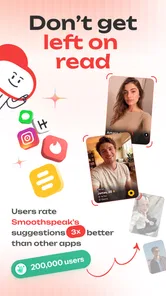
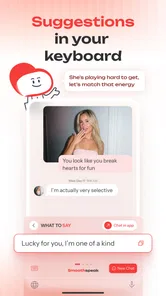
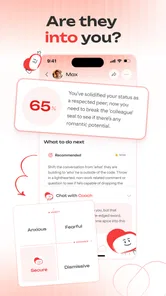
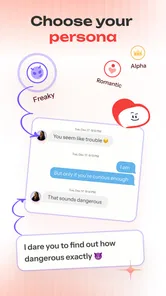
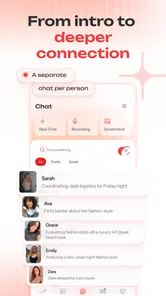
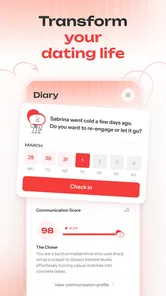
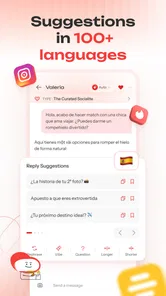
Analysis by Reviewed
I approached Smoothspeak: AI Dating Coach as a practical lifestyle app rather than a replacement for conversation, confidence, or personal judgment. Its focus is simple: helping people handle dating messages and dates with a little more care. That makes it especially interesting from an accessibility point of view, because dating communication can already be stressful for people who process language differently, tire quickly from social interaction, use assistive input methods, or need more time before replying.
In my experience, the most useful way to judge this app is not by asking whether it can make someone instantly charming. It cannot remove the uncertainty that comes with meeting another person. The better question is whether it makes the small decisions around dating easier: how to phrase a message, how to avoid sounding abrupt, how to respond when a conversation changes direction, and how to review a draft before sending it. On that narrower task, it has a clear purpose.
Smoothspeak comes from Smoothspeak and sits in the lifestyle category. It is free to install, with optional in-app purchases ranging from $2.99 to $49.99 per item. The app is rated for mature audiences aged seventeen and over, which fits its dating subject matter. It arrived on February 19, 2025, and the current version is 1.9.10, while Android support begins with version 8.0. Its average rating is 4.5 from around 5.7 thousand ratings, and it has passed 50 thousand installs. Those figures suggest a growing audience, but I would still treat the app as a tool to test personally rather than assuming it will suit every communication style.
How clearly the app supports different ways of reading and navigating
The first accessibility question is whether an app about wording actually reduces the effort of reading and composing. Smoothspeak is most helpful when I use it as a pause between the first draft in my head and the message I eventually send. That pause matters for anyone who finds dating language ambiguous, emotionally loaded, or difficult to organize under pressure.
For a user who prefers plain language, the central idea is easy to understand: bring a dating-related communication problem to the app and use its guidance to shape a response. That is less intimidating than searching through broad relationship advice, because the task is tied to a specific interaction. Someone who struggles with implied meanings may also benefit from examining whether a sentence sounds too intense, too distant, or unclear before sending it.
I would not treat the app as a guaranteed readability solution, however. AI-generated suggestions can still be wordy, emotionally vague, or more polished than the user’s natural voice. A message that looks smooth on screen may feel uncomfortable to say aloud or may use expressions that are unfamiliar to the person sending it. My practical advice is to read every suggestion twice: first for meaning, then for whether it sounds like something you would genuinely say.
That second check is particularly important for people with dyslexia, attention-related difficulties, or language-processing differences. The app can help turn a scattered thought into a clearer draft, but it should not become an automatic “send” button. I found the strongest workflow was to ask for help with one small communication goal at a time, such as making a reply warmer or setting a boundary more clearly. Large, complicated prompts are harder to evaluate and can produce advice that feels less relevant.
More From Our News Desk

Weather by Xiaomi Review: Clear at a Glance, Less Clear Up Close

X Under Pressure: Can It Recover When Posting Goes Wrong?

Clash of Clans Is Won Between the Battles

Android Auto Makes the Case for Quieter Car Software

MobiOffice: Transforming Mobile Productivity with Seamless Integration

EA SPORTS FC™ Mobile Soccer: Redefining Mobile Sports Gaming
Navigation also depends on how much information the user can comfortably hold at once. Dating advice often contains several emotional layers: what happened, what the other person might mean, what I want, and what I should say next. Smoothspeak is more manageable when those layers are separated. I would write down the immediate question first, then add only the context that changes the answer. This is a useful technique for anyone who becomes overwhelmed by long explanations, not just users with a specific disability.
The app’s value is therefore strongest as a focused drafting companion. It is not a full relationship-management system, a calendar, or a replacement for a messaging app. Compared with ordinary advice articles, it can feel more personal because the prompt starts with the user’s situation. Compared with asking a friend, it is available without the embarrassment of showing a private conversation. Compared with a general chatbot, its dating-focused purpose may make it easier to explain what kind of help is needed.
That privacy advantage should not be overstated. I would avoid pasting identifying details, private images, phone numbers, or a complete conversation when a short summary will do. A concise description such as “I want to decline another date kindly without inviting more discussion” is safer and often more useful than copying a long message thread. This is one of the most important habits for using the app responsibly.
Where the wording help feels genuinely useful
The most practical use is not generating a dramatic opening line. It is adjusting tone while preserving intent. For example, imagine receiving a message after a first date and wanting to say that the connection was pleasant but not romantic. A generic dating guide may offer broad advice about honesty. Smoothspeak can be used to work through the exact balance: kind enough not to be dismissive, direct enough not to create false hope, and short enough that the message does not become an over-explanation.
Another useful case is preparing a boundary before emotions rise. If a person repeatedly asks for faster replies, pushes for personal information, or ignores a stated limit, drafting a response in advance can reduce the mental load. I would use the app to make the boundary clear, then edit out any language that sounds apologetic or negotiable when I do not intend it to be. This is a subtle but valuable distinction: polite wording should not weaken a necessary boundary.
The app can also help users who are unsure how much context to include. In dating, too little information can seem abrupt, while too much can sound defensive. Asking for a shorter version and a more direct version side by side gives the user something concrete to compare. I found that this kind of comparison is more useful than accepting the first suggestion as the “correct” answer.
Motor, sensory, and cognitive considerations during real conversations
Dating communication is not always performed in ideal conditions. A person may be typing with one hand on public transport, using a switch or voice input, dealing with hand fatigue, or trying to reply while a noisy environment makes concentration difficult. Smoothspeak can reduce the amount of composing required, but it also introduces another step: the user must enter a situation, review the generated wording, edit it, and then move the final text into the chosen messaging service.
That extra step is a trade-off. For someone with limited dexterity, generating a concise draft may be easier than constructing every sentence from scratch. On the other hand, moving between apps or repeatedly correcting a suggestion can become tiring. I would keep prompts short and use a reusable personal instruction such as “keep this brief and natural” when appropriate, rather than rewriting the same request several times.
Users who rely on voice input should be especially careful with names, punctuation, and emotional qualifiers. A spoken prompt can lose a small word that changes the meaning of a sentence. After receiving a suggestion, I would inspect every phrase that affects consent, timing, exclusivity, or rejection. A minor transcription mistake in an ordinary note may be harmless; in a dating message, it can create a very different impression.
Sensory load is another consideration. Dating advice can contain emotionally charged language, and an AI response may present several possible interpretations of the other person’s behavior. For someone prone to rumination or anxiety, that can be more stimulating rather than calming. I recommend choosing a single question, requesting a short answer, and taking a break before deciding what to send. The app is more helpful when it supports reflection than when it encourages endless analysis of every emoji or delayed reply.
People with autism or other forms of social-communication difference may appreciate having a neutral place to test how a sentence could be interpreted. That does not mean the app can identify the one objectively correct social meaning. Dating messages are influenced by culture, personality, age, timing, and the relationship between two specific people. I would use the suggestions as possible interpretations, not as proof of what someone else feels.
For users with visual sensitivities or reading fatigue, the practical question is whether the app’s presentation remains comfortable during longer sessions. I would avoid treating a long advice exchange as the default. Copying only the relevant part of the response into a familiar note or messaging environment may be easier for some people, particularly if they already have preferred text-size, contrast, magnification, or screen-reader settings there. The important limitation is that the quality of the experience can depend heavily on the device and operating-system setup, so I would test a short interaction before relying on it for an important conversation.
People who communicate through sign language, augmentative and alternative communication, translation tools, or highly individualized phrasing may need more editing than a typical user. Smoothspeak can help organize an intended message, but its suggestion may not preserve a person’s preferred rhythm or cultural tone. The best approach is to treat the generated text as a draft that can be translated back into the user’s own communication style.
A realistic everyday workflow
Consider a user who has received a message asking to meet again, but who needs more time to decide. Rather than replying immediately with an unclear excuse, I would open Smoothspeak and describe the goal in plain terms: I enjoyed meeting this person, I am not ready to choose a date, and I want to ask for time without sounding rejecting. I would then compare a short response with a warmer version, remove any promise I cannot keep, and check that the final wording leaves room for an honest later answer.
If the user has motor fatigue, the prompt can be dictated. If reading is tiring, the response can be kept short. If social ambiguity is the main barrier, the user can ask what parts of the draft might be interpreted as a commitment. The app does not solve every problem in that situation, but it supports several small decisions without forcing the person to improvise under pressure.
After sending the message, I would stop there instead of feeding every subsequent reply into the app. That limit matters. A dating coach is useful for preparing communication, but constant interpretation can make a person less confident in their own judgment and more dependent on outside wording.
Situational access: when the app helps and when another option is better
Smoothspeak makes the most sense for adults who want help with texting, tone, boundaries, or early-stage dating uncertainty. It may be particularly useful for someone returning to dating after a long break, someone who prefers to rehearse difficult messages, or someone who does not have a trusted friend available at the moment a reply is needed.
It is also a reasonable option for people who dislike generic relationship articles. Traditional advice is often written for an imagined average dater and may assume that the reader is comfortable with flirting, confrontation, and fast replies. A focused prompt lets me describe the actual difficulty instead of searching for an article that happens to resemble it.
Still, there are situations where I would choose something else. If the issue is immediate safety, harassment, stalking, coercion, or threats, an AI dating coach should not be the main support. The priority should be a trusted person, a relevant local service, or emergency help when necessary. The app may help draft a brief message, but it cannot assess danger reliably or intervene in the real world.
It is also not the best choice for users seeking professional therapy, diagnosis, or structured treatment for severe anxiety. Its role is practical communication support. Someone who repeatedly feels unable to date, experiences intense distress, or is dealing with trauma needs human care that an app cannot replace.
Compared with a human friend, Smoothspeak offers privacy and immediate availability, but a friend may know the user’s personality and history better. Compared with a dating app’s built-in prompts, it can address a wider range of awkward or emotionally complicated moments, but it is another tool to operate alongside the dating service. Compared with a general-purpose AI assistant, its narrow dating focus may make the starting point easier, while a broader assistant may be better for translation, accessibility workflows, or tasks outside relationships.
The free entry point lowers the risk of trying it, but the optional purchases deserve attention before a user commits to regular use. Because individual items range from $2.99 to $49.99, I would begin with a specific need rather than assuming that paying will automatically improve the quality of advice. A person who only wants occasional help with a difficult message may not need an ongoing paid habit. Someone who uses it frequently should judge whether the convenience justifies the cost over time.
The mature age rating is also relevant to households. This is not an app I would hand to a child as a general communication tutor. Its subject is adult dating, and younger users need guidance appropriate to their age, privacy, and safety. For adults, the rating is a reminder to keep the tool within its intended context rather than treating it as a universal social-skills app.
Remaining barriers and how I would work around them
The largest barrier is not typing speed; it is trust. AI can produce confident language even when the situation is ambiguous. A polished answer may encourage a user to assume that the other person’s intentions are obvious when they are not. I would never use a generated interpretation as evidence of consent, commitment, attraction, or deception. Those conclusions require direct communication and attention to behavior over time.
A second barrier is voice mismatch. If every message begins to sound unusually polished, affectionate, or formal, the recipient may notice that it does not sound like the sender. This can be especially uncomfortable for users who already worry about masking or being misunderstood. My solution is to preserve one or two natural phrases, shorten the draft, and remove expressions I would not normally use. Authenticity is more important than elegance.
A third barrier is overuse. The app can make it tempting to optimize every sentence, including ordinary replies that would be perfectly acceptable without assistance. That can increase hesitation and make dating feel like a performance review. I would reserve it for moments involving a clear communication challenge: setting a limit, repairing a misunderstanding, declining respectfully, or asking for clarification.
There is also a cognitive barrier in deciding what information to share with the tool. The best prompt usually explains the user’s goal and the desired tone, not every private detail about the other person. Keeping the description minimal improves privacy and makes the answer easier to assess. This is a concrete advantage of a disciplined workflow: less typing, less exposure, and fewer distractions.
People using screen readers, alternative keyboards, magnification, voice control, or other assistive setups should test the complete path, not just the opening screen. The relevant experience includes entering a prompt, reviewing the answer, selecting useful text, editing it, and transferring it to the final conversation. If any part of that chain is awkward, the app may still be useful for occasional planning, but a familiar notes tool or a trusted human helper could be more efficient for everyday use.
Finally, the app cannot guarantee cultural or interpersonal accuracy. A phrase that sounds considerate in one community may feel distant, overly formal, or confusing in another. Users who date across languages or cultures should treat the suggestions as starting points and ask a trusted person when the stakes are high. Translation alone does not preserve tone, and an AI-generated sentence can hide that problem behind fluent wording.
My inclusive verdict
I see Smoothspeak as a focused aid for adults who want to communicate more clearly while dating, especially when the difficulty is drafting rather than deciding what they truly want. Its strongest accessibility contribution is giving users a low-pressure place to organize thoughts before a socially demanding message. That can help people who need extra processing time, prefer written rehearsal, experience communication anxiety, or want to check whether a boundary is expressed plainly.
Its inclusive value has limits. It does not remove the need to read, edit, and judge the result. It may require extra work for users with motor, sensory, language, or assistive-technology needs, and the quality of its advice can depend on how clearly the situation is explained. I would also avoid using it as a substitute for professional support, safety resources, or a real conversation with someone who knows the circumstances.
My recommendation is to try it with low-stakes situations first. Ask for a concise rewrite, compare the result with your own draft, and keep only what sounds like you. Use it to clarify your intention, not to outsource your feelings or decode another person with false certainty. If that approach makes messaging less tiring and helps you state needs more directly, the app earns its place in your routine.
For users who want instant, fully automated replies, Smoothspeak is not the right choice. For users who want a thoughtful drafting partner that can help them slow down and examine tone, it is more promising. The best result comes when the app supports your voice instead of replacing it. That is why I would recommend it selectively: as a practical, free-to-start companion for dating communication, with careful editing, sensible privacy habits, and clear awareness of where human judgment matters most.
Smoothspeak: AI Dating Coach Frequently Asked Questions
Is Smoothspeak suitable for someone who feels nervous about starting a dating conversation?
It may be useful if you often struggle to find an opening line or feel unsure how to respond. Smoothspeak can offer icebreakers and wording suggestions to help you get started, while you decide what feels natural to say. Treat its ideas as prompts rather than scripts: a genuine message that reflects your personality is usually a better fit than sending a suggestion unchanged.
What should I know about compatibility and age before downloading Smoothspeak?
Smoothspeak is a Lifestyle app intended for mature audiences, with a 17+ content rating. Its stated minimum operating-system requirement is version 8.0, so check your device’s software before installing. The app is free to download, and it has a 4.5 average from around 5,700 ratings. Those details can help you decide whether it suits your age group and device.
What is Smoothspeak: AI Dating Coach and how does it work?
Smoothspeak: AI Dating Coach is designed to help users improve their dating conversations and communication skills. It can provide suggestions, rewrites, icebreakers, and guidance for responding to messages or handling common dating situations. The app is best viewed as a writing and coaching aid rather than a replacement for genuine conversation, emotional judgment, or professional relationship advice.
Can Smoothspeak help me write replies for dating apps?
Yes, the app is intended to help you create more natural, confident, and engaging replies for dating conversations. You can use its suggestions when starting a chat, answering a difficult message, keeping a conversation going, or adjusting your tone. However, you should review every recommendation before sending it, because an AI-generated response may not always reflect your personality, intentions, humor, or the specific context of the conversation.
Is Smoothspeak: AI Dating Coach free to use?
Smoothspeak is free to download, with in-app purchases ranging from $2.99 to $49.99 per item. The available features and purchase options may depend on the current version and your device’s app store. Before buying anything, check the price and terms shown in the app. If you start a subscription, remember that deleting the app from your phone normally does not cancel it.
Pros
- Offers practical conversation tips for dating situations.
- Can help users feel more confident before sending a message.
- AI feedback is available whenever users need quick guidance.
- Useful for brainstorming icebreakers and thoughtful replies.
- May help identify unclear or overly intense wording in texts.
Cons
- Advice may feel generic when conversations involve unusual circumstances.
- Users should avoid sharing sensitive personal or private information.
- AI suggestions can miss sarcasm
- cultural nuances
- or emotional context.
- Some useful coaching features may require a paid subscription.
- Relying on scripted replies can make conversations feel less authentic.











