Smartz Eaze
- 378.00
- 1.6
- Installs
- 50.00K
- Price
- Free

Screenshots
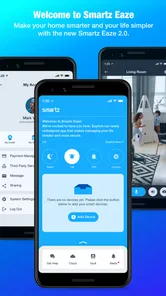
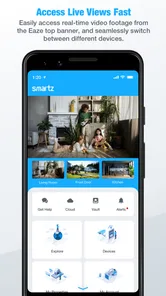
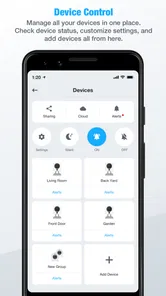
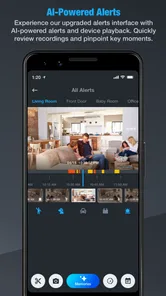

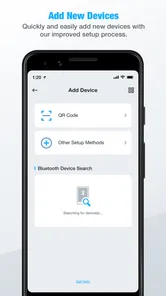
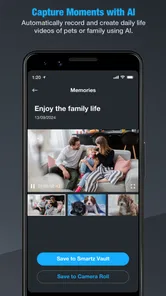
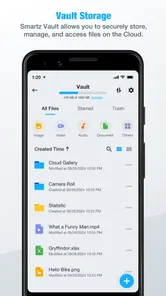
Analysis by Reviewed
Managing a property usually sounds simple until the small jobs begin competing for attention: remembering a repair, keeping track of a resident’s request, checking what still needs to be done, and making sure routine responsibilities do not disappear into a chat thread or a notebook. Smartz Eaze is a free lifestyle app from Smartz Inc. built around the idea of making property management easier to organize. I approached it less like a general productivity tool and more like a focused companion for people who need a clearer view of property-related tasks.
My overall impression is cautious rather than enthusiastic. The app has a sensible purpose, and its narrow focus can be useful when your main problem is scattered property information. At the same time, the experience does not feel like an automatic replacement for every spreadsheet, messaging app, calendar, or dedicated property-management platform. The current average rating is 1.6 from around 900 ratings, with roughly 400 written reviews, so I would not ignore the warning signs. I would treat Smartz Eaze as something to test carefully against your own workflow, not as a tool to adopt blindly.
What to consider before choosing Smartz Eaze
I’d use this section to set a sensible boundary before trying Smartz Eaze: decide which property tasks you want to improve and which records should stay in their existing tools. That distinction keeps an organizer from quietly becoming the only place you store information that needs a more dependable or specialized home.
Start with the kind of property work you actually need to manage
The first decision is not whether the app sounds convenient. It is whether your property responsibilities are simple enough for a focused mobile tool. If you manage one home, a small rental arrangement, or a limited set of recurring duties, a dedicated app may be more approachable than building a system from scratch. If you handle a large portfolio, complex accounting, formal maintenance contracts, or several people who need different access levels, you should compare it with more established property-management software before moving anything important.
I also think about the device and software environment before installing. Smartz Eaze requires Android 6.0 or later, and its current version is 1.0.1.24. That makes compatibility a practical first check for anyone using an older phone or tablet. A property app is only useful if it opens reliably when you are standing in a hallway, visiting a rental, or trying to deal with an issue away from a desktop computer.
The app is marked for Everyone, which makes it approachable for a household member or non-specialist helper who may not be comfortable with technical business software. That does not automatically make the workflow perfect for every user. Simplicity is valuable, but property management also depends on accuracy, consistent records, and clear responsibility. I would decide in advance who will maintain the information and how often it will be checked.
Use the first session as a workflow test
Rather than entering every property immediately, I would begin with one real but low-risk example. Add only the information needed to represent a normal week: a recurring responsibility, an open repair, a note about a room, or a follow-up that normally gets forgotten. Then ask whether the app makes that item easier to find and act on than your current method.
More From Our News Desk

Weather by Xiaomi Review: Clear at a Glance, Less Clear Up Close

X Under Pressure: Can It Recover When Posting Goes Wrong?

Clash of Clans Is Won Between the Battles

Android Auto Makes the Case for Quieter Car Software

MobiOffice: Transforming Mobile Productivity with Seamless Integration

EA SPORTS FC™ Mobile Soccer: Redefining Mobile Sports Gaming
This small trial reveals more than a quick glance at the interface. Notice how many steps it takes to record something, whether labels make sense later, and whether you can distinguish urgent work from routine work without relying on memory. If you need to open several screens just to understand what is pending, the app may create another layer of administration instead of removing one.
A useful habit is to enter information at the moment a task is identified, not at the end of the day. For example, if I notice a dripping tap during a property visit, I would record it immediately and include a short description that will still make sense a week later. I would avoid vague notes such as “check bathroom,” because vague entries become another form of clutter. The app can only simplify management when the information inside it is specific enough to support a decision.
Think about the person who will maintain the record
Many property systems fail in everyday use because responsibility is unclear. Before relying on Smartz Eaze, I would agree with anyone else involved on a simple rule: one person owns the next update, even if several people can report an issue. Without that rule, a task may be entered twice, left without a follow-up, or assumed to be handled by someone else.
This is one of the less obvious trade-offs of using a specialized app. A shared notebook or messaging conversation feels informal and quick, but it can become difficult to search. A structured app can make information easier to organize, yet it requires everyone to use the same process. If only one person uses Smartz Eaze while everyone else continues sending requests through messages, the app may become an incomplete copy of the real workflow.
Do not confuse organization with full property administration
The store summary presents the app as a way to simplify property management, but I would keep my expectations measured. Organizing responsibilities is not the same as replacing financial records, legal documents, inspection procedures, contractor communication, or a formal tenant-management system. I would continue keeping important documents and financial information in the tools designed for those purposes unless the app clearly supports the exact task I need.
That distinction matters for anyone deciding whether to move away from a spreadsheet. A spreadsheet may be unattractive, but it can be customized for calculations, exports, and detailed historical records. Smartz Eaze is more appealing when the problem is day-to-day visibility and mobile convenience. It is less convincing when the main requirement is complex reporting or a carefully auditable financial trail.
Where Smartz Eaze can be useful
The app is most promising when property work is small enough to review regularly but varied enough that scattered reminders become hard to manage. I’d focus on whether it helps you turn observations into clear next steps, then consider how that routine might work when another person needs to understand what is pending.
A focused place for everyday property responsibilities
The strongest idea here is focus. Instead of treating property work as a collection of unrelated reminders, Smartz Eaze gives that work its own home on a phone. For a person who repeatedly switches between a calendar, notes app, camera roll, and message history, even a modest amount of structure can reduce mental friction.
I can see the benefit for an owner who looks after a primary residence and one additional property. The owner may not need an enterprise platform, but still needs to remember maintenance, follow up on small issues, and keep a clearer view of what has happened. In that situation, a specialized lifestyle app may feel more natural than a business suite filled with options that are never used.
The app may also suit someone who shares property responsibilities with a partner or family member. A common problem in that setting is not a lack of effort; it is uncertainty about what has already been handled. A shared, property-centered record can make a quick handover easier. The important condition is that both people use it consistently and write entries that explain the next action rather than merely describing the problem.
A realistic weekly scenario
Imagine I manage a small rental and visit it on a Saturday. During the visit, I notice that a light fitting needs attention, a cupboard hinge is loose, and a routine check is due soon. Instead of keeping those observations in separate phone notes, I would put them into Smartz Eaze while I am still at the property. Later, I could review the list and decide which item needs a contractor, which can wait, and which is simply a recurring responsibility.
The useful part is not the act of typing. It is the separation between noticing a problem and forgetting it. On Monday, I would review the outstanding items before contacting anyone. After arranging the repair, I would update the record immediately rather than trusting myself to remember the details. This creates a simple chain: observe, record, act, review. The app is most valuable when it supports that habit.
There is also a practical benefit to using consistent wording. I would record the location, the visible symptom, and the next step in one short entry. “Kitchen sink: slow drainage; arrange inspection” is more useful than “plumbing issue.” This approach makes the app function as a decision aid instead of a storage box for unfinished thoughts.
Good for reducing dependence on memory
Property work contains many low-frequency tasks that are easy to overlook because they are not urgent every day. The danger is especially high when a person manages responsibilities around a full-time job or family commitments. A dedicated place to review those duties can help turn scattered awareness into a repeatable routine.
I would use Smartz Eaze at two specific moments: immediately after a property visit and during a short weekly review. The first moment captures new information while it is fresh. The second prevents the app from becoming a graveyard of old entries. This two-step routine is a concrete way to get more value from a simple organizer without spending much time inside it.
The free entry point is helpful, but the purchase range deserves attention
Smartz Eaze is free to install, which makes a cautious trial easier. You can evaluate whether its workflow suits you before committing money to the idea. However, in-app purchases range from $0.59 to $399.99 per item. That is a very wide range, so I would avoid assuming that every useful function is included at no cost.
Before building the app into a serious property process, I would inspect any purchase screen carefully and identify exactly what a paid item changes. I would also avoid buying a large option simply because it appears to offer more room or convenience. First confirm that the basic workflow is reliable for your own property. A low-cost trial of a specific function may be reasonable; a major purchase before testing the app would not be my approach.
This is especially important for a small landlord or homeowner, because the financial value of a management tool depends on the time it saves. If the app only replaces a short checklist, a high-priced purchase may not make sense. If it genuinely becomes the central place for recurring work, the calculation changes, but I would reach that conclusion only after using it regularly.
Smartz Inc. gives the app a clear identity
The developer, Smartz Inc., positions this as a property-focused product rather than a broad notes or calendar application. That specialization is useful when you want the subject matter to stay separate from personal reminders. I prefer that separation when a phone contains work, family, shopping, and property information all at once.
Still, a specialized identity raises the standard I apply. I expect the app to make property information easier to act on, not merely give it a different label. If the process feels slower than a plain note, the category alone is not enough. The value has to appear in the way I review responsibilities, follow up, and keep property-related information from getting lost.
Small workflow improvements matter more than a long feature list
One of my practical recommendations is to create a naming convention before adding many entries. Start each item with the property or area, then describe the issue and the next action. This makes later scanning quicker and reduces duplicate work. It is a simple technique, but it matters because a management app becomes harder to use when every entry is written in a different style.
I would also separate “needs action” from “useful reference” in my own process. A note about a room condition should not compete visually with an unresolved repair. If Smartz Eaze allows that distinction through its available organization tools, use it deliberately. If it does not, keep reference details limited and maintain a separate document for material that does not need regular review.
Finally, I would schedule a monthly cleanup. Close or remove items that no longer matter, correct unclear wording, and check whether recurring responsibilities are still relevant. This is a non-obvious cost of digital organization: without maintenance, the system gradually becomes less trustworthy. The app cannot tell me which entries are obsolete, so that judgement remains mine.
When a different category may fit better
A different category is worth considering when your main job is scheduling, calculations, document storage, or coordinating a larger operation. I’d compare tools by the task you need to complete most often, rather than assuming an app labeled for property management will cover every part of the work equally well.
Choose a calendar when timing is the main problem
If your biggest difficulty is remembering dates, a calendar may be the better primary tool. Calendars are familiar, quick for scheduled events, and easy to check alongside personal commitments. Smartz Eaze becomes more attractive when the work involves property context rather than only a date and a title.
For example, “annual inspection” belongs naturally on a calendar, while a developing maintenance issue may need a description, a follow-up, and a clear connection to a particular property. I would use the calendar for hard deadlines and Smartz Eaze for the property-centered record if the two tools complement each other. Trying to force one app to handle both jobs can make either system less clear.
Choose a notes app for unstructured observations
A notes application remains better for long descriptions, copied documents, photographs, meeting notes, and free-form planning. If I am documenting a complicated renovation or collecting several contractor estimates, a general notes tool may be more flexible. Smartz Eaze is the more logical choice when I want a repeatable property workflow rather than a blank page.
The trade-off is speed versus structure. Notes are quick to start but often become difficult to review. A focused property app asks me to organize information earlier. That extra discipline is worthwhile only if the structure matches the way I actually manage work.
Choose a spreadsheet for calculations and detailed history
For rent calculations, expense tracking, budgeting, or a long history of transactions, I would choose a spreadsheet or accounting-focused product. Those tools are designed for formulas, sorting, and numerical review. Smartz Eaze should not be my only record when financial accuracy is the central requirement.
A spreadsheet also makes sense when I need to compare properties across many columns or create a custom report. The disadvantage is that it can be awkward on a phone during a quick visit. This is where a property-focused mobile app may be more comfortable, provided it handles the practical information I need without forcing me to duplicate everything.
Choose dedicated property software for scale and collaboration
Someone managing many units, multiple contractors, formal tenant communication, or detailed operational records should compare Smartz Eaze with dedicated property-management platforms. Those products are generally built around larger workflows and team coordination, even though they may take longer to learn and cost more.
Smartz Eaze is easier to justify when the alternative is an improvised collection of personal tools. It is harder to justify when the alternative already provides the reporting, collaboration, and accountability required by a growing operation. The right choice depends less on the label “property management” and more on the number of moving parts in your daily work.
Be realistic about the app’s public reception
The app has more than 50,000 installs, so it has reached a meaningful number of Android users. However, its 1.6 average should make any potential user cautious. I would read recent user feedback before relying on it for important responsibilities, paying particular attention to comments about reliability, usability, and whether the current version resolves earlier frustrations.
I would not treat the rating as an automatic verdict, because a score does not explain whether the problem affects my particular workflow. But I would take it seriously enough to keep a backup record during the trial. For important repairs, deadlines, or financial matters, I would not allow one mobile app to be the only place where the information exists.
What switching really costs
Switching involves more than moving notes: you also have to decide what to migrate, establish a shared way of writing entries, and avoid losing track of active duties during the trial. I’d make the change gradually, keeping important records in their existing homes until the new routine proves useful and dependable.
Moving from scattered tools takes more effort than installing the app
The download is the easy part. The real cost of switching is deciding what information deserves to move. I would not copy every old note into Smartz Eaze. Instead, I would bring over active responsibilities, recurring property duties, and a small amount of context needed to understand open issues. Old material can remain archived elsewhere until I know the new workflow is dependable.
This selective migration prevents the first session from becoming a data-entry project. It also gives the app a fair test: I can see whether it helps with current work rather than spending hours preparing a perfect historical database.
Keep a temporary parallel record
Because the average rating is low, I would run Smartz Eaze alongside my existing method at first. For a few weeks, I would keep critical dates in the calendar and retain important documents in their usual location. I would compare whether the app helps me find and complete tasks faster.
Parallel use does create duplication, so it should be temporary and purposeful. The goal is not to maintain two permanent systems. The goal is to protect important information while testing whether Smartz Eaze deserves a central role. If it proves useful, gradually reduce duplicate entries for low-risk tasks first.
Plan for the cost of paid features
The broad in-app purchase range means switching may involve more than time. I would define a spending limit before exploring optional purchases and decide what result would justify that expense. For a single property, saving a few minutes is not enough on its own. I would want clearer follow-up, fewer missed responsibilities, or a more reliable shared process.
I would also avoid making a purchase to solve a problem that is really caused by poor organization. Better labels, shorter entries, and a weekly review may improve the experience more than an additional paid capability. Test the process first; spend only when the benefit is visible.
Know when to stop the trial
A fair trial needs an exit rule. I would stop using Smartz Eaze as my main organizer if I repeatedly forget to open it, if entries are difficult to interpret later, or if the app makes me duplicate too much work. I would also step back if the information I need most often belongs more naturally in a calendar, spreadsheet, or document system.
That is not a failure. The best management tool is the one that fits the way responsibilities actually move through your day. A focused app can be useful in theory and still be the wrong choice for a particular property owner.
My recommendation for different users
For a small property owner who wants a focused place to track everyday responsibilities, I’d consider a careful trial; for complex administration or a workflow already handled well elsewhere, I’d choose a more suitable tool. The deciding test is whether using it repeatedly makes follow-up clearer without adding enough upkeep to become another chore.
Who should try it
I would recommend trying Smartz Eaze to a homeowner or small-scale property manager who wants a dedicated mobile place for property responsibilities and is currently relying on memory, scattered notes, or message threads. The free starting point lowers the risk of an initial test, and the Everyone age rating makes it approachable for a household or small team.
I would begin with one property and a limited set of active tasks. Use it for a weekly review, not as a replacement for every other tool. Keep financial records and important documents in suitable systems, and use a backup for anything that would be costly to lose.
Who should skip it
I would skip Smartz Eaze as a primary system if I managed a complex portfolio, needed formal accounting, required detailed collaboration, or depended on extensive reporting. I would also avoid making it central to my work if the low public rating reflects problems that appear in the current version and affect the tasks I need most.
People who only need date reminders may be happier with a calendar. People who need calculations may prefer a spreadsheet. People who need long-form records may prefer notes software. The app makes the most sense in the middle: more focused than a blank notes page, but lighter than a full professional platform.
The bottom line
Smartz Eaze is worth a controlled trial, not an unconditional recommendation. Its property-focused approach can give everyday responsibilities a clearer home, especially for a small operation that has outgrown informal reminders. The most effective use is disciplined and modest: record issues while they are fresh, describe the next action, review the list weekly, and keep important information backed up elsewhere.
At the same time, the 1.6 average rating and the wide range of in-app purchase prices make caution essential. I would not pay for advanced options before confirming that the basic workflow is dependable on my device. I would not migrate every historical record immediately, and I would not expect it to replace accounting, documents, calendars, or full property-management software.
My final view is that Smartz Eaze may help a small property owner who needs focus more than complexity, but it has to earn trust through actual daily use. Install it, test one property, compare it honestly with your current method, and keep the tool only if it makes the next property decision easier. That is the clearest way to judge whether this particular app belongs in your routine.
Smartz Eaze Frequently Asked Questions
Who is Smartz Eaze intended for?
Smartz Eaze is a lifestyle app from Smartz Inc. focused on simplifying property management. It may be useful for people who want to handle property-related tasks through a mobile app, as well as those who use services or features connected to Smartz. The app is rated for Everyone, though the best fit depends on whether its tools support your property-management needs.
What is Smartz Eaze and what can I use it for?
Smartz Eaze is designed to make everyday tasks more convenient through a simple mobile experience. Its focus is simplifying property management, and depending on the services enabled for your account, it may help you access information, manage requests, communicate with a provider, or use connected smart features from one place. Available tools and supported services can vary by region, device, and account type.
Is Smartz Eaze free to download and use?
Smartz Eaze is free to download, but that does not necessarily mean every feature or service is free. In-app purchases range from $0.59 to $399.99 per item, and some functions can depend on a subscription, a participating organization, a connected product, or separate service charges. Review the app’s pricing information, terms, and any in-app purchase details carefully so you understand what is included before activating optional features.
What devices and operating systems are compatible with Smartz Eaze?
Smartz Eaze is intended for mobile devices, and the Android version requires Android 6.0 or later. Compatibility can also depend on screen size, permissions, and the specific services you want to use. Older phones may not support the newest release or may provide a less reliable experience. Check the relevant app-store listing for current requirements before downloading.
Does Smartz Eaze require an account or access to personal information?
Many of the app’s useful functions may require you to create an account or sign in through an existing service. Smartz Eaze can also request permissions such as notifications, location, camera, Bluetooth, or network access, depending on which features you use. It is worth reviewing the privacy policy and permission prompts, granting only necessary access, and confirming how your information is stored and shared.
Pros
- Simple interface makes everyday tasks easy to find and use.
- Lightweight design helps it run smoothly on many Android devices.
- Useful automation can reduce repetitive actions and save time.
- Settings are generally clear
- with little technical knowledge required.
- Convenient for users seeking a focused tool without unnecessary extras.
Cons
- Some features may require permissions that privacy-conscious users dislike.
- Compatibility and performance can vary across different device models.
- The free version may include ads or limit access to advanced options.
- Customization choices may feel limited for experienced users.
- Updates and support quality may depend on the developer’s activity.











