SmartHQ
- 6.84K
- 4.1
- Installs
- 1.00M
- Price
- Free

Screenshots
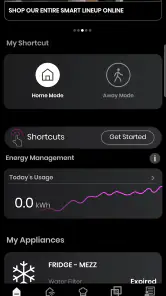
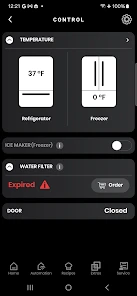
Analysis by Reviewed
I find a connected-home app most useful when it removes a small but recurring bit of household uncertainty: Is the laundry finished? Does the appliance need attention? SmartHQ is GE Appliances’ lifestyle app for bringing compatible home appliances into one place. Its appeal is practical rather than flashy: it can help you check on chores and appliance care without being in the same room.
Start with the appliance, not the app
The first question I’d ask is whether the appliances you want to manage are compatible. Smart controls are only helpful when the device itself supports them, so it’s worth checking that before expecting an older or unrelated appliance to appear in the app. Once you have a compatible appliance, the idea is to connect it and use the phone as a place to check its status or access available controls.
That makes the app a better fit for someone already using connected GE appliances than for someone shopping for a universal controller to bring every brand under one roof. If your household mixes several manufacturers, you may still need separate apps for the rest of your equipment. I’d treat SmartHQ as a companion to supported appliances, not as a promise that all smart-home devices will work together.
Decide what you want to know before connecting
Before setting anything up, I’d pick one everyday question that would genuinely be easier to answer on my phone: whether a cycle has finished, whether an appliance needs attention, or whether a supported control is useful from another room. This sounds basic, but it helps keep the app from becoming another icon you open once and forget. A clear purpose also makes it easier to judge whether the setup effort is worthwhile.
Compatibility is only the first checkpoint. It’s also worth thinking about where the appliance sits, who uses it, and whether a phone alert would change what you do next. A laundry notification is valuable when it helps you move a load at a convenient time; it matters less if you are usually beside the machine already. I’d start with the appliance that causes the most repeated checking, rather than trying to put every household task into an app at once.
From a household task to a useful result
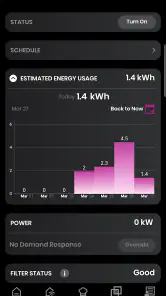
First off, setting up SmartHQ is a breeze. Compatible with a wide range of devices, from refrigerators to dishwashers, this app acts as a central hub for all your appliance needs. I downloaded it on my iPhone, and within minutes, I had it synced with my GE washing machine. The user interface is intuitive, making it super easy to navigate even for the less tech-savvy among us.
Make checks part of the routine
What really sets this app apart is its ability to streamline your daily chores. Imagine starting a load of laundry while you're still at work or preheating the oven on your way home. That's right, with your smartphone, you can use it as a remote control for your appliances. I found myself using it to check the status of my washing machine and receive alerts when the cycle was done, saving me trips to the laundry room.
More From Our News Desk

Clash of Clans Is Won Between the Battles

Android Auto Makes the Case for Quieter Car Software

MobiOffice: Transforming Mobile Productivity with Seamless Integration

EA SPORTS FC™ Mobile Soccer: Redefining Mobile Sports Gaming

How Microsoft OneDrive Became a Mobile Productivity Giant

How Google Translate Breaks Language Barriers Effortlessly
A useful way to build the app into a real routine is to check the appliance before you leave a room or head out for the day, then let an alert tell you when a task needs your attention. For example, if you start laundry before work, a completion notice can help you plan when to move the load rather than repeatedly checking the machine. The benefit is less about doing chores from anywhere and more about fitting them around the day you already have.
That workflow is especially handy when the person who starts a chore is not the person who can finish it. Someone heading out can start a suitable task, while another person at home can see that it needs attention and take over. I’d agree on a simple household routine—who checks alerts and who handles the physical task—rather than assuming the app itself coordinates people. It can make an appliance’s status easier to see, but the handoff still depends on the people in the home.
For a realistic weekday example, I might put laundry on before leaving, check its progress during a break, and use the completion alert to decide whether I can move the load right away or ask someone at home to do it. The useful outcome is not that the phone does the laundry; it reduces the uncertainty around timing. That small distinction is why connected status can be more valuable than remote control for many households.
Remote actions also have a practical trade-off: they depend on the appliance being connected and on the task being appropriate to control remotely. I wouldn’t assume every setting or cycle can be started from the phone, or that a remote command replaces checking the appliance itself when safety or preparation matters. The app is most useful for status and routine management, not for removing common-sense checks from cooking or laundry.
Care reminders and handoffs
Moreover, the app provides helpful maintenance reminders. It sends notifications when it's time to change the water filter in your fridge or to clean out your dryer vent, ensuring your appliances are running efficiently. This is not just about convenience; it's about extending the life of your appliances, which is a win-win in my book.
These reminders can also help with household handoffs. If one person usually handles laundry and another keeps track of the refrigerator, a shared routine of checking the app’s alerts can make small upkeep tasks easier to remember. I’d still use the reminder as a prompt to inspect or maintain the appliance, rather than treating an alert as proof that the task has been completed. That distinction keeps a helpful nudge from becoming another notification to dismiss.
One practical tip is to turn a reminder into a completed action immediately: check the relevant appliance, decide what maintenance it needs, and then make a note in whatever household routine you already trust. A notification alone cannot guarantee that a filter was changed or a vent was cleaned. Treating the alert as the start of a small task, rather than as the task itself, makes the feature more dependable in real life.
There is also a useful division of responsibility here. If one person manages appliance upkeep, the app can be a personal prompt; in a shared home, the alert is only helpful if everyone knows who is expected to act. I would avoid sending every notification to every household member unless that suits the way the home is run. Too many duplicate nudges can make people ignore the one reminder that matters.
Compared with checking each appliance in person, a phone-based status check is convenient when you’re elsewhere at home or away. Compared with a general smart-home hub, the focus here is narrower: supported GE appliances and their household tasks, rather than coordinating every connected device. That specialization is a strength if your appliances fit, but a limitation if you want one app for lights, speakers, thermostats, and equipment from several brands.
Where it sits beside other home apps
Among the usual options, SmartHQ makes the most sense as an appliance companion. The built-in controls on a washer, oven, or refrigerator remain the most direct route when you’re standing in front of it. A broad smart-home platform may be better for someone whose main goal is to coordinate devices from many brands. SmartHQ’s narrower role is appealing when the question is specifically about supported GE appliances, their status, and related care.
I wouldn’t choose it as the starting point for an all-purpose smart home. If your priority is controlling lighting, speakers, and devices from different manufacturers in one place, a general platform is a more natural fit, while the appliance maker’s own app may still be needed for brand-specific tasks. On the other hand, if laundry timing or a refrigerator maintenance prompt is the recurring headache, a focused appliance app can be more useful than a hub full of controls you rarely touch.
This is also why I’d evaluate it one appliance at a time. If one connected washer solves a daily annoyance, that can justify keeping the app even if other household devices live elsewhere. If you find yourself opening several apps for nearly identical checks, then the convenience may not outweigh the fragmentation. The right choice depends less on how many connected products you own than on whether this specific connection removes a task you actually repeat.
What to expect when a connection gets in the way
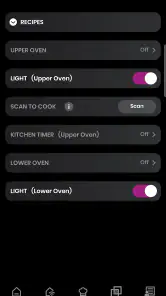
Now, let's talk performance. During my time using the app, I experienced seamless connectivity with zero hiccups. The app updates in real-time, and the responses were quick. Whether I was adjusting the temperature of my fridge or setting a timer on my oven, every command was executed flawlessly. It's clear that a lot of thought has gone into ensuring the app's reliability and performance.
In everyday use, I’d keep the phone and appliance connection in mind if a status seems stale or a command doesn’t appear to take effect. A connected appliance is still a physical device, so checking its own display or controls is the sensible fallback when something important needs confirmation. If you prefer appliances that work entirely through their built-in controls, or you don’t want another app and its alerts in your routine, the extra connection may feel unnecessary.
If a command seems delayed, I’d avoid sending it repeatedly without first checking the appliance itself. Repeating an action can leave you unsure which instruction took effect, especially when you are not standing nearby. For anything with a safety consequence or a time-sensitive preparation step, verify the appliance’s state directly before relying on the phone’s view. That is a sensible boundary for any remote appliance control, not a reason to distrust routine status checks.
Another friction point is attention. A connected-home app is useful only if its alerts are noticeable enough to help but not so frequent that they blend into the rest of your phone’s notifications. I’d keep the notifications tied to tasks I genuinely want to act on and build a habit of checking the appliance itself when the task is important. If you dislike phone alerts or prefer a low-tech household routine, the app may add more interruption than convenience.
SmartHQ is free, is rated for everyone, and is developed by GE Appliances. It has an average rating of 4.1 from around 33,000 ratings, with more than a million installs. Version 1.0.0.110.2 requires Android 9 or later; the app was released on August 28, 2015. Those details make it easy to identify, but the deciding factor for me remains whether you own compatible appliances and will actually use remote checks or care reminders.
For someone choosing between installing it and sticking with the appliance’s controls, I’d ask two questions: do I often need to know what the appliance is doing when I’m not beside it, and would a reminder lead me to take a useful action? If both answers are no, there is little reason to add another app. If either answer is yes, trying the connected workflow with one appliance is a more realistic test than expecting it to transform every household chore.
A good fit when connected appliances already matter
In a world that's constantly on the move, this app provides a glimpse into the future of home management. It's not just an app; it's like having a personal assistant for your appliances. If you're looking to simplify your life and make your home smarter, this app is definitely worth a try. So go ahead, download it, and watch your home transform into a smart haven.
My more grounded recommendation is to try it if you have compatible GE appliances and want a convenient way to follow laundry, appliance status, or maintenance prompts. If you’re considering it before buying an appliance, first decide whether those connected tasks would change your routine; the phone controls are a bonus, not a substitute for choosing an appliance that suits your household. For people with unsupported devices or no interest in remote monitoring, the usual approach—using the appliance’s own controls and checking it directly—may be simpler.
It is particularly well suited to people who already own supported appliances, keep a busy or shifting schedule, and appreciate being able to check a task without walking back to the kitchen or laundry area. It can also help in a household where appliance care tends to slip between people, provided the family agrees on who acts on each reminder. I’d skip it if you want one universal controller, have no compatible appliances, or prefer not to manage household tasks through a phone.
My final test would be simple: connect the appliance you check most often, use the app through an ordinary week, and notice whether it changes a decision you make—when to return to the laundry, whether someone else can take over, or when to inspect an appliance. If it saves repeated checking or helps a maintenance task happen on time, it earns its place. If you still rely on the appliance’s own display for everything, there is no need to force a connected routine that does not suit you.
SmartHQ Frequently Asked Questions
Can SmartHQ help me decide whether my home is ready for connected appliances?
SmartHQ is designed as a command center for a connected home, so it is most useful when you have compatible smart appliances and a dependable Wi-Fi connection. Before downloading, think about which devices you want to manage and whether they can connect to your home network. That preparation can make setup and everyday use feel more straightforward.
Who makes SmartHQ, and what kind of app is it?
SmartHQ is a Lifestyle app developed by GE Appliances. Its focus is managing supported connected appliances through a single mobile app, rather than serving as a general-purpose home automation tool. If you are considering it, the key question is whether your household has devices that work with SmartHQ and whether you want to manage them from your phone or tablet.
Is SmartHQ free, and what should I know before downloading it?
SmartHQ is a free Lifestyle app from GE Appliances, so you can download it without paying for the app itself. It is intended for an Everyone audience and has received an average rating of 4.1 from around 33,000 ratings. Before installing, consider whether you have compatible appliances and a reliable internet connection, since the app is designed to connect with smart home devices.
What is SmartHQ and what does it offer?
SmartHQ is a comprehensive smart home app designed to simplify managing your household appliances and devices. With SmartHQ, users can control various smart devices from a centralized platform, offering convenience and efficiency. The app supports a wide range of products, including kitchen appliances, washers, dryers, and more, enabling seamless integration and management of your smart home ecosystem.
Is SmartHQ compatible with all smart devices?
SmartHQ supports a broad array of smart devices, particularly those from GE Appliances. However, compatibility may vary for devices from other manufacturers. Before downloading the app, it's advisable to check if your specific devices are supported. The app is regularly updated to include more device integrations, enhancing its utility for diverse smart home setups.
Pros
- User-friendly interface design.
- Seamless integration with smart devices.
- Remote control for home appliances.
- Regular updates and improvements.
- Compatible with various platforms.
Cons
- Requires stable internet connection.
- Limited compatibility with older devices.
- Some features may require subscription.
- Occasional app performance lags.
- Initial setup can be time-consuming.
- Category
- Lifestyle
- Version
- 1.0.0.110.2