

Smart Lock for TTLock
- 10.00
- 3.1
- Installs
- 50.00K
- Price
- Free
Screenshots
Analysis by Reviewed
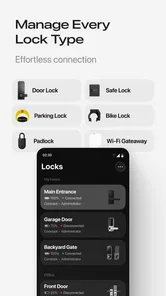
Smart Lock for TTLock is the kind of tool I would install only after deciding that ordinary keys no longer fit the way I use a door. It is built for managing compatible TTLock smart devices, with remote unlocking, eKey sharing, and access-history tracking gathered in one place. In my experience, that combination is more useful than a simple “open the lock from your phone” promise because it also changes how I handle guests, family members, cleaners, deliveries, or a small rental property.
The app comes from Solma Grow and sits in the tools category. It is free to install, available for Everyone, and has reached over fifty thousand installs. Its current version is 1.0.6, while the overall store score is a 3.1 average from just over one hundred ratings. That score tells me to approach it as a practical utility that may need patience rather than as a perfectly polished smart-home experience.
My main conclusion is simple: this is a worthwhile option for people who already use compatible TTLock hardware and want centralized access control, but it is not a universal smart-lock controller. The quality of the experience depends heavily on the lock itself, the phone, the connection available at the moment, and how carefully access permissions are organized.
How Smart Lock for TTLock feels in everyday use
I find Smart Lock for TTLock most useful when I treat it as a way to organize access, not just as a button for opening a door. In this section, I’ll look at the small habits that make shared entry easier to manage, especially keeping device names and permissions clear. That groundwork also makes the first setup feel less intimidating.
Speed expectations when opening a door
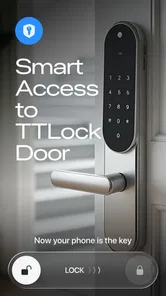
The first thing I look for in a lock app is not a long feature list. It is whether the action feels direct when I am standing outside with one hand full of shopping bags. Smart Lock for TTLock is designed around that immediate task: select the relevant device, request access, and use the phone as the control point. When everything is ready, the process feels more convenient than searching for keys or carrying a separate remote.
That convenience should not be confused with guaranteed instant unlocking. A phone app has more steps around it than a physical key. The phone must be available, the correct account must be active, the lock must respond, and the selected device must match the door I am facing. A user who expects the same instant reaction every time may find the transition from physical keys frustrating, especially during the first few uses.
I recommend setting up the app while standing near the lock rather than attempting the first configuration during an emergency. This gives me time to confirm which device appears in the account, check that the intended key is available, and learn where the unlock control sits. That small preparation matters more here than it would with a basic flashlight or calculator because a mistake happens at the exact moment I need access.
More From Our News Desk

 Gmail
GmailGmail in a Busy Inbox: Who Benefits Most?
From first account to crowded workday, Gmail earns its place through dependable search and flexible sorting—but its best fit depends on how much inbox maintenance you can tolerate.

 Prime Video
Switching to Prime Video: What Changes in Your Viewing Routine
Prime Video can make a compelling second home for streaming, but switching means learning a different catalog, rental layer, and route from browsing to playback.

 Universal TV Remote Control
Universal TV Remote Control Works Best as a Reliable Backup
A phone remote earns its place through quick setup and reliable habits. Here is how to get more from Universal TV Remote Control—and where its limits show.

 Weather - By Xiaomi
Weather by Xiaomi Review: Clear at a Glance, Less Clear Up Close
Xiaomi’s weather app makes everyday forecasts quick to scan, but its calm surface can leave useful details and recovery paths harder to find than they should be.

 X
XX Under Pressure: Can It Recover When Posting Goes Wrong?
A resilience-focused review of X, examining setup, mistaken posts, interruptions, weak connections, and the gaps that matter when recovery needs to be dependable.

 Clash of Clans
Clash of Clans Is Won Between the Battles
Its raids are quick; its community is a long-term project of coordination, teaching, rivalry, and shared responsibility—with all the friction that entails.
Latest News



The app’s speed also has a practical human factor. If several locks are registered, a clear naming system becomes part of performance. Names such as “front door,” “side entrance,” or “studio” are safer than leaving several devices with similar default labels. The app may respond normally, yet I can still waste time choosing the wrong lock if the device list is poorly organized.
What happens during heavy-use moments
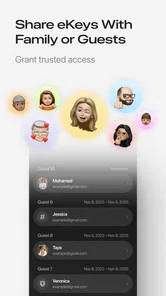
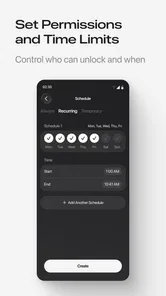
The strongest use case is controlled sharing. Instead of handing over a copied key, I can use the app’s eKey workflow to give another person access. That is especially helpful when a family member needs to enter while I am away, when a cleaner visits on a regular schedule, or when a guest needs a way inside without meeting me in person. The important advantage is not only convenience; it is that access becomes something I can manage digitally rather than something I must physically retrieve later.
I would still treat shared access as a responsibility. Before sending an eKey, I would double-check the recipient and the target door, then remove or adjust access when the arrangement ends. A digital key can be easier to distribute than a metal one, but that also makes careless sharing easier. The app is most useful when I use it as an access-management tool, not as a shortcut for sending permissions without thinking.
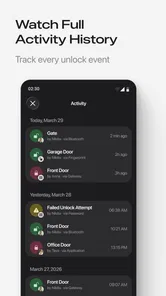
A realistic example is a small apartment that I occasionally lend to friends. I can prepare an eKey before their arrival, let them use the compatible lock, and review the history afterward. That workflow is cleaner than leaving a physical key under a mat. It also gives me a record to consult if I need to understand when the door was used. I would not treat the history as a substitute for good communication, but it adds useful context when several people may enter at different times.
Heavy use can expose organizational weaknesses quickly. If a household has many visitors and several doors, I would keep a simple private note matching people to the access they should have. The app can handle the digital side, but I should not rely on memory when names, devices, and permissions begin to overlap. This is one of the less obvious trade-offs: the app reduces key handling while increasing the need for tidy digital housekeeping.
Reliability and recovery when something goes wrong
Access history is one of the more valuable parts of the experience because it turns the lock from a one-time action into a traceable system. I can review activity instead of guessing whether someone entered. For a shared home, office, or rental space, that history can make everyday coordination easier. I would use it as a reference for timing and responsibility, not as an invitation to monitor every movement without a clear reason.
Recovery is where I would be most cautious. A smart lock app should not be the only plan for getting inside. Phones run out of battery, accounts can be signed out, connectivity can be poor, and hardware can behave differently from the software screen. I would keep an agreed backup method available, particularly for a main entrance. That might mean a trusted person with authorized access or another manufacturer-supported fallback, depending on the lock setup.
If an unlock attempt does not work, I would avoid tapping repeatedly without checking the basics. First I would confirm that I am using the right device, then verify that the phone is connected in the way the lock expects, and finally inspect whether the lock itself is responding normally. Repeated commands can create confusion, especially if the first request is delayed and a later tap appears to do nothing.
The app’s rating suggests that not every user has experienced a completely smooth journey. I do not read that as proof that the app is unusable, but it does temper my expectations. Smart-lock reliability is shared between the application, the TTLock device, the phone operating system, and the surrounding connection. When a problem appears, it may not be obvious which part caused it, so a calm setup and a backup plan are more important than with ordinary tools.
Device and phone constraints worth considering
Smart Lock for TTLock is useful only within the TTLock ecosystem. That is the first constraint, and it is an important one. If I have a lock from another platform, this is not a general-purpose smart-home remote that I can expect to control it. Before installing, I would identify the exact lock model and confirm that it belongs to the compatible TTLock family.
The minimum operating-system requirement is Android 9. That makes the app accessible to many older phones, but it still rules out devices running earlier software. I would also think about the phone I actually carry every day rather than the newer phone sitting at home. If the app is meant to be my key, it needs to be installed and usable on the device I bring to the door.
Another practical limitation is shared-device use. If several household members need access, each person should have a clear account and permission arrangement rather than passing one phone around. That keeps the access history more meaningful and reduces the chance that someone unlocks the wrong door from a borrowed device. The app supports the idea of distributed access, but the household still has to establish sensible rules.
The free installation is appealing, although in-app purchases range from $2.99 to $99.99 per item. I would pay close attention to any purchase screen during setup and avoid assuming that every possible management function is included without cost. The app may be perfectly adequate for a straightforward personal setup, but people managing many doors or more demanding access arrangements should examine the available options before building their entire workflow around it.
Because this is a tool rather than a social or entertainment app, resource demands matter in a quiet way. I would not expect it to be something I leave open constantly. I would open it when I need to manage a lock, share an eKey, or inspect history, then close it and continue with my day. That usage pattern should feel lighter than keeping a full smart-home dashboard active, but I would still avoid installing it on a phone that is already struggling for storage, battery life, or system responsiveness.
Where it is better than usual alternatives
Compared with a physical key, the app is more flexible for temporary or changing access. A key can be copied, misplaced, or left with someone long after they need it. An eKey is easier to send and manage from a distance, while access history gives me information that a metal key cannot provide. The trade-off is dependence on a phone and a digital account, so I would choose the app when flexibility matters more than absolute simplicity.
Compared with a basic lock app that only sends an open command, this one has a broader management purpose. Sharing eKeys and checking history make it more suitable for households, small workplaces, and occasional rentals. I would not describe that as a replacement for a complete building-access system, but it is more practical than a single-button controller when several people need different kinds of access.
Compared with a broader smart-home platform, the focused approach can be an advantage. I do not need a dashboard full of lights, cameras, thermostats, and routines just to manage a TTLock device. On the other hand, someone who wants every smart-home product in one unified interface may prefer a platform designed around multiple brands. This app makes the most sense when TTLock compatibility is already the priority.
Who should use it and who should skip it
I would recommend Smart Lock for TTLock to a homeowner who already owns compatible hardware and wants to stop distributing spare keys. It also fits a small landlord, a host who needs controlled guest entry, or a family that wants to know when a shared door was used. The app’s combination of remote control, eKey sharing, and history is genuinely useful in those situations.
I would be more hesitant to recommend it to someone who has not yet chosen a lock. That person should select the hardware and access ecosystem first, then make sure the app fits the intended routine. Installing this application before deciding on compatibility puts the software ahead of the more important purchase.
I would also steer away from it for anyone who wants a completely offline, no-account, no-phone entry method. A traditional key is less clever but easier to understand and recover from. Likewise, people responsible for a large commercial property may need stronger administration, auditing, and support expectations than this focused consumer tool is designed to provide.
My performance verdict after weighing convenience against friction
Smart Lock for TTLock feels most successful when I use it for planned access rather than panic access. Preparing an eKey, naming devices clearly, and checking history are the tasks where the app adds value beyond a physical key. Remote unlocking is convenient, but it is only as dependable as the complete chain between phone, account, connection, lock, and power.
The current version, 1.0.6, gives the app a defined place in the TTLock workflow, while the 3.1 average means I would not recommend treating it as flawless. I would install it with realistic expectations, test the setup several times, and keep a backup entry plan. Those steps do not cancel out the convenience; they make the convenience safer to rely on.
For me, the deciding question is not whether a phone can open a door. It is whether I need flexible permissions and a usable record of access. If the answer is yes and my lock belongs to the TTLock ecosystem, this free tools app is worth trying. If I only want the simplest possible way through my own front door, a physical key or a more basic lock solution may be the better choice.
Solma Grow has made a focused utility for a specific job, and that focus is both its strength and its boundary. I like the practical combination of remote unlocking, eKeys, and history, but I would judge it as part of a complete lock setup rather than in isolation. Used thoughtfully, it can remove a surprising amount of key-related hassle; used without preparation, it can make a simple doorway feel unnecessarily complicated.
Smart Lock for TTLock Frequently Asked Questions
Is Smart Lock for TTLock free to download, and are there in-app purchases?
Smart Lock for TTLock is free to download, so you can install the app without an upfront charge. It also offers in-app purchases, which are listed at prices ranging from $2.99 to $99.99 per item. Whether you need to make a purchase depends on the features you want to use and your setup. Check the purchase details in the app before confirming any transaction.
What phones can run Smart Lock for TTLock?
Smart Lock for TTLock is an Android app that requires Android 9 or later. Before downloading, check your device’s operating system version in its settings. A compatible operating system is only one part of a successful setup: you will also need a TTLock-compatible smart lock and any connection equipment required for the functions you plan to use. The app is rated for Everyone.
What is Smart Lock for TTLock, and what does it do?
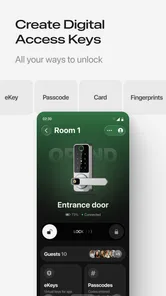
Smart Lock for TTLock is a companion application used to manage compatible electronic door locks through the TTLock platform. After pairing a supported lock, you can typically lock or unlock the door, create digital access codes, issue electronic keys, review access records, and manage users remotely when the lock and account support those functions. Available features may vary depending on the lock model, administrator permissions, and connection method. Its focus is practical access management rather than general phone security, so it is most relevant if you already use, or plan to use, a compatible TTLock device.
Does Smart Lock for TTLock work with every smart lock?
No. Smart Lock for TTLock is designed to work with locks that specifically support the TTLock system, so it is not universally compatible with every Bluetooth, Wi-Fi, keypad, or fingerprint lock. Before downloading or purchasing hardware, check the lock manufacturer’s product description for TTLock compatibility. Some functions may also require a particular gateway, supported phone, or updated firmware. Confirming that your lock supports TTLock is the most important step before relying on the app for everyday access.
Can I unlock a door without an internet connection?
In many cases, the app can communicate with a compatible Bluetooth lock when your phone is nearby, even if mobile data or Wi-Fi is unavailable. However, internet access may be necessary for account synchronization, remote unlocking, sharing permissions, receiving updates, or using a separate gateway. Offline behavior can differ by lock model, so test local access before relying on it as your only entry method. If you need to unlock the door while away from it, check that your particular lock setup supports remote access.
Pros
- Unlocks compatible TTLock devices directly from your smartphone.
- Supports multiple access methods
- including PINs
- cards
- and fingerprints.
- Useful for managing temporary or scheduled access permissions.
- Can reduce the need to carry physical keys.
- Remote management is available with supported locks and gateways.
Cons
- Only works with locks and devices compatible with the TTLock ecosystem.
- Bluetooth unlocking can be unreliable when the phone connection is weak.
- Some remote features require an additional gateway or compatible hardware.
- Account setup and device pairing may take time for first-time users.
- Access depends on phone battery
- app permissions
- and Bluetooth availability.








