

Skincare Routine: FeelinMySkin
- 69.00
- 4.7
- Installs
- 100.00K
- Price
- Free

Screenshots






Analysis by Reviewed
When I’m trying to make sense of a skincare label, the hardest part is often not finding another product but deciding whether it fits the routine I already have. That’s where FeelinMySkin is most useful to me: it brings product checking and routine planning together, so I can approach skincare with a little more order and less guesswork.
A routine planner with a practical purpose
This beauty app is made by FeelinMySkin, and its focus is the everyday work of keeping a routine understandable. A planner is helpful when several products have accumulated on the bathroom shelf, but it works best when I treat its suggestions as a starting point rather than a diagnosis or a promise of results. Skin changes, and a routine that felt comfortable last month may not suit me today.
The cosmetics scanner adds another useful step: it gives me a way to check products while I’m considering them, rather than relying only on packaging claims or a hurried search. For acne-prone skin in particular, that can make product research feel more organized. I’d still compare the result with my own experience and introduce unfamiliar products cautiously; a scan can inform a decision, but it cannot guarantee how my skin will react.
How I’d use it in an ordinary week
Imagine I’m standing in a shop with a cleanser in one hand and the products I already use at home in mind. I can use the scanner as a screening step, then return to the planner to keep track of what I actually choose. At home, recording how my skin feels alongside changes in the routine could make it easier to notice patterns over time, instead of changing several things at once and wondering which one caused a reaction.
That workflow is more valuable than treating the app as a product-shopping list. My practical tip is to make one change at a time and give myself a clear note about when I started it. If I’m already using a routine that suits me, I don’t need to replace it just because an app suggests another option. The benefit is better organization and a more deliberate way to compare choices, not a reason to chase a perfect routine.
Where it fits—and where it doesn’t
Compared with a basic notes app, FeelinMySkin is more specifically shaped around skincare, with scanning and a routine planner in the same place. Compared with browsing product reviews or asking a social group, it can make personal tracking less scattered. The community can offer ideas and shared experiences, but other users’ skin is not a reliable test for mine; I use those conversations for questions to investigate, not as medical advice.
There is some friction in any personalized planner: the suggestions are only as useful as the details I enter, and maintaining a log takes a little consistency. If I want clinical guidance for a persistent or painful skin problem, I’d choose a qualified professional instead. Likewise, someone who wants only a quick ingredient lookup and has no interest in planning, journaling, or community may find a simpler tool more convenient.
More From Our News Desk

 Gmail
GmailGmail in a Busy Inbox: Who Benefits Most?
From first account to crowded workday, Gmail earns its place through dependable search and flexible sorting—but its best fit depends on how much inbox maintenance you can tolerate.

 Prime Video
Switching to Prime Video: What Changes in Your Viewing Routine
Prime Video can make a compelling second home for streaming, but switching means learning a different catalog, rental layer, and route from browsing to playback.

 Universal TV Remote Control
Universal TV Remote Control Works Best as a Reliable Backup
A phone remote earns its place through quick setup and reliable habits. Here is how to get more from Universal TV Remote Control—and where its limits show.

 Weather - By Xiaomi
Weather by Xiaomi Review: Clear at a Glance, Less Clear Up Close
Xiaomi’s weather app makes everyday forecasts quick to scan, but its calm surface can leave useful details and recovery paths harder to find than they should be.

 X
XX Under Pressure: Can It Recover When Posting Goes Wrong?
A resilience-focused review of X, examining setup, mistaken posts, interruptions, weak connections, and the gaps that matter when recovery needs to be dependable.

 Clash of Clans
Clash of Clans Is Won Between the Battles
Its raids are quick; its community is a long-term project of coordination, teaching, rivalry, and shared responsibility—with all the friction that entails.
Latest News



Making the scanner more useful
I get more from a product scan when I decide in advance what question I’m trying to answer. For example, I might be checking whether a candidate seems compatible with the acne-conscious approach I’m following, rather than asking the app to tell me whether it is universally good. That distinction keeps the scanner in its proper role: a filter for narrowing choices, not a final verdict on a product or on my skin.
A second useful habit is to scan before buying, then make a brief note about why I chose the item. If I later decide it does not suit me, I can compare that experience with my original reason for selecting it. This creates a more honest personal record than relying on memory, which tends to preserve the purchase rationale and forget the small details of how a product actually felt.
I would also avoid scanning a long list and treating every result as a ranking. A shortlist of a few realistic candidates is easier to compare with what I already use, and it reduces the temptation to rebuild a routine around whatever looks most appealing in the moment. The point is to make a considered choice, not to turn shopping into a contest for the most app-approved shelf.
When a journal beats another product search
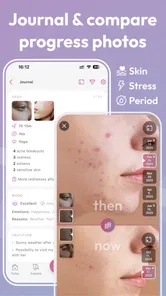
The journal is most useful to me when something changes and I want to understand the sequence. If my skin feels different after a new product enters the routine, a dated note can help me remember what changed and when. I’d keep entries simple: what I introduced, where it fits in the routine, and how my skin seemed afterward. A short, consistent record is more practical than trying to reconstruct a detailed history weeks later.
This is also where the app can help me resist changing too much at once. If I start a cleanser, serum, and moisturizer together, even a careful journal may leave me unsure which one mattered. Separating changes gives the notes a clearer purpose. It is not a guarantee that I’ll identify a cause, but it makes my own observations easier to interpret and gives me something concrete to discuss if I seek professional advice.
There is a trade-off: journaling only pays off if I actually keep doing it. Someone who dislikes writing down routine details may find the planner more work than benefit, especially if their needs are straightforward. I’d use it selectively rather than forcing a daily diary—record meaningful changes and observations, and let the rest of the routine stay uncomplicated.
Ever had those days when your skin feels like it belongs to someone else? I know I have! Enter FeelinMySkin, a skincare app that promises to make every day a good skin day. I decided to take this app for a spin, and here's how it went down.
Getting Started with FeelinMySkin
Let's kick things off with the basics. When I first downloaded FeelinMySkin, I was greeted by a sleek and user-friendly interface. It asked me a bunch of questions about my skin type, concerns, and goals. I felt like I was having a chat with a skincare guru! This initial setup is crucial because it tailors the experience to your unique skin needs.
Features That Stand Out
One of the coolest features is the personalized skincare routine it creates for you. Based on the info you provide, it suggests products and routines that fit like a glove. And if you're like me, perpetually confused in the skincare aisle, this feature is a godsend.
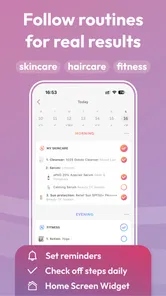
The app also includes a nifty tracker for logging your skincare products. No more second-guessing if you ran out of that fancy serum. It even reminds you when it's time to repurchase. I found this particularly helpful in keeping my skincare stash organized.
Daily Tips and Insights
FeelinMySkin doesn't stop at routines; it goes the extra mile with daily tips and insights. It's like having a skincare coach in your pocket. The app sends you reminders and tips on how to improve your skincare habits. And let's be honest, who doesn't need a little nudge every now and then?
Another sweet feature is the community aspect. You can connect with other users, share tips, and even swap product recommendations. It's like a little community of skincare enthusiasts helping each other out.
Using the community without outsourcing your judgement
I see the community as a place to discover questions and possibilities, not a shortcut to a personalized answer. If someone describes a product as soothing or says it worked well for them, that is an experience worth hearing, but it does not tell me how my skin will respond. I’d use a recommendation to build a shortlist, then check the product and make a cautious decision based on my own needs.
That boundary matters most when a conversation turns into confident advice about a persistent concern. Shared experiences can be supportive, but they are not a substitute for a clinician who can assess an individual problem. If I want discussion and encouragement around everyday routines, a community can be a welcome extra; if I need a diagnosis or treatment plan, I would look elsewhere.
Who is likely to get the most from it?
I’d recommend trying the app if your routine has become difficult to remember, if you are comparing products for acne-conscious care, or if you want a single place to connect product research with your own notes. It is especially appealing to someone who likes having a plan but still wants to make the final call independently. A person who is just beginning to organize a routine may also benefit from having their choices and observations together rather than scattered across browser tabs and scraps of paper.
On the other hand, I would skip it if I want a medical tool, expect a scan to certify that a product is safe for me, or have no interest in maintaining a planner. It is also not the best fit for someone who already has a stable routine and prefers not to track it. In those cases, a plain note or a quick ingredient reference may be less demanding and do the specific job just as well.
Choosing between this and familiar alternatives
A notes app is flexible and quick, but it leaves me to invent my own system for products, routines, and observations. FeelinMySkin’s advantage is that those skincare tasks sit together, which may make it easier to move from considering a product to recording how it fits into daily use. The cost of that structure is that I have to engage with the app’s way of organizing things instead of keeping everything as free-form as I would in a blank note.
Product-review sites and social feeds can show a wider range of opinions, but they can also pull me toward popularity rather than personal fit. The scanner and journal offer a more individual workflow: screen a candidate, decide whether it belongs in my routine, and observe my own experience. If I mainly want broad shopping comparisons, general review sources may suit me better; if I want to keep my decisions and routine connected, this app has a more focused purpose.
Keeping a routine realistic
My approach would be to use the planner as a guide to consistency, not as a demand to add more steps. A routine that is easy to follow is more useful than an elaborate one I keep abandoning. If the suggested plan feels too busy for my mornings, I would simplify it to the steps I can maintain and use the app to keep that version clear. The ability to organize a routine should reduce mental clutter, not create pressure to buy more or do more.
I would also revisit my notes when a routine changes, rather than assuming an old plan still reflects what I use. That small check helps keep product tracking meaningful and makes it easier to avoid treating a past experiment as part of my current routine. For me, the best result is not a perfect record; it is a routine I can understand and follow without second-guessing every product.
Final Thoughts
So, what's the verdict? I genuinely enjoyed using FeelinMySkin. It's more than just an app; it's a personal skincare assistant that learns and evolves with you. For anyone looking to up their skincare game, this app is worth a try. It's user-friendly, packed with features, and makes the whole skincare routine less of a chore and more of a ritual.
In a world where skincare can often feel overwhelming, FeelinMySkin stands out as a beacon of simplicity and effectiveness. Give it a go, and your skin might just thank you for it!
For a busy morning, I’d keep the routine simple: check the plan, follow the steps I’ve chosen, and save experimentation for a calmer moment. If a product is new, a brief journal note about when I began using it gives later comparisons more context. That small habit is especially useful when several products look similar or when I can’t remember which one I added first.
What to expect before installing
The app is free to download and rated for Everyone, with optional in-app purchases priced from $4.99 to $39.99 per item. It has an average rating of 4.5 from around 2,800 ratings, and more than 100,000 installs. Those figures suggest an established audience, though they don’t tell me whether its routine suggestions will suit a particular person’s skin.
It was released on August 8, 2020, and the current version is 2.11.316. It requires Android 7.0 or later. I’d check the purchase choices before paying for anything and start with the free experience to see whether the planner fits my habits. FeelinMySkin is best for someone who wants skincare decisions, product notes, and routine reminders in one place; it’s less compelling if I’m happiest with a paper list or already have a simple routine I never forget.
A sensible way to decide
My recommendation is to try it when your shelf feels hard to manage or you’re building a routine and want a central place to think things through. Keep expectations grounded: the planner can help you stay consistent, the scanner can support product research, and the journal can help you spot your own patterns, but none replaces careful testing or professional advice when skin concerns are serious. For me, that balance is the point: a practical companion for everyday organization, not an authority that should make every skincare choice on my behalf.
Skincare Routine: FeelinMySkin Frequently Asked Questions
Is FeelinMySkin free to download, and are there optional purchases?
FeelinMySkin is free to download, so you can try the app without paying upfront. It also offers in-app purchases, with options priced from around five dollars to around forty dollars per item. Consider whether you want any paid features before making a purchase, and check the options shown in the app so you can choose what suits your skincare needs and budget.
What is FeelinMySkin, and what is it designed to help with?
FeelinMySkin is a beauty app focused on skincare routines. Its tools bring together routine planning, cosmetics scanning, acne-safe product information, a skincare journal, and a community. It is intended for people who want a place to organize skincare-related details and follow their routine more consistently. The app is rated for Everyone, making its stated content age classification broad.
What features does the FeelinMySkin app offer for skincare routines?
FeelinMySkin is designed to enhance your skincare routine by offering personalized skincare plans, reminders for product applications, and detailed skin analysis. It allows users to track their skin progress over time with pictures and notes. Additionally, the app provides expert skincare tips and product recommendations tailored to your skin type and concerns. These features make it easier for users to maintain an effective skincare routine.
How does the personalized skincare plan work in the FeelinMySkin app?
The FeelinMySkin app begins by assessing your skin type and concerns through a detailed questionnaire and photo analysis. Based on this information, it generates a personalized skincare routine, recommending products and steps that best suit your needs. The app adjusts and updates the routine as your skin changes, ensuring that your skincare regimen remains effective and relevant.
Is the FeelinMySkin app suitable for all skin types?
Yes, the FeelinMySkin app is designed to cater to all skin types, including sensitive, oily, dry, and combination skin. Upon registration, users provide details about their skin type and any specific concerns. The app customizes recommendations and routines to suit individual needs, ensuring that users receive advice and product suggestions that are safe and effective for their skin type.
Pros
- User-friendly interface
- easy to navigate
- Personalized skincare routine suggestions
- Tracks product usage and skin progress
- Extensive product database with reviews
- Reminders for daily skincare rituals
Cons
- Limited free features
- premium required
- Occasional app crashes reported by users
- No offline access to routines or data
- Ads can be intrusive without premium
- Limited support for non-English languages











