Site Tracker
- 6.00
- 4.6
- Installs
- 10.00K
- Price
- Free
Screenshots

Analysis by Reviewed
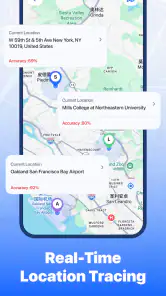
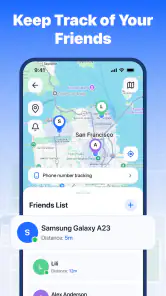
I tried Site Tracker with a simple question in mind: can a focused location-sharing app make everyday coordination less stressful without becoming another complicated service to manage? Its purpose is clear. It is a free Maps & Navigation app from Alpha game that is built around mutual real-time location tracking and safety alerts for trusted friends. That makes it more specific than a conventional map, but also more dependent on careful setup and cooperation from the people using it.
My overall impression is positive, especially for small groups that already trust one another and want a straightforward way to stay aware of each other’s whereabouts. The app has an average rating of 4.6 from around 170 ratings, and it has passed the early curiosity stage with over 10 thousand installs. Those figures suggest that people are finding a useful purpose for it, although the relatively small review base also means I would treat it as a focused tool rather than a fully proven replacement for every established location service.
Where Site Tracker is useful, and where people usually get stuck
The first thing to understand is that Site Tracker is not simply a map with a search box. Its value appears when several trusted friends use it together and need a shared view of movement or a way to receive safety-related alerts. If you install it expecting turn-by-turn navigation, public transport planning, business searches, or a complete travel-planning suite, you may feel that it is too narrow. I would use a conventional navigation app for getting from one address to another and keep this app for coordination and awareness.
The most common point of friction with this kind of tool is not the map itself. It is the relationship between the people involved. Location tracking only helps when the right friends are connected, the intended sharing arrangement is understood, and everyone knows what an alert means. A user can open the app and see an apparently incomplete situation simply because another person has not finished joining the shared setup or is not currently providing usable location information.
That is why I recommend deciding the purpose before inviting anyone. A group heading home after meeting in the evening has a different need from friends coordinating at a crowded event. In the first case, occasional checking and safety alerts may be enough. In the second, constant attention to the map can become distracting. Agreeing on the reason for using Site Tracker keeps it from turning into an uncomfortable expectation that everyone must be watched all the time.
There is also an important privacy habit here: only include people you genuinely trust. The app is designed around trusted friends, and that wording matters. I would not add a casual acquaintance merely because it is convenient, and I would remove old connections when a group activity ends if continued sharing is no longer necessary. That small routine makes the app feel like a safety tool rather than a permanent window into everyone’s movements.
Another subtle issue is interpreting a location as a precise statement of reality. A displayed position should help you understand a situation, not replace a phone call or personal judgement. If a friend seems stationary, that might be intentional, temporary, or related to the phone’s current conditions. I would use the map as context and use direct communication when the situation is urgent or confusing.
More From Our News Desk

Weather by Xiaomi Review: Clear at a Glance, Less Clear Up Close

X Under Pressure: Can It Recover When Posting Goes Wrong?

Clash of Clans Is Won Between the Battles

Android Auto Makes the Case for Quieter Car Software

MobiOffice: Transforming Mobile Productivity with Seamless Integration

EA SPORTS FC™ Mobile Soccer: Redefining Mobile Sports Gaming
Setup checks that prevent most avoidable problems
Before relying on Site Tracker during an outing, I would do a short test while everyone is together. Open the app, confirm that the intended people are present, and make sure each person understands how the shared view and safety alerts are supposed to be used. Testing at home or before leaving is much better than discovering a setup problem in a noisy station, at a festival, or during a late journey.
Keep the first test deliberately small. Add only the friends who need to participate, then check whether the arrangement makes sense to everyone. This is one of the more useful workflows for a mutual tracking app: start with a single real situation instead of trying to build a large permanent circle immediately. It makes mistakes easier to spot and reduces the chance of sharing with the wrong person.
If someone cannot see the expected information, I would check the basics in a calm order. First, confirm that the person is using the same app and has completed the joining process. Next, ask whether the app is open and whether the phone currently has a usable connection. Then check the phone’s location access and battery restrictions. These are general device-level checks, but they matter because tracking depends on the operating system allowing the app to obtain and communicate location information.
It is also worth checking whether the phone is in a mode that limits background activity. Battery-saving settings can pause or delay apps that are not actively on screen, while weak connectivity can make a current position appear slow to update. I would avoid changing every phone setting at once. Make one adjustment, test again, and note what changed. That approach is less confusing and makes it easier to undo an unnecessary change later.
For a family member or friend who is less comfortable with apps, the best setup is a guided one. Sit together, explain who can see what, and perform one short test before the person leaves. Do not assume that an invitation alone means the arrangement is ready. A few minutes of shared checking can prevent repeated messages later asking why someone is missing from the view.
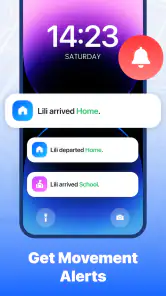
The same applies to safety alerts. I would discuss when an alert should be used and what the recipients should do after receiving one. An alert is not useful if nobody knows whether to call, check the map, or contact another person. Establishing that response in advance is a practical improvement that a short store description cannot communicate, but it makes the feature much more meaningful in real life.
A realistic workflow for an evening out
Imagine three friends leaving a restaurant at different times. One is walking to a bus stop, another is waiting for a ride, and the third is heading home on foot. Instead of sending repeated “where are you?” messages, they can use Site Tracker to maintain mutual awareness and rely on a safety alert if someone needs attention. The benefit is not that everybody stares at the map continuously. The benefit is that the group has a shared reference when plans change.
I would begin by creating the trusted group before the meal ends, confirming that each person can see the arrangement, and agreeing that everyone will send a direct message if plans change significantly. During the journey, I would check only when there is a reason, such as a delayed arrival or an unexpected change. This keeps location sharing useful without making it the sole communication channel.
A less obvious advantage of this workflow is that it reduces ambiguity during handoffs. If one friend is responsible for meeting another at a station, both can understand whether the meeting is still practical before making another trip across town. That can save time and avoid the awkwardness of waiting in the wrong place. Still, I would confirm the final meeting point by message rather than assuming the map alone communicates intent.
How to recover when the shared view is incomplete
When a friend appears missing or an alert seems delayed, the best response is a simple recovery sequence rather than repeatedly refreshing in frustration. Ask the person to open Site Tracker, check their connection, and confirm that the phone is not blocking location access or background activity. If the issue continues, have both people close and reopen the app, then test again while exchanging a normal message through another channel.
This matters because a location-sharing problem can be caused by several layers at once. The app may be fine while the phone has restricted it, the network may be unstable, or the participant may not have completed the intended sharing step. Treating every failure as an app defect can lead to unnecessary reinstallations and lost setup context.
I would also avoid removing and recreating the group as a first reaction. That may make the situation harder to understand, especially if some participants are already connected correctly. Preserve the existing arrangement while checking one participant at a time. If only one person is affected, the issue is more likely to be local to that phone or account flow than to the whole group.
For recurring problems, keep a short note of what happens: whether the person was indoors, whether the app was running in the background, whether the phone was in a low-power mode, and whether reopening the app helped. This is not exciting advice, but it gives you a useful pattern. It also produces clearer information if you later need help from the developer, Alpha game, instead of sending a vague report that the map “does not work.”
One practical trade-off is that troubleshooting takes cooperation from every participant. A single person who ignores the setup steps can make the group experience feel unreliable. For that reason, Site Tracker is a better fit for a small, organized circle than for a large group where nobody wants to take responsibility for checking settings or explaining the workflow.
When the app is not the cause
Location tools are especially sensitive to the environment around the phone. Underground travel, dense buildings, crowded venues, poor reception, and aggressive battery management can all affect how current a position appears. If several people are affected at the same time, I would suspect the surrounding connection or device conditions before blaming Site Tracker. Moving to a place with better reception and opening the app again can be a more sensible test than immediately changing the group.
The phone itself can also be the limiting factor. Site Tracker supports devices running Android 8.0 or later, so compatibility is one of the first things I would check before inviting someone who uses an older phone. On a supported device, the next questions are whether the operating system is allowing location access and whether the app can remain active when it is not on screen.
There is a human cause too: people often change plans without telling the group. If a friend takes a different route, leaves a meeting early, or hands the phone to somebody else, the map may look confusing even though it is reflecting the device rather than the person’s intention. A quick message remains essential. Site Tracker can add context to a conversation, but it cannot infer why somebody moved.
I would also be cautious about using it as the only emergency plan. The app’s safety focus can be reassuring, but any alert-based workflow depends on the phone, the connection, the participant setup, and the recipients noticing and responding. For urgent danger, direct contact and local emergency services are more appropriate than waiting for a location view to explain the situation.
How it compares with familiar alternatives
Compared with a standard map application, Site Tracker has a narrower purpose and a more social workflow. A regular map is usually better for searching places, planning routes, and navigating turn by turn. Site Tracker makes more sense when the question is “where are our trusted friends in relation to one another?” rather than “how do I reach this address?” Choosing between them is not really about which map looks better; it is about whether you need navigation or mutual awareness.
Compared with sending a location manually in a chat, the app can be more convenient for an ongoing group situation because the participants do not need to keep sending new pins whenever they move. The trade-off is that everyone must understand the shared setup and maintain the relevant phone conditions. A one-time location message can be simpler for a single meeting point, while Site Tracker is more useful when plans remain active over a period of time.
Compared with a broad family-safety platform, this app may appeal to people who want a focused experience rather than a large collection of household controls. However, anyone who needs extensive family administration, detailed historical reporting, or a mature ecosystem should compare those requirements carefully before switching. I would choose Site Tracker for a trusted-friends scenario, not automatically for every family-management need.
That distinction also explains who should skip it. If you rarely coordinate with friends, dislike location sharing, need detailed navigation, or expect a tracking app to work without any participation from the group, this is probably not the right choice. It is also a poor fit for someone who wants to monitor strangers or acquaintances; the trust model is central to using it responsibly.
What the current release means for a new user
Site Tracker is currently at version 1.0.9, which gives me the impression of a product that is still relatively early in its life rather than a long-established all-purpose platform. That is not automatically negative. A focused app can be easier to understand, and early users may appreciate a direct approach. I would simply keep expectations realistic and test the exact workflow before making it part of an important routine.
The app is free and carries an Everyone age rating, so the barrier to trying it is low. Even so, free installation does not remove the need to think about who participates, when sharing is active, and what the group should do after an alert. The useful cost here is attention: a few minutes spent setting expectations can determine whether the app feels dependable or confusing.
My strongest tip is to treat the first use as a rehearsal. Create a small trusted group, test the map while everyone is nearby, temporarily check the phone conditions that can interrupt background activity, and agree on a backup communication method. Then use it in a low-pressure situation before relying on it for a late-night trip or a crowded event. This workflow exposes practical problems while they are easy to fix.
My second tip is to avoid leaving old groups active indefinitely. When a trip or event is finished, review who still needs access and clean up the arrangement according to your own comfort level. This keeps the social boundary clear and prevents a temporary coordination tool from becoming an unnoticed permanent habit.
My third tip is to interpret alerts as prompts for human action, not as complete explanations. Check the person’s context, try direct contact, and consider the surrounding network and device conditions. That mindset prevents both false reassurance and unnecessary panic.
My practical verdict
I would recommend Site Tracker to friends who want a free, focused way to coordinate trusted people in real time and who are willing to perform a careful setup. Its appeal is strongest in small groups, evening journeys, meetups, and situations where everyone benefits from shared awareness without sending constant manual updates. The safety-alert angle gives the app a clear reason to exist beyond ordinary map navigation.
I would not present it as a universal replacement for a navigation app, a full family-management service, or direct emergency communication. Its usefulness depends on participant cooperation, device settings, connectivity, and sensible interpretation of what the map shows. Those are not minor details; they are the conditions that make the experience reliable.
After testing the practical workflow, I see a straightforward tool with a specific audience. If you are comfortable sharing location with a trusted circle and want to reduce uncertainty during shared plans, it is worth trying on a compatible device. If you need route planning, extensive controls, or a service that requires almost no setup from other people, a more established alternative may suit you better. For the right group, though, Site Tracker offers a practical middle ground: more continuous than a single shared pin, and more focused than a large navigation or family platform.
Site Tracker Frequently Asked Questions
Is Site Tracker intended for personal use or for keeping a group informed?
Site Tracker is presented as a Maps & Navigation app for mutual real-time location tracking and safety alerts among trusted friends. That makes it relevant to people who want to share their whereabouts with a trusted circle rather than only check a map on their own. Before downloading, consider who you would feel comfortable sharing location information with and agree on how your group plans to use the app.
Who developed Site Tracker, and what devices can run it?
Site Tracker is developed by Alpha game. It is listed for Android devices running version 8.0 or later, so it is worth checking your device’s operating-system version before installing. The app is free and has an Everyone content rating. These details can help you decide whether it suits your device and household, though location-sharing apps should always be used with people you trust.
What is Site Tracker and what can I use it for?
Site Tracker is designed to help users monitor websites and keep track of changes over time. After adding a website or page, you can use the app to check whether its content, availability, or selected elements have been updated. It can be useful for monitoring product pages, news, announcements, service status pages, personal projects, or any online information that you do not want to check manually every day.
How do I add a website to Site Tracker?
Adding a website is generally straightforward: enter or paste the page URL, confirm the address, and choose the tracking settings available for that page. Depending on the version and platform, you may be able to set an update interval or identify a specific part of the page to monitor. Make sure the URL is correct and publicly accessible, because pages requiring a login may not be tracked reliably.
Will Site Tracker send notifications when a website changes?
Site Tracker can notify you when a monitored page appears to have changed, depending on the notification options enabled on your device and within the app. Notifications may require permission from Android or iOS, and battery-saving settings can sometimes delay background checks. For important monitoring tasks, it is worth opening the app occasionally to confirm that tracking remains active and that the last check was completed successfully.
Pros
- Tracks website uptime and availability from your mobile device.
- Provides quick access to monitoring results and status updates.
- Useful for checking multiple websites in one place.
- Simple interface makes basic monitoring easy to understand.
- Can help identify downtime before it affects visitors or customers.
Cons
- Advanced monitoring features may require a paid subscription.
- Alerts can be delayed when notifications or background activity are restricted.
- Limited value for users who only need occasional website checks.
- Monitoring setup may require technical knowledge for complex sites.
- Battery and data use can increase if checks run frequently.
- Category
- Maps & Navigation
- Version
- 1.0.9











