

Sippd Coffeely
- 0.00
- 0.0
- Installs
- 10.00K
- Price
- Free

Screenshots
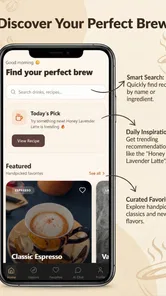
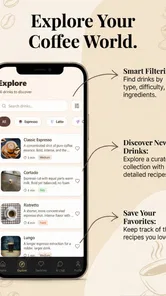
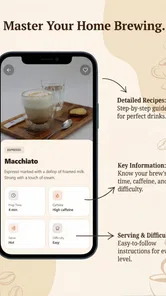
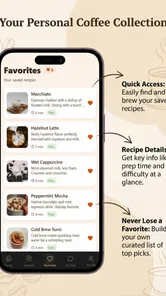
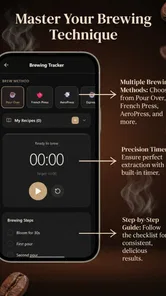
Analysis by Reviewed
I came to Sippd Coffeely looking for something more useful than a collection of coffee facts. Its appeal is the way it brings discovery, brewing guidance, recipe customization, and an AI assistant into one small Food & Drink app. In practice, it feels aimed at people who enjoy making coffee but do not always want to rely on memory, notes, or a separate timer.
The app is free to start, with optional in-app purchases ranging from a small amount to several dollars per item. It is published by NathanPham and is suitable for Everyone. The current release is version 1.1.5, and it runs on Android devices using version 7.0 or later. With over ten thousand installs, it is still a relatively small app, but that can be part of its charm: the experience feels focused rather than overloaded with unrelated café content.
From choosing a coffee to finishing the brew
I like to think of the process as a chain of small decisions rather than a single recipe lookup: what I want to try, which steps I can repeat, and what I’ll change after tasting. That perspective helps me use the timer as part of a deliberate brew instead of just another countdown. It also sets up the next section’s closer look at how those choices play out in an everyday routine.
The starting point: deciding what to make
The most realistic way to use this app is when I already have coffee in front of me but need help turning that starting point into a repeatable cup. Maybe I have a new bag of beans, a free afternoon, or simply a few minutes before work. Instead of opening a general search engine and sorting through conflicting advice, I can use the app as a single place to think through the brew.
That distinction matters. A normal recipe website is usually written for a particular method and assumes I will manage the timing myself. A basic stopwatch can measure seconds but cannot help me organize a recipe. Sippd Coffeely sits between those two options. It is not just a timer, and it is not merely a coffee encyclopedia. Its value comes from connecting the preparation stage with the actual brewing process.
I found the custom recipe idea especially practical for anyone who changes small details from cup to cup. Coffee preparation often involves more than following a fixed instruction. I may want to adjust the amount of coffee, the water, the timing, or the sequence of actions. A customizable approach lets the recipe reflect what I really do instead of forcing me to adapt my routine to a generic template.
This is also where the AI assistant can be useful. I would treat it as a conversational starting point when I am unsure how to approach a recipe or want help thinking through a change. That is more convenient than opening another app, although I would still use personal taste and sensible brewing habits as the final judge. Coffee advice can be subjective, and an assistant should support experimentation rather than replace it.
More From Our News Desk

 Gmail
GmailGmail in a Busy Inbox: Who Benefits Most?
From first account to crowded workday, Gmail earns its place through dependable search and flexible sorting—but its best fit depends on how much inbox maintenance you can tolerate.

 Prime Video
Switching to Prime Video: What Changes in Your Viewing Routine
Prime Video can make a compelling second home for streaming, but switching means learning a different catalog, rental layer, and route from browsing to playback.

 Universal TV Remote Control
Universal TV Remote Control Works Best as a Reliable Backup
A phone remote earns its place through quick setup and reliable habits. Here is how to get more from Universal TV Remote Control—and where its limits show.

 Weather - By Xiaomi
Weather by Xiaomi Review: Clear at a Glance, Less Clear Up Close
Xiaomi’s weather app makes everyday forecasts quick to scan, but its calm surface can leave useful details and recovery paths harder to find than they should be.

 X
XX Under Pressure: Can It Recover When Posting Goes Wrong?
A resilience-focused review of X, examining setup, mistaken posts, interruptions, weak connections, and the gaps that matter when recovery needs to be dependable.

 Clash of Clans
Clash of Clans Is Won Between the Battles
Its raids are quick; its community is a long-term project of coordination, teaching, rivalry, and shared responsibility—with all the friction that entails.
Latest News



A step-by-step brewing flow
Once I have an idea of what I want to brew, the interactive timer becomes the practical center of the experience. The important difference from a kitchen stopwatch is that a coffee timer can be tied to the stages of a recipe. I can focus on the next action instead of repeatedly checking a clock and trying to remember when to pour, pause, or continue.
For a weekday morning, I would prepare the coffee and water first, open the selected recipe, and begin the timer only when I am ready to brew. That small habit prevents a common mistake: starting a timer too early while still measuring or heating water. The app works best when I treat it as a guide for the active brewing moment, not as a replacement for all preparation around it.
The custom recipe workflow also makes the app more useful over time. A first attempt may be a rough baseline. After tasting the result, I can decide whether the next version should be shorter, longer, stronger, or simply organized differently. The key insight is to change one meaningful part at a time. If I alter everything at once, the recipe may look new, but I will not know which adjustment improved the cup.
That makes the timer more than a convenience feature. It creates a bridge between intention and observation. I can begin with a plan, follow the stages, taste the outcome, and then revise the recipe. For someone learning to brew, that loop is more valuable than collecting dozens of instructions that never become a personal routine.
Where the handoffs happen
The app does not brew the coffee for me, so several handoffs remain in my hands. I still need to prepare the ingredients, select the appropriate equipment, and pay attention to what is physically happening in the cup. The app can organize the digital side, but the quality of the result depends on how carefully I carry out the real-world steps.
This is worth understanding before downloading it. Someone expecting an automatic connection between the app and a coffee machine may find the experience too manual. Its role is closer to a guided companion. I move from discovery to recipe planning, from planning to timed brewing, and from brewing to tasting. Each transition requires a little attention from me.
The AI assistant introduces another handoff: I have to turn a vague question into a useful one. “How do I make better coffee?” is unlikely to be as helpful as describing what I am trying to change in a recipe. I get more value when I use it for a specific decision, such as comparing two approaches or thinking through a single adjustment. This is one of the less obvious ways to improve the experience: ask narrow questions tied to the cup I am actually making.
Custom recipes create a similar responsibility. Flexibility is helpful, but it also means I need to name or organize my own experiments sensibly. If I make many changes without a clear system, customization can become clutter. My practical advice is to keep a dependable base recipe and make small variations from it. That gives the app a useful role as a brewing notebook rather than a place where every attempt becomes disconnected.
A realistic everyday scenario
Imagine I receive a new coffee and want to try it before leaving for work. I do not know which recipe will suit it, and I do not want to spend the morning reading long articles. I open the app, use the discovery and assistant features to shape an initial plan, then save that approach as a custom recipe. When I start brewing, the interactive timer keeps my attention on the sequence instead of my phone’s general clock.
If the drink tastes too intense, I do not need to discard the whole process. I can return to the recipe, adjust one part for the next attempt, and use the same timed structure again. If I am in a rush, I may decide that the app is not worth opening for a familiar daily cup. That is an important trade-off: it is most useful when I am learning, experimenting, or trying to reproduce a result, not necessarily when I already know the routine by heart.
For a weekend coffee session, the balance changes. I have more time to explore, and the app becomes a way to make experimentation less random. I can compare my own variations and think about the relationship between the recipe and the result. The experience feels more rewarding when I approach it as a process of refinement rather than expecting one perfect instruction immediately.
What the result feels like
The strongest outcome is consistency. Even if the first recipe is not perfect, having a structured process makes it easier to repeat the attempt and understand what changed. That is something a general timer does not provide on its own. The app helps turn a casual coffee session into a sequence I can revisit.
I also like that the experience can serve different levels of interest. A beginner can use the timer and assistant as guidance, while a more experienced home brewer can use custom recipes to document personal preferences. The app does not force me to treat coffee as a technical hobby, but it gives me enough structure to become more deliberate if I want to.
The result is less about discovering a magical setting and more about reducing friction between an idea and a finished cup. I can move from “I want to try something different” to an actual recipe, then from that recipe to a timed brew. That complete path is the app’s clearest strength.
Where the flow breaks down
The same flexibility that makes the app appealing can also make it feel less immediate than a dedicated timer. If I only want a countdown for a recipe I already know, opening a broader coffee app may feel like extra work. A simple timer is faster for that narrow task, while Sippd Coffeely earns its place when I want planning and experimentation around the timer.
The AI assistant should also be approached with reasonable expectations. It can help me frame ideas and explore options, but coffee results depend on equipment, ingredients, technique, and taste. I would not follow advice blindly, especially when the suggestion conflicts with what I can observe while brewing. The best workflow is to use the assistant for possibilities, then test those possibilities in small, controlled changes.
There is also a mental cost to customization. A blank or highly flexible recipe system can be liberating, but a new user may wonder where to begin. I would start with one repeatable recipe instead of trying to build a complete library on the first day. That approach keeps the app approachable and gives each later adjustment a clear purpose.
The optional purchases are another point to consider. The app is free, but some items cost from a few cents to nearly ten dollars. I would explore the core experience first and only pay when an added item clearly supports the way I brew. For someone who wants a completely free, minimal stopwatch, this purchasing model may feel unnecessary. For someone who expects to use the app regularly, it is easier to judge the value after establishing a routine.
Who should use it, and who should skip it
I would recommend it to home coffee drinkers who enjoy trying recipes, people who forget brewing stages, and beginners who want more structure than scattered online advice provides. It is also a good fit for anyone who likes recording a personal process and improving it gradually. The combination of a timer, custom recipes, and an AI assistant gives each of those users a different entry point.
I would be more cautious about recommending it to someone who wants a completely hands-off experience, a hardware-connected coffee system, or an instant answer with no experimentation. It is not the best choice if I am making the same familiar drink every day and already know the timing. In that situation, a basic timer or the clock already on the phone may be more efficient.
It may also be a poor match for users who dislike conversational tools or prefer to judge every brewing decision independently. The assistant is an optional style of support, not a reason to abandon personal taste. The app works best when I see its suggestions as prompts for testing rather than unquestionable instructions.
How it compares with ordinary alternatives
Compared with a general recipe site, the app offers a more connected path from choosing an approach to carrying it out. A website may provide more broad reading, but it usually leaves me to manage the timer and adapt the instructions myself. Sippd Coffeely is more focused on the active workflow.
Compared with a standalone stopwatch, it adds context. A stopwatch can be perfectly adequate when I already have a recipe written down, but it does not help me shape or revise that recipe. The app is the better option when the problem is not simply counting time but remembering a process and learning from the result.
Compared with a paper notebook, it is more immediate during brewing because the timing and recipe work live together. Paper still has an advantage for free-form tasting notes and long-term personal records, so I would not treat the app as a total replacement for every coffee habit. A hybrid approach may suit serious hobbyists: use the app for the live brew and a separate note for detailed impressions.
My final take after following the full workflow
Sippd Coffeely makes the most sense when I begin with uncertainty and want to finish with a repeatable cup. Its journey is clear: discover an approach, shape it into a recipe, use the interactive timer, hand the physical work back to myself, and return to the recipe after tasting. That is a more useful experience than any single feature suggests.
My main advice is to start small. Choose one coffee, create one practical recipe, ask the assistant a focused question if needed, and change only one part after the first brew. This keeps the workflow understandable and reveals whether the app genuinely improves my routine.
For a free Food & Drink app from NathanPham, it offers a thoughtful combination of guidance and control. It is not a universal solution and it can feel excessive for a simple daily brew, but its real strength is turning coffee experimentation into a repeatable workflow. If that is the problem I want to solve, I would give it a try; if I only need a quick countdown, I would choose the simpler tool.
Sippd Coffeely Frequently Asked Questions
What does Sippd Coffeely offer for exploring and brewing coffee?
Sippd Coffeely is a Food & Drink app for discovering and brewing coffee. Its features include an interactive timer, custom recipes, and an AI assistant, giving coffee fans a few ways to support their brewing routine. If you enjoy trying different recipes or want a timer alongside your coffee-making process, these tools are the main features to explore.
Which devices can run Sippd Coffeely?
Sippd Coffeely requires Android 7.0 or later, so check your device’s operating system before downloading. The app is listed for Android, and searching its exact name in Google Play can help you confirm compatibility and find the official app. Avoid downloading unofficial installation files, which may not be the genuine application.
What is Sippd Coffeely, and what can I use it for?
Sippd Coffeely is designed for coffee lovers who want a convenient way to explore coffee-related information, discover drinks, and organize their preferences. Depending on the available version, it may include coffee recommendations, brewing ideas, café or product details, and tools for saving favorites. Before downloading, check the current app description because features and supported regions can change over time.
Is Sippd Coffeely free to download and use?
The app is free to download, but it offers in-app purchases, with items ranging from ten cents to nine dollars and ninety-nine cents. Review any purchase details shown in the app before confirming a transaction, especially if you plan to use its features regularly. This lets you decide whether the free experience meets your needs and avoid unexpected spending.
Does Sippd Coffeely require an internet connection?
An internet connection is likely needed for features that load updated coffee information, recommendations, account data, menus, or online content. Some saved items may remain accessible offline, but this depends on how the app handles stored data. If you plan to use Sippd Coffeely while traveling or in cafés with unreliable connectivity, test its main functions offline before relying on it.
Pros
- Quickly suggests coffee options based on your preferences.
- Simple interface makes browsing cafés and drinks easy.
- Useful for discovering nearby coffee spots and new beverages.
- Personalized recommendations can save time when choosing a drink.
- Convenient details help compare cafés before visiting.
Cons
- Availability and accuracy may vary by location.
- Some recommendations may feel repetitive over time.
- The app may require location access for its full experience.
- Café menus and prices may not always be updated.
- Smaller towns may have limited listings or useful recommendations.











