SimpliSafe Home Security App
- 15.74K
- 4.5
- Installs
- 1.00M
- Price
- Free

Screenshots
Analysis by Reviewed
I judge a home-security app by a practical question: does it make it easier to check on the system and act without turning a quick task into a project? That is the standard I’d use for SimpliSafe Home Security App. It is a free Lifestyle app from SimpliSafe Home Security Systems, and its purpose is to put control of a SimpliSafe wireless security system within reach when you’re away. The key decision is whether you already want to use SimpliSafe’s system; this is a companion to that setup, not a general-purpose security dashboard for any home.
Start with the system you want to manage
Before choosing an app, I’d separate two questions: what kind of security setup suits the home, and how do you want to manage it day to day? This app makes most sense once SimpliSafe is already part of the answer. It is not a shortcut to getting security equipment, and downloading it alone does not turn a phone into an alarm system.
That distinction also helps when comparing options. A companion app built around one security system may keep its routine controls in one place; a broad smart-home dashboard may be more useful when the main goal is coordinating devices from several brands. Neither approach is automatically better. I’d choose based on the equipment I intend to use and the decisions I need to make when I’m away, rather than on the number of controls an app appears to offer.
Choose it for control, not as a standalone alarm
If you have a SimpliSafe system, remote access can be useful for ordinary moments: checking its status after leaving in a hurry, or making a change when your plans shift. The app is most compelling when you want phone-based access alongside the home equipment. It should not be treated as a substitute for choosing and installing a security system in the first place.
A realistic routine might be leaving for work, realizing you cannot remember whether you armed the system, and checking from your phone rather than turning back. That convenience is the point, but it depends on having the compatible SimpliSafe setup and a phone that meets the app’s requirements. If you are still comparing security approaches, decide on the system first and the companion app second.
Your Home at Your Fingertips
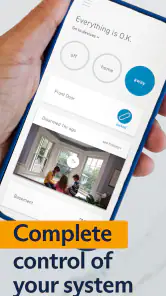
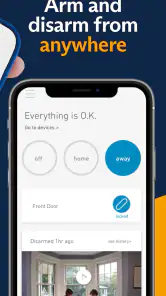
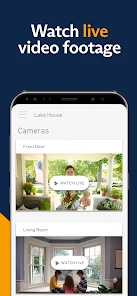
Imagine being able to control your entire home security system from your phone. That’s exactly what the SimpliSafe Home Security App offers. You can arm or disarm your system, watch live video feeds, and even get alerts about any suspicious activity. It’s like having a security guard in your pocket, minus the awkward small talk.
User-Friendly Interface
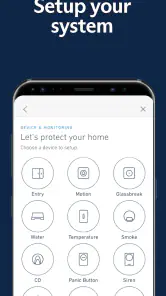
First things first, the app’s interface is super intuitive. You don’t need to be a tech guru to navigate through the options. The home screen gives you a quick overview of your system’s status, and with just a few taps, you can access more detailed settings. The icons are clear, and everything is laid out logically, making it a breeze to use.
More From Our News Desk

Clash of Clans Is Won Between the Battles

Android Auto Makes the Case for Quieter Car Software

MobiOffice: Transforming Mobile Productivity with Seamless Integration

EA SPORTS FC™ Mobile Soccer: Redefining Mobile Sports Gaming

How Microsoft OneDrive Became a Mobile Productivity Giant

How Google Translate Breaks Language Barriers Effortlessly
Build a routine around the status check
The most practical way I’d use a remote-control app is as a quick checkpoint, not something to keep open all day. After leaving home, check the system status once and then move on. If another person in the household is responsible for setting things, agree on a simple routine so two people do not make conflicting changes or assume the other has handled it.
It is also worth thinking through the less tidy moments. If a visitor, housemate, or delivery arrangement changes the normal routine, decide in advance who is allowed to adjust the system and who should simply let the usual plan stand. A phone makes a control available from farther away, but that convenience is most useful when everyone understands how the household intends to use it.
Real-Time Alerts
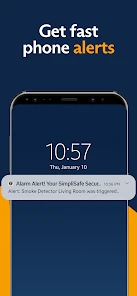
One of the standout features has to be the real-time alerts. You’ll get notifications if anything seems off, whether it’s a door that’s been left open or a motion sensor that’s been triggered. These alerts give you peace of mind, especially when you’re not at home. Plus, you can customize these alerts to suit your needs, which is a nice touch.
Make notifications useful, not constant
For alerts to help, they need to be noticeable without becoming background noise. I’d review which events matter to the household and shape notifications around those priorities. If every minor event interrupts the day, it becomes easier to swipe away the one that deserves attention. A useful trade-off is choosing a smaller set of meaningful alerts and checking the system when you have time, rather than expecting every notification to explain the whole situation.
Consider what you would actually do when an alert arrives. If you are driving, in a meeting, or asleep, the first response may be to wait until you can safely look at the phone. Housemates can agree who is most likely to respond at different times, but should avoid assuming an alert has been handled just because it appeared on someone’s screen. Remote notices help inform a decision; they do not make the decision for you.
Integration with Other Devices
If you’re someone who loves smart home devices, you’ll be pleased to know that this app integrates seamlessly with them. Whether it’s your smart locks, cameras, or even your voice assistants, the app plays well with others. This means you can control everything in one place, making your life a whole lot easier.
Check whether “one place” fits your home
For a household that already uses compatible equipment, having security controls close at hand can reduce the friction of checking the system. But a mixed-device home should not assume every product will fit neatly into one app. Before switching, list the devices and everyday tasks you care about, then confirm that the system you are considering covers them. A single app is only simpler if it actually replaces the separate steps you currently take.
For example, someone who wants to coordinate lighting, entertainment, climate, and security may care more about a broad smart-home platform than a security-focused companion app. Someone whose main concern is checking and managing a SimpliSafe setup may reasonably prefer the dedicated route. I would not choose either category based on a vague promise of integration; I’d make the decision around the devices and routines already in the home.
What to consider before switching
Moving from another security setup is not just an app decision: it means deciding whether to change the equipment and the way you manage home access. I would compare the everyday workflow you need—arming, checking status, and reviewing alerts—with what your current system already provides. If you rely on a different brand’s sensors or want one app to manage equipment from several manufacturers, a broader smart-home platform may suit you better. The convenience of a single control point matters only if it covers the devices you actually use.
For a household with several people, agree on who should receive alerts and who is expected to respond before relying on notifications as a routine. A useful, easily overlooked habit is to tailor alerts to the events you genuinely want to act on; too many low-priority notifications can make important ones easier to miss. Also make a simple plan for what you will do if you receive an alert while driving, asleep, or otherwise unable to check the phone immediately. Remote visibility helps you make a decision, but it does not make every alert self-explanatory.
Who will get the most from it
I’d consider it for someone who already owns, or is choosing, SimpliSafe equipment and wants a straightforward way to manage it away from home. It is also a sensible fit for people who travel or have a changing daily schedule, since checking the system remotely can save an unnecessary trip back. On the other hand, if you want a security app that works independently of a specific home system, or you do not want to use SimpliSafe hardware, this is not the right starting point.
It can also suit people who prefer to check a system themselves rather than depending entirely on a general-purpose smart-home interface. A person who regularly leaves at different times, returns later than planned, or needs to verify the home setup while away may find that remote access earns its place in the routine. The best case is not constant monitoring; it is being able to confirm the status when a real question comes up.
I would skip it if the goal is simply to get a security app without choosing its associated system, or if replacing existing equipment would create more hassle than the remote controls would solve. It may also be the wrong fit for someone who wants one hub to manage a varied collection of devices and does not want a security system’s own app in the mix. In those situations, a broader platform or the existing provider’s app may be the more sensible place to start.
The app has been available since August 24, 2012, and version 7.59.1 is the current release. It requires Android 11 or later, is rated for Everyone, and has more than one million installs. Its average rating is 4.5 from around 32,000 ratings, with roughly 16,000 written reviews. Those figures suggest an established app, but I would still judge it by whether its controls match your home routine rather than by popularity alone.
Compare the kind of help you want
Compared with the usual alternatives, the distinction is less about which app has the most buttons and more about the system each one serves. A manufacturer’s companion app can keep core security controls together, while a general smart-home app may be preferable if your priority is coordinating a mixed collection of devices. A professionally monitored security service may also be a better fit if you want people to handle escalation rather than managing alerts yourself. Those are different needs, not interchangeable app features.
That difference matters when deciding what to do after a notification. If you want to stay involved in checking alerts and deciding what action to take, a system-centered app can be a useful control point. If your preference is to hand more of that response to a service, compare monitoring arrangements rather than expecting a phone app to provide the same kind of support. I’d treat the app as one part of the security decision, not as proof that every home-security approach works the same way.
Think through the move before changing systems
Switching has a practical cost beyond learning a new screen: you may need to reconsider the equipment in the home and how household members use it. Before making that commitment, write down the few actions you perform most often and compare those steps with the new setup. If the main benefit is only that the controls look different, that may not justify changing a working arrangement. If remote checks solve a recurring problem, the change may be easier to justify.
It is also sensible to involve everyone who shares responsibility for the home. A quick conversation about who checks the system, who receives alerts, and what to do when plans change can prevent confusion after the app becomes part of daily life. This is especially useful in homes where one person travels or works irregular hours while another is usually nearby. Clear expectations make remote access more valuable than simply installing an app and hoping everyone uses it the same way.
All in all, the SimpliSafe Home Security App is a robust tool for anyone looking to up their home security game. It’s user-friendly, offers a ton of features, and keeps you connected to your home, no matter where you are. If you’re on the fence about diving into the world of smart home security, this app might just be the nudge you need.
So, if you’re keen on making your home a fortress with minimal fuss, give this app a try. It’s got the tech, the ease of use, and most importantly, the ability to make you feel like you’ve got everything under control.
My recommendation
For an existing SimpliSafe household, I’d try the app as the everyday remote-control layer and check that its alerts and system status fit the way you live. Keep notifications useful rather than noisy, and make sure other household members know how the system is managed. If you are comparing systems from scratch, choose based on the equipment, monitoring approach, and device compatibility you want; the app alone is not a reason to switch. For the right setup, it can make routine security checks simpler. For a mixed-device home or someone seeking a standalone app, another category of solution is the better match.
SimpliSafe Home Security App Frequently Asked Questions
Is the SimpliSafe Home Security App available for both Android and iOS?
Yes. The app is available for Android and iOS, making it accessible to users on either mobile platform. Before downloading, check that your device meets the minimum operating-system requirement: version 11 or later. The app is free to download, but its security controls are intended to work with a SimpliSafe wireless security system.
Who develops the SimpliSafe Home Security App?
The app is developed by SimpliSafe Home Security Systems. It is a lifestyle app intended to give SimpliSafe system owners a way to manage their wireless security setup from a mobile device. If you are comparing security apps before installing one, consider whether you use SimpliSafe equipment, since the app’s main purpose is to control that system rather than serve as a standalone security solution.
Can I use the SimpliSafe Home Security App without owning a SimpliSafe system?
The app is designed to control a SimpliSafe wireless security system, so its security controls and monitoring features depend on having a compatible system to manage. You can download the app for free, but it is most useful when paired with SimpliSafe equipment. Before downloading, consider whether you already use or plan to set up a SimpliSafe system.
Is the SimpliSafe Home Security App free to download?
Yes, the SimpliSafe Home Security App is free to download. Keep in mind that downloading the app is separate from using a SimpliSafe security system: equipment, service plans, or particular features may involve additional costs. Review the options that apply to your setup before relying on the app for home security.
What features does the SimpliSafe Home Security App offer?
The SimpliSafe Home Security App provides users with an array of features designed to enhance home security. These include real-time alerts, live streaming of security cameras, remote arm and disarm functionality, and integration with smart home devices. Users can also customize their security settings, monitor environmental sensors, and check system status from anywhere using their smartphone.
Pros
- User-friendly interface for easy navigation
- Real-time alerts for instant security updates
- Customizable settings for personalized security
- Remote control of home security system
- Integration with smart home devices
Cons
- Premium features require subscription
- Limited functionality without equipment
- Alerts can be delayed in poor network
- Occasional app crashes reported
- No free trial for premium services

- Category
- Lifestyle
- Version
- 7.59.1