SIG CONNECT
- 62.00
- 4.4
- Installs
- 50.00K
- Price
- Free

Screenshots
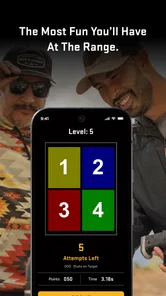
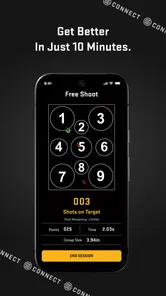
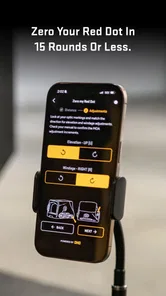
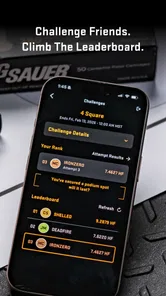
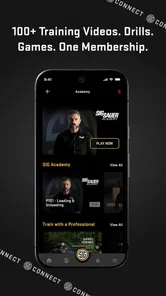
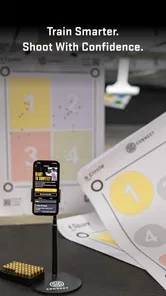
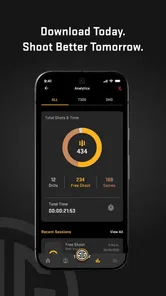
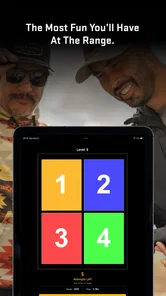
Analysis by Reviewed
I approached SIG CONNECT as a practical companion for range visits rather than as a conventional entertainment app. Its purpose sits somewhere between a shooting-session organizer, a skill-building tool, and a light game layer for people who already spend time at the range. That combination makes it more interesting than a simple logbook, but it also means its value depends heavily on how you practice. If you want a focused way to make sessions more structured, it has a clear appeal. If you are looking for a general lifestyle app with broad everyday usefulness, this is a much narrower choice.
The app comes from Sig Sauer Application Development and is listed in the Lifestyle category. It is free to install, although optional in-app purchases range from $9.99 to $99.99 per item. I would therefore treat the free download as an opportunity to test the basic experience before deciding whether the additional content fits your routine. The audience is also clearly adult: the content rating is Mature 17+, which is consistent with an app centered on firearms and range practice.
How SIG CONNECT fits into a real range routine
The most convincing way to use the app is to open it before a planned session and decide what you want to get from that visit. Instead of arriving with a vague intention to “get some practice,” you can use the game-oriented approach to give the session a purpose. That might mean concentrating on consistency, turning a familiar drill into a personal challenge, or simply making repetitive practice feel less flat. I like this idea because motivation is often the part of training that disappears first.
A realistic example would be a weekend visit after several busy weeks. I would use the app at home or in the parking area to choose a manageable objective, then keep the phone available between activities rather than handling it while actively shooting. After the session, I could review the progress I recorded and decide whether the next visit should repeat the same challenge or move to something more demanding. The benefit is not that the app replaces instruction; it gives the visit a thread that connects preparation, practice, and reflection.
That distinction matters. SIG CONNECT is not a substitute for a qualified instructor, safe range procedures, or careful handling habits. Its strongest role is organizational and motivational. It can help you pay attention to your own practice, but it cannot judge every technical detail of your stance, grip, sight picture, or decision-making. I would use it alongside established safety habits, never as an authority that overrides range rules or professional coaching.
The game element may appeal to people who lose interest when every session feels like the same routine. Turning progress into something visible can make it easier to return regularly. For experienced users, that can be useful when basic practice has become automatic and needs a fresh structure. For newer users, the appeal is different: the app may make the learning process feel less intimidating, provided they understand that a playful interface does not make firearms practice casual.
What the current release tells me
The current version is 4.2.76, and the app was released on January 23, 2024. Those details place it beyond the earliest launch stage, so I would expect a more established experience than a first experimental build. I would not, however, read the version number as proof that every part of the product is mature. A relatively advanced version can still have areas that feel unfinished, especially when an app combines tracking, games, and optional paid content.
More From Our News Desk

Weather by Xiaomi Review: Clear at a Glance, Less Clear Up Close

X Under Pressure: Can It Recover When Posting Goes Wrong?

Clash of Clans Is Won Between the Battles

Android Auto Makes the Case for Quieter Car Software

MobiOffice: Transforming Mobile Productivity with Seamless Integration

EA SPORTS FC™ Mobile Soccer: Redefining Mobile Sports Gaming
Its public reception is encouraging without being overwhelming. SIG CONNECT has a 4.4 average from more than two hundred ratings, with dozens of written reviews, and it has passed 50K+ installs. I see that as enough activity to suggest that real users are trying it, but not enough to assume that every unusual device, range setup, or practice style has been thoroughly represented. In other words, the app looks established enough to explore, while still deserving a personal trial before you build your whole training routine around it.
The most important evolution implied by the current release is not simply the presence of a newer build; it is the attempt to bring several jobs into one place. A traditional paper notebook is flexible and private, but it requires manual interpretation. A basic phone note is quick, yet poor at showing long-term patterns. A dedicated training app may offer more structured records, while a separate game may be more entertaining. SIG CONNECT sits between those alternatives, aiming to make the act of tracking feel more active.
That middle position is both its strength and its limitation. I appreciate not having to treat every range visit as a spreadsheet exercise. At the same time, users who want highly detailed technical records may eventually find a simple notebook or a specialist logging tool easier to customize. The app makes the process more engaging, but engagement and precision are not always the same thing.
Where the game approach helps
The game layer is most useful when it changes your behavior in a good way. A target or progress system can encourage you to return to skills you normally ignore. It may also make a session feel complete even when you have limited time. Instead of measuring success only by how long you stayed at the range, you can focus on whether you followed the objective you set.
One non-obvious advantage is that a game-like structure can expose inconsistency in your habits. If you repeatedly pursue the same kind of challenge, you may notice that your progress stalls. That is a useful signal: perhaps you need slower practice, a different drill, or feedback from an instructor rather than simply increasing difficulty. I would treat a plateau as information, not as a reason to chase points or rush through exercises.
Another practical use is planning around limited ammunition or limited time. A short visit can be more productive if you decide in advance what you are trying to improve. The app’s progress focus encourages that mindset. It does not magically make a brief session equivalent to a long one, but it can reduce wasted time spent deciding what to do next.
There is also a social and motivational trade-off, even if you use the app alone. A visible record can make improvement feel tangible, which is helpful for someone who tends to remember only the frustrating parts of a session. On the other hand, progress tracking can become counterproductive if you start treating every visit as a score to protect. I would keep the emphasis on safe, repeatable performance rather than on winning an imaginary contest against your earlier self.
How existing users may experience the update path
Someone already using SIG CONNECT will probably judge the current release less by its novelty and more by its reliability during a normal routine. The useful question is whether opening the app, choosing an activity, and recording progress feels quicker than using separate tools. If it does, the integrated approach earns its place. If those steps feel like extra administration, an existing notebook habit may remain more convenient.
I would recommend that returning users review their routine rather than automatically changing everything. Keep the method that already helps you train safely, then introduce one app-based element at a time. For example, use the progress tracking for a single recurring goal while continuing to record personal notes elsewhere. After a few visits, you can decide whether the app gives you enough value to replace that second system.
This gradual approach also helps with continuity. Any tracking tool becomes less useful when entries are inconsistent. If you only open the app on unusually good days, the progress picture will be misleading. A better habit is to record ordinary sessions as well, including days when improvement is slow. That creates a more honest reference for deciding what to practice next.
Users who have invested in other training tools should also consider duplication. If you already maintain detailed records in a dedicated logbook, SIG CONNECT may be best used for motivation and session structure rather than as your sole archive. Keeping two complete records can become tiring. I would choose one system for detailed information and let the other handle the part it does better.
Where the experience still needs patience
The first limitation is focus. This is a firearm-oriented lifestyle app, not a broad wellness platform, general fitness tracker, or all-purpose habit manager. People who do not visit a range or who are uncomfortable with the subject will have little reason to keep it installed. Even among firearm owners, its usefulness depends on whether the game and progress approach match the way they prefer to practice.
The second limitation is the risk of confusing activity with improvement. A completed challenge can feel satisfying, but a badge, score, or progress marker is not the same as sound technique. I would be cautious about any workflow that encourages speed at the expense of control, judgment, or safety. The app can frame practice; it should not dictate unsafe behavior simply because a challenge seems more difficult or rewarding.
The optional purchase model is another point to consider. The download is free, but paid items can cost from $9.99 to $99.99 each. That is a wide range, so I would avoid assuming that every useful part of the experience is included at no cost. Before spending, I would identify the exact feature or content that improves your routine and ask whether you will use it repeatedly. A one-time curiosity is rarely worth a high purchase, while a tool used during every visit may be easier to justify.
Phone use at a range can also create friction. Screens, notifications, low battery, glare, and the need to keep attention on the environment are all practical concerns. I would not keep the phone in my hand during active handling or firing. The safest workflow is to prepare before the activity, make brief updates only when the range environment permits, and review details afterward. If that feels awkward at your location, a paper note may be the better companion for the session.
There is a subtler issue with long-term records: numbers can look more objective than they really are. Conditions, equipment, fatigue, range layout, and the quality of the drill all affect a session. I would add a short personal note after important visits, even if the app mainly emphasizes progress. Without context, a change in performance may be difficult to interpret later.
Who should choose it, and who should skip it
I think SIG CONNECT is a good fit for recreational shooters who want more structure without turning every visit into formal coursework. It also suits people who enjoy game mechanics, need a reason to return consistently, or like seeing a record of gradual improvement. The free entry point makes it reasonable to test, especially if you already own an Android device running at least Android 8.0.
It may also help an experienced shooter who feels stuck in repetitive practice. A new challenge format can make familiar work feel deliberate again. The key is to use the app as a prompt for thoughtful repetition, not as permission to skip fundamentals. Someone who already has a disciplined training plan may find it useful as a motivational layer, but probably not essential as the central system.
I would skip it if you want a comprehensive coaching platform, highly customizable technical documentation, or a tool that has value away from shooting activities. I would also avoid relying on it if your primary need is instruction from a professional. A coach can see details that an app cannot, correct unsafe habits in real time, and adapt exercises to your ability. In those situations, SIG CONNECT is at most a supporting notebook with a game-like presentation.
It is not the best choice for someone who dislikes gamification. If progress markers make you feel pressured or distract you from careful practice, a plain logbook may serve you better. The usual alternative is less exciting, but it can be faster, more flexible, and easier to use in environments where taking out a phone is inconvenient.
What I would watch before committing
My main test would be consistency across several ordinary sessions. Does the app make preparation faster? Does it help me choose a realistic objective? Can I review progress without spending more time managing the record than practicing? Those questions matter more than the novelty of the first launch.
I would also watch how the paid content fits into the free experience. Because purchases can reach $99.99 per item, the decision should be based on repeated usefulness rather than curiosity. A sensible approach is to use the free version long enough to understand your routine, then pay only for something that solves a specific problem you have already identified.
Another thing worth monitoring is whether the progress view encourages balanced practice. If it repeatedly pushes you toward one type of challenge, remember to maintain the broader habits that keep training responsible and useful. A good app should support your plan, not quietly replace it with whatever is easiest to measure.
Finally, I would keep an eye on whether future releases continue to make the core workflow clearer and less distracting. The current version shows an app that has moved beyond its initial release and attracted a real user base, but its long-term value will depend on how well it serves both newcomers and people with established routines. The best evolution would be one that adds depth without making simple session tracking feel complicated.
My overall recommendation
SIG CONNECT is a specialized, free-to-start Lifestyle app with a sensible idea: make range practice easier to organize and more motivating by combining progress tracking with games. I like it most as a bridge between a notebook and a training challenge. It can give a casual shooter a reason to practice with intention, while offering an experienced user a fresh way to structure familiar work.
My recommendation is conditional but positive. Try it if you already visit a range, enjoy measurable goals, and are willing to treat the app as a companion rather than an instructor. Start with the free experience, keep safety and professional guidance above any in-app objective, and judge the paid options by how often they would genuinely improve your sessions. If you want unrestricted technical notes or a broader everyday app, choose a simpler logbook instead.
The best reason to use SIG CONNECT is not the game itself; it is the small improvement in preparation and consistency that the game can encourage. Used that way, it has a clear place in a responsible practice routine. Used as a substitute for coaching, judgment, or safe range procedure, it is the wrong tool.
SIG CONNECT Frequently Asked Questions
Is SIG CONNECT intended for a particular community or organization?
SIG CONNECT is a Lifestyle app developed by Sig Sauer Application Development. Before downloading, consider whether you have a reason to use the service and whether the organization or community you are interested in uses SIG CONNECT. The app’s short description is simply “SIG CONNECT,” while its stated purpose is to make range time fun, play games, improve skills, and track progress.
What is SIG CONNECT and what can I use it for?
SIG CONNECT is a communication and information platform designed to help users stay connected with an organization, community, institution, or service that uses the SIG system. Depending on the provider, the app may offer announcements, messages, event information, documents, alerts, and access to useful resources. Available features can vary according to your account, location, and the organization managing the service.
How do I sign in to SIG CONNECT?
To use SIG CONNECT, you will generally need credentials provided by the organization or service connected to the app. Some versions may require an email address, phone number, member ID, or an invitation code. If you cannot log in, check that your details are entered correctly, update the app, and contact the relevant administrator rather than creating multiple accounts unnecessarily.
Does SIG CONNECT require an internet connection?
Most of SIG CONNECT’s main functions require an active internet connection because the app must retrieve current messages, announcements, account information, or shared content from its servers. Mobile data or Wi-Fi may be used, depending on your device settings. Certain previously loaded information might remain visible offline, but users should not expect all features or updates to work without connectivity.
Is SIG CONNECT free to download and use?
SIG CONNECT is free to download, but in-app purchases are available, ranging from $9.99 to $99.99 per item. Access and usage conditions may also depend on the organization behind the app. Before making a purchase, check what it covers and whether it is relevant to how you plan to use SIG CONNECT.
Pros
- Quick access to SIG services
- updates
- and useful resources in one app.
- Clean interface makes essential information easy to find.
- Helpful notifications can keep users informed about important changes.
- Convenient mobile access reduces the need to use a desktop browser.
- Available on the go for checking information whenever needed.
Cons
- Some features may require an active SIG account or verified access.
- The usefulness of the app depends on the services available in your region.
- Notifications may become excessive if too many categories are enabled.
- Certain pages may redirect to web content instead of native app screens.
- Performance can vary depending on connection quality and device model.











