

Sidekick by Sorted Food
- 282.00
- 4.3
- Installs
- 100.00K
- Price
- Free

Screenshots
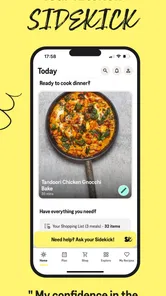
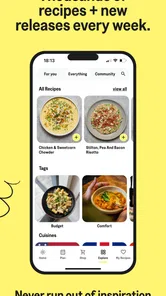
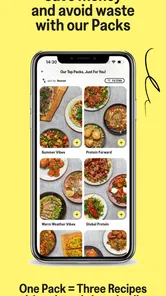
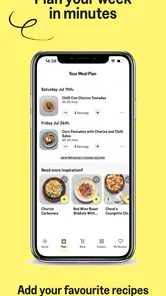
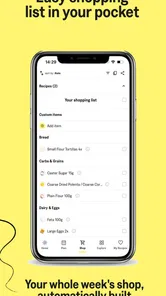
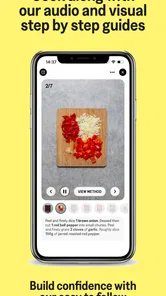
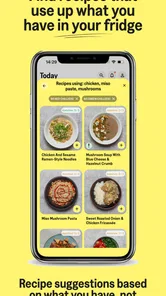
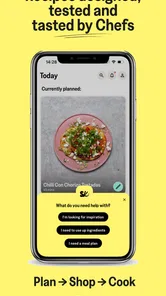
Analysis by Reviewed
When I choose a meal-planning app, I want it to solve a particular problem: turning a vague “what should I cook?” into a dinner I can actually make with what’s on hand. Sidekick by Sorted Food is aimed at that everyday gap between collecting recipes and getting food on the table. It’s a free Food & Drink app from Sorted Club, with optional in-app purchases, and its approach makes the most sense if you want a little structure without turning cooking into a project.
A better fit for some kitchens than others
I’d consider Sidekick if you cook at home regularly but lose time choosing recipes, remembering what needs buying, or figuring out how to use half-open packets and leftover vegetables. It’s especially useful when you’re willing to plan a few meals together rather than picking every dinner from scratch. A recipe collection alone can inspire you, but the pantry and shopping-list angle gives this app a more practical role in the week.
It may be less appealing if you already have a strict meal routine, prefer improvising without guidance, or need an app built around a very specific dietary or medical plan. The original article describes options for different dietary preferences, but I wouldn’t treat any general recipe app as a substitute for checking ingredients and making sure a dish suits your needs. If precise nutrition tracking is your main priority, a dedicated nutrition tool may be a better match.
Your Kitchen Companion
So, you might be wondering what makes Sidekick by Sorted Food stand out in the sea of food apps. Well, it’s all about simplicity and creativity. The app taps into your pantry, gets a feel for what you’ve got, and then throws a bunch of recipes your way that are not only delicious but also super easy to follow. It’s like magic, but better because you get to eat.
One of the coolest features is the way the app helps you manage your groceries. Picture this: you input what you already have at home, and Sidekick suggests meals that require minimal extra ingredients. Plus, it keeps your shopping list organized, which is a lifesaver for those of us who tend to wander aimlessly through grocery store aisles.
Making the meal plan work in real life
A useful habit is to check your fridge and cupboards before choosing recipes, then add only the missing items to your shopping list. That small step can make a plan feel realistic instead of aspirational. I’d also keep pantry entries current when you use up staples; otherwise, a recipe suggestion may look convenient on screen but still leave you short when you start cooking.
For example, imagine getting home late on a weekday with vegetables that need using and little appetite for another supermarket trip. I’d look for a recipe that uses those ingredients, check which extras it calls for, and decide whether the shopping list is manageable before committing. That’s where the app’s planning tools can reduce the mental load: they help turn “there’s food somewhere in here” into a concrete next step.
More From Our News Desk

 Gmail
GmailGmail in a Busy Inbox: Who Benefits Most?
From first account to crowded workday, Gmail earns its place through dependable search and flexible sorting—but its best fit depends on how much inbox maintenance you can tolerate.

 Prime Video
Switching to Prime Video: What Changes in Your Viewing Routine
Prime Video can make a compelling second home for streaming, but switching means learning a different catalog, rental layer, and route from browsing to playback.

 Universal TV Remote Control
Universal TV Remote Control Works Best as a Reliable Backup
A phone remote earns its place through quick setup and reliable habits. Here is how to get more from Universal TV Remote Control—and where its limits show.

 Weather - By Xiaomi
Weather by Xiaomi Review: Clear at a Glance, Less Clear Up Close
Xiaomi’s weather app makes everyday forecasts quick to scan, but its calm surface can leave useful details and recovery paths harder to find than they should be.

 X
XX Under Pressure: Can It Recover When Posting Goes Wrong?
A resilience-focused review of X, examining setup, mistaken posts, interruptions, weak connections, and the gaps that matter when recovery needs to be dependable.

 Clash of Clans
Clash of Clans Is Won Between the Battles
Its raids are quick; its community is a long-term project of coordination, teaching, rivalry, and shared responsibility—with all the friction that entails.
Latest News



Getting Started
Setting up the app is a breeze. You start by creating a profile, and then you’re prompted to fill in your pantry staples. The user interface is slick and intuitive, perfect for those who don’t want to spend hours figuring things out.
Once you’re set up, you can dive into the treasure trove of recipes. They’re categorized in a way that makes sense—think quick meals, budget-friendly options, and even dishes that cater to specific dietary needs. Trust me, whether you’re a vegan, vegetarian, or a full-blown carnivore, Sidekick has got you covered.
Where it differs from recipe browsing
Compared with saving recipes in a browser or scrolling through a general cooking app, Sidekick’s appeal is the connection between choosing meals, checking your existing ingredients, and organizing what you need to buy. That workflow is valuable when decision fatigue is the real obstacle. A simple recipe bookmark folder may be better if you only cook occasionally and don’t want to maintain a pantry list; a free-form meal planner may suit you more if you already know exactly what you’re making and just need a calendar.
There is a trade-off: useful suggestions depend on the information you put in. Treat the pantry as a helpful snapshot, not an automatic inventory of everything in your kitchen. Before shopping, I’d review the list against what you have, especially for ingredients you use often or items that can be easy to overlook. That quick check is less exciting than browsing recipes, but it helps prevent duplicate buys and last-minute substitutions.
The Joy of Cooking with Sidekick
Now, let’s talk about the actual cooking experience. One word: delightful. The recipes are detailed without being overwhelming. Each step is clearly explained, and there are even handy tips sprinkled throughout to help you level up your cooking game.
What I love most is the flexibility. If you’re missing an ingredient, the app suggests alternatives. It’s like having a chill, non-judgmental friend guiding you through the process. Plus, the cooking times are pretty spot-on, so you won’t be left waiting around while your stomach growls.
Small checks that make cooking smoother
I’d read the full recipe before starting, even when the instructions look straightforward. It gives you a chance to spot a step that needs preparation or an ingredient you assumed was already covered. If you’re new to cooking, laying out the ingredients first can make the clear step-by-step guidance easier to follow; if you’re experienced, you can use the recipe as a framework and adapt where it makes sense.
Ingredient swaps are handy, but I wouldn’t assume every substitute behaves exactly like the original. A replacement can change texture, flavor, or cooking time, so use the suggestion as a starting point and keep an eye on the food. That’s a practical distinction between flexible home cooking and following a recipe mechanically: the app can guide the decision, while your own judgment still matters.
What to expect before committing
Sidekick has a 4.4 average from around 1.7 thousand ratings, and it has passed 100 thousand installs. It’s rated for Everyone, first arrived on November 6, 2019, and the current version is 3.1.0, with Android 7.0 as the minimum operating-system requirement. Those details suggest an established app with a broad audience, but they don’t tell you whether its particular recipe style will suit your household; trying the free app is a sensible way to judge that for yourself.
The app is free to install, while in-app purchases range from $5.49 to $104.99 per item. I’d look at what is included before paying for anything and decide whether the planning routine is genuinely helping you. If you only want occasional recipe inspiration, paying for more than you use may not make sense. If it helps you plan meals consistently and makes shopping less haphazard, the value is more personal than any feature checklist can settle.
Why You’ll Keep Coming Back
Aside from the delicious food, Sidekick by Sorted Food keeps things fresh by regularly updating its recipe database. It’s not just about what you can cook today but also about expanding your culinary horizons. I've found myself trying out dishes I’d never have considered before, all thanks to this app.
There’s also a community aspect. You can share your cooking triumphs (or disasters) with other users, which adds a fun, social element to meal prep. It’s a great way to get new ideas and find inspiration.
Turning a plan into a workable week
I’d use the planner as a flexible shortlist rather than a promise that every meal must happen exactly as scheduled. Before choosing, think about which nights are genuinely busy, which meals can tolerate a change of day, and what fresh ingredients should be used first. That simple ordering makes the plan more resilient: a recipe with delicate produce can go earlier, while cupboard-friendly choices can stay in reserve if plans shift.
Another useful approach is to shop once for a small cluster of meals, then check the list for ingredients that appear across more than one recipe. This can make a plan feel more economical without assuming the app will optimize every purchase for you. I’d still compare the list with household staples and package sizes; a listed ingredient may be sold in a quantity larger than one dinner needs, which is an opportunity to choose another recipe that can use the remainder.
For a shared household, it also helps to agree on a few preferences before selecting meals. One person can be excited by trying something new while another wants familiar food after work. I’d pick a mix: one dependable option, one recipe that uses ingredients already around, and one more adventurous choice. That keeps the app’s discovery side in play without making the whole week feel like an experiment.
When a different tool makes more sense
Sidekick sits between a recipe library and a structured meal-planning routine. Compared with handwritten notes, it can keep recipes and shopping needs closer together; compared with a generic recipe search, it encourages you to think about the meals as a group. But a shared digital grocery list may be more convenient for a household whose main problem is coordinating who buys what, while a calendar-first planner is a better fit for someone who already has recipes and only needs to assign them to days.
If you’re following a medically necessary diet, managing allergies, or tracking exact nutrition targets, I’d put a specialist resource first and check every recipe and ingredient label yourself. Broad dietary categories can help narrow choices, but they are not a guarantee that a particular dish meets strict requirements. Likewise, if you mostly cook by instinct and rarely repeat recipes, maintaining a pantry record may feel like more administration than help.
The best way to judge the fit is to try one modest planning cycle rather than reorganizing your whole kitchen around the app. Choose a few meals you would realistically cook, review the ingredients, and see whether the resulting list makes shopping easier. If you find yourself returning to the plan during the week, that’s a stronger sign of value than simply enjoying the recipe browsing on the first day.
My recommendation
For me, the strongest reason to use Sidekick is not simply having more recipes; it’s having a repeatable path from checking the kitchen to selecting meals and preparing a shopping list. That makes it a good candidate for busy home cooks who want guidance but still like choosing what sounds appealing. Its 280 written reviews point to an active audience, though I’d focus less on popularity and more on whether the suggested cooking style fits your habits.
I’d skip it if you want a completely hands-off inventory, a specialist diet-management system, or a tool that only tracks nutrients. I’d also choose a basic recipe notebook or saved collection if planning itself feels like extra work. Sidekick is most convincing when you’ll actually maintain the pantry details and use the plan; without that small commitment, its connected workflow loses much of its advantage.
Final Thoughts
If you’re on the fence about trying out a new cooking app, I’d say give Sidekick by Sorted Food a whirl. It’s a wonderful tool for anyone looking to make the most of their pantry while exploring new flavors. Whether you’re a seasoned chef or a kitchen newbie, this app will make cooking a joyous adventure. Now, go on and give it a try—your taste buds will thank you!
Sidekick by Sorted Food Frequently Asked Questions
Is Sidekick by Sorted Food free to download, and are there extra costs?
Sidekick is free to download, so you can install it and explore the app before deciding whether it suits your cooking routine. It also offers in-app purchases, including subscription options, so some features or content may require payment. Check the purchase details shown in the app before confirming anything, and consider whether an ongoing meal-planning service fits your budget.
Which devices can run Sidekick by Sorted Food?
Sidekick is available for Android and iOS, and the Android version requires Android 7.0 or later. Before downloading, check that your device meets the operating-system requirement and has enough space for the app. Keeping your device’s software current can also help you get a smoother experience with recipes and meal-planning features.
Who makes Sidekick by Sorted Food, and is it suitable for all ages?
Sidekick is made by Sorted Club and is a Food & Drink app focused on helping home cooks plan meals and make recipes. Its content rating is Everyone, making it suitable for a broad audience. It has earned an average rating of 4.4 from around 1.7K ratings, giving prospective users a useful snapshot of how it has been received.
What is Sidekick by Sorted Food, and how does it work?
Sidekick by Sorted Food is an innovative meal planning app designed to simplify cooking. It offers personalized weekly meal plans, complete with shopping lists and step-by-step recipes. Users can customize their preferences, select dietary needs, and discover new culinary inspirations, all while reducing food waste and saving time in the kitchen.
Is Sidekick by Sorted Food suitable for specific dietary preferences or restrictions?
Yes, Sidekick by Sorted Food caters to various dietary needs, including vegetarian, vegan, gluten-free, and more. Users can customize their meal plans based on personal preferences or restrictions, ensuring they receive recipes that align with their lifestyle while still exploring diverse and exciting dishes.
Pros
- User-friendly interface for easy navigation.
- Wide variety of recipes to explore.
- Customizable meal plans for dietary needs.
- Interactive features enhance cooking experience.
- Regular updates with new content.
Cons
- Requires subscription for full access.
- Limited offline functionality.
- Some features need stable internet.
- Occasional app crashes reported.
- Not all recipes include video tutorials.











