SharkClean
- 17.48K
- 3.6
- Installs
- 1.00M
- Price
- Free

Screenshots
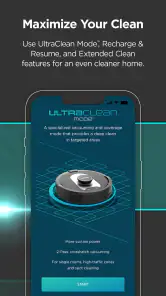
Analysis by Reviewed
I find the most frustrating part of a connected vacuum is not pressing “start”; it is getting the phone, home Wi-Fi and robot to cooperate. SharkClean is SharkNinja’s Lifestyle app for connecting to a Shark robot vacuum and managing cleaning from a phone. It is free, rated for Everyone, and has a 3.6 average from around 44,000 ratings. That mixed score makes me approach it as a useful companion rather than a flawless replacement for the vacuum’s own controls.
Getting Started and Keeping a Clean Run on Track
Setting up SharkClean is a breeze. All you need is a Shark robotic vacuum and a smartphone. The app is available for both Android and iOS, making it accessible to a wide range of users. Once you download and install it, the app guides you through a straightforward setup process. You’ll have your vacuum connected to your Wi-Fi network in no time.
Where setup can get stuck
In practice, “straightforward” still depends on the robot and phone being ready to pair. I’d start with the vacuum powered on and close enough to the router for a stable connection, then follow the in-app prompts without switching between networks midway. If setup stalls, restarting the app and checking that the phone is on the intended home Wi-Fi are sensible first steps; repeated taps are less useful than confirming those basics.
It also helps to distinguish a connection problem from a cleaning problem. If the robot itself is not responding, first check its power and physical state before assuming the app has failed. A phone app can send a command, but it cannot free a wheel or solve an interruption at the machine.
Features You’ll Love
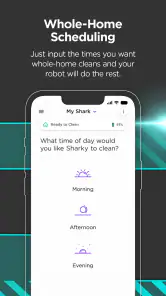
The app offers a plethora of features that make cleaning less of a chore. One of my favorites is the scheduling feature. You can set up cleaning schedules so your vacuum can do its thing while you’re out enjoying life. Imagine coming home to a freshly vacuumed floor every day!
Scheduling works best when the floor is prepared for an unattended run. I’d pick a time when people are usually out of the robot’s way and do a quick sweep for loose cables or small items first. That small habit matters more than adding extra commands: a scheduled run is convenient, but it cannot anticipate a newly dropped sock or a chair moved into its path.
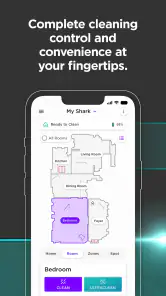
Another standout feature is the remote control capability. Forgot to start the vacuum before leaving the house? No worries. Just whip out your phone and start it remotely. It’s like having a remote control for your vacuum, which feels pretty futuristic if you ask me.
More From Our News Desk

Clash of Clans Is Won Between the Battles

Android Auto Makes the Case for Quieter Car Software

MobiOffice: Transforming Mobile Productivity with Seamless Integration

EA SPORTS FC™ Mobile Soccer: Redefining Mobile Sports Gaming

How Microsoft OneDrive Became a Mobile Productivity Giant

How Google Translate Breaks Language Barriers Effortlessly
Making maps useful, not just interesting
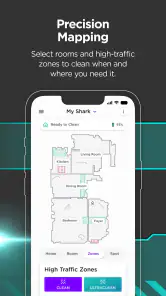
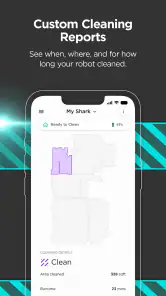
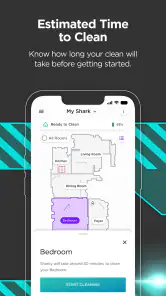
Now, let’s talk about navigation. The app provides interactive maps of your home, allowing you to see where your vacuum has cleaned and what areas need attention. It’s like having a bird’s eye view of your cleaning progress. Plus, the app lets you set no-go zones, ensuring the vacuum stays out of areas you’d rather it avoid.
A practical use for those zones is protecting a spot that repeatedly causes trouble, such as an area with dangling cords or a pet’s bowls. I’d make a change only after checking the map and seeing whether the robot’s route actually reaches the problem area. That avoids treating every missed patch as a mapping issue when a temporary obstacle may be the real reason.
The map is most useful as a guide to coverage, not a guarantee that every patch of floor is equally clean. If a room looks untouched, clear the route and try another run before redrawing boundaries. For a quick tidy before guests arrive, remote start is simpler; for recurring whole-home upkeep, a schedule and a few carefully chosen restricted areas are more useful together.
Recovering from interruptions
When a run stops unexpectedly, I’d use the app’s alert as a prompt to check the robot rather than repeatedly sending a new start command. Look for an obstacle, make sure the vacuum is in a position to continue, and then use the app to check its status. This is a more reliable workflow than assuming the connection is broken whenever cleaning pauses.
In a realistic weekday routine, I’d schedule cleaning while the household is out, glance at the map later, and use remote start only if an unexpected mess needs attention. That makes the app a practical control point without requiring me to watch the robot constantly. If you prefer to decide each time and never want scheduled cleaning, the physical controls or a simpler routine may suit you just as well.
Performance and Reliability
When it comes to performance, the app doesn’t disappoint. It communicates seamlessly with the vacuum, ensuring smooth operation. The real-time notifications keep you updated on the cleaning status, and if the vacuum ever gets stuck, the app alerts you so you can rescue it.
As for reliability, I’ve found the app to be consistently stable. There’s nothing worse than a glitchy app, especially when it controls your vacuum, but thankfully, SharkClean holds its ground well.
When the app may not be the problem
If a command appears delayed or a run does not begin, I would check the robot’s power, its location and the phone’s Wi-Fi connection before reinstalling anything. If the vacuum is physically blocked, the map and notifications can help explain what happened, but clearing the obstruction is still a hands-on job. This distinction keeps troubleshooting simple: connection symptoms point toward the phone or network, while a robot that has stopped in place calls for a quick physical check.
Compared with operating a vacuum entirely by hand, the app’s advantage is being able to schedule, check progress and start a run when you are away. Compared with a basic remote or onboard controls, it offers a clearer view of coverage and a way to manage no-go areas. But it only makes sense if you own a compatible Shark robot and value those connected controls; it is not a general home-cleaning planner or a substitute for a conventional vacuum when you need to clean a specific spot yourself.
Choosing the right level of control
The choice between this app and simpler controls comes down to how often you want to intervene. If you already know when the floors need attention and are happy to press a button on the robot, connecting a phone may add little to your routine. The app earns its place when you want to start a run from another room, keep a recurring schedule, or check where the robot has been without following it around.
I would also treat scheduled cleaning as a convenience, not a promise that the home will always be ready for a run. A household with toys, pet items or frequently moved furniture may need a quick floor check before the robot starts. In that setting, a schedule can still help, but a manual start after a brief tidy may be less frustrating than expecting the robot to handle a constantly changing layout.
Who will get the most from it
I’d recommend it to Shark robot owners who want routine cleaning to happen with less prompting, especially in homes where a predictable schedule and remote status checks are useful. Someone who dislikes setting up connected devices, has unreliable home Wi-Fi, or prefers full manual control may find the app more hassle than benefit. SharkNinja has kept the app free; it has over a million installs, and version 6.6.0 supports devices running Android 8.0 or later.
There is a practical trade-off for people who share a home: remote control is most helpful when everyone knows a run may begin. Before starting the robot while away, I’d consider whether anyone is working from home or has left something on the floor. The app can make a vacuum easier to manage from a distance, but it cannot judge whether the timing is convenient for the people in the room.
What to try before giving up on a run
If the robot seems offline, I’d avoid changing several things at once. Check that the vacuum is powered and in a sensible position, confirm the phone is connected to the expected home network, then reopen the app and try a single command. If the robot starts but stops during cleaning, inspect its immediate surroundings before treating the incident as a Wi-Fi fault. Keeping those checks separate makes it easier to tell whether the problem is communication or an obstacle.
For a room that repeatedly appears to be missed, I’d first remove temporary clutter and observe another run before changing a no-go boundary. A map can help identify a pattern, but a single gap may simply reflect a chair, bag or other item blocking access at that moment. Making map changes only after seeing the same issue more than once is a useful way to avoid restricting an area unnecessarily.
SharkClean is a focused Lifestyle app rather than a broad smart-home dashboard: its value is tied to controlling a compatible Shark robot. SharkNinja developed it, and its presence on both major phone platforms makes it accessible to many households. Its 3.6 average across around 44,000 ratings suggests that experiences are mixed, so I would not buy a robot solely on the assumption that every app interaction will be effortless. The app is best judged as an extra layer of control for someone who already wants a Shark robot.
For anyone wondering whether the app replaces the robot’s own controls, I would treat the two as complementary. The phone is handy for scheduling, remote starts and checking coverage; the physical machine remains the sensible place to inspect when it cannot move or respond. If the Wi-Fi is down or the phone is unavailable, a connected routine may be less convenient, so people who want a completely phone-independent setup should favor straightforward onboard operation.
In conclusion, if you’re looking for an app that complements your Shark robotic vacuum and makes cleaning less of a hassle, SharkClean is a strong contender. With its user-friendly interface, useful scheduling and remote controls, it can make routine cleaning easier to fit around the day. I’d recommend it most to owners who will actually use those connected options and are willing to keep the floor and network ready for them. If you prefer manual control or want an app that works independently of a Shark robot, this is not the right fit.
SharkClean Frequently Asked Questions
Can I use SharkClean without owning a Shark robot vacuum?
SharkClean is built around connecting to a Shark ROBOT™ rather than providing a standalone cleaning service. Without a compatible robot, there is no vacuum for the app to control, so its connected features will have little practical use. If you are exploring the app before buying a robot, check the model’s compatibility and consider whether app-based controls fit the way you want to manage cleaning.
Who develops SharkClean, and what kind of app is it?
SharkClean is a Lifestyle app developed by SharkNinja, designed to connect with a Shark robot vacuum through your phone. Its purpose is practical: it brings supported robot controls and cleaning-related information into one mobile interface. The app is available at no charge, but the experience depends on having a compatible Shark robot and setting up the connection between that device and the app.
Is SharkClean free to download, and what devices can run it?
SharkClean is a free Lifestyle app from SharkNinja for connecting to a Shark robot vacuum. Its current version is 6.6.0 and it requires Android 8.0 or later. The app is rated for Everyone, so it is suitable for a broad audience. Check your phone’s operating system before installing, and make sure you have a compatible Shark robot to use its connected features.
What is SharkClean and how does it work?
SharkClean is a smart home cleaning app designed to work with Shark robot vacuums. It allows users to control, schedule, and monitor their Shark robot vacuum's cleaning activities through their smartphone. By connecting the app to your Wi-Fi network, you can start or stop cleaning sessions, set cleaning schedules, and view cleaning reports from anywhere, making home cleaning more convenient and efficient.
Is SharkClean compatible with all Shark robot vacuum models?
The SharkClean app is compatible with a variety of Shark robot vacuum models, but not all of them. It's essential to check the specific model of your Shark vacuum to ensure compatibility. Generally, newer models are more likely to support app connectivity. You can find compatibility information in the product manual or on the Shark website before purchasing or downloading the app.
Pros
- Intuitive user interface
- High cleaning efficiency
- Customizable cleaning schedules
- Smart home integration
- Long battery life
Cons
- Limited to Shark devices
- Occasional connectivity issues
- Expensive initial cost
- Noisy operation
- Bulky design
- Category
- Lifestyle
- Version
- 6.6.0