Sewpal: Sewing Pattern & Guide
- 63.00
- 4.8
- Installs
- 10.00K
- Price
- Free
Screenshots
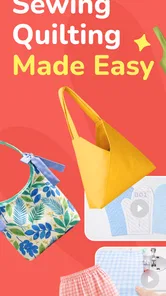
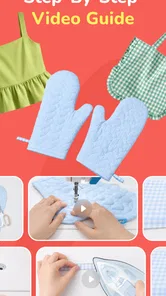
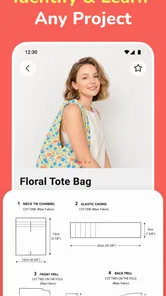
Analysis by Reviewed
I approached Sewpal: Sewing Pattern & Guide as a practical companion for the moments when an idea needs to become an actual sewing project. It sits in the lifestyle category, comes from PIXELCELL PTE. LIMITED, and focuses on patterns and guided steps rather than trying to replace the hands-on work of choosing fabric, threading a machine, or correcting a crooked seam. That distinction matters: this is most useful when I want structure before I start sewing.
My first impression is that the app is aimed at reducing the uncertainty between “I would like to make this” and “I know what to do next.” The free download makes it easy to try, while optional in-app purchases priced at $29.99 per item mean I would still check what is included before treating it as a complete long-term sewing library. Its age rating is Everyone, so the presentation is suitable for a broad audience, including someone learning at home rather than attending a formal class.
How Sewpal fits into a real sewing routine
I find Sewpal most useful when I treat it as one part of my sewing setup, rather than the place where every project detail must live. Before I begin, I’d decide what I need the guide to help with and keep personal measurements or alterations in my own notes. That makes it easier to judge whether its pattern-led approach suits my habits, while keeping the next choice—how much guidance I actually need—in view.
A calmer starting point for new projects
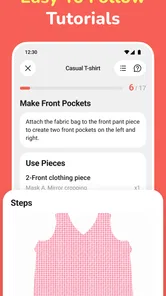
When I begin a sewing project without a plan, the difficult part is often not the stitching itself. It is deciding which pattern to use, understanding the order of operations, and knowing whether I have prepared the material correctly. Sewpal is built around those early decisions. Its combination of patterns and step-by-step guidance gives me a route to follow instead of leaving every choice scattered across searches, saved posts, and handwritten notes.
That makes it particularly appealing to beginners who understand basic sewing vocabulary but still lose confidence when instructions jump too quickly. A guided sequence can help turn a large project into smaller checks: prepare the pieces, follow the next instruction, pause, and inspect the result before moving on. I would not expect an app to teach every physical skill, but I do value having the project logic in one place.
More experienced sewists may find a different benefit. Rather than needing inspiration every time, they can use a pattern guide as a planning reference and adapt the process to their own habits. The app is less compelling if someone already has a carefully organized pattern collection and a method they trust, but it can still be useful when starting an unfamiliar type of project.
What the app feels like during ordinary use
For a realistic example, imagine that I have a free evening, a piece of fabric on the table, and enough time to make progress but not enough patience to keep switching between unrelated tutorials. I would open Sewpal before cutting anything, choose a suitable project, review the sequence, and use the steps as a checklist while working. That preparation is important because cutting is the point where a small misunderstanding can become wasted material.
More From Our News Desk

Weather by Xiaomi Review: Clear at a Glance, Less Clear Up Close

X Under Pressure: Can It Recover When Posting Goes Wrong?

Clash of Clans Is Won Between the Battles

Android Auto Makes the Case for Quieter Car Software

MobiOffice: Transforming Mobile Productivity with Seamless Integration

EA SPORTS FC™ Mobile Soccer: Redefining Mobile Sports Gaming
I would also keep the app open nearby rather than relying on memory. The most useful habit is to read the next step before completing the current one. This helps reveal whether a seam, fold, or opening needs to be handled earlier than expected. It is a small workflow improvement, but it can prevent the common problem of reaching a later instruction and discovering that an earlier piece was assembled in the wrong orientation.
The strongest practical idea here is using the guide as a project-control tool, not merely as inspiration. I would mark my place mentally after each completed stage, keep fabric pieces grouped by their role, and avoid cutting until the pattern sequence makes sense. Even without adding a separate planning system, that approach makes the app more useful than a collection of attractive project images.
Speed expectations and the role of patience
I would not judge Sewpal by how quickly it produces a finished item. Sewing itself is the limiting activity, and an app cannot shorten careful measuring, pinning, pressing, or fitting. The better question is whether it helps me move from one stage to the next without unnecessary hesitation. In that role, a focused pattern guide should feel faster than repeatedly searching for disconnected instructions.
Perceived speed will also depend on how familiar I am with the project. A beginner may spend extra time interpreting terminology or comparing the instructions with the fabric in front of them. That is not necessarily a performance problem; it is part of learning. Still, I would prefer to review the full sequence before starting, because stopping at every step can make even a well-organized project feel slow.
The current version is 1.0.0, so I would approach it as an early release and allow a little flexibility in my workflow. I would keep the material list and any measurements I need beside the device rather than assuming I can solve every question inside the app. That simple backup makes the experience less fragile if I need to pause, switch tasks, or return to the project later.
Heavy-use moments at the cutting table
The app is likely to receive its heaviest practical use when I am moving quickly between preparation and construction. A long session might involve repeatedly checking several steps, comparing the guide with fabric pieces, and returning to an earlier instruction to confirm the order. That kind of use is more demanding than opening the app briefly for inspiration because the device becomes part of the workspace.
My advice would be to prepare the environment before beginning. Put the phone or tablet where it can be viewed without touching fabric with messy hands, gather the basic tools, and read ahead far enough to understand the next transition. This is not glamorous, but it reduces interruptions and makes the guide feel more responsive because I am not stopping to reorganize every few minutes.
A second useful technique is to separate “learning time” from “production time.” I would first browse the pattern and study the sequence without cutting. Then I would return to the project with the fabric ready. This prevents me from mixing discovery with irreversible actions. It is especially helpful for beginners, who may otherwise cut immediately and only later notice that the chosen material or layout does not suit the planned construction.
There is also a trade-off in using a mobile guide near a sewing machine. The screen is convenient, but it is not as easy to annotate as paper, and repeated handling can interrupt the rhythm of sewing. For a complex project, I would write down the current step or make a simple paper checklist. Sewpal can remain the reference source while the note becomes the quick working prompt.
Reliability, recovery, and interrupted projects
Reliability in a sewing app is not only about whether it opens. It is also about whether I can recover my place after an interruption. Real projects are rarely completed in one sitting: a delivery arrives, a child needs attention, or I discover that I need a different tool. I would therefore avoid depending entirely on an assumed automatic position marker and instead note the last completed stage myself.
That habit is useful even when an app behaves perfectly. If I return after several days, a short note such as “finished the side seams; next is the opening” is clearer than trying to remember which screen I viewed last. It also protects the project from confusion if I browse another pattern before coming back to the original one.
I would treat the app as a guide that supports recovery, not as the sole record of my work. Keep measurements, alterations, and personal adjustments outside the app. This is particularly important for repeat projects. Once I change a length, seam allowance, or finishing method, that information belongs to my own project notes so I can reproduce the result later.
The rating shown for the app is a 4.8 average from around 1.8 thousand ratings, which suggests that the overall experience has been well received by the people who chose to rate it. I still would not interpret that as a guarantee that every pattern suits every skill level. A high average can tell me that the concept works for many users, while my own success will depend on the clarity of a particular project and how closely it matches my experience.
Device constraints and practical comfort
Sewpal supports devices running Android 9 or later, so compatibility is broad enough for many everyday phones and tablets. I would still think about screen size before choosing how to use it. A phone is convenient beside a machine, but a larger display is more comfortable for examining pattern details and reading longer instructions without constant scrolling.
Resource demands are difficult to judge from the app’s basic listing alone, so I would keep expectations sensible rather than assuming it is either exceptionally light or demanding. For a sewing guide, the important practical concern is not gaming-level performance; it is whether the device remains comfortable to use during a long session. Brightness, screen timeout, battery condition, and the position of the device may matter more than raw speed.
If I were using an older compatible phone, I would close unrelated apps before starting a project and keep the device charged. That is ordinary preparation, but it helps avoid confusing a crowded device or low battery with a problem in the sewing app itself. I would also avoid placing the phone where loose thread, chalk, or fabric can cover the screen or interfere with touch controls.
Storage is another everyday consideration. The app itself may be easy to install, but sewing projects can generate photographs, notes, and reference files outside it. I would leave room for those personal records, especially if I use the camera to document fitting changes or save images of fabric combinations. The app is more useful when it is part of an organized project space rather than the only place where information lives.
Where it beats ordinary alternatives
The usual alternatives are printed patterns, books, video tutorials, social media posts, and general web searches. Each has a strength. Paper is easy to mark and does not depend on battery life. Books offer context and often explain techniques in depth. Videos show movement clearly, which can be valuable for unfamiliar handling. Search engines provide variety, but they can also produce a confusing mix of methods and skill levels.
Sewpal’s advantage is the middle ground between a static pattern and a stream of unrelated content. A step-by-step format gives me a defined route, while the app is easier to consult than a long video when I only need to confirm the next action. That makes it suitable for a focused project session where I want less browsing and more doing.
It is not automatically better than paper. If I like writing alterations directly on a pattern, a printed option may be more flexible. It is not automatically better than video either. When the challenge is seeing how fabric should be manipulated, a moving demonstration can communicate more than written steps. My preferred setup would be to use Sewpal for the project structure and add paper notes or a video reference only when the physical technique needs extra explanation.
Who should use it, and who should skip it
I would recommend trying Sewpal if you are new to sewing, return to the hobby after a long break, or regularly begin projects with enthusiasm but lose momentum during preparation. The guided format can provide the missing middle layer between inspiration and execution. It is also a reasonable choice for a casual maker who wants a clear activity for an afternoon without building a large personal library first.
I would be more cautious if you are an advanced sewist who mainly drafts your own designs, follows highly technical garment references, or needs extensive fitting theory. In those cases, a specialized book, professional pattern system, or personal drafting workflow may offer more control. The app should not be treated as a substitute for learning fabric behavior, accurate measurement, or safe machine use.
The optional purchase model is another reason to be selective. Since individual in-app items cost $29.99, I would begin with the free experience and decide whether the available guidance matches my projects before buying anything. A paid item may make sense when it covers a project I genuinely intend to complete, but purchasing broadly just to collect patterns could become expensive for a hobbyist who only sews occasionally.
Small workflow improvements that make a difference
One of my favorite ways to use a guide like this is to create a “preflight” pause. Before cutting, I would confirm the project goal, inspect the available fabric, identify the pieces that must be aligned, and read far enough to understand the finishing method. This catches mismatches early. A pattern can be clear and still be unsuitable for the material I have chosen.
I would also photograph the arranged pieces before sewing. The image is not a replacement for the instructions, but it gives me a visual record of orientation if I stop halfway through. This is especially useful when several similar pieces are on the table. The photo can live in my regular gallery or project notes, keeping the app focused on guidance rather than forcing it to carry every personal detail.
For repeated makes, I would maintain a short alteration log: what I changed, why I changed it, and what I should do next time. This turns a one-time guided project into a learning loop. Sewpal supplies the starting structure, while my notes capture the information that is unique to my body, fabric, tools, and preferences.
Finally, I would use the app before shopping for materials, not after. Reviewing the project first helps me avoid buying fabric that is attractive but impractical for the intended construction. That is a less obvious benefit of pattern guidance: it can improve decisions before the sewing begins, when mistakes are still inexpensive to correct.
My performance verdict
After considering how I would use it in short checks, long sessions, and interrupted projects, I see Sewpal as a focused lifestyle app whose value comes from organization rather than spectacle. It is free to start, available to a substantial existing audience with over ten thousand installs, and designed for Everyone. Those details make it approachable, but the real test is whether its pattern guidance fits the way I prefer to learn.
I would not choose it expecting a complete replacement for sewing education, printed references, or personal notes. I would choose it when I want a defined project path and a convenient guide beside my fabric. The main friction is the need to manage the device as part of a hands-on workspace, along with the need to evaluate optional paid items carefully. Those are manageable limitations, provided I keep a simple backup record of my progress.
My final recommendation is positive for beginners and casual makers who need help turning an idea into a sequence of practical actions. More advanced users should try it with a specific project in mind rather than assuming it will replace their established tools. Sewpal is at its best when it reduces decision fatigue before and during sewing; it is less suitable when I need deep technical instruction, extensive customization, or a fully paper-based workflow.
For me, that makes it worth exploring as a free starting point. I would install it, inspect the available patterns, choose one realistic project, and test the guidance from planning through the first completed section. If that experience feels clear and fits my materials, a paid item could be justified. If not, I would return to books, printed patterns, or video instruction without forcing the app into a role it was not designed to fill.
Sewpal: Sewing Pattern & Guide Frequently Asked Questions
Who develops Sewpal: Sewing Pattern & Guide, and what kind of app is it?
Sewpal: Sewing Pattern & Guide is a lifestyle app developed by PIXELCELL PTE. LIMITED. It is intended for people who want to turn sewing ideas into real projects using patterns and step-by-step tutorials. Its focus is practical creative work, so it may appeal to anyone who enjoys making or learning about sewn projects. The app is rated for Everyone.
What is Sewpal: Sewing Pattern & Guide, and who is it designed for?
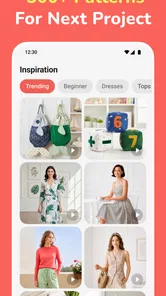
Sewpal: Sewing Pattern & Guide is a sewing companion intended to help users explore patterns, follow garment-making instructions, and improve their practical sewing skills. It may be useful for beginners who need structured guidance as well as experienced sewists looking for project inspiration. Before downloading, check the available pattern categories and difficulty levels to make sure the app matches your interests and experience.
Does Sewpal provide complete sewing patterns and step-by-step instructions?
The app is designed around sewing patterns and instructional guidance, but the amount of information can vary from one project to another. Some patterns may include measurements, construction steps, fabric suggestions, or visual references, while others may require additional sewing knowledge. It is worth reviewing the pattern details inside the app before starting a project, especially if you need highly detailed instructions.
Can beginners use Sewpal without previous sewing experience?
Beginners can use Sewpal as a source of project ideas and sewing guidance, although the experience may depend on the complexity of the selected pattern. New sewists should start with simpler projects and carefully review the required materials, measurements, and techniques. The app can support learning, but it may not replace a full sewing course or personalized instruction when a technique is difficult.
Does Sewpal work offline, and does it require an internet connection?
Internet requirements may depend on how the app delivers its patterns, images, guides, and updates. Some content might be available only after loading it online, while other information may remain accessible once saved on the device. If you plan to sew in a workshop or another location without reliable connectivity, test the app beforehand and check whether individual projects can be downloaded or viewed offline.
Pros
- Clear step-by-step sewing guidance for beginners.
- Pattern library helps plan projects before cutting fabric.
- Useful reference for improving basic sewing techniques.
- Convenient mobile access while working at the sewing table.
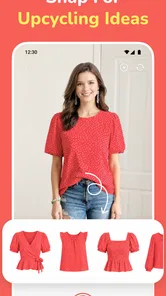
- Can inspire new clothing and craft projects.
Cons
- Some patterns or guides may require in-app purchases.
- Instructions may feel too basic for experienced sewists.
- Small phone screens can make pattern details harder to follow.
- Project results depend on accurate measurements and fabric choice.
- Offline access may be limited for some content.











