Security Camera CZ
- 1.18K
- 4.3
- Installs
- 1.00M
- Price
- Free

Screenshots
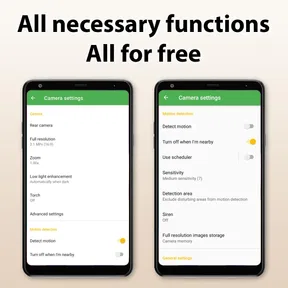
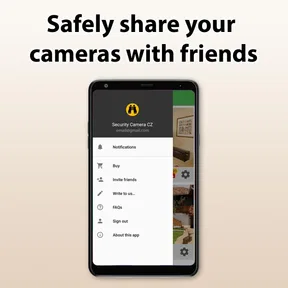
Analysis by Reviewed
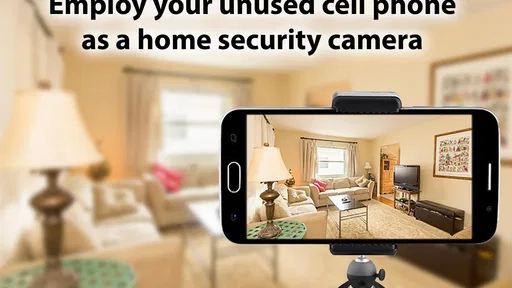
I like the idea behind Security Camera CZ: instead of buying a separate camera for every temporary need, I can give an old phone a second job. It is a free House & Home app from SCamera, aimed at turning a spare device into a way to watch a room, check on pets, or use as a webcam. Its 4.3 average from around 17,000 ratings and over a million installs suggest it has found an audience, but its usefulness depends on having a suitable phone and a place to keep it powered and connected.
Start with the job you need it to do
I would first decide whether I need a stationary view of one specific space or a more complete home-monitoring system. This app makes the most sense when I already have an unused phone and want to check a room for a limited, clearly defined reason. It is less compelling if I need several camera angles, a permanent installation, or a dependable setup that does not rely on an older handset staying awake and connected.
For example, if I am working in another part of the house while a pet settles in a room, a spare phone can give me a quick way to look in without buying another device. I would place it near the pet’s usual resting area, make sure the lens is unobstructed, and check the view from the device I plan to use. That is a practical, modest role: it can help me check what is happening, but it should not be treated as a substitute for being there when an animal needs care.
There is also a useful difference between this arrangement and a video call. A call is often simpler if someone is already in the room and can answer, while a phone left in place is better suited to a view that stays pointed at one area. A standalone indoor camera is the more sensible alternative when I want equipment intended to remain installed, rather than converting a phone I might otherwise use for something else.
How it feels in everyday use
I would treat this as a practical, low-cost monitoring setup rather than a replacement for a dedicated security system. A spare phone can be handy when I want a view of one room without buying hardware, and the app’s Everyone age rating makes it approachable for a broad range of households. It was released in 2018, so I would also check that the app and the phone still work well together before relying on them for an important monitoring job.
Speed depends on the whole setup
For a live view, the phone acting as the camera and the network both matter. I would place the spare device where it has a stable Wi-Fi connection and a clear view, then check the stream from the viewing phone before leaving home. A weak signal or an awkward camera angle can make a simple setup feel unreliable, even when the app itself is easy to navigate. It is worth testing from the exact spot where you plan to use it rather than assuming the connection will behave the same throughout the home.
Continuous monitoring also asks more of an old phone than occasional use does. Before leaving it in place, I would make sure it has enough charge or a safe power source, stays cool, and is not likely to be disturbed. An older device with a tired battery may be fine for a short pet check but less suitable for a long unattended session. I would avoid placing it somewhere hot, covered, or where a cable could be pulled loose.
More From Our News Desk
 Instagram
’s Power Comes From Its Place in Your Phone
A close look at how Instagram turns Meta’s reach, recommendation systems and everyday camera habits into durable platform power—and what that costs users.
 Gmail
Gmail in a Busy Inbox: Who Benefits Most?
From first account to crowded workday, Gmail earns its place through dependable search and flexible sorting—but its best fit depends on how much inbox maintenance you can tolerate.

 Prime Video
Switching to Prime Video: What Changes in Your Viewing Routine
Prime Video can make a compelling second home for streaming, but switching means learning a different catalog, rental layer, and route from browsing to playback.
 Universal TV Remote Control
 Works Best as a Reliable Backup
A phone remote earns its place through quick setup and reliable habits. Here is how to get more from Universal TV Remote Control—and where its limits show.
 Weather - By Xiaomi
Weather by Xiaomi Review: Clear at a Glance, Less Clear Up Close
Xiaomi’s weather app makes everyday forecasts quick to scan, but its calm surface can leave useful details and recovery paths harder to find than they should be.

 X
X Under Pressure: Can It Recover When Posting Goes Wrong?
A resilience-focused review of X, examining setup, mistaken posts, interruptions, weak connections, and the gaps that matter when recovery needs to be dependable.
Latest News



Useful for focused, temporary jobs
A realistic use is checking on a pet while I step out for errands: I can position the phone to show the area where the animal usually rests, then view the room remotely. For a better result, I would keep the camera away from bright windows and aim it at the pet’s usual path, rather than trying to cover an entire room from one corner. That small bit of planning can make a basic phone camera more useful without changing the app.
The same approach can help with a home office or a room that is empty for part of the day. Still, a repurposed phone is not automatically a secure, always-on system. I would test whether notifications and remote viewing behave as expected, and I would not use it as my only protection for valuable property or an urgent safety concern. A dedicated camera may be the better choice if you need a purpose-built installation, consistent operation, or a setup that does not depend on an aging handset.
Trade-offs before you rely on it
Compared with buying a standalone indoor camera, this approach can save a purchase when you already own a spare phone, but it uses that phone for one job and ties the setup to its battery, camera, and network connection. Compared with simply making a video call to check a room, a monitoring app is more suited to leaving a camera in position; a call, however, may be simpler for a quick, one-off check when someone can answer at the other end. The right option depends on whether you need a stationary view or just a brief look.
The app is free to try, with in-app purchases listed at $14.99 per item. I would begin with the functions I actually need, then decide whether any paid option is worth it rather than paying on the assumption that it is necessary. If the spare phone is unreliable, the connection drops often, or I need dependable coverage across several areas, I would skip this workaround and consider dedicated equipment instead.
Before using it for a real household routine, I would run a short trial: set the camera in place, leave the room, check the remote view, and see whether the device remains connected. That simple rehearsal can reveal a blocked lens, poor Wi-Fi reception, or a phone that needs attention. It is a more useful test than discovering a problem after relying on the camera while away.
Think through the viewing angle and the room
One phone camera can only show the slice of a room that it faces, so I would treat placement as part of the setup rather than an afterthought. A shelf or stable surface can work better than a low spot where passing feet might bump the device. I would also check the framing from the remote viewer, because the angle that looks sensible when I am standing beside the phone may leave the important area out of view.
For a temporary check on a delivery area or an empty workspace, a narrow view can be an advantage: it avoids pointing the lens at places that are irrelevant to the task. For watching a pet, the useful frame is usually where it spends time, not every corner of the home. This makes a repurposed phone most effective when I can name the one thing I want to observe and position the device accordingly.
Keep the setup simple enough to recover
A spare phone is convenient until it gets moved, unplugged, or loses its connection. I would choose a location where nobody needs to handle it during the monitoring period, and I would avoid routing a charging cable across a walkway. If the view stops working, a quick check of power, Wi-Fi, and whether the lens has been blocked is a more useful first response than assuming the app itself has failed.
I would not build a routine around a setup I have not tested after the phone has been left alone for a while. A short initial check tells me whether the image is framed correctly and whether the connection holds in that room; a later check helps me learn whether the particular device stays ready for the length of time I need. Those are practical checks, not a promise that an old phone will behave like dedicated equipment.
What an older handset changes
The phone’s condition matters as much as its camera. An older handset can be a smart reuse project if its camera still gives a usable view and it can remain powered safely, but a weak battery, an unreliable wireless connection, or a device that becomes warm during extended use changes the calculation. I would not leave it in a cramped or sunlit spot, and I would stop using that placement if the phone seems uncomfortable to touch or the cable is under strain.
There is a small opportunity cost, too: once the phone is serving as a monitor, it may not be available for ordinary use. That is easy to overlook when the device is simply lying in a drawer. If I expect to need it during the day, I would use another spare handset or choose a purpose-built camera rather than repeatedly interrupting the monitoring setup.
Simple setup, with realistic expectations
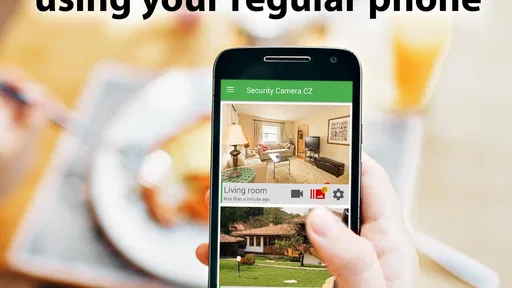
I was genuinely surprised at how easy it was to set up Security Camera CZ. The app effortlessly turns your phone into a surveillance camera. All you need is a stable Wi-Fi connection, and you're good to go! Once you have everything in place, you can view live streams, record videos, and even capture images remotely. It’s like having a security guard right inside your pocket.
Simplicity Meets Functionality
The interface is super-friendly. I mean, even if you're not the most tech-savvy person out there, you'll find it pretty straightforward. Navigating through its features is a breeze, and setting up alerts is as simple as pie. The app sends notifications whenever it detects any movement, which is fantastic if you’re as paranoid about security as I am.
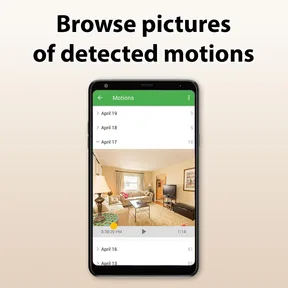
One of the standout features for me was the motion detection. It’s pretty sensitive, and you can adjust it according to your needs. I tested it by walking slowly across the room, and it picked me up every single time. Talk about impressive!
When motion alerts help—and when they distract
Motion detection can be useful when I want a prompt to check a room instead of watching the screen continuously. I would still tune the camera’s position and sensitivity around the room’s normal activity, then observe how it behaves during a trial. A pet moving through the frame, shifting light, or routine household activity may produce alerts that are less meaningful than the event I actually care about. The practical goal is not simply to receive more notifications; it is to make the alerts relevant enough that I will notice them.
That is why I would not assume that an alert means an emergency or that the absence of an alert proves nothing happened. For a pet check, the live view can be the more useful part; for a room that is usually still, a notification may help direct my attention. If I need a system designed to distinguish particular events or provide dependable security coverage, I would choose equipment built for that purpose rather than relying on a repurposed phone alone.
Peace of Mind at No Cost
Another thing I love about Security Camera CZ is that it doesn't demand a hefty price tag. In fact, it's free, with some in-app purchases if you want to access more advanced features. But honestly, even the free version is packed with more than enough functionality to keep you and your space secure.
It’s perfect if you’re on a budget but still want to ensure your home’s safety. Plus, it’s great for keeping an eye on your pets or checking in on your little ones while they nap. I found it especially useful for monitoring my home office while I’m out, giving me peace of mind that my stuff is safe and sound.
Choosing it over a dedicated camera
For someone who already owns a spare phone, the main appeal is avoiding a new hardware purchase for a narrow, temporary job. That trade-off is strongest when I only need one view, can position the phone safely, and am comfortable checking that it remains online. A dedicated indoor camera is usually the better fit when I want a permanent fixture, a less improvised placement, or a device whose whole purpose is monitoring.
I would also consider how often I need to check in. If it is an occasional look at a room, a spare phone may be a sensible experiment. If I need reliable coverage every day, multiple viewpoints, or a monitoring setup that other household members can depend on without troubleshooting the handset, a purpose-built option is easier to justify. The app’s House & Home focus is clear, but the best choice still depends on how much reliability the job demands.
Wrapping Up My Experience
In conclusion, this is a useful option for anyone who wants to try a spare phone as a simple monitoring camera without paying upfront. I would recommend it for short-term, single-room use, especially for checking on a pet or keeping an eye on a home office. I would not treat it as a substitute for dedicated security equipment when uninterrupted coverage matters. Its value comes from making use of a device you already own, provided you are willing to test the connection and keep the phone ready for the job.
So, if you’ve got an old phone lying around, download the app, and turn it into your personal security camera. Trust me, you’ll sleep better at night knowing you’ve got an extra pair of eyes watching over your home.
Security Camera CZ Frequently Asked Questions
Can I use Security Camera CZ to check on pets when I’m away?
Yes. The app is designed to turn an old phone into a pet monitor, as well as a security camera, IP camera, or webcam. That can be useful if you have a spare device and want to keep an eye on your home or pets using a phone you already own. It is free to download, with in-app purchases available.
What kind of app is Security Camera CZ, and who is it for?
Security Camera CZ is a House & Home app for people interested in repurposing an old phone as a security camera, pet monitor, IP camera, or webcam. Its focus is practical home monitoring, so it may appeal to anyone with a spare device who wants to explore that use. The app is rated for Everyone.
Can Security Camera CZ give an old phone a new purpose?
Yes. Security Camera CZ is intended to turn an old phone into a security camera, pet monitor, IP camera, or webcam. That makes it a practical option if you have a spare device and want to try using it for home monitoring rather than buying a separate camera. The app is free to download, with in-app purchases available.
Is Security Camera CZ free to download?
Security Camera CZ is free to download, so you can try the app without paying upfront. In-app purchases are available at $14.99 per item, which is worth keeping in mind if you are considering paid options. The app is in the House & Home category and is rated for Everyone, making its basic purpose easy to understand before you install it.
What features does Security Camera CZ offer?
Security Camera CZ is a versatile app that transforms your device into a security camera. It offers features such as motion detection, live streaming, and cloud storage for recordings. Additionally, it supports multiple camera setups, night vision, and two-way audio, making it a comprehensive security solution for monitoring your home or office.
Pros
- User-friendly interface
- High-quality video recording
- Remote access via app
- Motion detection alerts
- Cloud storage available
Cons
- Requires internet connection
- Limited free features
- Can drain battery quickly
- Occasional connectivity issues
- Subscription for premium features