

Savvy Navvy Boating Navigation
- 296.00
- 4.2
- Installs
- 500.00K
- Price
- Free

Screenshots
Analysis by Reviewed
When I’m planning a boat trip, I want to see more than a line from one point to another. I need to think about the route, the weather and the water conditions together. Savvy Navvy is a marine navigation app from savvy navvy that brings those concerns into one planning experience. It’s aimed at sailors and boaters, but its mix of charts, marine weather and tide information also makes it relevant to people who fish from a boat. I’d treat it as a practical planning aid, not a substitute for good seamanship or independent checks.
Where it fits in a boating routine
The app is free to install, and its Everyone age rating makes it broadly accessible, though responsible use on the water still depends on the person at the helm. I think the best first step is to try it on a familiar, uncomplicated outing rather than making it the only source of guidance on an unfamiliar passage. That gives you time to learn how its chart and planning views work without adding unnecessary pressure to a busy departure.
It can also help make a group outing easier to discuss before anyone boards. One person can think about the route, another can check the forecast, and the skipper can weigh both against the boat and the crew. The app does not make those decisions for you; its value is that the relevant information is easier to consider together. I would still agree on a plan aloud, including what would make the group delay, turn back or choose another destination.
Who will get the most from it
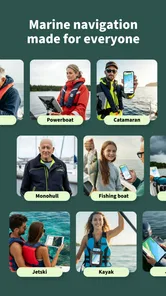
I can see this fitting best for recreational boaters who want a clearer picture before setting off, especially when a trip depends on wind or tidal conditions. A weekend sailor can use it to compare a possible route with the forecast, while someone heading out to fish can use nautical charts and marine conditions as part of deciding where and when to go. It is less compelling if you only need ordinary road directions, or if you never travel by water; a conventional map app is simpler for those jobs.
A useful habit is to plan with the app before you reach the dock, rather than trying to work everything out while preparing to leave. Check the route, then look at the weather and tide information as separate decision points: a route that appears convenient may not suit the conditions or your boat. I’d also keep a second way to navigate available. A phone’s battery, screen visibility and reception can all become practical concerns on the water, so no single app should be the whole safety plan.
How it fits alongside other tools
Compared with a general-purpose map app, Savvy Navvy is built around boating information rather than roads, with nautical charts and marine conditions brought into the same context. That focus is its main advantage for a water-based trip. The trade-off is that a dedicated chartplotter or another established navigation setup may be a better primary tool for boaters who already rely on equipment mounted at the helm. I’d use the app to support planning and situational awareness, not assume it replaces every instrument or local source of information.
For a realistic day out, imagine checking a coastal route at home the evening before, then reviewing wind and tide again before leaving in the morning. If either has shifted your plans, you can reconsider the route before committing. That small pause is where an integrated planning tool can be more useful than looking up a chart in one place and weather in another. Still, conditions can change, and an app’s guidance is only one input; local notices and the judgement of the person in charge matter too.
More From Our News Desk

 Weather - By Xiaomi
Weather by Xiaomi Review: Clear at a Glance, Less Clear Up Close
Xiaomi’s weather app makes everyday forecasts quick to scan, but its calm surface can leave useful details and recovery paths harder to find than they should be.

 X
XX Under Pressure: Can It Recover When Posting Goes Wrong?
A resilience-focused review of X, examining setup, mistaken posts, interruptions, weak connections, and the gaps that matter when recovery needs to be dependable.

 Clash of Clans
Clash of Clans Is Won Between the Battles
Its raids are quick; its community is a long-term project of coordination, teaching, rivalry, and shared responsibility—with all the friction that entails.

 Android Auto
Android Auto Makes the Case for Quieter Car Software
The car interface is no longer judged by how much it can do, but by how quietly it helps. Android Auto shows what drivers now expect—and what still gets in the way.

 MobiOffice: Word, Sheets, PDF
MobiOffice: Transforming Mobile Productivity with Seamless Integration
MobiOffice: Word, Sheets, PDF is redefining mobile productivity with a surprising blend of functionality and innovation.

 EA SPORTS FC Soccer Mobile 26
EA SPORTS FC™ Mobile Soccer: Redefining Mobile Sports Gaming
Dive into EA SPORTS FC™ Mobile Soccer, where immersive gameplay and strategic depth transform mobile sports gaming.
Latest News



Practical trade-offs before you set off
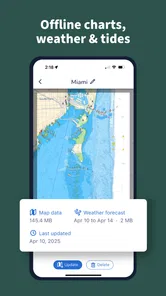
Offline access is useful when you expect weak signal, but I would prepare in advance rather than assume a chart or route will be ready when connectivity disappears. Download what you need while you have a connection and check that it is available before departure. This is a simple step, yet it avoids discovering at the wrong moment that you planned to rely on information you had not prepared for offline use.
That preparation is particularly worthwhile if your trip crosses between areas where reception is reliable and areas where it is not. I’d open the planned material before leaving, make sure it is usable in the conditions you expect, and keep a paper chart or another suitable backup where appropriate. Offline preparation can reduce dependence on a connection, but it does not solve every phone limitation: glare, a wet screen, a low battery or a device that is difficult to read at the helm can still make a phone a poor primary display.
The app is free to install and is rated for Everyone. It has a 4.3 average from around 2.9 thousand ratings, with more than 500 thousand installs, so there is a sizeable audience using it. Some optional purchases are listed at prices between $84 and $169 per item; I’d check what is included and whether it suits my own boating needs before paying. The current version is 2.2.19385, and the app has been available since September 19, 2019. Those facts show an established product with ongoing versioning, but they do not by themselves prove how any particular feature has changed over time.
Charting New Waters
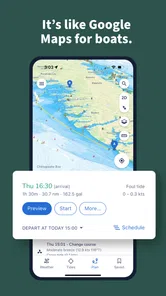
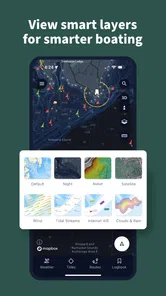
First things first, the user interface of Savvy Navvy is as sleek as a dolphin cutting through the sea. It's intuitive and doesn't require a degree in maritime studies to figure out. You open it up, and bam! You're greeted with a clean and clutter-free screen that just screams, "Let's go sailing!" The app integrates essential details like wind, tide, and weather conditions into its charts, giving you a comprehensive snapshot of your journey at a glance.
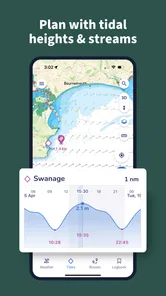
One of the standout features has to be the route planning. It's like having a seasoned captain whispering in your ear. You can plot your course with ease, and the app even suggests routes based on weather forecasts and tidal information. It's almost like it can read your mind—or at least the ocean's mood.
Turning a route into a decision
For me, the most useful way to approach a suggested route is as a starting point for questions, not as an instruction to follow automatically. Does it make sense for the boat I’m taking? Are the forecast and tide suitable for the people aboard, and do I have a sensible alternative if conditions change? This kind of check is especially valuable when a route looks straightforward on screen but the day’s conditions make it less comfortable or practical.
I’d also avoid making a last-minute route change while distracted by preparations on deck. Plan where you can concentrate, then review the intended course when you have a moment to compare it with the weather and tide information. If the crew is unfamiliar with the route, explain the broad plan before departure so they understand the intended direction and the reason for any change. The app can help organize the information, but good communication remains a human responsibility.
Weather or Not
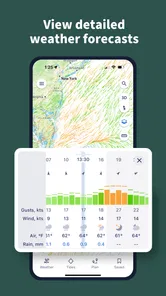
Weather can be a fickle friend when you're out at sea. Luckily, Savvy Navvy doesn't leave you high and dry. The app provides real-time updates on weather conditions, ensuring you're always in the know. You can even see wind patterns, which is incredibly handy if you're relying on sails rather than a motor. The added benefit of tide information means you're less likely to find yourself stranded on a sandbank, which is always a plus in my book.
Even with weather in the same planning view, I would not use a single glance as a complete forecast review. Wind matters differently depending on the boat, direction of travel and crew, while tide considerations can make a route more or less suitable at a particular time. A useful workflow is to check the overall picture first, then return to the details that could change your decision. If the situation is uncertain, waiting or choosing a shorter outing can be the more sensible result of using the app.
Using reports without outsourcing judgement
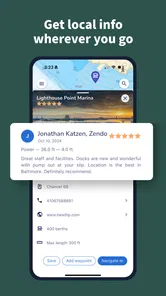
Another feature worth mentioning is the community feel. The app encourages users to contribute reports and updates, creating a network of informed sailors. It's like having a fleet of friends looking out for each other, sharing tips and insights about various waterways. Plus, if you ever feel like you're in a bind, there's a help section that covers a range of topics from beginner to advanced seafaring tips.
Community contributions can be useful context, but I’d treat them as prompts to investigate rather than guarantees about what I will encounter. Water conditions and local circumstances can change, and another boater’s report may not match the timing or needs of my trip. I’d use reports to identify something worth checking, then make my own assessment alongside charts, current conditions and local guidance. That balance lets shared experience help without giving it more authority than it deserves.
Oh, and did I mention offline access? That's right. Savvy Navvy lets you download maps and routes for offline use, so even when you're in the middle of nowhere with no signal, your trusty app has got your back.
When another setup is the better choice
If you already navigate comfortably with a chartplotter at the helm, this app may be most useful before the trip or as a secondary reference rather than as a replacement. A dedicated display can be easier to see and use in a working cockpit, while a phone is convenient for planning away from the boat. Likewise, a boater who needs a highly specialized workflow should compare the app with the equipment and tools they already depend on before changing their routine.
It is also not the right choice for someone looking for a road-navigation app, or for a person who expects software to make boating decisions on their behalf. The marine focus is a benefit only when you actually need marine information. New boaters may appreciate the help material, but reading guidance in an app is not a substitute for practical experience, training or advice suited to local waters.
Sailing into the Sunset
So, what's the final verdict? Well, if you love the idea of having a pocket-sized first mate ready to tackle any nautical challenge, then this app is a must-have. Whether you're a seasoned sailor or a weekend warrior, Savvy Navvy brings a level of confidence to your voyages that’s hard to beat. It's not just about getting from point A to B; it's about enjoying the journey and knowing you're well-equipped for whatever the sea throws your way. So, next time you hoist your sails, make sure your smartphone is armed with this gem. Happy sailing!
What I’d check as it develops
For existing users, a newer version number is a reason to review the app after updating, not proof that charts, route suggestions or weather handling have changed in a particular way. I’d revisit a familiar route and compare the information and workflow with what I remember, then make sure any offline material I depend on is still prepared. That gives me a practical way to notice changes without assuming that an update automatically improves every part of the experience.
The developer, savvy navvy, has continued to version the app since its release in 2019, and its current version is 2.2.19385. That is useful context when deciding whether to keep it in a regular routine, but version numbers alone do not tell me what has changed in a particular release. I’d read any update notes available in the app store, then check the functions I actually use rather than expecting every update to affect charting, forecasts or routing in the same way.
For someone considering an optional purchase, the practical question is whether the included capability matches the waters and trips they care about. With individual in-app items priced from $84 to $169, I would compare the details carefully and avoid buying based only on the general appeal of marine navigation. A free install gives you a way to explore the experience first; before spending, make sure the specific paid option supports a real need in your own routine.
My overall view is that Savvy Navvy is most useful when it helps me bring several boating considerations into one planning session. Its marine focus is a real advantage over road-first maps, while the need to verify conditions and maintain a backup keeps expectations grounded. If you are new to boating, use the help material to build familiarity, but don’t treat route suggestions as a replacement for learning local waters. If you already have a dependable helm setup, try it as a companion before deciding whether it deserves a larger role in your routine.
Savvy Navvy Boating Navigation Frequently Asked Questions
What devices and operating systems can I use with Savvy Navvy Boating Navigation?
Savvy Navvy Boating Navigation is available for both Android and iOS platforms. You can download it from Google Play Store for Android devices and the Apple App Store for iOS devices. The app is listed for Android devices running version 8.0 or later, and its availability across smartphones and tablets lets users plan boating routes on their preferred device.
Who develops Savvy Navvy Boating Navigation, and what is it designed for?
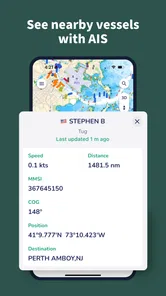
Savvy Navvy Boating Navigation is developed by savvy navvy and sits in the Maps & Navigation category. Its focus is nautical charts and tools for sailing and fishing, with marine weather, tides, boat GPS, and depth map features highlighted in its description. That makes it relevant to boaters looking for navigation information rather than a general road-mapping app.
What platforms is Savvy Navvy Boating Navigation available on?
Savvy Navvy Boating Navigation is available for both Android and iOS platforms. You can download it from Google Play Store for Android devices and the Apple App Store for iOS devices. The app ensures seamless functionality across smartphones and tablets, allowing users to plan their boating routes with ease regardless of their device preference.
How does Savvy Navvy Boating Navigation enhance my boating experience?
Savvy Navvy Boating Navigation enhances your boating experience by providing advanced route planning features, real-time weather updates, and tidal information. The app integrates multiple data sources to offer an all-in-one solution for boaters, ensuring safe and efficient navigation. Its user-friendly interface makes it easy to plot courses, check conditions, and adjust plans on the go.
Is an internet connection required to use Savvy Navvy Boating Navigation?
While Savvy Navvy Boating Navigation primarily requires an internet connection to download maps, access the latest weather updates, and receive real-time data, it does offer offline functionality. Users can save routes and maps for offline use, which is especially useful when navigating areas with limited or no connectivity. This ensures continuous access to essential navigation tools.
Pros
- User-friendly interface for easy navigation.
- Comprehensive weather forecasts included.
- Real-time tide and wind data.
- Cross-platform functionality for Android and iOS.
- Detailed nautical charts available.
Cons
- Requires subscription for full features.
- Limited offline functionality.
- Occasional GPS inaccuracies.
- High battery consumption.
- Some features need internet access.











