

Satellite View:Live Earth Maps
- 85.00
- 3.2
- Installs
- 1.00M
- Price
- Free

Screenshots
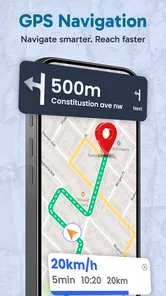
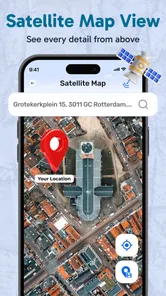
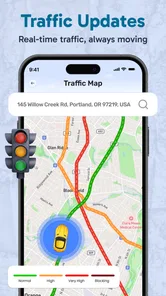
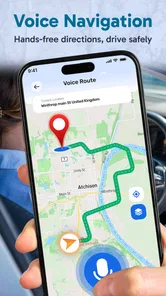
Analysis by Reviewed
I see Satellite View: Live Earth Maps as a visual way to get curious about places, rather than a tool I would rely on for every trip. It sits in the maps and navigation category, with a focus on satellite imagery and exploring the globe. That makes it appealing when I want a quick visual impression of an area, though it is worth separating that kind of browsing from turn-by-turn directions or dependable, current travel information.
What to expect from the current app
Macro Mobile Solution’s app is free to install, rated for Everyone, and currently at version 2.0.0. It has passed one million installs, with an average rating of 3.2 from around 3,400 ratings. Those figures suggest a sizeable audience but a mixed reception, so I would approach it as a useful extra rather than assume it will replace a familiar navigation app. Optional in-app purchases range from $9.99 to $29.99 per item, which is worth keeping in mind before buying anything.
The app was released on February 26, 2022, and version 2.0.0 is the current version. Those facts give a little context for its life so far, but they do not tell me what changed between releases. I would not treat the version number as proof of a particular upgrade; what matters to me is whether the app works smoothly on my device and whether its map views are useful for the places I actually want to inspect.
Where satellite browsing helps
For a practical example, imagine I am considering a rental in a neighborhood I do not know. A satellite view can help me look at the surrounding blocks, nearby open spaces, and the shape of the area before I visit. I would use it to prepare questions or decide what to inspect in person, not to judge a building’s condition or assume that every visible detail is current. The same distinction matters when scouting a walking route: imagery can orient me, while a dedicated navigation service is the better choice for live directions and changing road conditions.
That is the main trade-off compared with familiar map apps. A standard navigation app is usually the more dependable choice when I need a route, traffic-aware timing, or clear instructions while moving. Satellite-focused browsing is more useful when the goal is visual context: seeing how a place sits within its surroundings or satisfying a bit of geographic curiosity. If I switch between those purposes, I avoid asking one kind of map to do a job it may not be suited for.
A small workflow that makes browsing more useful
I find it helps to search for a destination before zooming in and to compare the broad area with the immediate surroundings. Starting close-up can make a location feel isolated; pulling back shows how it connects to nearby streets and landmarks. I also treat the image as a snapshot, not live proof of what is happening on the ground. For a visit, I would pair this visual check with current directions and confirm important details when I arrive.
One useful habit is to decide what question I am trying to answer before opening the map. “Is there a large green space nearby?” is a better satellite-view question than “Is this route safe tonight?” The first can be explored visually; the second depends on current, local knowledge that imagery cannot provide. Keeping that distinction clear makes the app more useful without asking it to make decisions it cannot support.
More From Our News Desk

 Weather - By Xiaomi
Weather by Xiaomi Review: Clear at a Glance, Less Clear Up Close
Xiaomi’s weather app makes everyday forecasts quick to scan, but its calm surface can leave useful details and recovery paths harder to find than they should be.

 X
XX Under Pressure: Can It Recover When Posting Goes Wrong?
A resilience-focused review of X, examining setup, mistaken posts, interruptions, weak connections, and the gaps that matter when recovery needs to be dependable.

 Clash of Clans
Clash of Clans Is Won Between the Battles
Its raids are quick; its community is a long-term project of coordination, teaching, rivalry, and shared responsibility—with all the friction that entails.

 Android Auto
Android Auto Makes the Case for Quieter Car Software
The car interface is no longer judged by how much it can do, but by how quietly it helps. Android Auto shows what drivers now expect—and what still gets in the way.

 MobiOffice: Word, Sheets, PDF
MobiOffice: Transforming Mobile Productivity with Seamless Integration
MobiOffice: Word, Sheets, PDF is redefining mobile productivity with a surprising blend of functionality and innovation.

 EA SPORTS FC Soccer Mobile 26
EA SPORTS FC™ Mobile Soccer: Redefining Mobile Sports Gaming
Dive into EA SPORTS FC™ Mobile Soccer, where immersive gameplay and strategic depth transform mobile sports gaming.
Latest News



Who is likely to enjoy it
This is a better fit for curious explorers, travelers doing early-stage research, or anyone who likes looking at geography from above. It may also be handy when I want a quick visual reference before meeting someone somewhere unfamiliar. I would skip it as my only map if I depend on precise navigation, need authoritative information for a time-sensitive trip, or want to make decisions based solely on imagery. In those cases, a dedicated navigation or local-information app is a safer companion.
A realistic everyday use is planning a first visit to a venue on the edge of town. I could inspect the surrounding layout to get a broad sense of the area, then use my regular map app for the actual journey and check signs when I arrive. If the satellite image seems unclear or doesn’t answer the question, I would not keep zooming in as though extra detail must appear; I would switch to a more suitable source or verify on site.
It can also help with low-stakes trip planning from home. Before choosing between two possible stops, I might use the aerial view to understand whether each sits near a waterfront, open land, or a dense cluster of buildings. That is a way to form a rough impression, not a guarantee that a path is publicly accessible or that a place is open. For those details, I would check current local information rather than infer them from the map.
For people who mainly want conventional directions, the extra visual browsing may not justify keeping another maps app on the phone. I would particularly avoid depending on it while driving: a satellite view is something I would inspect before setting off, not a substitute for clear spoken or turn-by-turn guidance. The safer workflow is to explore while stationary, choose a trusted navigation tool for the trip, and keep attention on the road.
Before installing, I would also consider the practical basics: the app requires Android 7.0 or later, and its free starting point does not mean every optional item is included. I would try the core experience first and only consider a purchase if a feature I actually use is gated. That avoids paying for something based on expectation rather than a real need.
How I would judge whether it fits
The useful question is not whether a satellite map can show a place, but whether the view helps with the decision I am making. If I want a visual overview before a visit, that can be worthwhile. If I need opening hours, a current closure, a reliable walking route, or an exact arrival time, I would use a service built around those details. Keeping one app for visual exploration and another for navigation is a sensible compromise, not a failure of either tool.
Exploring the World Virtually
So, what's the deal with Satellite View: Live Earth Maps? Imagine having a bird's eye view of any location on the planet. This app provides high-resolution satellite images that let you zoom into any corner of the globe. Whether you're planning your next vacation or just curious about a place you've never been, this app has got you covered.
Features That Stand Out
Let's talk features. One of the coolest things is the real-time traffic updates. If you're navigating through an unfamiliar city, this can be a real lifesaver. The app also offers 3D views of major landmarks, which is perfect for getting a feel for a place before you visit.
Another neat feature is the weather overlay. Knowing the weather conditions anywhere in the world can be incredibly useful, especially if you're planning outdoor activities. And if you're into stargazing, there's even an option to switch to an astronomical view!
User Experience
Now, let's get into the user experience. The interface is pretty intuitive. Even if you're not tech-savvy, you'll find it easy to navigate. The search function works like a charm, allowing you to find places quickly. Plus, the loading times for maps are impressively fast, so you won't be left waiting.
However, like any app, it's not without its quirks. Occasionally, the app may lag if you're viewing highly detailed maps or if your internet connection is on the slower side. But honestly, it's a small price to pay for such a comprehensive view of the world.
Making the imagery work for you
I would use the different views described here as ways to orient myself, not as interchangeable sources of truth. A 3D landmark view can make a place easier to picture before a visit, while an overhead image is better for understanding the broader layout. If I am checking a destination for someone else, I would describe what the map appears to show and avoid promising that a visible path, entrance, or facility is open or accessible.
For a weekend outing, for instance, I might look at a destination from above to see how it relates to nearby open areas, then check the weather separately before packing. The visual map can help me picture the setting, but it cannot tell me whether conditions have changed since the imagery was captured. That separation is especially helpful for outdoor plans, where a stale view could otherwise create false confidence.
Before relying on any of the extra overlays for a decision, I would test them on a familiar location and see whether they answer a practical question clearly. If an overlay is difficult to interpret or appears inconsistent with what I know, I would treat it as a prompt to verify elsewhere rather than a final answer. This small check helps me distinguish an interesting view from information I can safely act on.
What the version history can and cannot tell me
Version 2.0.0 gives existing users a clear marker for the build they are using, but a version number by itself does not explain which screens or tools have changed. I would judge the current experience by checking whether search, map loading, and the views I care about behave reliably on my own device. If I already have the app, I would not assume an update has altered a favorite workflow until I have opened it and tried that workflow again.
For someone deciding whether to keep it, the practical test is simple: does the app make visual exploration easier than the map tools already on the phone? If the answer is yes for a recurring task, it can earn a place as a companion. If I only open it once out of curiosity and still rely on another service for every useful detail, I would not feel obliged to keep it installed.
Why You Should Try It
At the end of the day, Satellite View: Live Earth Maps is more than just a tool; it's an experience. It's perfect for travel enthusiasts, geography buffs, or anyone with a curious mind. The app combines practicality with a sense of adventure, making it a must-have for your smartphone.
So, if you're ready to embark on a virtual journey around the globe, give this app a try. Who knows? You might discover somewhere new to add to your travel bucket list or just enjoy the thrill of exploring different locales from the comfort of your home.
My bottom line for different users
I would recommend trying it if you enjoy inspecting places visually and are comfortable keeping a second app for actual route guidance. Its free starting point makes that trial low-commitment, while the optional purchases are a reason to check what is included before spending. The Everyone rating also makes it broadly approachable, though that says nothing about whether its tools suit a particular trip.
For a traveler, a curious armchair explorer, or someone choosing where to visit next, the appeal is the chance to look around before going. For a commuter who needs dependable directions every day, I would choose a dedicated navigation app first and treat this one as optional. My recommendation is therefore specific: use it for visual context and discovery, verify consequential details elsewhere, and keep it only if that distinction makes your planning easier.
Satellite View:Live Earth Maps Frequently Asked Questions
Who develops Satellite View: Live Earth Maps, and what kind of app is it?
Satellite View: Live Earth Maps is a Maps & Navigation app developed by Macro Mobile Solution. Its focus is exploring places through satellite-style maps, street views, and 3D earth imagery. If you are looking for a dedicated navigation tool, it is worth considering how its map exploration features fit your needs before downloading.
What features does Satellite View: Live Earth Maps offer?
Satellite View: Live Earth Maps provides users with a comprehensive view of the globe using real-time satellite imagery. The app features live street views, a 3D terrain perspective, and the ability to explore different locations around the world with high-resolution details. It also includes route planning and navigation tools, making it a handy application for travelers and geography enthusiasts alike.
Is Satellite View: Live Earth Maps free to use or are there any in-app purchases?
Yes, Satellite View: Live Earth Maps is free to download and use. However, it offers in-app purchases ranging from about ten dollars to thirty dollars per item. The app’s main download is free, but check the purchase options in the app before choosing any paid extras.
How accurate is the live data provided by Satellite View: Live Earth Maps?
The app utilizes data from reputable satellite sources to provide highly accurate and up-to-date information. While it strives to deliver precise imagery and mapping details, users should be aware that there might be slight delays or discrepancies due to factors like data processing times and satellite coverage. Regular updates ensure improved accuracy and new features.
Can I use Satellite View: Live Earth Maps offline?
Satellite View: Live Earth Maps primarily operates online to deliver real-time data and imagery. However, users can download specific map areas for offline use, which is particularly useful for travelers in regions with limited internet access. To make the most of this feature, ensure that you download the necessary maps beforehand.
Pros
- Provides real-time satellite imagery.
- Easy navigation with intuitive interface.
- Offers street
- terrain
- and hybrid views.
- Includes weather overlay for forecasts.
- Frequent updates with new data.
Cons
- High data usage on mobile networks.
- Limited offline map accessibility.
- Occasional lag in loading images.
- Some features require in-app purchases.
- May drain battery quickly.











