San Antonio Express-News
- 247.00
- 4.1
- Installs
- 10.00K
- Price
- Free

Screenshots







Analysis by Reviewed
I approached San Antonio Express-News as a local news reader rather than as a general-purpose headline app. That distinction matters. Its focus is the San Antonio area, so the value comes from staying close to one community: local developments, regional issues, and stories that can easily disappear inside a national news feed. For me, that makes it most useful when I want a focused local source instead of an endless stream of unrelated headlines.
The app is free to install and is intended for Everyone. It belongs to the News & Magazines category, and Hearst Newspapers - LLC is listed as the developer. The application has been available since October 10, 2018, and its current version is 202608.28 for devices running Android 9 or later. Those details give the app a fairly established presence, while the 10K+ install level suggests a more specialized audience than the enormous national news platforms attract.
What the app is like as a local news companion
My first impression is that this is a publication-centered experience, not a social news network. I would open it with a particular purpose: checking what is happening around San Antonio, catching up on local reporting, or reading a story that matters to daily life in the area. That narrow purpose is its strongest identity. It does not need to compete with broad aggregators on the number of subjects it covers because its usefulness comes from local relevance.
That focus also changes how I judge it. A national app can feel busy and comprehensive, but it often requires filtering through stories that have little connection to my day. A local publication app can be quieter while still being more useful for someone who lives in, works in, or regularly follows San Antonio. If your main question is “What is happening near me?” rather than “What is happening everywhere?”, this format makes sense.
The average rating is 4.1 from around 600 ratings, with more than 200 written reviews. I would read that as a generally positive reception, but not as a guarantee that every reader will have the same experience. News apps are especially personal: one reader may value local depth, while another may dislike a subscription prompt, a particular layout, or the amount of coverage given to one topic.
Trust starts with a clear editorial purpose
For me, trust begins with knowing what an app is trying to do. San Antonio Express-News presents itself as a source for trusted San Antonio-area news, and the publication-specific approach is easier to understand than an anonymous feed assembled from many sources. When I use a dedicated local news app, I know why I am opening it and what kind of information I am likely to find.
That does not mean I would treat every article as a substitute for official information during an emergency or an important personal decision. I would still check relevant government notices, direct announcements, or primary documents when accuracy has immediate consequences. The app is best viewed as a practical way to follow reporting and context, not as the only source I would consult for something urgent.
More From Our News Desk

Weather by Xiaomi Review: Clear at a Glance, Less Clear Up Close

X Under Pressure: Can It Recover When Posting Goes Wrong?

Clash of Clans Is Won Between the Battles

Android Auto Makes the Case for Quieter Car Software

MobiOffice: Transforming Mobile Productivity with Seamless Integration

EA SPORTS FC™ Mobile Soccer: Redefining Mobile Sports Gaming
The developer identity is visible as Hearst Newspapers - LLC, which is useful context when deciding whether the app fits my expectations. I prefer apps whose publisher is easy to identify because it gives me a clearer sense of who is responsible for the publication. It also helps separate this app from an unofficial local-news reader that might simply collect stories from elsewhere.
What I would check before becoming a regular reader
Before settling into any news app, I look beyond the headline list. I pay attention to whether the app makes it easy to understand what I am reading, whether the publisher is apparent, and whether the path from free access to paid content is clear. Those checks are more valuable to me than a polished opening screen because they affect how comfortable I feel using the app over time.
San Antonio Express-News is free to download, but it includes in-app purchases ranging from $5.99 to $14.99 per item. That is the point where I would slow down and read the purchase screen carefully. A free installation does not automatically mean every article or reading option is free, so I would want to understand what a paid item provides before confirming anything. This is particularly important if I am handing the phone to a family member or using a shared device.
I also would not assume that a news app’s free entry point tells me everything about its ongoing cost. The practical habit is simple: inspect the wording around any purchase, check whether it looks like a one-time item or recurring access, and avoid tapping through quickly when I only intended to read a headline. That small pause gives me more control without making the app difficult to use.
Permissions and data-sensitive moments
My privacy review would begin at installation and continue whenever the app asks for access. I would read each permission prompt instead of approving everything automatically. If a permission is optional, I prefer to decline it until I understand why it would improve my experience. If the app can still serve its basic news purpose without that access, keeping the choice narrow is the more comfortable approach for me.
I would be especially attentive when the app requests anything connected with notifications, location, contacts, photos, microphone access, or other device information. A local news app may be useful without every possible permission, but the right choice depends on the exact prompt shown on my device. I would not infer the purpose of a permission from the app’s category alone; I would read the explanation presented at that moment.
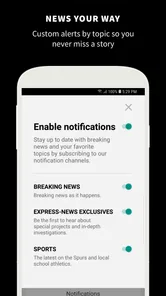
Notifications are a good example of a permission that affects both usefulness and privacy. Breaking-news alerts can save me from repeatedly opening the app, but too many alerts can turn a helpful source into background noise. I would start with notifications disabled or limited, then enable them only if I found that timely updates genuinely helped me. On Android, I can revisit notification controls later through the system settings rather than treating the first decision as permanent.
Another sensitive moment is account creation or a purchase flow. I would use only the information needed for the action I want to take, review the account controls shown on screen, and avoid entering extra personal details simply because a form offers the option. If I decide that paid access is not worthwhile, I would check the relevant store subscription or purchase controls instead of assuming that deleting the app cancels anything.
How I would use it during an ordinary week
Imagine I live in the San Antonio area and have ten quiet minutes before work. I would open the app to scan local headlines, choose one or two stories that affect my neighborhood or commute, and close it rather than trying to consume the entire news cycle. That routine is more sustainable than leaving a broad news aggregator open all day, especially when I want local context without constant national updates.
On a weekend, I might use it differently. I would look for deeper local coverage, save the details mentally, and then compare an important story with an official source or another reputable publication. The app’s role in that workflow is discovery and explanation. It helps me notice what deserves attention, while a primary source gives me the strongest confirmation when the details matter.
For someone who has moved away from San Antonio but still follows the area, the same focused design could be useful. It can provide a connection to local events and issues without requiring a large social-media feed. However, I would not choose it as my only news app if I needed extensive national, international, business, technology, or specialist coverage. Its local emphasis is a benefit only when that is what I actually want.
Where it fits beside familiar alternatives
Compared with a general news aggregator, this app should feel more intentional. Aggregators are convenient when I want many publishers, subjects, and viewpoints in one place, but they can also make local stories harder to find. San Antonio Express-News takes the opposite approach: fewer geographic priorities, more attention on one regional audience. I would choose the aggregator for breadth and this app for local focus.
Compared with reading the publication in a mobile browser, a dedicated app can be more convenient for repeat visits because it keeps the publication in a separate space on my phone. The trade-off is that an app may introduce its own notification decisions, account steps, purchase prompts, and update requirements. If I only read an occasional article, the browser may be the simpler option. If I check local coverage often, the app is easier to keep within reach.
Compared with social media, the publication app gives me a cleaner starting point. Social platforms are useful for discovering eyewitness discussion and links, but they also mix reporting with opinion, reposts, and recommendation algorithms. I would rather use this app to establish what the publication is reporting, then use other sources only when I need additional perspectives or confirmation.
Practical controls I would keep in mind
My preferred setup would be deliberately restrained. I would install the app, inspect the first permission prompts, and decide whether notifications are worth enabling. I would then read a few stories before considering any paid option. This sequence matters because it lets me judge the editorial value first instead of making a purchase simply because a prompt appears while I am curious.
I would also keep the operating system current enough for the app’s Android 9 minimum requirement and pay attention to update behavior. The listed version, 202608.28, shows that the app is maintained through version releases, but an update number alone does not tell me whether a particular change will improve my personal experience. I would review the store’s update notes and the permissions displayed by the operating system whenever the app changes substantially.
If I share a device, I would be careful with visible account information and purchase access. News reading can look harmless, but a logged-in account or an unlocked payment method can create avoidable problems. I would use the device’s screen lock, review store purchase authentication, and sign out or remove account access when appropriate. These are ordinary precautions, yet they give me more control than relying on the app to make every privacy decision for me.
For families, the Everyone rating is reassuring in terms of the listed age category, but I would still decide whether the app suits each person’s reading habits. News content can cover serious or upsetting subjects even when an app is appropriate for a general audience. I would not confuse an Everyone label with a promise that every article will feel comfortable for every reader.
Who will get the most from it
I think the app is a good match for San Antonio residents who want a direct local-news habit, people with family or work ties to the area, and readers who prefer a publication with a clearly defined geographic focus. It is also suitable for someone who wants to reduce the noise of a broad feed and spend a short, deliberate period catching up on regional reporting.
It is less suitable for readers who want a single app covering the whole world, who dislike any possibility of in-app purchases, or who prefer to gather news exclusively through a browser. It may also be the wrong choice for someone who expects every story to be free without checking the purchase terms. In those cases, a general aggregator, a browser-based routine, or a free public-news source may fit better.
I would also skip making it my sole source if I need specialized reporting outside the San Antonio area. No local publication app can replace a wider mix of sources for national policy, international events, financial research, or technical subjects. The sensible setup for me would be to use this app for local awareness and another carefully chosen source for everything beyond that boundary.
My cautious verdict after weighing control and convenience
San Antonio Express-News has a clear reason to exist: it puts San Antonio-area news in a focused app rather than asking me to search through a generic feed. I like that clarity, and the established developer identity, Everyone rating, free installation, and ongoing versioning make it approachable for a broad audience. Its 4.1 average suggests that many readers find the experience worthwhile, although I would still judge it against my own tolerance for purchase prompts and local-news priorities.
The main trade-off is not complicated, but it should be visible before installation becomes a habit. I would manage notifications carefully, read permission prompts instead of approving them automatically, and examine every in-app purchase screen before confirming. Those choices let me benefit from a local publication app without handing over more attention, access, or money than I intended.
My recommendation is cautious but positive: try it if San Antonio coverage is genuinely relevant to your life, then spend a few sessions deciding whether the reporting and reading experience justify keeping it installed. The best reason to choose it is local focus, not the promise of being your only news source. If that focus matches your needs and you are comfortable checking the visible account and payment controls, it is a practical addition to a balanced news routine.
San Antonio Express-News Frequently Asked Questions
What devices can run the San Antonio Express-News app?
The San Antonio Express-News app is available for mobile devices running Android or iOS, with the supported system version depending on the platform. Before installing, check your device’s operating-system version and the app’s compatibility information in its store. Keeping your device’s software current can also help with app stability and access to the latest features.
Who publishes the San Antonio Express-News app, and what is its age rating?
The app is published by Hearst Newspapers - LLC and is categorized as a News & Magazines app. Its content rating is Everyone, making it broadly suitable for general audiences. As with any news app, articles may cover serious or sensitive current events, so parents may want to consider their child’s reading habits even when an app carries an all-ages rating.
What is the San Antonio Express-News app?
The San Antonio Express-News app is a mobile news platform focused on San Antonio, South Texas, and surrounding communities. During testing, it provided access to breaking news, local reporting, politics, sports, business, entertainment, weather, and opinion content. It is designed for readers who want updates from the Express-News in a convenient format rather than relying only on the newspaper’s website.
Is the San Antonio Express-News app free to download and use?
The app can generally be downloaded without an upfront charge, but access to all articles may depend on the publication’s subscription and digital-access policies. Some stories or features may be available to everyone, while frequent reading can require a subscription or account. Before downloading, users should review the current pricing, trial terms, and renewal details shown in the app store or within the application. In-app purchases are listed from $5.99 to $14.99 per item, so check the purchase details before confirming.
What kind of news and features are available in the app?
The San Antonio Express-News app typically includes local and regional reporting, breaking-news updates, high school and professional sports coverage, business stories, entertainment, food, lifestyle, weather, and editorial content. Depending on the current version, readers may also find notifications, saved articles, photo galleries, videos, newsletters, and personalized content options. Feature availability can vary by device and subscription level.
Pros
- Covers San Antonio-area breaking news
- politics
- and community updates.
- Strong local sports coverage
- including Spurs
- high school
- and college teams.
- Offers reporting from journalists familiar with regional issues and neighborhoods.
- Useful for following local events
- public safety
- and cultural developments.
- Digital access makes the publication convenient to read on mobile devices.
Cons
- Some articles or features may require a paid subscription to access.
- Advertising and promotional content can affect the reading experience.
- Coverage is primarily regional
- so national news may be limited.
- App performance and notifications may vary after updates or on older devices.
- Some readers may find frequent breaking-news alerts distracting.













