Safe Surfer: Block Porn & Apps
- 405.00
- 3.8
- Installs
- 500.00K
- Price
- Free

Screenshots
Analysis by Reviewed
Ever found yourself scrolling through your phone, worried about what might pop up unexpectedly? Yeah, me too. That's where Safe Surfer: Block Porn & Apps comes into play. This app is like that friend who always has your back when you need it the most.
The idea I find most useful here is focused protection: instead of relying only on willpower or asking a child to avoid certain pages, you can use a filter to reduce exposure to unwanted online material. That does not make browsing risk-free, and it cannot replace a conversation about what to do when something uncomfortable appears. But it gives families a practical layer of help, especially when a phone is shared or a young person is beginning to use the internet more independently.
What the filter changes in everyday use
Safe Surfer is a free parenting app from Safe Surfer, with optional in-app purchases ranging from $1.49 to $5.49 per item. Its central appeal is the ability to block adult material and other content a family considers harmful. In day-to-day terms, that can mean fewer chances of landing on an unsuitable page while browsing, rather than having to depend on a parent being beside the child every time a phone is in use. I see that as a helpful boundary, not a guarantee that every unwanted result will disappear.
The app has an average rating of 3.8 from around five thousand ratings, and more than half a million installs. Those figures suggest it has found a substantial audience, while also leaving room for different experiences and expectations. The Everyone age rating describes the app itself; it should not be confused with a promise that every online page or every use of a device is suitable for every child.
Its focus is worth keeping in mind when choosing it. A filter is most useful when the concern is accidental exposure or when a family wants a straightforward way to set limits. It is less suited to someone looking for a complete explanation of a child’s online life or a substitute for broader device-management tools. I would decide first what I actually want to prevent, then judge the app against that specific need instead of expecting one install to solve every digital-safety concern.
What is Safe Surfer?
So, let’s dive into what this app is all about. Safe Surfer: Block Porn & Apps is designed to help keep your online experience safe and clean. It’s not just about blocking unwanted content; it’s about giving you peace of mind while you surf the web or hand over your phone to your kids. In today’s digital age, ensuring a safe online environment is crucial, and this app does just that.
Features That Stand Out
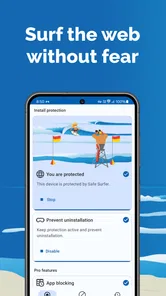
First things first, the features. Safe Surfer offers a robust filtering system that blocks inappropriate content across various platforms. It’s like having a digital guardian angel that ensures your browsing stays on the right track. The app is super intuitive, making it easy for anyone to set up and start using right away. And let me tell you, the user interface is a breath of fresh air. No clutter, just clean, straightforward controls.
More From Our News Desk

 Gmail
Gmail in a Busy Inbox: Who Benefits Most?
From first account to crowded workday, Gmail earns its place through dependable search and flexible sorting—but its best fit depends on how much inbox maintenance you can tolerate.

 Prime Video
Switching to Prime Video: What Changes in Your Viewing Routine
Prime Video can make a compelling second home for streaming, but switching means learning a different catalog, rental layer, and route from browsing to playback.

 Universal TV Remote Control
 Works Best as a Reliable Backup
A phone remote earns its place through quick setup and reliable habits. Here is how to get more from Universal TV Remote Control—and where its limits show.

 Weather - By Xiaomi
Weather by Xiaomi Review: Clear at a Glance, Less Clear Up Close
Xiaomi’s weather app makes everyday forecasts quick to scan, but its calm surface can leave useful details and recovery paths harder to find than they should be.

 X
X Under Pressure: Can It Recover When Posting Goes Wrong?
A resilience-focused review of X, examining setup, mistaken posts, interruptions, weak connections, and the gaps that matter when recovery needs to be dependable.

 Clash of Clans
 Is Won Between the Battles
Its raids are quick; its community is a long-term project of coordination, teaching, rivalry, and shared responsibility—with all the friction that entails.
Latest News



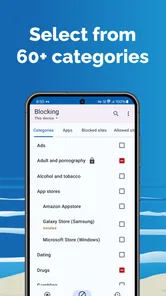
One of the standout features is the remote management capability. You can manage multiple devices from one account, which is perfect for families. Plus, with the app's ability to block specific apps and set time restrictions, you can make sure that the little ones aren’t spending too much time glued to their screens. It’s a perfect blend of protection and parental control.
Putting protection into a family routine
A realistic use for this kind of filtering is the moment a child starts using a phone outside the living room: on the way to school, while waiting for a ride, or during a quiet stretch at home when an adult cannot supervise every tap. I would set expectations together before handing over the device. Explain that the filter is there to reduce unwanted exposure, not to punish curiosity, and agree on what the child should do if a page seems wrong or a block feels mistaken.
Remote management can also make a difference in a household with more than one device. Rather than treating each phone as an isolated project, a parent can use the shared management approach described for the app to keep the family’s setup more consistent. I would still check each device directly after configuring it: a setting that seems clear on a parent’s phone is only useful if the child’s device is actually covered and behaving as expected.
Blocking apps and setting time limits can complement content filtering, but they address different problems. A website filter is about what can appear during browsing; an app restriction or time boundary is about access and habits. Keeping those goals separate helps avoid overblocking. For example, if the real issue is late-night scrolling, a time limit may be more relevant than tightening every content setting. If the worry is accidental exposure, a filter may be the more direct starting point.
My Personal Experience
Now, onto my personal experience with Safe Surfer. Installing the app was a breeze. I was up and running in no time, and the difference was noticeable immediately. No more annoying pop-ups or unwanted ads interrupting my browsing. It felt like a digital detox, and honestly, I didn’t realize how much I needed it until I had it.
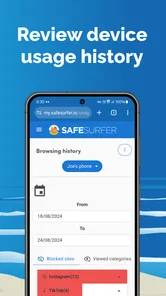
The app runs smoothly in the background without slowing down my device, which is a huge plus. I also appreciated the detailed reports it offers, helping me understand and control internet usage better. It’s like having an insight into your digital habits, and who doesn’t love a bit of self-improvement?
Where I would be cautious
Filters inevitably involve trade-offs. A block can be reassuring when it catches something a parent would rather a child not see, but a legitimate page may also be restricted, or an unsuitable page may still get through. I would not tell a child that the app makes the internet completely safe. I would describe it as one useful barrier and make it easy for them to ask for help without feeling they have done something wrong.
There is also a balance between protection and trust. Applying strict limits without explaining them can turn a safety tool into a source of arguments, especially as children get older and need more independence. I would start with the concern that matters most, use the least restrictive setting that addresses it, and revisit the arrangement as the child’s needs change. The aim is a safer routine, not a contest to lock down every corner of a device.
Families should also consider what happens when a child uses another device. A protection setup on one phone cannot automatically stand in for household rules on a friend’s tablet, a school device, or a shared computer. That is why I see the app as most effective when it sits alongside simple habits: keeping communication open, agreeing on device boundaries, and showing a child how to leave a page and tell a trusted adult when something feels uncomfortable.
Safe Surfer runs on Android devices with version 5.1 or later, and its current version is 3.8.14. The app has been available since February 15, 2017, and is rated Everyone. Those details make it easier to check whether it suits a particular Android device, but families should still think about how their own devices are used and whether they want a focused filter or a broader set of controls.
How it compares with other ways to set boundaries
The usual alternatives include built-in parental controls, browser-level filtering, and simply setting family rules without an extra app. Built-in controls can be convenient when a household wants to manage screen time and access through the phone’s existing settings. A browser filter may be enough if the concern is limited to web browsing. Safe Surfer is more appealing when a parent wants a dedicated filtering app and the option to manage multiple devices, rather than piecing together separate settings and hoping everyone remembers how they work.
That focus is also a limitation. If you want a single system for every device in a mixed Android-and-iOS household, check that it fits the actual phones your family uses before relying on it. If your priority is only a bedtime schedule or a basic app limit, the controls already built into a device may be simpler. I would choose Safe Surfer when content filtering is the central concern, not just because a family wants any kind of parental control.
For an adult using it personally, the decision is different. Someone trying to reduce access to distracting or unwanted material may value a barrier that supports a goal they have already chosen. But anyone who needs detailed control over every app, account, and device should compare the available tools carefully rather than assume a focused filter covers those needs. The right choice depends on whether the main problem is content exposure, time spent, or a broader pattern of device use.
Who is most likely to benefit
I think Safe Surfer is best for parents who want a dedicated content filter, especially when children use their phones without an adult beside them. It can also suit an adult who wants help keeping certain material out of their own browsing routine. The app’s family-oriented management and its combination of filtering with app blocking and time limits make it more useful than a narrow web-only solution for households trying to set a few clear boundaries in one place.
I would skip it if you expect a filter to replace supervision, if your needs are limited to a control your phone already provides, or if you need a tool whose coverage you can verify across every device in your household. I would also avoid presenting it to a child as a secret surveillance measure. A clear explanation of what is being limited and why is more likely to support cooperation than rules that arrive without context.
Before relying on it, I would check that the Android version is compatible, decide which categories or apps matter to your household, and test the setup on the device the child actually uses. Then revisit it after ordinary browsing rather than assuming the first configuration is perfect. That small review helps catch both sides of the trade-off: a boundary that is too loose to be useful and one that blocks normal activities unnecessarily.
Final Thoughts
If you’re looking for an app to help you surf the web with peace and confidence, Safe Surfer: Block Porn & Apps is definitely worth considering. It’s effective, easy to use, and offers features that genuinely enhance your online experience. Whether you’re a parent wanting to protect your children or just someone who values a clean browsing environment, this app has got you covered.
Safe Surfer is more than just a filter; it’s a tool that empowers you to take control of your digital life. So, why not give it a try? You might just find it’s the app you never knew you needed until now.
Safe Surfer: Block Porn & Apps Frequently Asked Questions
Is Safe Surfer free to download, and are there any optional purchases?
Safe Surfer is free to download, so you can try its core approach to blocking pornography, apps, and other harmful online content without an upfront purchase. The app also offers in-app purchases, which are priced from $1.49 to $5.49 per item. Check the purchase options in the app before choosing whether any paid features are right for your needs.
What is Safe Surfer and how does it work?
Safe Surfer is an app designed to help users block inappropriate content, such as pornography, and manage app usage on their devices. By employing advanced filtering technologies, it monitors and restricts access to unwanted content across the web and installed applications. This ensures a safer browsing experience, especially for children and teens.
Is Safe Surfer compatible with both Android and iOS devices?
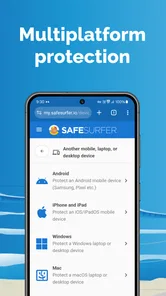
Yes, Safe Surfer is available for both Android and iOS platforms. It has been optimized to work seamlessly across various devices, ensuring comprehensive protection regardless of the operating system. Users can download it from the Google Play Store or Apple App Store, depending on their device. On Android, the current version is 3.8.14 and requires Android 5.1 or later.
Does Safe Surfer offer customizable settings for different users?
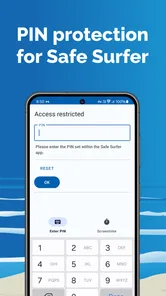
Safe Surfer provides a range of customizable settings to tailor the app's functionality to different user needs. Parents can adjust filtering levels, set time restrictions, and block specific websites or apps. This flexibility makes it easier to create a personalized safe browsing environment for each family member.
How does Safe Surfer ensure privacy while monitoring web activity?
Safe Surfer prioritizes user privacy by using secure encryption methods to monitor and filter internet traffic. It does not store personal data or browsing history, ensuring that users' online activities remain confidential. This approach offers peace of mind for users concerned about their privacy while maintaining safety.
Pros
- Effective content filtering for safer browsing.
- User-friendly interface and easy navigation.
- Customizable blocking settings for flexibility.
- Cross-device compatibility enhances protection.
- Regular updates improve filtering accuracy.
Cons
- May block non-explicit content mistakenly.
- Requires network access for full functionality.
- Premium features are behind a paywall.
- Limited support for non-English languages.
- Occasional app crashes on older devices.