

Rylo: Live Call Captions
- 773.00
- 4.2
- Installs
- 100.00K
- Price
- Free

Screenshots
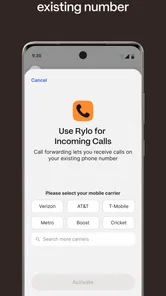
Analysis by Reviewed
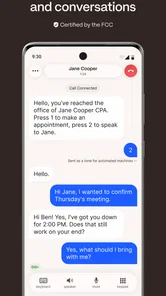
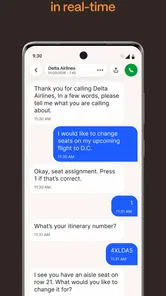
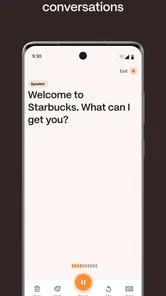
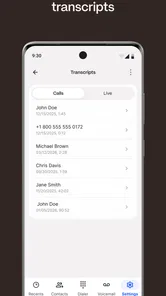
Phone calls are easy to take for granted until hearing speech clearly becomes tiring, unreliable, or impossible. That is where Rylo: Live Call Captions makes a practical difference. It is a free communication app from Rylo HQ designed to turn spoken phone conversations into readable text while the call is happening. I found its value less in adding another way to chat and more in changing the pressure of a call: instead of guessing at a missed sentence, I can pause, read, and respond with more confidence.
That distinction matters. A normal phone call demands constant attention to sound, timing, background noise, and the other person’s speaking pace. Live captions introduce a visual reference, which can make the exchange feel more manageable for deaf and hard-of-hearing users. The app is rated for Everyone, works on devices running Android 7.0 or later, and its current version is 2.0.12. Those details make it approachable for people using older compatible phones, although the actual experience still depends on the phone, the call environment, and how clearly the other person speaks.
Why readable speech changes the need for a phone call
In my experience, the biggest benefit is not simply that words appear on screen. The captions change the balance of responsibility during a conversation. Without visual support, a listener may have to ask for repetition several times, pretend to understand, or abandon a call altogether. With Rylo running, the conversation has another channel. I can look at the text when a name, address, number, or short instruction is difficult to catch.
A realistic example is a call with a delivery service. The representative may say a street name quickly, give a time window, and then add a condition before asking whether everything is clear. On an ordinary call, missing one part can mean asking the representative to repeat the entire explanation. With live captions, I can check the displayed wording, confirm the important detail, and use my voice to answer when I am ready. That makes the call less exhausting and reduces the chance of agreeing to something I did not understand.
The app is especially useful when a call cannot easily be moved to text messaging. Banks, clinics, offices, repair services, and family members may still prefer or require a voice call. A text conversation is often clearer, but it is not always available at the right moment. Rylo fits into that gap by preserving the immediacy of a call while giving the listener a readable aid.
I also see value in short, high-stakes exchanges. Confirming an appointment, checking a reservation, discussing a school matter, or receiving directions can be stressful when every sentence has to be understood through sound alone. Captions let me concentrate on meaning rather than on whether I heard the last few words correctly. The practical win is greater control over the conversation, not merely a transcript-like display.
How the conversation rhythm feels in practice
Captions do not make a phone call identical to messaging. The other person still speaks, and I still need to respond in the normal rhythm of a call. What changes is the recovery process after a missed phrase. Instead of interrupting immediately, I can glance at the text and decide whether the sentence is clear enough. That small pause can make the conversation feel calmer and less embarrassing.
More From Our News Desk

 Gmail
GmailGmail in a Busy Inbox: Who Benefits Most?
From first account to crowded workday, Gmail earns its place through dependable search and flexible sorting—but its best fit depends on how much inbox maintenance you can tolerate.

 Prime Video
Switching to Prime Video: What Changes in Your Viewing Routine
Prime Video can make a compelling second home for streaming, but switching means learning a different catalog, rental layer, and route from browsing to playback.

 Universal TV Remote Control
Universal TV Remote Control Works Best as a Reliable Backup
A phone remote earns its place through quick setup and reliable habits. Here is how to get more from Universal TV Remote Control—and where its limits show.

 Weather - By Xiaomi
Weather by Xiaomi Review: Clear at a Glance, Less Clear Up Close
Xiaomi’s weather app makes everyday forecasts quick to scan, but its calm surface can leave useful details and recovery paths harder to find than they should be.

 X
XX Under Pressure: Can It Recover When Posting Goes Wrong?
A resilience-focused review of X, examining setup, mistaken posts, interruptions, weak connections, and the gaps that matter when recovery needs to be dependable.

 Clash of Clans
Clash of Clans Is Won Between the Battles
Its raids are quick; its community is a long-term project of coordination, teaching, rivalry, and shared responsibility—with all the friction that entails.
Latest News



There is also a useful difference between understanding the general topic and catching exact wording. I may follow a friend discussing weekend plans without help, yet struggle with a business name or a sequence of digits. A captioned call gives me a second chance for those precise details. My advice is to treat the text as support for important words rather than assuming every line will be perfect. If something matters, I still confirm it directly.
The app can change how both people take turns. When I can read what was said, I am less likely to answer too early just because I am afraid of losing the moment. I can wait, process the information, and reply more deliberately. That is valuable for users who find rapid back-and-forth speech overwhelming. It also helps when the caller has a strong accent, speaks from a noisy place, or moves between topics quickly.
One useful habit is to tell the other person at the beginning that I am using captions and may take an extra moment before answering. That simple explanation sets expectations. It prevents a pause from being mistaken for confusion or disinterest. I would also keep the phone positioned so the screen is easy to read without constantly changing grip. The app is most helpful when checking the words does not become a separate physical struggle.
For longer calls, I would use a deliberate rhythm: listen, glance at the caption, confirm a key point, and then answer. Trying to read every line with total concentration can make the call more tiring rather than less. The best use is selective attention. I look closely when the topic is important or unclear, then return my focus to the person’s voice and the overall conversation.
Where captions help, and where they still demand attention
Live text is not a replacement for careful listening or clear communication. It adds another stream of information, and that stream can compete for attention. Reading while someone is speaking requires visual focus, so I would not use the phone in a situation where looking at the screen is unsafe or impossible. The app is intended to support a call, not to make divided attention harmless.
There is a real cognitive trade-off here. A user may feel relieved to have words on screen, but following captions can become tiring during a long or complicated discussion. I found it more effective to use them as an anchor: check the sentence, identify the key point, and avoid obsessing over every small variation in the text. If the conversation involves several people speaking over one another, the visual stream may become harder to follow, and asking participants to take turns remains important.
Background noise and unusual speech patterns can also affect how useful the captions are. A quiet room and one person speaking at a time give the app a better chance of producing readable text. In a crowded café, on a busy street, or during a call with overlapping voices, I would be more cautious. The captions can help recover meaning, but they should not be treated as an unquestionable record.
This is one of the most important boundaries for practical use: captions can show what the system interpreted, not guarantee that every word was correct. Names, technical terms, medication instructions, addresses, and financial details deserve confirmation. My workflow would be to repeat the critical information aloud or ask the caller to spell it. That extra step is not a weakness unique to this app; it is a sensible safeguard whenever automated speech recognition is involved.
The screen itself also affects attention. If I stare at the text continuously, I may lose the emotional tone of the caller’s voice and miss when they are waiting for a response. If I ignore the text completely, I lose the reason for using the app. Rylo works best when I decide in advance what I need from it: full support for difficult calls, occasional checking for familiar conversations, or help only with names and numbers.
Boundaries, privacy, and everyday confidence
Using a captioning tool can make phone calls more accessible, but it does not remove the need for personal boundaries. I would avoid treating the app as a reason to stay on a call longer than I want. Better understanding should make it easier to end a conversation clearly, not create an obligation to remain available. A direct sentence such as “I have the information I need, so I’m going to go now” is still useful, whether the call is captioned or not.
The same idea applies socially. Some callers may become overly careful, speak unnaturally, or assume that every pause means a problem. I prefer a short explanation: the captions help me follow the call, but I still want the conversation to sound normal. That keeps the tool in the background instead of making accessibility the entire subject of the call.
I would also think carefully before using captioning for sensitive conversations in public. The screen may be visible to people nearby, and reading text aloud or displaying private details can create a different kind of exposure. Choosing a quieter place, lowering screen visibility, and checking the surrounding environment are sensible habits. These are not reasons to avoid the app; they are reminders that accessibility and privacy have to be considered together.
Another boundary is knowing when a different communication method is better. If the other person can send a written message, email, or chat response, that may be preferable for complicated instructions because it gives both sides a stable reference. Video calling may be better when facial expressions, signing, or visual context are essential. A standard voice call without assistance remains simpler for people who hear comfortably and do not need captions. Rylo earns its place when the immediacy of a phone call matters and readable support makes that call possible.
For family and friends, the app can reduce the emotional cost of asking for repetition. That may sound small, but repeated misunderstandings can make someone avoid calls altogether. When I know there is a visual backup, I am more willing to answer an unexpected call or contact a service directly. The result is not just better comprehension; it can also restore independence in ordinary tasks.
What the app offers compared with usual alternatives
The usual alternatives each solve a different part of the problem. Text messaging is excellent for exact details and gives the recipient time to respond, but it cannot always replace a live conversation. Relay services can provide broader communication support, yet they may introduce another participant or a different pace. Built-in accessibility tools may already help on some phones, while a dedicated app can be easier to associate with the specific need for captioned calls.
Rylo’s strongest position is convenience for people who want to keep using ordinary phone conversations while adding visual assistance. It does not ask me to persuade every caller to install the same service. That matters when speaking with a clinic, business, relative, or unfamiliar contact. The caller can continue using a normal call, while I use the app as my side of the conversation.
The trade-off is that a dedicated captioning app adds another step to the calling routine. I need to remember to use it when needed and keep my attention on both the call and the screen. Someone who mostly communicates through written chat may find that unnecessary. Someone who needs highly formal, permanent documentation may prefer a written channel instead of relying on live captions during speech.
Rylo is also not the right choice for every hearing-related situation. If the user needs signing, visual lip-reading, a human relay operator, or support for a group discussion, captions alone may not be enough. Likewise, if a call contains complex legal, medical, or technical information, I would combine the app with written confirmation rather than depending on the live text as the sole source of truth.
Who should try it and how to get the most from it
I would recommend this app first to deaf and hard-of-hearing users who still need to handle regular phone calls. It can also suit people whose hearing varies by environment, fatigue, or speaker, especially when avoiding a call is inconvenient. The free price makes it easy to test without turning the decision into a financial commitment, and the Everyone age rating keeps its intended use broad.
Before relying on it for an important appointment, I would make a short practice call. The goal is not to measure the app with a perfect score, but to learn how quickly the text appears, how comfortable the screen is to read, and how much attention the process requires. A practice run also helps identify which words need confirmation. That preparation is more valuable than discovering the workflow halfway through a stressful call.
For better clarity, I would ask callers to speak one at a time, avoid covering the microphone, and repeat only the specific phrase that was unclear. If a name or number appears incorrectly, I would ask for spelling rather than guessing from context. During a long call, I would note important points separately instead of assuming I can reconstruct everything later from the caption stream.
The app has attracted a meaningful user base, with over one hundred thousand installs and an average rating of 4.1 from around two thousand ratings. I read that as a sign of practical usefulness rather than proof that every call will be effortless. The experience will naturally vary with the device, the speaker, the surroundings, and the user’s preferred way of communicating. Its 770 reviews also indicate that people are actively evaluating it as a real communication aid, not merely downloading it out of curiosity.
Rylo HQ has kept the product focused on one clear need: making phone conversations easier to follow through live text. That focus is its advantage. I did not come away expecting it to replace messaging, relay support, or every other accessibility option. Instead, I see it as a bridge for the moments when a voice call is necessary but sound alone is not dependable enough.
My final view on Rylo
After considering how it affects the pace and effort of a call, I think Rylo is most valuable as a confidence tool. It gives the listener room to verify, pause, and respond without turning every missed word into a crisis. That can change everyday choices: answering a service call, confirming an appointment, speaking with family, or handling an unexpected question without immediately asking someone else to help.
Its limitations are worth respecting. Reading captions costs attention, automated wording should be checked for important details, and noisy or overlapping conversations may reduce the benefit. People who prefer text-first communication, need a human relay, or require a permanent written record may be better served by another option. The app is not a universal answer, and I would not present it that way.
Still, for its intended audience, the idea is both focused and useful. Rylo makes the rhythm of a phone call less dependent on catching every sound perfectly. It gives users more control over when to concentrate, when to ask for clarification, and when to end the conversation. If live calls are part of your life but hearing them clearly is inconsistent, this free communication app is worth trying as a practical visual safety net.
Rylo: Live Call Captions Frequently Asked Questions
Who is Rylo: Live Call Captions designed for?
Rylo is a communication app intended to help deaf and hard of hearing users follow phone conversations by showing spoken dialogue as captions. It may also be useful to anyone who finds on-screen text helpful during a call. The app is rated for Everyone, but the usefulness of live captions will depend on whether the calling setup and device work with its features.
What devices and operating systems can run Rylo?
Rylo is available for Android devices running Android 7.0 or later. Before downloading, check that your phone meets that requirement and that you can grant the permissions needed for the calling experience you want to use. Rylo is developed by Rylo HQ, and its current version is 2.0.12; compatibility can still vary across phone models and operating-system configurations.
What is Rylo: Live Call Captions, and how does it work?
Rylo: Live Call Captions is designed to make phone conversations easier to follow by displaying spoken dialogue as text during a call. After installing and configuring the app, eligible conversations can be transcribed in near real time on your device. The exact experience may depend on your phone model, operating system, language settings, network connection, and the calling method being used.
Does Rylo support every phone call and messaging platform?
Not necessarily. Compatibility can vary depending on whether you are making a regular cellular call, using an internet-based calling service, or communicating through a third-party app. Before downloading, check Rylo’s current store listing and supported-device information. Some features may require specific permissions, a compatible operating-system version, or particular calling services, so availability should not be assumed across all platforms.
Are Rylo’s captions accurate enough for everyday conversations?
Rylo can be useful for following conversations, but live transcription is not perfect. Accuracy may be affected by accents, background noise, poor signal quality, fast speech, overlapping speakers, technical terminology, and language selection. Captions should be treated as assistance rather than an official transcript. For important medical, legal, business, or financial discussions, confirm critical details directly instead of relying only on the displayed text.
Pros
- Captions appear in real time during phone conversations.
- Useful for users with hearing loss or difficulty understanding calls.
- Can make conversations easier in noisy environments.
- Simple concept that works without requiring the other caller to install it.
- Helps users follow important details such as names
- dates
- and addresses.
Cons
- Caption accuracy can vary with accents
- background noise
- or fast speech.
- The app may require microphone and call-related permissions to function.
- Sensitive conversations may raise privacy concerns when processed for captions.
- Captions can lag slightly
- especially with weak internet connectivity.
- Availability and functionality may differ by country
- device
- or Android version.











