

RouteOne GO: Truck Navigation
- 5.00
- 4.2
- Installs
- 10.00K
- Price
- Free

Screenshots
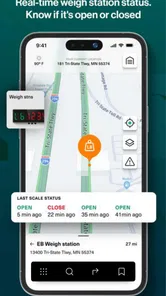
Analysis by Reviewed
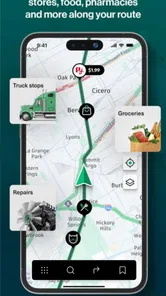
I spend enough time looking at navigation apps to know that a truck driver needs more than a blue line and an arrival estimate. A route that works for a small car can become a poor choice when vehicle size, fuel use, stopping points, and long stretches of unreliable mobile service enter the picture. RouteOne GO: Truck Navigation is built around that more practical problem. I found it most interesting as a focused tool for drivers who want route planning to reflect the realities of truck travel rather than simply copy the experience of ordinary car navigation.
This is a free Maps & Navigation app from Route One Go, available to everyone and running on Android 8.0 or later. It has a 4.2 average from around forty-six ratings, with over ten thousand installs, so it is established enough to attract real use while still feeling like a relatively small, specialized product. The current version is 1.0.33, and the app was released on November 20, 2024. Those details matter because this is not a mature household-name navigation platform with years of accumulated familiarity; it is a newer tool that deserves a practical trial before becoming the only app in a driver’s workflow.
Where connectivity changes the driving experience
The most important thing to understand is that a navigation app is only as dependable as the information it can access at the moment you need it. RouteOne GO is designed around truck navigation, optimized routing, fuel costs, and useful stops, but those jobs naturally depend on current route information and the phone’s ability to communicate. I would not treat it as a magical replacement for preparation. Before leaving, I would open the planned journey while connected, check the major decisions in the route, and make sure the phone has enough battery for the trip.
That habit is especially valuable for commercial drivers. A route can look simple at the depot and become much less convenient after a missed turn, a road closure, or a long detour. When a driver is moving through a city with strong service, the app can be used as an active planning companion. In a rural area, a tunnel, or a congested industrial zone where the signal becomes inconsistent, I would want a second layer of preparation rather than relying on a screen that may not update as expected.
I also like the idea of separating route confidence from signal confidence. If the app suggests a sensible truck-friendly path while the phone is connected, that is useful. It still does not mean every later change will appear instantly when connectivity weakens. My recommendation is to look ahead at complicated sections before entering them: urban approaches, border-style checkpoints, fuel decisions, and the final roads near a delivery address. That small review can reduce the need to make decisions while the connection is unstable.
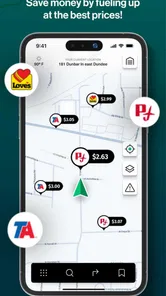
Fuel planning makes connectivity even more relevant. Fuel cost is not only a number to glance at after the route is calculated; it can influence which route feels reasonable. A slightly longer road may be preferable if it produces a more manageable journey or places a useful stop at the right point. I would use the app to compare the overall plan before departure, then avoid repeatedly recalculating unless the situation genuinely changes. Constant changes can consume attention, battery, and mobile data without improving the trip.
A realistic working-day example
Imagine starting an early delivery run from an industrial estate. The first part of the journey has reliable service, so I would enter the destination, review the suggested route, and examine where fuel or other key stops fit into the day. If the route then crosses a rural stretch, I would pay attention to the next major decision before leaving coverage. That is not because I expect the app to fail every time the signal dips; it is because a professional driver should not discover an important turn only when the phone is struggling to refresh.
More From Our News Desk

 Weather - By Xiaomi
Weather by Xiaomi Review: Clear at a Glance, Less Clear Up Close
Xiaomi’s weather app makes everyday forecasts quick to scan, but its calm surface can leave useful details and recovery paths harder to find than they should be.

 X
XX Under Pressure: Can It Recover When Posting Goes Wrong?
A resilience-focused review of X, examining setup, mistaken posts, interruptions, weak connections, and the gaps that matter when recovery needs to be dependable.

 Clash of Clans
Clash of Clans Is Won Between the Battles
Its raids are quick; its community is a long-term project of coordination, teaching, rivalry, and shared responsibility—with all the friction that entails.

 Android Auto
Android Auto Makes the Case for Quieter Car Software
The car interface is no longer judged by how much it can do, but by how quietly it helps. Android Auto shows what drivers now expect—and what still gets in the way.

 MobiOffice: Word, Sheets, PDF
MobiOffice: Transforming Mobile Productivity with Seamless Integration
MobiOffice: Word, Sheets, PDF is redefining mobile productivity with a surprising blend of functionality and innovation.

 EA SPORTS FC Soccer Mobile 26
EA SPORTS FC™ Mobile Soccer: Redefining Mobile Sports Gaming
Dive into EA SPORTS FC™ Mobile Soccer, where immersive gameplay and strategic depth transform mobile sports gaming.
Latest News



Later, if traffic or a road restriction forces a change, I would pull over safely before asking the app to rethink the route. The useful workflow is not “touch the screen whenever something looks different.” It is “use the app for planning, keep the phone stable and visible, and make route changes during a safe stop.” That approach makes the connectivity question manageable and keeps the driver’s attention where it belongs.
Using it in a moving truck, not at a desk
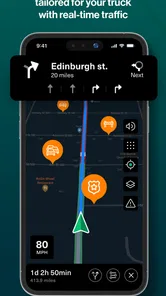
Truck navigation has a different rhythm from ordinary commuting. A car driver may accept a quick detour or a narrow local road because turning around is easy. A truck driver has to think about access, stopping, fuel, delivery timing, and the consequences of a poor final approach. RouteOne GO’s focus on those truck-specific concerns gives it a clearer purpose than a general map app, particularly when I am planning a full working day instead of a single personal trip.
The mobile context matters as much as the route itself. A phone mounted in a cab is exposed to vibration, glare, heat, and constant movement. I would set up the route before pulling away, keep interactions brief, and avoid treating the display like a planning table while driving. The app is more useful when it reduces decisions rather than creating another stream of distractions.
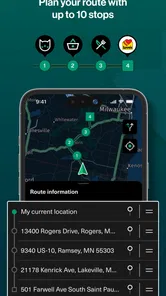
For a driver who moves between several delivery points, the best workflow is to think in stages. First, establish the broad route. Next, consider where fuel and practical stops fit. Finally, review the approach to the destination before the last section begins. This is more reliable than waiting until the truck is close to the address and then trying to solve every detail at once. The app’s emphasis on key stops supports that kind of planning, even though I would still use personal judgement about whether a particular stop is suitable for the vehicle and the schedule.
That last point is important. A stop appearing in a navigation tool does not automatically make it ideal for every truck. I would consider entrance width, turning space, operating hours, congestion, and whether stopping there fits the delivery plan. RouteOne GO can help organize the journey, but it should not replace the driver’s knowledge of the vehicle or the local area.
Who benefits most from the focused approach
I see the strongest fit for independent truck drivers, small fleets, and anyone who wants a navigation app centered on the working cost of a journey. If fuel expenditure and useful stops are part of the daily decision, a truck-oriented tool is more relevant than a standard map that mainly optimizes for the fastest car trip.
It may also suit a driver who prefers to prepare a route before departure instead of improvising at every junction. The combination of route planning and fuel awareness encourages a more deliberate style. That is valuable on long runs, where a few poor choices can create a chain of delays and unnecessary spending.
On the other hand, I would not make it my first recommendation for someone who only drives a passenger car, takes occasional short trips, or wants a broad travel platform with a large ecosystem of unrelated services. A general navigation app may be simpler for those needs. Likewise, a fleet with strict dispatch, tracking, or operational requirements should evaluate this app against its existing professional systems rather than assuming a navigation-focused product covers every management task.
What happens when a route needs correcting
Every navigation app eventually faces a difficult moment: the driver misses a turn, a road becomes unusable, or the original plan no longer makes sense. The quality of the experience is not measured only by the first route. It is also measured by how calmly the driver can recover.
With RouteOne GO, I would treat recovery as a deliberate process. If I miss a turn, I would continue to a safe place rather than making a sudden maneuver, then let the app recalculate or enter the destination again if needed. If the connection is weak, I would avoid repeatedly tapping for new alternatives. I would first use the route already visible, confirm the next major direction when possible, and wait until service improves or the truck is safely stopped.
This is one area where a paper note, a second navigation source, or basic knowledge of the route can still be sensible. That is not a criticism unique to this app; it is a practical rule for any phone-based navigation system. A truck driver cannot afford to confuse a temporary signal problem with a road problem. Keeping the next major town, highway, or delivery area in mind provides useful context when the screen is delayed.
Recovery also means recognizing when the app’s preferred route is no longer the best route. A changed traffic situation, a late delivery, or a fuel concern can alter the priorities. I would use RouteOne GO to understand the available path, then decide whether the suggested option fits the actual vehicle and timetable. The app can organize information, but the driver remains responsible for the final decision.
Practical steps before leaving coverage
Build the route while the phone has a dependable connection and inspect the major turns rather than accepting the first screen automatically.
Think about fuel and key stops as part of the journey, not as emergency decisions made after the tank is low.
Take a mental note of the next large road or town before entering a weak-signal area.
Keep a charging plan in the cab, because navigation, screen brightness, and mobile communication can all place pressure on the battery.
If a correction is needed, pull over safely before interacting with the phone and recalculate only when the new route is genuinely useful.
These steps reveal a trade-off in the app’s design. A focused navigation tool can make truck planning clearer, but it does not remove the need for driver preparation. In fact, the more important the journey, the more I would combine the app with a simple backup routine.
Keeping mobile data and battery use sensible
Connectivity is not only about whether a route loads. It also affects how confidently I can use the app throughout a long day. A driver who constantly changes destinations, requests alternatives, and keeps the screen active may use more battery and data than someone who plans the main journey in advance. I would therefore use RouteOne GO in short, purposeful sessions: plan before departure, check the next complex section during a safe stop, and avoid unnecessary recalculation.
That approach is particularly helpful for drivers on limited mobile plans or in regions where coverage changes frequently. I would not assume that every part of the experience remains fully available when the phone is offline, because dependable offline behavior is not something I can promise from the information available about the app. Instead, I would prepare around connectivity: load and inspect what I need while connected, keep the phone charged, and maintain enough route awareness to continue safely if updates are delayed.
There is also a privacy-conscious benefit to minimizing unnecessary interaction. I do not need to keep changing the route simply to see whether a different option appears. If the current plan is workable, leaving it alone can make the journey calmer. Fuel planning should be done with the whole run in mind, not refreshed every few minutes because the driver has entered a different road.
The app is free to download, but in-app items cost $12.99 each. I would check what an item provides and whether it matches my actual driving needs before paying. For occasional personal use, that extra decision may make a general navigation app more attractive. For someone who regularly drives a truck and can benefit from specialized planning, a paid item may be easier to justify, but only after testing the free experience and understanding how it fits the daily workflow.
How it compares with familiar alternatives
Compared with a typical car-focused map app, RouteOne GO has a more relevant starting point for truck work because its purpose is tied to truck routes, fuel costs, and important stops. That focus can reduce the mental effort of adapting a passenger-car tool to a commercial vehicle. A general map app may still be better for discovering businesses, checking a broad range of local information, or handling everyday driving where truck-specific planning is unnecessary.
Compared with paper directions, the app is easier to adjust when the plan changes and more convenient for reviewing a complete route before departure. Paper is still useful as a backup reference, especially when a driver is entering a low-connectivity area. Compared with a dedicated fleet platform, RouteOne GO may be the more approachable choice for an individual driver who mainly needs navigation rather than dispatch coordination or company-wide monitoring.
The real trade-off is specialization versus completeness. This app is appealing because it concentrates on the needs of truck travel. A larger navigation ecosystem may offer more surrounding services, while RouteOne GO may feel more direct for the specific job of planning a truck journey. I would choose based on the workday, not on the number of features listed on a screen.
My final view on RouteOne GO
After looking at how it fits into real driving conditions, I see RouteOne GO as a promising specialist option for truck drivers who want route planning to account for more than arrival time. Its attention to optimized routes, fuel costs, and key stops gives it a practical identity, and the free entry point makes it easy to test without committing immediately. The 4.2 average from its current user feedback is encouraging, though the relatively small review base means I would still judge it against my own routes and vehicle needs.
My strongest advice is to use it as a prepared navigation companion, not as an excuse to stop thinking about connectivity. Plan while online, review difficult sections before departure, keep the phone powered, and have a recovery habit for missed turns or weak service. Those steps make the app more useful and also expose whether it suits your particular driving pattern.
I would recommend it to an independent truck driver or small operator who values a truck-oriented route and wants fuel and stopping decisions included in the planning mindset. I would be more cautious for someone who needs a complete fleet-management system, depends heavily on guaranteed offline operation, or mainly drives a normal car. In those cases, a different tool may be a better match.
My bottom line is simple: RouteOne GO is worth trying when truck-specific planning matters, provided you treat connectivity as part of the route strategy rather than an invisible guarantee. It has a clear purpose, sensible everyday uses, and enough flexibility to become useful in a driver’s routine. Its best results will come from a person who prepares thoughtfully and uses the app to support good decisions, not from someone expecting any navigation screen to solve every road problem automatically.
RouteOne GO: Truck Navigation Frequently Asked Questions
How much does RouteOne GO: Truck Navigation cost to download?
RouteOne GO is free to download, so you can install it without paying an upfront price. The app also offers in-app purchases, with items priced at $12.99 each. Before relying on any paid feature for regular work, review the purchase details in the app and check that it matches what you need for your routes.
What devices and operating systems can run RouteOne GO?
RouteOne GO: Truck Navigation is available for Android devices running version 8.0 or later. It is a Maps & Navigation app from Route One Go, with a truck-focused purpose that may be especially relevant to drivers who need routing suited to commercial vehicles. Check that your device meets the operating-system requirement and has working GPS before setting out.
What is RouteOne GO: Truck Navigation, and who is it designed for?
RouteOne GO: Truck Navigation is a navigation app created for professional truck drivers and other commercial vehicle operators. Unlike a standard car-navigation app, it is intended to consider truck-related requirements such as vehicle dimensions, weight, road restrictions, and commercial routes. It can be useful for long-haul drivers, delivery operators, and fleet workers who need guidance that is better suited to large vehicles.
Does RouteOne GO provide truck-specific routes based on my vehicle information?
The app is designed to offer routing that takes a truck’s characteristics into account, which may help avoid unsuitable roads, low bridges, weight-limited areas, and restricted zones. Before relying on the directions, drivers should enter their vehicle details as accurately as possible, including height, weight, length, and other relevant limitations. Routing data can change, so posted road signs and local regulations should always take priority.
Can I use RouteOne GO: Truck Navigation without an internet connection?
Offline availability may depend on the app version, region, and the map features downloaded to the device. If offline maps or route storage are offered, it is best to download the required areas before starting a journey and confirm that the route remains accessible without mobile data. Drivers should also remember that live traffic, closures, weather updates, and other real-time information generally require an active internet connection.
Pros
- Truck-specific routing helps avoid unsuitable roads
- bridges
- and restricted areas.
- Clear turn-by-turn guidance is useful when driving large vehicles.
- Route planning can account for vehicle dimensions and weight limits.
- Helpful for reducing route-related stress on unfamiliar roads.
- Interface is generally straightforward for quick access while parked.
Cons
- Coverage and restriction data may vary by country or region.
- Some advanced navigation features may require a subscription.
- Traffic updates can be less reliable in areas with limited connectivity.
- Large route calculations may take time on older smartphones.
- Drivers should still verify signs
- closures
- and local truck regulations.











